Offline Music Mp3 Player- Muso
- 392.00
- 4.6
- Installs
- 50.00M
- Price
- Free

Screenshots



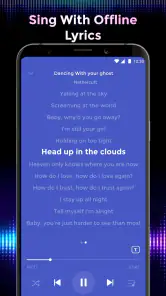
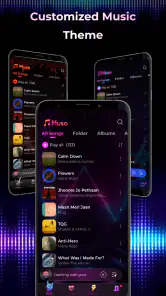



Analysis by Reviewed
When I want music to be available without relying on a connection, I look for a player that keeps my own collection easy to reach and simple to manage. Offline Music Mp3 Player- Muso is aimed at that everyday need, with listening tools and sound controls in one place. It is a free music and audio app from BEABLE TECHNOLOGY, and its appeal is practical rather than complicated: make a collection of local tracks more enjoyable to use on the move.
Start with the music you already have
I would think of Muso as a tool for working with a personal listening collection, not as a way to make or publish music. Its creative starting point is choosing what belongs in that collection: a set of tracks for a focused work session, music for a regular commute, or a few albums to take on a trip. That small act of selection can make a local library feel more purposeful than a long, unfiltered list of files.
Before relying on a playlist for a particular occasion, I’d check that the tracks I want are stored on the device and play correctly. This is especially useful when I’m preparing for a flight or another stretch without reception. A visible track or playlist is not, by itself, a reason to assume every song is ready offline; checking beforehand is a simple way to avoid a frustrating gap later.
The app is a better fit for people who already have audio files than for anyone expecting a streaming catalog to supply music on demand. If discovering unfamiliar artists is the main pleasure, I’d start with a streaming service instead. If the aim is to manage a chosen collection and keep it accessible without mobile data, Muso has a more relevant job to do.
Using a local library as a listening workflow
For me, an offline player is most useful when it removes little points of friction. I want to find the tracks I selected, start listening, and make a few adjustments if the sound does not suit my headphones or speaker. Muso brings that kind of everyday playback together with playlist and audio controls, so the workflow is about preparing and listening rather than searching a vast online catalog.
A straightforward way to listen
One of the first things you'll notice about this app is its sleek and user-friendly interface. You don't need to be tech-savvy to navigate through it. Whether you’re in the mood for some jazz, pop, or even classical, the app organizes your music collection effortlessly. Just tap, and you’re good to go!
That simple approach is especially helpful when I’m listening while doing something else. On a walk, for example, I want to pick a familiar album before leaving rather than browse around once I’m outside. A short preparation step at home lets me spend less time handling my phone and more time listening. I’d still keep the phone’s normal safety considerations in mind while moving; the convenience of quick playback is not a reason to interact with the screen in situations that need attention.
More From Our News Desk

Weather by Xiaomi Review: Clear at a Glance, Less Clear Up Close

X Under Pressure: Can It Recover When Posting Goes Wrong?

Clash of Clans Is Won Between the Battles

Android Auto Makes the Case for Quieter Car Software

MobiOffice: Transforming Mobile Productivity with Seamless Integration

EA SPORTS FC™ Mobile Soccer: Redefining Mobile Sports Gaming
Playlists that serve a purpose
Creating playlists is a breeze with Muso. You can sort your songs by artist, album, or genre. And if you’re feeling creative, why not mix things up and create a custom playlist for that perfect road trip vibe? The app gives you the freedom to tailor your music exactly how you want it.
A small but useful way to get more from that flexibility is to make playlists around situations, not just genres: a quieter set for reading, a familiar run of tracks for the commute, or a longer mix for travel. That keeps me from repeatedly searching through a full library when I only want a certain mood. The trade-off is that playlists need a little attention as a collection changes; a player can only organize what is actually available in the library.
I’d also keep playlists deliberately distinct instead of making one enormous list for every occasion. A short, well-chosen set is easier to test before a trip and quicker to revise when I add or remove music. If a playlist is meant to accompany exercise, I can arrange it around the length and feel of the session; for a quiet evening, I can avoid mixing in tracks that pull me into a different mood. This is a modest workflow improvement, but it makes the app’s manual approach feel more intentional.
Sound adjustments for different listening setups
Another cool feature is the equalizer. It allows you to tweak the sound settings to fit your preferences, ensuring you get the best out of your headphones or speakers. Whether you want more bass or a treble boost, it’s all at your fingertips.
I’d treat equalizer changes as something to adjust for the listening setup, rather than turning every control up at once. A bass-heavy setting that feels fun through one pair of headphones may sound muddy on another device. If I am sharing audio through a speaker, I would also start with a modest adjustment and listen before making bigger changes. That makes the feature more useful than simply choosing the strongest effect.
One practical habit is to make a change, listen to a familiar track, and compare the result at a comfortable volume before settling on it. Familiar music gives me a more useful reference than a song I barely know. I would also avoid assuming that one adjustment is ideal everywhere: headphones, a phone speaker, and an external speaker can each make the same track sound different. The equalizer is valuable as a personal control, but it works best as careful tuning rather than a promise to improve every recording.
Preparing for an offline session
What makes Muso stand out is its offline capability. You can download your favorite tracks and carry them wherever you go. So, whether you're hiking in the mountains or chilling at a beach resort with no WiFi, your music is always with you. Just imagine humming along to your favorite tracks while soaking in the sun. Sounds like bliss, right?
Moreover, the app supports various audio formats. So, whether it’s mp3, wav, or flac, you’re covered. It’s like having a versatile jukebox in your pocket.
Offline listening is most dependable when I prepare deliberately: choose the tracks, make sure they are available locally, and test playback before I lose reception. That simple check also helps avoid a common confusion with offline music apps—having a playlist visible does not necessarily mean every song is stored on the device. For long trips, I would keep a compact selection rather than filling the library with files I will not play, especially if device storage is important to me.
That compact-selection approach has another benefit: it makes troubleshooting easier. If a track fails during a quick test, I can replace it or leave it out before the journey, rather than trying to diagnose the problem somewhere with limited connectivity. I’d also check the first and last parts of a long playlist, not just its opening song, so I know the selection is usable beyond the first few minutes. These checks are simple, but they turn offline listening from a hopeful assumption into a plan.
How it fits beside other music apps
Muso’s volume-boosting focus gives it another reason to consider it alongside its library and equalizer tools. I would use any boost cautiously: raising output can make quiet tracks easier to hear, but it is not a substitute for good source files or comfortable headphone levels. If consistent sound quality across a large streaming catalog is the main goal, a streaming app may be a better match. If the goal is to manage and play a personal offline collection, Muso’s approach is more relevant.
Compared with a typical streaming app, the trade-off is control in place of discovery and convenience. A streaming service can make it easier to browse new music and keep a cloud-based selection available across devices, while Muso makes sense when I want to play files I have already gathered. Compared with a very basic built-in player, the appeal here is the combination of playlist handling and sound adjustments. Which option is better depends less on a universal ranking and more on whether I want the app to find music for me or help me use music I already own.
The app has a 4.6 average from around 296,000 ratings and has passed 50 million installs. It is rated for Everyone, with a minimum Android requirement of version 5.0; version 1.3.6 is the current release. The app is free to install, with optional in-app purchases ranging from $1.99 to $6.99 per item. I would begin with the free experience and decide whether any paid extras matter to my own listening habits, rather than assuming they are necessary.
Where it fits—and where I would look elsewhere
If you keep music files on your device and want quick access, playlists, and sound adjustments without making a streaming subscription the center of your setup, this is a sensible option to try. It is also a good fit for people who regularly travel through dead zones or want to avoid using mobile data for music. On the other hand, I would skip it if I mainly discover new releases through curated streaming recommendations, expect a cloud library to follow me automatically, or do not want to manage audio files and playlists myself.
It is also not the right choice if my main creative goal is editing recordings, mixing tracks, or preparing audio for publication. The useful work here is selecting, organizing, and listening to existing music; I would use a dedicated audio editor or production tool for making changes to the recordings themselves. Keeping those roles separate helps set realistic expectations and avoids treating a playback app as a studio.
For a normal day, I can picture choosing a few familiar albums before leaving home, then using one playlist on the commute and another during a walk after work. If the route passes through areas with weak reception, local playback avoids the uncertainty of streaming. Once I’m back, I can adjust the playlist for the next day instead of relying on whatever happens to be easiest to find in the moment. That is the sort of small, repeatable routine where Muso’s strengths are most apparent.
One decision many listeners will face is whether they need both this kind of player and a streaming app. I would keep both only if they serve different purposes: the streaming service for finding new music, and Muso for a deliberately chosen offline library. If I rarely listen to local files, the extra app and the effort of maintaining a separate collection may not be worth it. If I travel often or already have music stored on my device, that division can be genuinely useful.
My main practical caution is to keep expectations clear: an offline player works best when you take responsibility for what is in your collection and ready to play. It offers control, but that control means selecting and organizing tracks yourself. The developer is BEABLE TECHNOLOGY, and the app sits in the music and audio category; its strongest case is as a hands-on player for people who value access to their own music over an all-in-one streaming catalog.
A considered choice for everyday listening
If you’re someone who values offline music access and wants an app that’s both functional and easy on the eyes, Muso is definitely worth checking out. It’s not just about playing music; it’s about enjoying every beat without interruptions. Plus, the app doesn’t bombard you with ads, which is a huge plus in my book!
In conclusion, Offline Music Mp3 Player- Muso is more than just an app; it’s a reliable companion for those who live and breathe music. Whether you’re on a plane or just want to save on data, Muso ensures that your tunes are always within reach. Give it a try, and you might just find it's the music app you never knew you needed.
Offline Music Mp3 Player- Muso Frequently Asked Questions
Does Muso need an internet connection to find music on my device?
Muso is an offline music player, so it is intended for playing audio files already available on your device rather than streaming music. Once your tracks are stored locally, you can listen without a connection. This makes it worth considering if you want a player for music you have saved on your phone.
What is Muso Offline Music MP3 Player?
Muso Offline Music MP3 Player is a versatile music application designed for Android and iOS devices, allowing users to listen to their favorite music without an internet connection. The app supports a wide range of audio formats, ensuring compatibility with most music files. It offers features like playlist creation, equalizer settings, and customizable themes for a personalized listening experience.
Can I use Muso to listen to music offline?
Yes, Muso Offline Music MP3 Player is specifically designed for offline music playback. You can download your favorite tracks to your device and listen to them anytime, anywhere, without needing an internet connection. This makes it ideal for users who travel frequently or have limited data plans.
What audio formats does Muso support?
Muso supports a wide range of audio formats, including MP3, WAV, AAC, and FLAC. This broad compatibility ensures that you can play almost any music file you have on your device. Whether it's a high-quality FLAC file or a standard MP3, Muso handles them all with ease, providing excellent sound quality.
Are there any customization options available in Muso?
Yes, Muso offers several customization options to enhance your listening experience. Users can create and manage playlists, adjust the equalizer settings to suit their audio preferences, and choose from various themes to personalize the app's appearance. These features allow users to tailor the app to their specific needs and aesthetic tastes.
Pros
- Rich audio quality enhances listening experience.
- User-friendly interface for easy navigation.
- Supports multiple audio formats for flexibility.
- No ads ensure uninterrupted listening.
- Customizable playlists for personalized music sessions.
Cons
- Limited free features without in-app purchases.
- No cloud sync for music library backups.
- Occasional bugs in the playlist feature.
- Requires manual music library updates.
- Lacks social sharing features for playlists.
- Category
- Music & Audio
- Version
- 1.3.6











