نشان | نقشه و مسیریاب Neshan
- 3.63K
- 4.5
- Installs
- 10.00M
- Price
- Free

Screenshots



Analysis by Reviewed
I first opened نشان | نقشه و مسیریاب Neshan expecting another map app to try for a few days, then forget. What makes a navigation tool worth keeping is not a flashy first impression; it is whether it helps with ordinary trips often enough to become a habit. Neshan is built for maps and navigation, and its appeal is clearest when I need practical directions around town rather than a reason to explore a new interface.
Who benefits from trying it?
I would start with Neshan if I drive familiar routes often but still want a second opinion about traffic, or if I regularly visit addresses outside my usual area. The app is also worth considering when a trip may pass through places with unreliable internet: preparing an offline map in advance can make the route easier to manage. Its value is less obvious for someone who rarely needs directions, has a navigation system they already trust, or mainly wants broad travel planning across many countries.
That distinction matters because installing a map app is easy; making room for it in a routine is not. I would not keep Neshan just because I enjoyed testing it once. I would judge it on the routes I repeat and whether its guidance feels clear enough to check before I leave, without turning every trip into a comparison exercise.
From the first trip to a useful routine
The first-week test for any map app is simple: can I find a destination, understand the route, and keep moving without fuss? Neshan makes a friendly first impression, and its traffic information and route choices give me a reason to check it before setting off. The more useful question comes later: does it still help when the journey is familiar, the trip is routine, and I am short on time?
Getting Started with Neshan
First things first, downloading and setting up نشان | نقشه و مسیریاب Neshan is a breeze. It’s available on both Android and iOS, making it accessible for just about everyone. Once installed, the app greets you with a clean and intuitive interface. It’s like opening a new book, simple yet inviting. The Android release dates back to March 19, 2017, and the current version is 14.7.9; it runs on Android 5.0 or later. Neshan is free, rated for Everyone, and developed by نقشه و مسیریاب نشان. Its 4.5 average from around 250,000 ratings and more than 10 million installs suggest that it has found a substantial audience.
For a new user, I would begin with a destination I know rather than testing the app on an urgent, unfamiliar drive. Comparing its suggested route with roads I recognize is a practical way to learn how it presents choices and how much detail I want to see. That first check also helps me decide whether I find its directions easy to follow while parked, before I rely on them on the move.
Design and User Interface
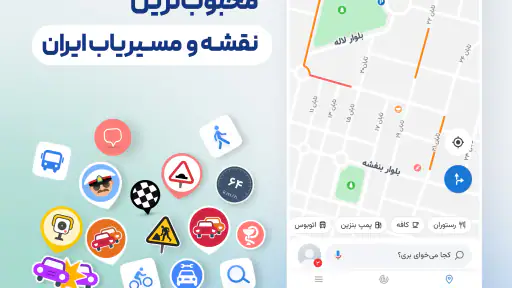
I have to say, I was immediately impressed by the app’s sleek design. The colors are pleasant to the eyes, and the layout is straightforward. No unnecessary clutter, just the essential features you need right in front of you. Whether you’re a tech-savvy individual or someone who only uses their smartphone for calls, navigating through Neshan is as easy as pie. That low-friction layout matters most when I am already outside and need to check a route quickly, rather than sitting at home with time to explore menus.
More From Our News Desk

Weather by Xiaomi Review: Clear at a Glance, Less Clear Up Close

X Under Pressure: Can It Recover When Posting Goes Wrong?

Clash of Clans Is Won Between the Battles

Android Auto Makes the Case for Quieter Car Software

MobiOffice: Transforming Mobile Productivity with Seamless Integration

EA SPORTS FC™ Mobile Soccer: Redefining Mobile Sports Gaming
My useful test for a map screen is not whether it looks polished in a quiet room, but whether I can make sense of it when I have a destination in mind and limited time. I would set up the route before starting, then leave the phone alone as much as possible. A clear starting point and a quick route check are more valuable to me than repeatedly inspecting the screen after setting off.
Features at a Glance
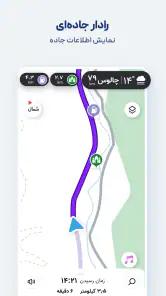
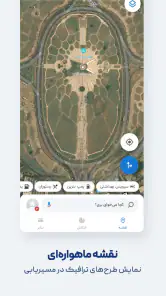
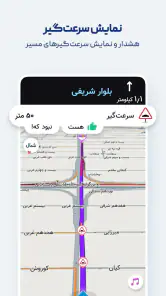
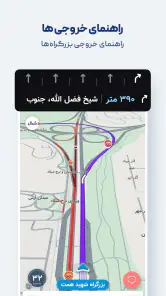
What sets Neshan apart from other navigation apps, you ask? Well, for starters, it offers real-time traffic updates, which are crucial for those of us who hate getting stuck in traffic jams. It’s like having a personal traffic reporter right in your pocket! The app also provides detailed route options, allowing you to choose between the fastest or the most scenic routes, depending on your mood. I would treat those choices as practical trade-offs: the quickest path may suit a tight schedule, while a different route can be more appealing when I have time to spare. As with any navigation app, live guidance is only as current as the connection and location signal available during a trip, so I still glance at the overall route before following each turn.
One small but useful habit is to compare the broad shape of the suggested route with what I know, not just accept the first option automatically. A route that looks shorter on a screen may involve turns or roads I would rather avoid. When time is tight, traffic information can help me make a more informed choice; when it is not, I can favor a route that feels more comfortable. The useful feature is having a choice, not assuming one option will suit every driver and every day.
Another feature that I found super useful is the offline map capability. Imagine you’re traveling to a remote area with zero internet connection; Neshan has got your back. Simply download the map in advance, and you can navigate without any hiccups. It’s like magic! The useful habit here is to prepare before leaving coverage: save the relevant map while connected and check that the area you need is included. Offline access is a backup for a planned journey, not a substitute for checking changing traffic conditions before departure.
For a weekend trip, I would prepare the offline map while I still have a reliable connection, then confirm that the planned area is covered before setting off. That simple sequence avoids discovering too late that I have not saved the place I need. I would also treat offline navigation as a safety net for finding my way, rather than expecting it to offer the same live traffic picture as a connected trip.
Performance and Reliability
Neshan runs smoothly, and I haven’t encountered any bugs or crashes so far. The loading times are quick, and the GPS accuracy is spot on. I remember this one time I was running late for a meeting, and the app guided me through an unfamiliar neighborhood flawlessly. It felt like I had a local guide sitting right next to me. For a recurring commute, I would still compare the suggested route with my own knowledge of a road closure or an awkward turn; navigation is helpful, but I do not hand over judgment completely.
A realistic routine shows where the app earns its place. On a weekday morning, I can enter a meeting address, check the traffic-aware options before walking to the car, and choose a route that suits the time I have. On the return trip, saved places can spare me from typing a familiar destination again. For a weekend drive beyond reliable service, preparing the offline map beforehand turns a potential frustration into a manageable plan. Those are small conveniences, but repeated small conveniences are what make a map app worth opening month after month.
There is a useful boundary to that routine: I would review the route while parked, then give attention to the road rather than trying to correct every minor change on the screen. If a turn looks unsuitable or the road conditions do not match the guidance, I would use my judgment and stop somewhere safe before checking again. A map can help with decisions, but it cannot see every local circumstance as it unfolds.
Additional Perks
Besides the basics, Neshan offers some delightful extras. You can mark your favorite places, which is perfect for foodies who love revisiting their favorite eateries. Plus, the app's integration with ride-hailing services is a cherry on top, making it super convenient to book a ride without switching apps. I find saved places most useful when I give them names I will recognize later, rather than accumulating a long list of vague pins. That turns a favorite café, a regular appointment, or a pickup point into a practical shortcut instead of map clutter.
Saved places work best as a short working list, not a collection of every address I have ever visited. I would keep the locations I return to and remove or rename entries that no longer make sense. That makes the feature quicker to use when I am leaving in a hurry, and it reduces the chance of choosing an old pin that looks similar to a current destination.
The ride-hailing connection is most useful when I have already decided that driving is not the right choice. Rather than treating it as the centerpiece of the app, I see it as a convenient transition from planning a destination to arranging a ride. If I prefer to manage transport through a separate service, that extra connection may not change my habits, but it still supports a different kind of everyday trip.
Compared with using a general-purpose map app, Neshan makes a stronger case when its local routing and traffic information fit the places I travel. A global alternative may be preferable if I already rely on its broader travel tools or need a familiar map ecosystem across many countries. I would not switch solely for the novelty of a different screen; I would compare the actual routes on my regular journeys and keep the one that gives me clearer, more useful guidance. Likewise, if I rarely drive or already have a navigation setup that consistently works for me, another app may add little value.
For a fair comparison, I would enter the same destination in both apps before a familiar journey and look at the route choices, clarity, and practical fit—not just which one claims to be faster. I would repeat that check on more than one kind of trip: a regular commute and an unfamiliar address, for example. A single result can reflect the day’s conditions; a recurring preference is a better reason to make one app the default.
For drivers who make repeat trips, people exploring unfamiliar neighborhoods, and anyone who wants an offline map ready before a connection becomes unreliable, Neshan has a sensible everyday role. It is less compelling for someone who expects a navigation app to remove every uncertainty: traffic can change, a GPS position may need a moment to settle, and a suggested shortcut is not automatically the most comfortable road. I recommend checking the route before moving and using common sense when road conditions differ from what the screen suggests.
What keeps it useful—and what can wear thin
After the first few trips, the useful question is whether opening Neshan becomes an easy part of leaving home. For me, the best routine is modest: enter the destination, check the route and traffic, save places I genuinely revisit, and prepare offline coverage when a journey calls for it. I would not expect every trip to reveal a new feature. A map app earns lasting space by doing ordinary jobs without demanding much attention.
There can still be friction. A route suggestion is not a promise that the drive will be faster or more pleasant, and live conditions can change after I have set off. Offline preparation also asks me to think ahead; if I forget to save the area while connected, the backup will not help at the moment I need it. Those are manageable limitations, but they make the app less suitable for anyone who wants navigation to work without any preparation or judgment.
I would also avoid turning route checking into a habit of constant switching. If two options are both reasonable, choosing one and focusing on the drive is usually more useful than repeatedly reopening the map to search for a perfect route. The app can inform the decision, but my familiarity with local roads, the time available, and comfort with a route still matter.
For someone who mostly walks, takes public transport, or travels only occasionally, the benefit may not justify adding another app to their routine. A general map they already use may be enough for finding a place or checking directions. On the other hand, frequent drivers who regularly encounter unfamiliar addresses are more likely to get value from traffic-aware routing, saved destinations, and planning for offline areas.
Neshan’s place in the category is therefore practical rather than universal. A well-established global mapping app may suit a traveler who wants the same familiar tools across many countries, while a built-in navigation option may be enough for a driver who already likes its guidance. I would choose Neshan when its routes suit my regular area and its local usefulness beats the hassle of maintaining another map. If that comparison does not hold up over repeated trips, there is little reason to stay out of loyalty.
In conclusion, نشان | نقشه و مسیریاب Neshan is more than just a navigation tool; it’s a travel companion that’s always ready to assist you. Whether you’re exploring new territories or just heading to work, it’s got all the right features to make your journey smoother and more enjoyable. So, next time you’re headed somewhere, why not let Neshan lead the way? Trust me, you won’t regret it! For me, its lasting value comes from dependable routines rather than constant discovery: checking traffic, reusing saved destinations, and preparing offline coverage when a trip calls for it. With more than 3,000 written reviews alongside its broad user base, it is clearly established, though popularity alone cannot decide whether its routes suit your own area. I would give it a fair trial on the journeys I make most often, then keep it if it consistently saves effort. If it does not, choosing a map that better fits my habits is the sensible call.
نشان | نقشه و مسیریاب Neshan Frequently Asked Questions
Can I use Neshan for everyday trips around my city?
Neshan is a map and navigation app intended to help with routes and local journeys, so it may be useful for regular trips as well as occasional travel. Its local focus is most relevant when your journeys are in areas it covers. Before relying on it for an important trip, check the route in advance and remain attentive to road signs and changing conditions.
Does Neshan work well for drivers, or can it also help with other kinds of travel?
Neshan belongs to the Maps & Navigation category and is designed to provide map and route guidance. That makes it a natural option to consider when planning a drive, while its usefulness for other travel depends on the routes and local information available for your destination. If you have a specific journey in mind, review the suggested route before setting off and use sensible judgement along the way.
Is Neshan free to download, and what devices can run it?
Neshan is a free Maps & Navigation app from نقشه و مسیریاب نشان, available for Android and iOS. On Android, it requires version 5.0 or later. Its Everyone content rating makes it broadly suitable for users, though you should still check that your device has enough storage and that the app is compatible with your operating system before installing.
What is Neshan and how does it compare to other navigation apps?
Neshan is a navigation and map application specifically designed for users in the Middle East, offering detailed local maps, traffic updates, and location-based services. Unlike global giants like Google Maps, Neshan focuses on providing accurate local information and offline maps, making it an ideal choice for users in regions with limited internet access. Its local focus may make it a useful alternative for people whose regular journeys are centered on the areas it serves.
Does Neshan support offline navigation and how reliable is it?
Yes, Neshan supports offline navigation, which is particularly useful in areas with poor internet connectivity. Users can download maps for specific regions and navigate without an internet connection. The offline feature is reliable, offering turn-by-turn directions and updated points of interest, ensuring you reach your destination even without a data plan. Downloading the relevant map before setting out can help you prepare for a journey where connectivity may be limited.
Pros
- User-friendly interface for easy navigation.
- Accurate real-time traffic updates.
- Offline maps availability.
- Customizable route options.
- Voice-guided navigation.
Cons
- Limited POI database compared to competitors.
- Occasional GPS signal issues.
- Ads in the free version.
- Battery consumption can be high.
- Limited language options.
- Category
- Maps & Navigation
- Version
- 14.7.9











