MyRadar Weather Radar
- 118.29K
- 4.8
- Installs
- 10.00M
- Price
- Free

Screenshots

Analysis by Reviewed
For me, the useful question with a weather app is not just whether it can show rain, but whether I can quickly tell if that rain is heading toward my route. MyRadar Weather Radar puts the map at the center of that decision, which suits people who like to inspect conditions visually rather than rely only on a short forecast. I’d treat it as a practical companion for checking what is happening nearby, while keeping in mind that a radar view is one tool for planning, not a guarantee about the weather ahead.
Quick checks and speed expectations
The map-first approach makes everyday checks feel direct: open the app, orient yourself, and look for precipitation near the places you care about. That is a different rhythm from a forecast app that leads with temperatures and a list of hourly conditions. When I’m deciding whether to leave now or wait, seeing a weather pattern on a map can answer a different question from reading a forecast summary.
ACME AtronOmatic LLC develops this free weather app, which has a 4.8 average from around 321,000 ratings and over 10 million installs. It is rated for Everyone, and in-app purchases are available, with listed items ranging from $2.99 to $29.99. Those details make it easy to try the basic app before deciding whether any paid options are relevant to your routine.
First Impressions and User Interface
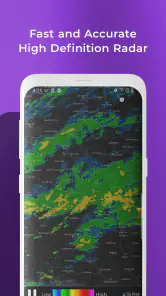
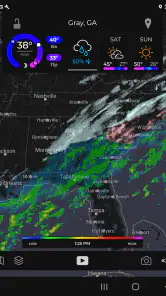
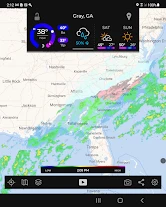
Right off the bat, the first thing you’ll notice about MyRadar Weather Radar is its sleek and intuitive user interface. It’s super easy to navigate, and even if you’re not exactly a tech wizard, you’ll find yourself zipping through the features like a pro. The app opens to a detailed map, showing real-time radar images that are both clear and visually appealing. It’s like having your own personal weather station right on your phone.
Features That Stand Out
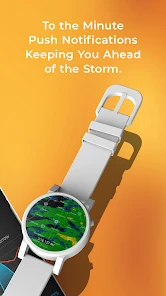
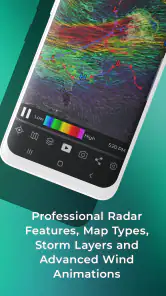
The app isn’t just a pretty face; it packs a punch with its robust features. One of the standout elements is the high-definition radar that updates quickly, ensuring you’re always in the know about what’s happening weather-wise. You can zoom in and out with ease, providing a detailed view of weather patterns anywhere in the world. Another cool feature is the weather alerts that you can customize based on your preferences. Whether it’s thunderstorms, hurricanes, or just a drizzle, you’ll be the first to know.
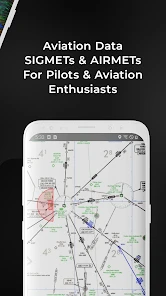
And let’s not forget the aviation layers. For those who love flying or have a keen interest in aviation, this feature is a game-changer. It provides detailed information on air conditions, making it easier for pilots and enthusiasts alike to plan their flights with confidence.
Using the map under pressure
A useful habit is to check the map at two scales: first zoom out to see the broader movement, then zoom back in around home, work, or the destination you are actually deciding about. A patch of rain on a wide map is less informative than its position relative to your street or the road you plan to take. I would use that view to decide whether to carry a rain jacket or pause an outdoor errand, not to make a safety-critical call based on a single glance.
More From Our News Desk

Weather by Xiaomi Review: Clear at a Glance, Less Clear Up Close

X Under Pressure: Can It Recover When Posting Goes Wrong?

Clash of Clans Is Won Between the Battles

Android Auto Makes the Case for Quieter Car Software

MobiOffice: Transforming Mobile Productivity with Seamless Integration

EA SPORTS FC™ Mobile Soccer: Redefining Mobile Sports Gaming
For a realistic example, imagine leaving work with a walk to a bus stop and groceries afterward. A forecast can tell you that rain is possible; the radar view can help you judge whether precipitation is already nearby and whether changing your departure time might be worthwhile. If the weather is severe or conditions are changing quickly, I’d still follow official local warnings and use sound judgment rather than assume a phone display captures every hazard.
Busy days, alerts, and trade-offs
MyRadar is most useful when weather affects several small decisions in a day: a commute, a dog walk, a practice session, or a weekend drive. Customizable alerts can reduce the need to keep reopening the map, but alerts are only helpful when they match what you care about. I’d start with a narrow set of notifications and adjust after seeing whether they interrupt too often or arrive for conditions that do not affect your plans.
Compared with the standard weather app that comes with a phone, this one puts radar and map inspection more prominently in the experience. That is a real advantage for tracking rain, but it may be less convenient if all you want is a quick temperature or a simple week-ahead summary. I would keep a basic forecast source alongside it when planning several days out, since a radar map is strongest for viewing current patterns rather than replacing every kind of forecast.
Reliability and device considerations
Performance-wise, the app runs smoothly without any noticeable lags, which is crucial for any weather app. You don’t want to be stuck waiting for the radar to load when you’re trying to figure out if you need an umbrella before heading out. Plus, the app’s reliability is commendable. I’ve yet to experience any crashes, which speaks volumes about its stability.
Because the main experience is a detailed map, a larger screen can make it easier to inspect a wider area, while a phone remains handy for quick checks on the move. If a map feels busy, zooming in on the place that matters can make the decision clearer. As with any map-based weather tool, the experience also depends on being able to load the display, so I would check conditions before setting off rather than rely on it as the only source of information once connectivity is uncertain.
Who will get the most from it
I’d recommend it to people who regularly make plans around rain and prefer seeing conditions spatially: commuters, outdoor enthusiasts, and aviation followers are natural fits. It is also a useful choice for someone who wants alerts without constantly checking a forecast page. On the other hand, if you mainly want a clean daily temperature, a simple forecast widget or your phone’s built-in weather app may be less distracting. Pilots should treat the aviation information as a planning aid, not a substitute for the appropriate official flight-weather sources.
Why It’s Worth the Download
So, why should you download this app? If you’re like me and always want to be prepared, MyRadar Weather Radar is a must-have. It’s more than just a weather app; it’s a tool that keeps you informed and safe. With its real-time updates and customizable alerts, you’re never caught off guard. Plus, the aviation feature is a delightful bonus for those interested in flight conditions.
In conclusion, this app is worth every megabyte. Whether you’re planning a weekend hike, a vacation, or just your daily commute, having this app on your phone gives you peace of mind. So, give it a go and see how it transforms your weather-checking routine. Trust me, you won’t regret it!
MyRadar Weather Radar Frequently Asked Questions
Can I use MyRadar Weather Radar without creating an account?
MyRadar is designed around checking weather on its map, so you can use its core radar experience to view conditions without making an account the focus of the process. Open the app when you want a quick visual check, then explore its weather information and alert options as needed. Availability of particular features may depend on your device and app settings.
Does MyRadar Weather Radar help me plan outdoor activities?
Yes. MyRadar can be useful when deciding whether to head out, travel, or adjust outdoor plans. Its animated radar helps you see precipitation and changing weather around an area, while forecasts and alerts provide additional context. For plans that depend on conditions, it is sensible to check the app again shortly beforehand, since weather can change.
What is MyRadar Weather Radar, and who is it for?
MyRadar Weather Radar is a weather app for people who want to check conditions visually and keep an eye on changing weather. Its map-based presentation makes radar activity easy to scan, while features such as forecasts, storm tracking, and alerts can help with everyday planning. It is suitable for general audiences, including anyone who wants weather information close at hand.
What features does MyRadar Weather Radar offer?
MyRadar Weather Radar provides real-time weather updates, animated weather radars, and advanced storm tracking capabilities. Additionally, it offers aviation layers, including flight plan routes, and provides detailed hurricane and tropical storm information. The app also features weather alerts and forecasts, ensuring users are well-prepared for any weather conditions.
Is MyRadar Weather Radar free to use?
Yes, MyRadar Weather Radar is free to download and use. However, it offers in-app purchases for premium features, such as removing ads and accessing advanced radar features. These optional purchases enhance the user experience by providing more detailed weather data and additional functionalities. In-app purchases range from $2.99 to $29.99 per item, so check the purchase details in the app before choosing an upgrade.
Pros
- User-friendly interface for quick navigation.
- Offers real-time weather updates.
- High-resolution radar imagery.
- Customizable weather alerts.
- Provides detailed weather forecasts.
Cons
- Contains in-app advertisements.
- Some features require a premium subscription.
- Occasional app crashes reported.
- Limited features in free version.
- May drain battery quickly on some devices.
- Category
- Weather
- Version
- Varies with device