

MyRadar Weather Radar Pro
- 5.02K
- 4.8
- Installs
- 100.00K
- Price
- $5.99

Screenshots
Analysis by Reviewed
I often turn to a radar map when the forecast says rain is possible but doesn’t tell me whether it is actually close. That is the job MyRadar Weather Radar Pro is best suited to: helping me see weather moving across a map, rather than making every decision from a single daily forecast. It is a weather app from ACME AtronOmatic LLC, and its focus on radar, temperatures, warnings, hurricanes, and widgets makes it most useful when conditions are changing.
Where a radar app can trip you up
The first adjustment is learning what the map can and cannot answer. Radar helps me judge where precipitation appears to be and how it is moving, but it is not a promise that rain will reach a particular street at a precise time. A broad view is useful for spotting the direction of a system; zooming in can help with local context, but tiny map details should not be mistaken for certainty.
I also avoid treating an animated loop as a complete forecast. It shows a recent pattern, which is valuable for a quick decision, but a forecast is still needed for planning later in the day. When I’m deciding whether to carry a coat for the next few hours, I use the map alongside the temperature and warnings instead of relying on the animation alone.
Set it up around the questions you ask
On first use, I’d start by checking the map around the places that matter to me and choosing only the layers I expect to consult. Too many overlays can make a radar view harder to read. If I care about rain for a walk, precipitation and temperature are more immediately useful than a screen crowded with every available detail. I’d also review alert choices so notifications match the weather I genuinely need to know about.
Widgets can make a quick glance easier, while alerts help when I’m busy and can’t keep opening the map. The trade-off is that alerts are most helpful when they are relevant: broad or overly frequent notifications can become background noise. I’d begin with a small set of priorities, then adjust after seeing what I actually use.
Recover your routine before blaming the radar
If the map looks stale or confusing, I first check the simple things: whether the app is open and responsive, whether I’m viewing the intended location, and whether the selected layer makes sense for the question I’m asking. Switching back to a basic radar view can help distinguish a display choice from a problem with the information I’m trying to interpret.
For an important trip or outdoor plan, I don’t make the app my only source. I compare the radar with the warning information and a conventional forecast, then check again before leaving. That workflow is more dependable than assuming one glance will remain useful as weather changes.
More From Our News Desk

 Gmail
GmailGmail in a Busy Inbox: Who Benefits Most?
From first account to crowded workday, Gmail earns its place through dependable search and flexible sorting—but its best fit depends on how much inbox maintenance you can tolerate.

 Prime Video
Switching to Prime Video: What Changes in Your Viewing Routine
Prime Video can make a compelling second home for streaming, but switching means learning a different catalog, rental layer, and route from browsing to playback.

 Universal TV Remote Control
Universal TV Remote Control Works Best as a Reliable Backup
A phone remote earns its place through quick setup and reliable habits. Here is how to get more from Universal TV Remote Control—and where its limits show.

 Weather - By Xiaomi
Weather by Xiaomi Review: Clear at a Glance, Less Clear Up Close
Xiaomi’s weather app makes everyday forecasts quick to scan, but its calm surface can leave useful details and recovery paths harder to find than they should be.

 X
XX Under Pressure: Can It Recover When Posting Goes Wrong?
A resilience-focused review of X, examining setup, mistaken posts, interruptions, weak connections, and the gaps that matter when recovery needs to be dependable.

 Clash of Clans
Clash of Clans Is Won Between the Battles
Its raids are quick; its community is a long-term project of coordination, teaching, rivalry, and shared responsibility—with all the friction that entails.
Latest News



When the app may not be the problem
Weather can vary over short distances, and radar images have limits; a mismatch between what the map suggests and what I see outside does not automatically mean the app has failed. If a storm is developing or moving quickly, conditions may change between checks. For safety-critical decisions, I give official warnings and local instructions priority over my own reading of a map.
This is also not the right fit for everyone. If I only want a simple daily summary, a standard forecast app may feel quicker and less busy. Someone who wants long-range planning should not expect a live radar display to settle questions about weather far ahead. I’d choose MyRadar when seeing current movement matters more than keeping the interface minimal.
First Impressions of MyRadar Weather Radar Pro
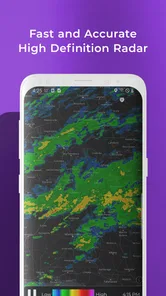
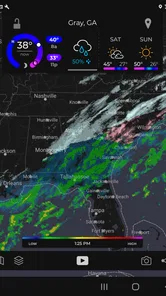
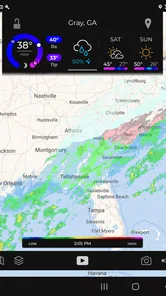
At first glance, MyRadar Weather Radar Pro hits you with its clean and intuitive interface. It’s like the app is saying, “Hey, I’m here to make your life easier!” Navigating through the app is a breeze, and the radar maps are incredibly detailed. You can zoom in to see street-level details or zoom out to get a broader view of weather patterns. It’s perfect for those of us who like to plan our day around the weather.
Features That Stand Out
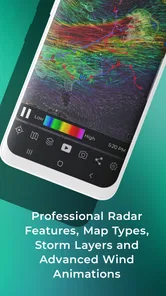
One of the standout features is the real-time weather updates. No more refreshing for the latest forecasts; the app does it all for you. The animated weather radar is a game-changer, allowing you to track the movement of weather systems as they happen. It’s almost mesmerizing to watch the storms roll in and out on the map.
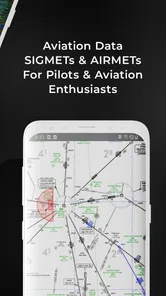
For those with specific weather interests, you’ll love the ability to overlay different data layers. Whether you’re interested in wind patterns, temperature, or even aviation layers, MyRadar Weather Radar Pro has got you covered. It’s like having a personal meteorologist in your pocket!
Features That Matter in Daily Use
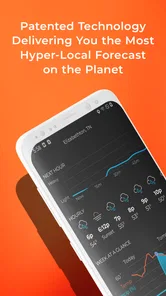
For a practical routine, I would use the animated map before leaving home, then look again before an outdoor commitment if the sky is unsettled. Imagine a picnic planned for the afternoon: a glance at the wider map can show whether a rain area is approaching, while a closer view helps me decide whether to move the picnic or bring a cover. I still check a forecast for the hours ahead, because radar is strongest as a view of current movement, not a guarantee about later conditions.
This is where the app differs from the usual weather alternative. A forecast-focused app is often faster for “Will it be warm today?” MyRadar is more compelling when the question is “What is moving toward me right now?” That distinction is useful for drivers choosing when to leave, people planning outdoor work, or anyone who follows storms. It is less compelling if I rarely look at maps and simply want a short daily summary.
The app’s store details identify it as a paid download at $5.99, with in-app purchases ranging from $2.99 to $29.99 per item. I’d decide whether the radar-centered approach is worth paying for before installing, and check the purchase details in the app rather than assuming every option is included. It is rated for Everyone, has a 4.8 average from around 9.5K ratings, and has been available since September 17, 2013. Those figures give useful context, but they don’t tell me whether its particular workflow suits my habits.
A commute is a useful test
Suppose I’m about to drive across town and the sky looks threatening. I’d check the wider radar first to see whether the precipitation is moving toward my route or away from it, then check the map closer to my destination. I wouldn’t use that view to decide whether to drive through dangerous conditions; I’d pay attention to warnings and local guidance. But for an ordinary shower, seeing the movement can help me decide whether to leave now, wait briefly, or bring rain gear.
That kind of check also shows why I wouldn’t keep the map open constantly. A quick look before leaving and another when plans change is more useful than repeatedly watching every frame. The map is a decision aid, not a substitute for looking outside or checking the forecast for the full journey. If I’m responsible for meeting someone, I’d send a realistic arrival estimate rather than treating the radar’s apparent path as a precise timetable.
Who will get the most from it
I’d recommend it most to people who regularly make short-term outdoor decisions: walkers, gardeners, event helpers, or commuters who want to watch an approaching weather system. Its warnings and hurricane information also make it relevant to people who monitor more serious conditions, though I would always follow official alerts and local guidance rather than treating a consumer map as the final authority. The app has over 100K installs, but popularity alone is not a reason to choose it; the key question is whether a live map is something I’ll actually use.
A useful habit is to keep the first view simple and add a layer only when it answers a specific question. If I’m checking whether a shower is near, a clean radar view is easier to read than several competing overlays. If I’m curious about temperature or wind, I can bring in that information deliberately. This small discipline makes the map more useful and reduces the chance that extra detail distracts from the decision at hand.
I’d be less enthusiastic about recommending it to someone who checks weather only to choose a jacket in the morning. That person may get more value from a basic forecast app that puts the day’s outlook front and center, without requiring them to interpret map movement. The same goes for anyone who finds animated maps visually busy: the radar-first design is a strength only if seeing changing conditions is genuinely helpful to you.
Small habits that make the map easier to use
One practical tip is to compare the same location at two different zoom levels rather than immediately switching among layers. The wider view helps me understand the larger system; the closer view tells me whether it appears relevant to my immediate plans. If those views seem to tell different stories, I treat that as a cue to be cautious, not as a reason to search for a more satisfying-looking map.
I’d also make a distinction between information I want to see and information I need to be notified about. A layer can be useful when I open the app without deserving an alert that interrupts my day. Keeping notifications selective helps preserve their value, while widgets suit the less urgent habit of checking conditions at a glance. The trade-off is that a quick glance can miss context, so I’d open the full map when the decision matters.
Why You’ll Love It
So, why should you download this app? Well, if you’re like me and hate being caught off guard by the weather, this app is a lifesaver. It’s great for planning outdoor activities, keeping track of severe weather alerts, or just satisfying your inner weather geek. Plus, it’s available on both Android and iOS, so everyone can join in on the weather fun.
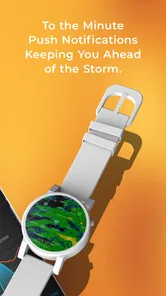
Another awesome feature is its customization options. You can set up alerts for specific weather conditions, and the app will notify you when they’re heading your way. It’s super handy for those days when you’ve got a million things to do and don’t have time to obsessively check the weather.
What to check when a view seems wrong
If a map does not match the conditions outside, I’d first make sure I’m looking at the right place and the intended layer, then give the display a moment and check it again. A radar view is an image to interpret, not a direct measurement of rain at my exact position. A small location mismatch or a quickly changing system can make the difference between what I see on screen and what I experience outdoors.
If the app itself seems unresponsive, I’d close and reopen it and make sure I’m not confusing a frozen display with a changing weather pattern. If the issue continues, I’d use another forecast source for the immediate decision rather than relying on a screen that I can’t confidently read. For a safety concern, I’d go straight to official warnings and local instructions; a consumer radar app should not be the only channel I trust.
Final Thoughts
In a nutshell, MyRadar Weather Radar Pro is a must-have app for anyone who wants to stay ahead of the weather curve. With its user-friendly interface, detailed maps, and real-time updates, it’s like having a weather station right in your hand. So, whether you’re planning your next big adventure or just trying to avoid getting drenched, give this app a try. Trust me, you won’t regret it!
My own verdict is more measured: I like the radar-first approach when timing matters, but I wouldn’t pay for it expecting a replacement for every kind of forecast. Its value comes from checking movement, using warnings thoughtfully, and pairing the map with a broader forecast when planning ahead. If that matches the way you make weather decisions, it is a focused tool worth considering; if you prefer a simple daily outlook, a lighter alternative may serve you better.
MyRadar Weather Radar Pro Frequently Asked Questions
Can MyRadar Weather Radar Pro be useful for checking weather while traveling?
Yes. MyRadar Weather Radar Pro can help you view radar and weather conditions beyond your immediate neighborhood, which is useful when planning a drive or checking what may be approaching a destination. Its radar-focused display is especially handy for following precipitation in motion. As with any weather app, use local official alerts for urgent safety decisions.
Does MyRadar Weather Radar Pro include home-screen widgets?
Yes, widgets are among the app’s weather tools, giving you a convenient way to check conditions without opening the full radar map. The store summary also highlights temperatures and warnings alongside real-time radar. Widget availability and appearance can depend on your device and operating system, so check the options on your phone after installing the app.
What features does MyRadar Weather Radar Pro offer?
MyRadar Weather Radar Pro is a comprehensive weather app that provides real-time radar images, severe weather alerts, and detailed forecasts. It includes advanced features such as hurricane tracking, aviation layers, and the ability to view radar images in motion. The app is designed to give users accurate weather information at their fingertips. Its focus on radar makes it particularly useful for seeing weather patterns develop and move.
Is MyRadar Weather Radar Pro available on both Android and iOS?
Yes, MyRadar Weather Radar Pro is available for download on both Android and iOS platforms. Users can find it on the Google Play Store for Android devices and the Apple App Store for iOS devices. This makes it accessible to a wide range of smartphone users. The app is developed by ACME AtronOmatic LLC and is in the weather category.
Does MyRadar Weather Radar Pro require a subscription for full access?
MyRadar Weather Radar Pro costs $5.99, and it also offers in-app purchases ranging from $2.99 to $29.99 per item. While the app provides radar, temperatures, warnings, hurricane information, and widgets, additional purchases may unlock other options. Review the purchase details shown in your app store before buying so you can decide whether the available features fit your needs.
Pros
- Accurate weather updates
- Real-time radar imagery
- User-friendly interface
- Customizable alerts
- Detailed weather data
Cons
- Requires internet connection
- Frequent ads in free version
- Battery draining
- Subscription for premium features
- Limited offline functionality












