MuseScore: sheet music
- 5.75K
- 3.9
- Installs
- 5.00M
- Price
- Free

Screenshots


Analysis by Reviewed
When I first open a sheet-music app, I want one thing to happen quickly: I want to find a score I recognize and make sense of a few bars without getting lost in menus. MuseScore: sheet music is built around that kind of discovery and practice. It is a music and audio app from Musescore Limited, and its large collection makes it a useful place to look for arrangements across instruments and genres. The key is to treat it as a flexible library, not as a guarantee that every result is the right edition or the right difficulty.
What to expect from a score library
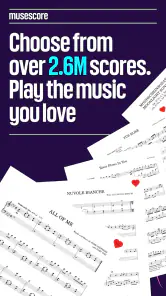
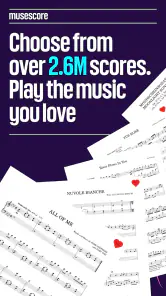
The collection is a major reason to try it: it brings together more than two and a half million scores, with material spanning familiar classical pieces and contemporary songs. It is free to install, though in-app purchases range from $1.99 to $214.99 per item, so I would check what is included before committing to any purchase. The app has a 3.9 average from around 146,000 ratings, and more than five million installs. It is rated for Teen users. Those figures suggest a well-used service, but they do not guarantee that every arrangement will suit your instrument, skill level, or expectations. I treat the library as a place to search and compare, not as a promise that every result is an authoritative edition.
Getting started without overthinking it
After installing, I would begin with a piece I already know rather than searching broadly. A familiar melody makes it easier to judge whether a score is readable and whether its arrangement matches what I want to play. Search for the title, then check the instrument and arrangement details before settling on a result. Several scores for the same song can differ in difficulty, key, or how closely they follow the recording.
The current version is 2.14.06, and the listed minimum operating-system requirement is version 7.0. Once I find a promising score, I would open it and inspect a few measures before planning a whole practice session around it. On a phone, notation can feel cramped; turning the device or moving to a tablet may make longer passages easier to follow. That small check can save frustration later.
For a first visit, I would keep the goal modest: locate one score, confirm that it is for the instrument I play, and read a short section. There is no need to build a library or explore every corner before discovering whether the app suits me. If the notation itself is unfamiliar, I would start with a tune I can hum; recognizing the melody gives me a reference point even when I cannot yet read every note confidently.
Turning a search into a useful practice session
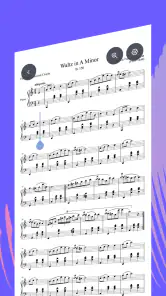
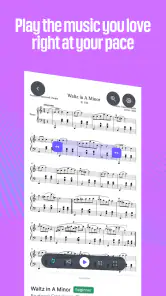
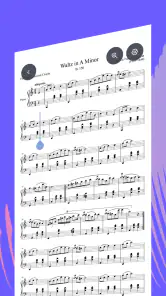
One of the standout features of MuseScore is its interactive sheet music viewer. As someone who often gets lost in the notes, I find the ability to play along with the music particularly helpful. You can adjust the tempo, loop sections, and even transpose the music to suit your vocal range or instrument tuning. It’s like having a personal music tutor guiding you through each piece.
For a first successful session, I would choose a short section, slow it down, and listen while following the notation. Then I would loop only the passage that causes trouble instead of repeatedly starting from the beginning. This is especially useful when a rhythm looks unfamiliar: hearing the part while tracking the notes can help connect what is on the page with what your hands need to do. Transposition can also help when a score sits awkwardly for your voice or instrument, but it is worth checking the resulting notes against your playing needs rather than assuming every arrangement will become a perfect fit.
More From Our News Desk

Weather by Xiaomi Review: Clear at a Glance, Less Clear Up Close

X Under Pressure: Can It Recover When Posting Goes Wrong?

Clash of Clans Is Won Between the Battles

Android Auto Makes the Case for Quieter Car Software

MobiOffice: Transforming Mobile Productivity with Seamless Integration

EA SPORTS FC™ Mobile Soccer: Redefining Mobile Sports Gaming
A realistic use is a quick practice break before a lesson. I might search for a piece I have been assigned, compare a couple of versions, and use a slow playback to work through one difficult phrase. That is more practical than opening a general video or audio service, where the performance may be easy to hear but the notation is not the focus. Compared with paper sheets, the app is easier for searching and experimenting with tempo; paper can still be better when I want an uncluttered page, no screen to manage, or a dependable printed copy on a music stand.
Reading more than the first search result
Choosing well is a small skill in itself. When several arrangements appear for one title, I compare their instrument labels and glance at the opening measures before settling in. I also check whether the written range looks plausible for me: a score can have the right song name yet sit in an uncomfortable register or include a part that is beyond my current technique. If a version looks dense, I do not assume I need to practice harder; another arrangement may simply be a better starting point.
Playback is useful as a guide, but I would not use it as the only judge of a score. If the tune sounds different from the version I know, the arrangement may have changed the key, rhythm, or accompaniment. I pause and compare a recognizable phrase rather than trying to force my ear to accept the first result. This takes a little time, but it is more efficient than learning a passage and later discovering that I chose the wrong arrangement.
Transposition is another tool I would use deliberately. It can make a part sit more comfortably for a singer or an instrument with a different tuning, but shifting notes does not automatically make a technically demanding passage easy. I still look at the resulting range and fingering implications before committing to a full practice session. That distinction matters particularly for beginners, who may otherwise mistake a key change for a simpler arrangement.
Sharing music and choosing the right score
Another nifty feature is the ability to upload and share your own compositions. For budding composers, this is a fantastic way to get feedback and collaborate with other musicians. The community aspect of MuseScore is quite strong, making it a hub for both learning and sharing musical ideas.
For a beginner, I would treat community scores as useful starting points, then look closely at the notation before practicing. A popular song may appear in several arrangements, and the first result is not automatically the easiest or most faithful. Check the clef, key signature, and apparent range against your instrument; if you are learning by ear, compare a few bars with a version you recognize. This simple habit helps avoid spending time on a score that is technically playable but not the version you meant to learn.
The upload and sharing side is most relevant if you already write music or want to show a composition to other players. If you only need a polished, officially published edition for an ensemble or a performance, I would be more selective and consider whether a dedicated publisher’s score is a better fit. Likewise, if your main goal is simply listening to complete recordings, a conventional music-streaming app is likely the more direct choice.
For someone sharing a draft, I would think about what kind of feedback would actually help before posting: whether the melody is clear, whether a part is playable, or whether the harmony works. A notation community can be more useful for those focused questions than a general social feed, but sharing a score is not a substitute for a teacher, editor, or rehearsal with the people who will perform it. I see the community as a way to put musical ideas in front of other players, not as automatic quality control.
Keeping practice flexible across devices
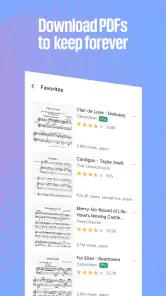
Whether you’re at home, in a music class, or just jamming with friends, MuseScore ensures you have access to your favorite sheets wherever you go. The app syncs seamlessly across devices, so you can start a piece on your tablet and finish it on your phone. Plus, offline access means you can keep practicing even when you’re off the grid.
For travel or a lesson in a place with unreliable connectivity, I would prepare the pieces I expect to use beforehand and check that they are available when I need them. A phone is handy for a quick reference, while a larger screen is more comfortable for reading several staves. I would still keep a backup plan for important rehearsals, such as a printed copy or another saved reference, because relying on any digital score means managing battery life, screen visibility, and the device itself.
One practical trade-off is that portability and readability are not the same thing. A phone is easy to carry, but a dense score may require frequent zooming or repositioning, which interrupts practice. Before a lesson or rehearsal, I would open the exact page and test how comfortably I can follow it from the place where I will be playing. If I have to keep pinching and scrolling between measures, a tablet or printed copy is likely the better tool for that session.
For casual practice, the phone format can still be enough: checking a melody, reviewing a short passage, or comparing a couple of arrangements does not demand the same uninterrupted view as reading a long piece. I would save the larger screen for parts where several staves need to stay visible together. That division of labor makes the app more convenient without pretending every screen is equally suited to every score.
Who will get the most from it
The app is a good match for curious players who want to discover arrangements, practise with playback, or keep scores accessible in one place. It may be less satisfying for musicians who prefer a strictly curated catalog, need a specific licensed edition, or dislike reading notation on a screen. New players should also expect to spend a little time comparing arrangements; the large selection is helpful, but it can make choosing less straightforward than opening a single book.
I would especially recommend trying it if you play more than one instrument, like experimenting with songs outside your usual repertoire, or want a convenient way to revisit a troublesome phrase between lessons. It is also a sensible option for a learner who already has basic notation skills and wants playback to support independent practice. The combination of a searchable collection and score-focused tools gives it a different job from a streaming service or a general video platform.
On the other hand, I would skip it as my main solution if I only want finished recordings, need a guaranteed official arrangement for a public performance, or prefer a fixed paper edition that never changes position on a screen. A player who is not comfortable reading notation may also find that a large catalog does not, by itself, explain how to play each instrument. In those situations, a teacher, a method book, a publisher’s edition, or an audio-first service may serve the goal better.
Making it part of your routine
In a world where digital convenience is king, MuseScore: sheet music reigns supreme for musicians seeking sheet music accessibility and interactive learning. Its combination of a vast library, easy-to-use features, and community engagement makes it more than just an app; it’s a musical companion. Whether you’re a seasoned musician or just starting out, MuseScore offers something valuable for everyone. Give it a try, and you might just find your musical journey has a new favorite partner.
My practical recommendation is to begin with one familiar song, find a score that clearly matches your instrument, and use the playback tools on a short passage. That lets you judge both the notation and the practice workflow before building a larger collection. If that first session makes it easier to understand a tricky phrase or get back to playing after a busy day, the app has already earned its place in your routine.
My overall view is positive, with one important condition: the app works best when I bring a little judgment to the search. The breadth is exciting, but it also means I need to check which arrangement I have opened and whether its notation suits the task in front of me. For an informal practice session, that flexibility is a strength. For a performance where accuracy and a particular edition matter, I would verify the score carefully and use a more authoritative source if needed.
MuseScore: sheet music Frequently Asked Questions
Can I search for a particular piece or browse by musical interests?
MuseScore is built around finding and reading sheet music, with a collection described as containing over 2.6 million free scores. That gives you a broad place to explore when you have a piece in mind or simply want to discover music to study or play. The experience is most relevant if you are comfortable browsing a music-focused collection on your device.
Is MuseScore suitable for musicians who want scores for different instruments?
MuseScore is aimed at people interested in sheet music, including musicians looking for material to read, study, or play. Its large collection can make the app useful for exploring a variety of scores, although the best fit depends on whether you find the pieces and notation you need. If you are choosing it for a specific instrument or repertoire, browsing the available collection is a sensible first step.
Can I browse and read sheet music without composing my own?
Yes. MuseScore is useful even if you simply want to explore and read music rather than write it. Its collection includes over 2.6 million free scores, so you can look for music notes and find pieces to study or play. The app is listed in the Music & Audio category, making it relevant to musicians and anyone interested in sheet music.
What is MuseScore and who is it for?
MuseScore is a versatile sheet music app designed for musicians, composers, and music educators who need to create, edit, and share musical scores. It offers extensive features for writing music, whether you're arranging compositions for a full orchestra or creating simple piano pieces. Users range from students learning music theory to professional composers needing a powerful tool to bring their musical ideas to life.
Is MuseScore free to use, and are there any premium features?
MuseScore is free to download and use, offering a robust set of features without any initial cost. However, it does provide a MuseScore Pro subscription that unlocks additional features, such as advanced sharing options, access to premium sheet music collections, and priority support. This makes it flexible for both casual users and those who seek enhanced functionalities. In-app purchases are available, with prices ranging from $1.99 to $214.99 per item.
Pros
- Vast library of sheet music available.
- User-friendly interface for easy navigation.
- Offline access to saved scores.
- Regular updates with new features.
- Cross-platform compatibility.
Cons
- Some features require a premium subscription.
- Occasional bugs in sheet rendering.
- Limited support for certain instruments.
- Ads present in the free version.
- High data usage for streaming music.
- Category
- Music & Audio
- Version
- 2.14.06











