Monster Maker
- 95.00
- 4.5
- Installs
- 1.00M
- Price
- Free
Screenshots
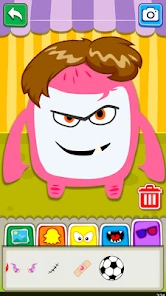
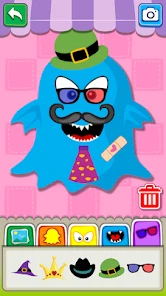
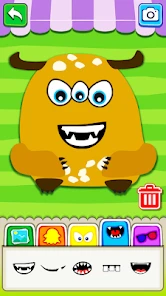
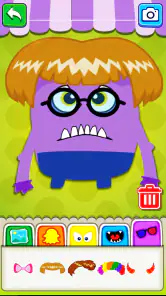
Analysis by Reviewed
I picked up Monster Maker as a light creative app for making odd little characters, and it works best when I treat it as a playful activity rather than a serious drawing tool. It comes from Sunny Kid Games, is free, and is rated for Everyone, so it makes sense for families looking for an easy way to spend a few minutes inventing creatures together. The app has an average rating of 4.5 from around 2.9 thousand ratings, but what matters more in everyday use is whether the simple idea stays enjoyable after the first few creations.
Before a first creative session
I would approach this as an activity to open when someone is ready to make a character, not as a project that needs a plan or a long setup. The basic appeal is immediate: choose visual elements, combine them, and see what kind of monster takes shape. That makes it approachable for a child who may not yet feel confident drawing from scratch, while still leaving room for an adult to join in without needing art supplies or a lesson plan.
It also helps to decide what “finished” means before beginning. With a flexible character-making activity, there is always another possible change to consider. I like a simple boundary such as choosing a few features, settling on the colors, and then giving the creature a name. That keeps the session satisfying instead of turning it into a search for a perfect result. If a child wants to keep going, a fresh character can be a better next step than endlessly revising the first one.
Unleashing Your Creativity
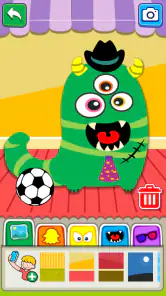
When I first launched Monster Maker, I was immediately drawn in by the vibrant colors and intuitive interface. The app doesn’t just give you a blank canvas; it provides you with endless possibilities to create creatures that are as unique as your imagination. From choosing different body parts to customizing colors and textures, this app is like a playground for your inner mad scientist.
Features That Stand Out
One of the features I absolutely adore is the extensive library of monster parts. Seriously, there are so many options to mix and match! You can pick from a variety of eyes, mouths, horns, and even wings, making each creation truly one-of-a-kind. Plus, the drag-and-drop functionality is super smooth, ensuring that even those new to digital art can dive right in without a hitch.
And let’s not forget about the color customization. The app allows you to paint your monster with any color you fancy, offering both solid colors and gradients. Whether you want a fiery red dragon or a pastel pink bunny-monster, the world is your oyster!
Where the creative flow can snag
The generous mix-and-match approach is also where I would set expectations carefully. A large choice of parts can make it tempting to keep adjusting a creature instead of finishing one, especially for a young child who is still deciding what they want. I find it helps to pick a small theme first—such as a sleepy monster or a creature with too many eyes—then make choices around that idea. It turns the app into a short creative prompt rather than an open-ended task that can feel overwhelming.
More From Our News Desk

Weather by Xiaomi Review: Clear at a Glance, Less Clear Up Close

X Under Pressure: Can It Recover When Posting Goes Wrong?

Clash of Clans Is Won Between the Battles

Android Auto Makes the Case for Quieter Car Software

MobiOffice: Transforming Mobile Productivity with Seamless Integration

EA SPORTS FC™ Mobile Soccer: Redefining Mobile Sports Gaming
For a parent, a useful way to share the activity is to take turns choosing one detail at a time. A child can choose a body part, an adult can suggest a color, and then the child decides whether the combination works. This gives the session a natural stopping point and keeps the focus on imagination rather than on finding a “perfect” design. It also makes the app easier to use during a brief wait or quiet moment, when there isn’t time for a longer craft project.
A practical setup and recovery routine
The app is listed for Android devices running version 5.0 or later, and its current version is 1.34. If it does not open or respond as expected, I would start with ordinary checks: close and reopen it, make sure the device has available storage, and check that the operating system is compatible. If a character-building session is interrupted, restarting the app is a sensible first step; I would avoid assuming that an unfinished design has been saved unless I can see it again after reopening.
When sharing is the part that stalls, I would first check whether the device itself can use the intended sharing option and whether the relevant app is available and signed in. That is a practical distinction: a sharing hiccup can come from the phone’s setup rather than from the creative activity. For younger users, I would also handle any sharing choices together, making sure a child understands where an image is going before sending it.
Small ways to make the choices easier
A useful trick when a child is stuck between options is to narrow the decision rather than offering more ideas. For example, ask whether the monster should look friendly or grumpy, then choose parts that support that mood. This gives each selection a reason and can help a younger user feel in control without needing to understand every option at once. It is also a good way to keep the adult in a supporting role instead of taking over the design.
Another approach is to create a pair of contrasting characters in separate turns: one that looks tidy and one that looks deliberately mismatched. The comparison gives the child a playful goal beyond simply making another monster, and it encourages noticing how a single choice can change the overall impression. I would keep the challenge flexible, though; the point is to enjoy the visual result, not to judge which character is better.
Who will enjoy it—and who may want another tool
This is a good fit for families who want a low-pressure character-making activity, or for children who enjoy choosing features and colors more than drawing every line themselves. It can also suit an adult who wants a quick, silly creative break. Compared with a conventional drawing app, its appeal is the guided assembly of a monster from parts; the trade-off is that someone looking for freehand sketching, detailed editing, or a broader art workflow may prefer a dedicated drawing tool.
It is less suitable if the main goal is structured art instruction or a deep design project. The fun here comes from making combinations, not from learning drawing techniques or carefully refining a finished illustration. I would also skip it for a child who quickly tires of choosing among visual options or who needs an activity with a clear lesson, story, or challenge. The Parenting category is a useful clue to its family-friendly purpose, but an adult still needs to decide whether the style and open-ended play suit their child.
Sharing Your Masterpiece
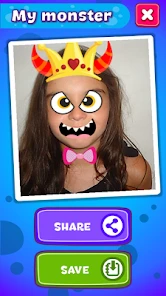
Once you’ve crafted your perfect monster, showing it off is a breeze. The app lets you share your creations on social media directly from the app. Imagine the fun of sending your friends a picture of a monster you designed, challenging them to create one even crazier! It’s a fun way to interact and spark creativity amongst your circle.
And if you’re someone who loves a bit of recognition, the app’s community feature lets you upload your monsters to a gallery where users can like and comment. It’s a fantastic way to get feedback and maybe even inspire others.
Sharing with a little care
I would treat sharing as an optional extension, not a necessary part of the activity. A child can enjoy making a character without posting or sending it anywhere, and keeping the creation on the device is a perfectly reasonable choice for a family that prefers private play. If sharing is wanted, an adult can review the destination first and help the child think about whether the picture is intended for a friend, a family chat, or a wider audience.
If the sharing route does not appear to work, I would separate the steps: first make sure the device can open the chosen destination, then try the sharing action again. If the basic creation activity works but sending does not, it is sensible to troubleshoot the phone’s sharing setup before assuming the character maker itself is at fault. That keeps a minor technical snag from interrupting the fun or prompting unnecessary changes to the design.
Making the most of a short session
A realistic use is a few minutes at home while dinner is being prepared: I would invite a child to make one creature with a silly constraint, such as choosing the strangest available combination, then give it a name aloud. That small extra step makes the design feel like a shared activity without needing supplies or a long plan. If the child wants to keep creating, switching roles—one person picks parts while the other chooses colors—can add variety without turning it into a competition.
One practical trade-off is that the app’s central appeal is visual experimentation, so repeated sessions may feel similar if a child wants new goals each time. I would bring my own prompts rather than expecting the app to provide a sequence of activities: make a monster for a rainy day, invent a friendly creature, or create two characters that look like opposites. These prompts add replay value while keeping expectations grounded in what the app is designed to do.
When the phone, not the activity, is causing trouble
If the app feels slow or stops responding, I would first close other demanding tasks and reopen it before trying anything more disruptive. I would also check that the device has some free storage and that its software is compatible, particularly if the app has just been installed on an older phone. These are general checks rather than guarantees, but they are a sensible order of operations for a small creative app: start with reversible steps and avoid clearing data unless you understand what may be removed.
It is worth distinguishing an app problem from a broader device problem. If other apps are also failing to open or the phone is low on space, the monster-making session may only be where the issue became noticeable. Conversely, if the rest of the device behaves normally and only one step such as sharing is troublesome, focus on that part of the workflow instead of repeatedly rebuilding the character. This is especially useful with children, because it can preserve the creative work and make troubleshooting feel calm rather than like a failure.
What to expect over time
Monster Maker is most appealing when the goal is a quick result that still feels personal. It sits between a coloring activity and a full drawing app: there is more room for individual choices than in a fixed coloring page, but less freedom than starting with a blank sheet and drawing every shape. That middle ground is exactly why I would offer it to a child who enjoys assembling visual ideas but may be discouraged by drawing from scratch.
For a child who wants to practice lines, shading, or realistic proportions, a drawing app with lessons or a more open canvas is a better match. For someone who mainly wants a low-pressure prompt during a quiet moment, this one can be easier to begin because the character starts to take shape through selections rather than through a blank page. The right choice depends less on age alone and more on whether the child enjoys making choices from a visual palette.
Final Thoughts
All in all, this is a delightful app that offers entertainment and a creative outlet for users of all ages. Its user-friendly design and extensive customization options make it a standout choice for anyone looking to unleash their creative beast. Whether you’re passing time or seriously diving into digital art, this app is worth trying if character play is what you want. The free price makes it easy to consider, and it has reached over one million installs, though popularity alone cannot tell you whether its style will suit your household. I’d recommend it for relaxed, shared creature-making, while anyone seeking a full drawing studio or a guided learning experience should look elsewhere.
My practical verdict is to try it when you want a cheerful, contained activity rather than a replacement for art practice. Keep the first session short, offer a simple theme if choices become tiring, and decide together whether sharing is appropriate. For the right child, the pleasure is in seeing a strange combination become a character; for someone who needs lessons, a story-led game, or precise drawing controls, another kind of app will be more rewarding.
Monster Maker Frequently Asked Questions
What is Monster Maker?
Monster Maker is an engaging mobile application designed for creativity and fun. It allows users to create and design their own unique monsters using a variety of tools and features. With endless customization options, users can experiment with different body parts, colors, and accessories to bring their monstrous creations to life. Ideal for users of all ages who enjoy artistic expression. The app is developed by Sunny Kid Games and is presented as a way to create fun characters.
What age group is Monster Maker intended for?
Monster Maker has an Everyone content rating, making it suitable for a broad audience, including families looking for a light creative activity. Children can explore character-making at their own pace, while adults may enjoy experimenting with imaginative designs too. As with any app used by a child, parents can decide whether its features and play style suit their family.
Is Monster Maker suitable for children?
Yes, Monster Maker is suitable for children and is designed to be family-friendly. The app provides a safe and entertaining environment where kids can unleash their creativity. It includes parental controls and child-friendly content, ensuring that young users can enjoy designing their monsters without exposure to inappropriate material. It's a great way for children to develop their artistic skills.
What features does Monster Maker offer?
Monster Maker offers a wide range of features that enhance the creative experience. Users can choose from numerous monster templates or start from scratch. The app includes a variety of tools for customizing monsters, such as color palettes, textures, and body part selection. Additionally, users can animate their monsters and share them with friends or on social media platforms, making it a versatile and interactive app.
Will Monster Maker work on my phone or tablet?
Monster Maker is an app for Android devices running Android 5.0 or later. Before downloading, check your device’s operating system version to make sure it meets that requirement. If you use an iPhone or iPad, check the relevant app store for compatibility before installing. The app is currently version 1.34, so keeping your device and app updated can help you use the available release.
Pros
- User-friendly interface
- Wide variety of monster parts
- Creative customization options
- Regular updates
- Interactive tutorials
Cons
- Limited free features
- Ads can be intrusive
- Requires stable internet
- High battery usage
- Occasional bugs
- Category
- Parenting
- Version
- 1.34













