Learn Music & Songs Xylophone
- 9.00
- 3.8
- Installs
- 1.00M
- Price
- Free

Screenshots


Analysis by Reviewed
When I want to give a child a first chance to explore notes without bringing out an instrument, Learn Music & Songs Xylophone is an appealing place to start. I tried it as a simple music activity, and found that its best use is not delivering a full course but making it easy to listen, tap, and try again. That modest role is worth keeping in mind: it can make music feel approachable, while an adult’s questions and encouragement help turn screen time into a shared learning moment.
Who will get the most from it?
I’d treat this as a low-pressure first step rather than a replacement for music lessons. It suits a child who is curious about sounds, enjoys copying patterns, and is happy to practise briefly with an adult nearby. A parent can use it as a shared activity: ask the child to listen to a short phrase, notice which keys light up, then try to repeat it. That turns tapping into a listening game instead of simply chasing the screen’s rewards.
It can also work for an adult who wants a playful introduction before choosing an instrument. The on-screen keys make it easy to try notes without setting up a real xylophone, though the experience cannot teach the feel, spacing, or sound of physical bars. If your goal is formal technique, reading notation, or structured progress toward an instrument, a teacher or a more comprehensive music-learning tool will be a better fit.
First Impressions
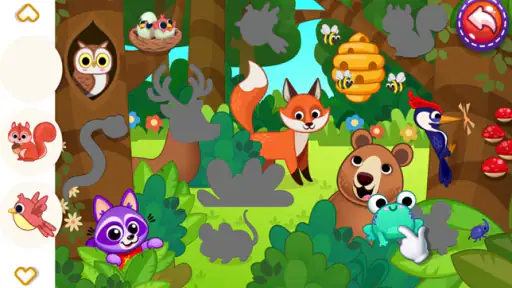
Right off the bat, the app's colorful interface caught my eye. It's not just visually appealing, but also user-friendly. The main menu is straightforward, making navigation a breeze even for first-time users. Plus, the cheerful sound effects add a delightful touch to the overall experience.
For a realistic routine, I’d use it during a short wait at home or as a calm activity before another task, rather than treating it as an open-ended babysitter. Sitting beside a child for the first few minutes helps them understand that the aim is to listen and follow, not just tap as quickly as possible. That small bit of guidance makes the musical part more likely to stick.
Features and Functionality
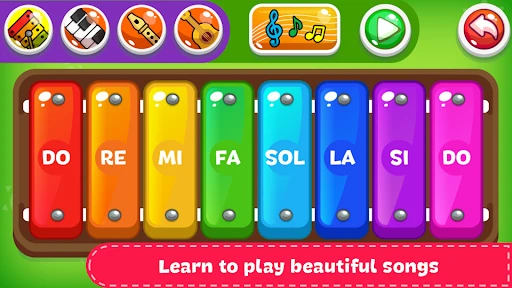
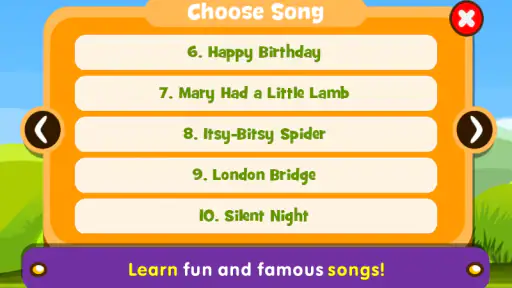
One of the app’s standout features is its interactive lessons. It offers a variety of songs that users can learn by following along with the xylophone keys displayed on the screen. Each note lights up as you play, helping you stay on track. It's almost like having a personal music tutor right at your fingertips!
A useful way to make those guided songs more than a copying exercise is to pause between attempts and ask what changed: did the tune move higher, lower, or repeat a note? The lights help a beginner locate the next key, but listening before tapping can build a more meaningful connection between the sound and the action. For very young children, I’d keep the prompt simple and let them enjoy trying it rather than turning every session into a test.
More From Our News Desk

Weather by Xiaomi Review: Clear at a Glance, Less Clear Up Close

X Under Pressure: Can It Recover When Posting Goes Wrong?

Clash of Clans Is Won Between the Battles

Android Auto Makes the Case for Quieter Car Software

MobiOffice: Transforming Mobile Productivity with Seamless Integration

EA SPORTS FC™ Mobile Soccer: Redefining Mobile Sports Gaming
There’s also a ‘free play’ mode where you can experiment and create your own tunes. This feature is fantastic for sparking creativity, especially for young ones who love to explore sounds and melodies.
Free play is also a sensible place to let a child take the lead after a guided song. They can try to recreate a phrase from memory or make a different ending, which gives the parent a chance to hear whether the child is noticing patterns. The trade-off is that this mode is open-ended: children who prefer clear goals may need a small challenge from an adult, while imaginative players may be content to explore without one.
Making a short session count
A practical session does not need to be long or elaborate. I’d begin with one guided tune, give the child a moment to listen to it, and then invite them to follow the illuminated keys. Afterward, switching to free play lets them make their own version. This sequence gives the activity a gentle beginning and ending without turning it into a lesson that demands constant adult instruction.
If a child gets frustrated by missing notes, I’d slow the pace verbally rather than focusing on accuracy: listen to one small part, try it, then continue. The visual cue is helpful for finding the next key, but it can also tempt a child to watch only the screen. Asking them to listen for the sound as well gives the activity a second focus and may make repeating a phrase more satisfying.
Parents can also use the app as a low-stakes way to learn what kind of musical play their child enjoys. A child who likes copying may gravitate toward guided songs; one who prefers inventing may spend more time in free play. That is useful when deciding whether to bring out a toy instrument, play music together, or look for more structured lessons. I would treat those preferences as clues, not as a test of talent or readiness.
Educational Value
For those wondering about the educational value, Learn Music & Songs Xylophone does not disappoint. The app introduces users to musical concepts such as pitch, rhythm, and melody in a way that’s easy to grasp. It’s designed to be educational without feeling like a chore, which is a huge plus in my book.
That makes it more suitable for building familiarity than measuring achievement. I wouldn’t use it to judge whether a child is ready for lessons, since completing an on-screen pattern is different from keeping time with another musician or playing a real instrument. Compared with ordinary music videos, it asks the child to respond directly; compared with a full instrument-learning app, it keeps the task simpler and more focused on immediate sound-making.
Moreover, the app encourages practice through its rewarding system. As you progress, you earn stars and unlock new songs, which is a great motivator for kids to keep learning.
For parents, I’d use stars as a prompt to return to a song, not as a score of musical ability. A child may enjoy the reward without understanding the tune yet, so it can help to replay a familiar piece and notice one small detail together. That approach keeps the encouragement positive without making every session about unlocking the next item.
Where it fits among children’s music options
The most useful comparison is with the things families already reach for. A music video can expose a child to songs, but the child mostly watches and listens. A physical xylophone invites hands-on play and teaches the feel of striking real bars, though it takes space and does not guide a beginner through a tune. This app offers a middle ground: a child can actively follow notes on a screen, with the visual prompts doing some of the work that an adult might otherwise do.
That middle ground is also its boundary. The screen can make starting easy, but it cannot provide the physical feedback of a real instrument or the responsive teaching of a person listening alongside the child. I’d choose it when convenience and a guided first try matter most. If a child is already eager to practise on an instrument, or needs a curriculum with clear progression, I’d look beyond a simple xylophone activity rather than expecting this one app to cover every stage.
It may be especially useful when a household does not own a child-sized instrument or when a parent wants to test interest before buying one. In that situation, the app is a convenient sampler, not proof that a child will enjoy practising on a real xylophone. The sounds and actions are close enough to invite exploration, but the physical experience is different enough that I’d let the child try an actual instrument before making a bigger commitment.
Room for Improvement
While the app is delightful, there are a few areas where it could improve. For instance, adding more diverse songs would enhance the learning experience. Also, a feature to track progress over time would be beneficial, especially for parents who want to monitor their child's improvement.
That limitation matters if you’re hoping to build a regular practice plan: there’s no progress record to consult, so a parent would need to remember which songs a child has tried and what felt difficult. A simple home routine can work around this—choose one familiar song, repeat it, then let the child play freely—but it is not a substitute for a teacher’s feedback or a structured curriculum.
Another trade-off is that visual prompts can make a tune feel easier to copy than to remember. For a child who relies on the lights, following along may not mean they can reproduce the phrase once the prompt is gone. I’d occasionally pause before the next attempt and see whether they can recall a small part by ear, while keeping the mood playful. This is a parent-led workaround, not a built-in assessment.
The app is free to download, with optional in-app purchases priced at $2.99 per item. I’d check the purchase options with a child before handing over the device, and treat any paid item as an optional extra rather than something needed to begin. Its 3.8 average from around 2,500 ratings and 1 million-plus installs suggest that many families have tried it, though those figures alone cannot tell you whether its style will suit your child.
One practical question is whether the free experience is enough to try the basic idea. The app can be downloaded without paying, and the optional items are separate purchases rather than a reason to assume a child must spend money to explore music. I’d let a parent handle any purchase decisions and avoid promising that a particular song or extra is included until checking the choices on the device.
How it fits today
Sunny Kid Games released this parenting app on July 10, 2017, and its current version is 1.42. Those details give existing users a clear sense of the version they may encounter, but they do not by themselves show what changed between releases. I’d focus on whether the current experience meets your child’s needs rather than assuming a particular update added a feature or fixed a specific issue. It is free, rated for Everyone, and requires Android 7.0 or later, making it an accessible option for compatible devices.
For someone who already has it installed, the version number is a useful point of reference when checking which release is on a device, but I wouldn’t treat it as evidence of a particular improvement. The key question is practical: does the child still find the guided songs understandable, and does the app remain a pleasant way to explore notes? New users can make the same judgement by trying a brief session instead of expecting a version label to explain the experience.
The age rating makes the app broadly suitable for a family audience, but I’d still stay nearby with a young child. That is less about navigating menus and more about shaping the activity: an adult can help keep the focus on listening, decide when to stop, and manage any optional purchase choices. The app is most useful when it supports that shared moment rather than taking the place of it.
If you’re deciding between this and alternatives, the choice depends on what you want the screen to do. Music videos are better for passive listening, while a physical xylophone offers real-world touch and sound; this app sits between them by letting a child actively follow notes on a screen. I’d choose it for an easy first experiment, but pick a real instrument or guided lessons when tactile practice, musical feedback, or a planned learning path matters more.
Who should look elsewhere?
I would skip this as a main learning tool if your child wants to read music, practise an instrument in a systematic way, or receive feedback on technique. It is also not the best choice for a family seeking a record of progress to share with a teacher, since the parent has to remember what the child tried. Those needs call for a more structured option, a real instrument, or support from a music teacher.
On the other hand, a beginner who is unsure whether music will hold their interest may benefit from the low commitment. There is no need to buy an instrument just to see whether a child likes matching notes and making simple tunes. I’d frame the app as an invitation to explore, then use the child’s reaction to decide what might be worth trying next.
My recommendation
Overall, Learn Music & Songs Xylophone is an enjoyable starting point for budding musicians who want to explore sounds without pressure. It is entertaining and easy to approach, and its guided songs and open play give parents two different ways to share the experience. I’d recommend it as a brief, supervised activity for a curious child or a playful first experiment for an adult, not as a complete music course.
Its strongest use is the moment when a child hears a note, finds it on the screen, and wants to try again. Keep sessions short, balance following along with free play, and treat rewards as encouragement rather than proof of progress. If that is what you need, this app is worth a try; if you want hands-on technique or a clear learning path, a physical instrument or structured teaching will serve you better.
Learn Music & Songs Xylophone Frequently Asked Questions
Is Learn Music & Songs Xylophone free to download, and does it include in-app purchases?
Learn Music & Songs Xylophone is free to download, so families can try its music-learning approach without paying upfront. It also offers in-app purchases, priced at $2.99 per item, which may matter if a child uses the app and can access purchase options on the device. Check your device’s purchase controls before handing it over, and consider whether those optional costs suit your family.
What age group is Learn Music & Songs Xylophone intended for?
The app is listed for everyone and is presented as a music game for children, making it a family-friendly option to consider. Its colorful, approachable style is aimed at helping young learners explore music, though the simple xylophone format may also appeal to older beginners. Parents can decide whether the activities suit a child’s interests and learning needs before downloading.
What is Learn Music & Songs Xylophone?
Learn Music & Songs Xylophone is an interactive app designed to teach users, especially children, how to play the xylophone. It features colorful graphics and a user-friendly interface that makes learning music fun and engaging. The app offers a variety of songs for practice and provides real-time feedback to help users improve their musical skills.
Is Learn Music & Songs Xylophone suitable for beginners?
Absolutely! Learn Music & Songs Xylophone is tailored for beginners, even those with no prior musical experience. The app starts with basic lessons and gradually progresses to more complex tunes, allowing users to learn at their own pace. It’s perfect for children and adults who want to explore the world of music in an easy and enjoyable way.
What features does Learn Music & Songs Xylophone offer?
The app offers a range of features to enhance the learning experience. These include interactive lessons, a wide selection of songs to practice, and a colorful, engaging interface. Users also benefit from real-time feedback and progress tracking, which helps in identifying strengths and areas for improvement. Additionally, the app may include fun mini-games to reinforce learning.
Pros
- Engaging for kids with colorful interface.
- Includes a variety of songs to learn.
- Simple controls for easy learning.
- Interactive tutorials for beginners.
- Offline access to songs and lessons.
Cons
- Limited advanced features for experts.
- Ads can be intrusive at times.
- Requires in-app purchases for more songs.
- No option to record and playback.
- Lacks community or social features.
- Category
- Parenting
- Version
- 1.42













