Moises: The Musician's AI App
- 7.90K
- 4.6
- Installs
- 10.00M
- Price
- Free

Screenshots

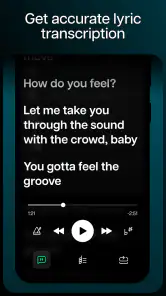

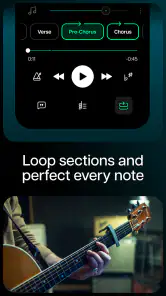
Analysis by Reviewed
I’d approach Moises: The Musician's AI App as a practical listening and practice tool, not a replacement for recording software or formal lessons. Its main appeal is being able to work with parts inside a song instead of hearing only the finished mix. That can make a familiar track feel like a useful study session: you can focus on one part, follow the harmony, or try playing along. I find that especially appealing when I want to learn by ear but need a little help separating what I’m hearing.
Start with one song and one goal
For a first visit, I wouldn’t try to explore every tool at once. Choose a song you already know and decide what you want to learn from it: perhaps the bass movement, the singer’s phrasing, or the way the drums mark a transition. Familiarity gives you a reference point, so you can tell whether the changed listening experience is helping rather than simply sounding different.
This is also a useful way to avoid a common beginner trap: mistaking more controls for more progress. If your immediate goal is to keep time through a chorus, focus on that passage and listen for the beat before changing anything else. A clear, small task makes it easier to judge whether the app belongs in your routine.
Transform Your Music Experience
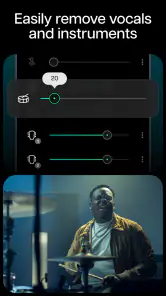
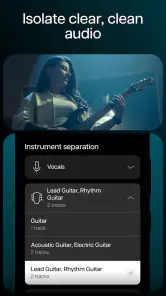
First off, let’s talk about its ability to separate vocals and instruments from any song. Yes, you heard it right! With Moises, you can isolate vocals, drums, bass, and other instruments to create your own remix or practice alongside your favorite artists. This feature is a godsend for those of us who love to experiment with sound. I tried it with some classic rock tracks, and the results were nothing short of amazing!
What to expect when you open it
Moises is a Music & Audio app from Moises Systems, available free, with optional in-app purchases ranging from $3.99 to $299.99 per item. It has a 4.6 average from around 390,000 ratings, and more than 10 million installs. It’s rated for Everyone, so its audience is broad, though the most satisfying results will likely come to people who already have a song or practice goal in mind. The app was released on November 30, 2020, and version 2.105.0 supports Android 9 and later.
For a first session, pick one track you know well and decide what you want to hear more clearly. A vocal line is an easy place to begin, but a drummer can instead focus on the rhythm section, while a singer might want to listen closely to the accompaniment. Starting with a familiar recording makes it easier to judge whether the separated parts are useful; you don’t need to understand every control before you can get something from the result.
Practice Like a Pro
If you’re a musician looking to hone your skills, Moises has got your back. The app allows you to change the pitch and speed of any track without affecting its quality. This means you can slow down that tricky guitar solo or speed up a drum track to match your skill level. It’s like having a personal music tutor available 24/7. I found myself spending hours perfecting my guitar riffs, thanks to this feature.
More From Our News Desk

Weather by Xiaomi Review: Clear at a Glance, Less Clear Up Close

X Under Pressure: Can It Recover When Posting Goes Wrong?

Clash of Clans Is Won Between the Battles

Android Auto Makes the Case for Quieter Car Software

MobiOffice: Transforming Mobile Productivity with Seamless Integration

EA SPORTS FC™ Mobile Soccer: Redefining Mobile Sports Gaming
Your first useful practice loop
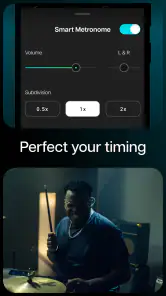
Try using a short, familiar passage rather than treating the whole song as one big assignment. First, listen to the complete mix so you know how the parts fit together. Then bring forward the part you’re studying and play along at a pace you can manage. Once the rhythm or fingering feels steadier, return to the full mix and see whether you can hold your part without leaning on the isolated audio. That last check matters: a clean solo listen can be encouraging, but the real test is keeping time against everything else.
One useful trade-off is that separation gives you a clearer practice target, not a perfectly recorded studio stem. The source recording still matters, and dense arrangements can leave some sounds harder to distinguish than others. I’d treat the output as a guide for learning and experimenting rather than assume every extracted part will be clean enough for a polished release. If your goal is professional editing or detailed mixing, a dedicated audio workstation gives you more control over a recording you own.
Jam Along with Ease
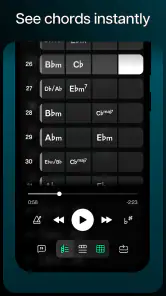
Moises also supports chord detection, which is incredibly useful when you’re trying to learn a new song. The app displays the chords in real-time as the music plays. This feature is particularly helpful for beginners who are still finding their way around the fretboard. I remember struggling with chord changes in the past, but with Moises, it's like having the sheet music right in front of me.
How it fits into an everyday routine
Picture a guitarist with ten minutes before heading out: they open a song they already know, focus on the rhythm part, and use the time to check a chord change that keeps tripping them up. That’s a more realistic win than expecting an app to teach an entire instrument in one sitting. A singer could use the same short window to listen to the melody against the backing, while a drummer could concentrate on the pulse rather than the vocal. The value is in turning a casual replay into focused listening.
Chord detection is best treated as a helpful pointer, not unquestionable notation. If a displayed chord seems odd, listen again and compare it with your instrument; songs can contain changes or voicings that are easy to misread by ear. This small check makes the feature more useful, especially for learners who might otherwise copy a label without noticing how it sounds in context.
Getting started without overthinking it
On Android, the minimum supported system is version 9, and the app is also available on iOS. After installing, choose a track that serves a clear purpose, then focus on one task: follow a part, work through a passage, or explore the detected chords. You do not need to begin by planning a full remix. If you’re deciding whether to pay, spend time with the free app first and see whether its tools fit your routine; optional purchases are available, but I wouldn’t buy one just because the feature list sounds ambitious.
The interface is designed to keep the main musical task accessible, but a first-time user may still need a little patience to understand which controls affect the listening experience and which change the material being studied. I’d make one adjustment at a time and listen again, rather than changing several things at once. That makes it much easier to tell whether a setting actually helped.
The app’s user interface is intuitive and easy to navigate. Even if you’re not tech-savvy, you’ll find it a breeze to use. The design is sleek, and everything is laid out in a way that makes sense. I especially appreciate how the developers have kept the musician’s workflow in mind, enabling quick access to all the essential tools.
Making the result useful beyond practice
There’s a worthwhile distinction between studying a part and preparing material to share. For private practice, an imperfectly isolated sound can still reveal a bass pattern or help you locate a vocal entrance. For a remix intended to sound finished, the same artifacts may be distracting. I’d use the extracted audio to make decisions and learn, then listen back to the original recording before treating any idea as final.
Another practical approach is to compare the same section in two ways: first with the part you’re studying emphasized, then with the whole arrangement. This helps you notice whether you’ve learned the musical phrase itself or only followed a cue that disappears in the full mix. It’s a simple self-check, but it makes the tool serve your ear rather than replacing it.
Who will get the most from it
I’d recommend Moises most to learners who practice with recorded music, singers who want to study a vocal line, and curious listeners who enjoy hearing how a song is put together. It also suits musicians who need a quick way to rehearse with a familiar track. If you mainly want to stream albums, make playlists, or record and mix original projects from scratch, a conventional music player or a full desktop audio editor is a better fit. This is a focused companion for working with songs, rather than an all-purpose studio.
It may also be a poor fit if you need a dependable substitute for a teacher, formal sheet music, or source-quality multitrack files. The app can make listening more deliberate, but it cannot decide which fingering is comfortable for your hands or explain why a musical passage works. I’d pair it with your instrument, your own careful listening, and lessons or notation when those are what the job calls for.
What to do when a part sounds unclear
If an isolated instrument seems muddy or carries traces of another sound, I wouldn’t immediately assume you chose the wrong setting. Some recordings are layered so tightly that separating their elements is inherently challenging. Try listening to a less crowded passage, compare the result with the complete mix, and focus on the musical clue you need rather than demanding a flawless solo track. If the recording remains too messy for your purpose, switching to a cleaner song is often more productive than repeatedly adjusting things.
That trade-off is central to deciding whether the app is right for you. A casual learner can get real value from a part that is merely easier to hear; someone preparing precise production work may find that the remaining artifacts get in the way. In that case, a dedicated workstation and properly recorded stems are the more sensible route.
Final Thoughts
In a nutshell, Moises is a versatile app that offers a plethora of features for musicians of all levels. Whether you’re looking to remix your favorite songs, practice instruments, or simply explore the depths of music creation, this app has something for everyone. It’s not just an app; it’s a whole music studio in your pocket. So, if you’re passionate about music and eager to expand your creativity, give Moises: The Musician's AI App a try. You won’t be disappointed!
Ready to dive into the world of music like never before? Moises is available for both Android and iOS, so go ahead and unleash your inner musician!
A sensible way to decide
My advice is to judge it by whether it helps you hear or practice something you otherwise would miss. Try a song with a clear arrangement, compare the separated part with the full mix, and keep the result that genuinely helps your ear or timing. If you need exact notation, pristine stems, or a full production workflow, use a tool built for that purpose instead. For a first-time user who wants a low-friction way into closer listening, though, this is a rewarding place to start.
Choosing it over familiar alternatives
Compared with an ordinary music player, this app asks you to interact with a recording rather than simply choose what to hear next. That makes it less convenient for background listening but much more purposeful when you want to isolate a part, slow down a passage, or inspect chords. Compared with a full audio editor, it is easier to approach for a quick practice task, while offering less fine-grained control over production. I see it as the middle ground: more hands-on than streaming, less demanding than building a session in studio software.
For a first-time user, the clearest test is not whether every tool feels essential. It’s whether one repeated task becomes easier: finding a chord change, following a bass line, or staying with a groove. If that happens, the app has earned a place in your practice routine. If you rarely work with existing songs and mostly create original recordings, you’ll probably get more from software designed around recording and editing from the start.
Keep expectations realistic
One question people often have is whether the app can make learning a song effortless. It can make particular details easier to investigate, but it doesn’t remove the need to listen, repeat, and practise. I’d use it to identify a passage or build confidence at a manageable pace, then put the phone aside and try the part from memory. That transition is where a listening aid becomes useful musical practice.
Another sensible question is whether a paid option is necessary to get started. I’d begin with the free experience and decide based on the specific task you return to, rather than paying in anticipation of a future project. Optional purchases span a wide range, so check the terms shown in the app before committing and consider whether the feature you need is actually included in the option you choose.
If you’re wondering which song to try first, pick one with a part you can already hum or tap. A familiar melody makes it easier to notice when the focus shifts, while a relatively open arrangement gives separated sounds a better chance of being useful. You can always move on to busier music once you know what kind of result helps you most.
Moises: The Musician's AI App Frequently Asked Questions
Do I need musical experience to get useful results from Moises?
No formal music background is needed to explore Moises. Its main idea is straightforward: work with separated parts of a song so you can listen to or practice with the elements you care about. Beginners can use that approach to follow a song more closely, while experienced musicians may find it useful for focused practice and experimenting with arrangements.
Can Moises help me learn a song by listening to individual parts?
Yes. Moises is designed to let you work with stems extracted from music or audio, including by removing vocals or instruments. Hearing parts separately can help you concentrate on a musical element that is difficult to follow in a full mix. It can be a helpful practice aid, though learning still depends on listening carefully and working through the material yourself.
Is Moises free to download, and does it include paid features?
Moises is free to download, so you can try its music tools without an upfront purchase. The app also offers in-app purchases, with listed items ranging from $3.99 to $299.99. Before buying anything, review the options shown in the app and choose only what fits your needs. Its core appeal is working with separated musical parts for practice and experimentation.
What can I do with a song after importing it into Moises?
Moises is built around working with musical parts rather than simply listening to a track. Its store summary highlights removing vocals and instruments, so you can focus on the stems extracted from music or audio. This can be useful when you want to rehearse along with selected parts, explore an arrangement, or create a backing track that better suits your practice.
What is Moises: The Musician's AI App?
Moises: The Musician's AI App is an innovative application designed to help musicians and music enthusiasts enhance their practice and performance. The app uses advanced AI technology to separate vocals and instruments from any song, allowing users to remix tracks, adjust pitch and tempo, and even practice with backing tracks. It's suitable for both beginners and professionals.
Pros
- Easy-to-use interface for all skill levels.
- Real-time audio processing capabilities.
- High-quality sound separation and enhancement.
- Customizable settings for personalized use.
- Cloud storage integration for easy access.
Cons
- Requires stable internet connection.
- Subscription needed for premium features.
- Limited free version capabilities.
- Occasional bugs in audio processing.
- Lacks advanced editing tools.
- Category
- Music & Audio
- Version
- 2.105.0











