Messages: SMS Message Text App
- 179.00
- 4.2
- Installs
- 1.00M
- Price
- Free

Screenshots
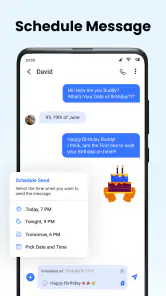
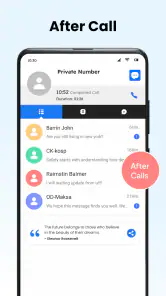
Analysis by Reviewed
I find a dedicated texting app most useful when it keeps ordinary conversations easy to manage instead of pushing me toward another social platform. Messages: SMS Message Text App is a communication app from iStrom Apps, aimed at people who want a straightforward place for SMS. It is free to install and use, so trying it does not require an upfront purchase. Its 4.2 average from around 34,000 ratings suggests that many users have tried it, though ratings alone cannot tell you whether it fits your phone or habits.
A low-risk way to test a different texting routine
Because changing messaging apps affects everyday habits, I would try this one during a typical week rather than judging it from a quick look. Pay attention to whether your regular contacts are easy to find, whether notifications arrive in a way that suits you, and whether group threads remain manageable. That kind of trial is more useful than spending time customizing everything before you know if the basic routine feels right.
If you are moving from another SMS app, make the switch deliberately. Check which app is set as the default for texting on your phone, then send a simple message to someone you contact often. A short test helps catch practical friction early: for example, you can confirm that replies appear in the expected conversation and that you recognize the notification. I would avoid changing apps just before an important appointment or while waiting for a time-sensitive message.
What free access means in practice
The app is listed as free, with optional in-app purchases priced at $1.49 per item. That gives you a way to start without paying, while leaving some paid extras available. I would treat the free version as the sensible first step: use it for your normal texting routine before deciding whether any purchase is worth it to you. The listing does not establish what each item unlocks, so I would not buy on the assumption that a particular feature is included.
That distinction matters when comparing it with alternatives. Many people already have a messaging app on their phone, so the real cost of trying this one is not just money; it is the time spent switching and learning a different layout. Since the basic download costs nothing, it is reasonable to evaluate it without paying, but free access alone does not make it better than an app that already works well for you. I would consider a purchase only after I had found a specific extra I wanted and checked its description in the app.
Simplicity at Its Best
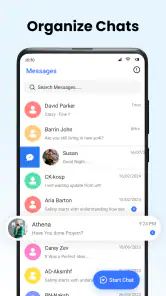
One of the first things I noticed about Messages: SMS Message Text App is its clean and user-friendly interface. It’s like walking into a room that’s been perfectly organized. No clutter, no confusion—just straightforward texting. Whether you're sending a quick hello or a detailed plan for the weekend, the app makes it all feel seamless.
Features That Stand Out
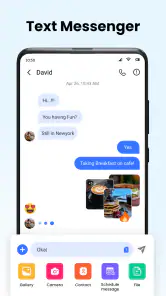
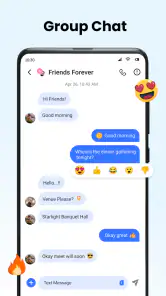
What sets this app apart is its focus on the essentials. You get all the necessary features, like group chats, emojis, and multimedia support, without any unnecessary fluff. But what really caught my attention is its reliable performance. Messages send and receive quickly, even when my Wi-Fi decided to take a little nap. Plus, the app supports rich communication services (RCS), which means you’re getting an enhanced messaging experience with read receipts and typing indicators.
More From Our News Desk

Weather by Xiaomi Review: Clear at a Glance, Less Clear Up Close

X Under Pressure: Can It Recover When Posting Goes Wrong?

Clash of Clans Is Won Between the Battles

Android Auto Makes the Case for Quieter Car Software

MobiOffice: Transforming Mobile Productivity with Seamless Integration

EA SPORTS FC™ Mobile Soccer: Redefining Mobile Sports Gaming
The practical value of that mix depends on how you use your phone. If most of your exchanges are short confirmations, delivery updates, and family check-ins, familiar SMS-style conversations can be more convenient than asking everyone to join a new service. If your conversations depend on features that belong to a particular platform, such as its shared media tools or other ecosystem-specific options, a dedicated platform messenger may still be the better fit. I see this app as a focused place for phone-number messaging, not a replacement for every kind of online conversation.
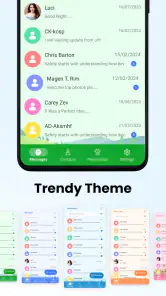
An added bonus is the app’s customization options. You can tweak the theme to match your mood, change notification tones, and even adjust the bubble colors for each chat. It’s these little touches that make the app feel personal and engaging.
My tip is to use customization to make important threads easier to recognize, not to decorate every conversation at once. A distinctive color for a family group or a separate notification tone for a useful contact can make a busy notification list easier to scan. There is a trade-off, though: if you change too many things early, it can become harder to tell whether the app’s default behavior suits you. I would adjust one setting at a time and keep the changes that genuinely help.
Where it fits into an everyday routine
I see the clearest use for this app in practical, low-friction conversations: coordinating a pickup, confirming an appointment, or sending a quick update to a family group. For example, if I’m running late to meet someone, I can send a short text and keep the exchange in the same place as other everyday SMS conversations. Chat-specific bubble colors may also help me distinguish a close family thread from a work contact at a glance, although personalization is most useful when it improves recognition rather than becoming a project of its own.
Here is a realistic routine where that focus helps: I might message a family member about a change to the evening plan, confirm a time with a repair person, and send a quick update to a friend. Those are separate conversations with different levels of urgency, but they do not necessarily require everyone to use the same social app. A familiar texting inbox keeps the exchanges together, while a distinct thread appearance can help me avoid replying to the wrong person when I am in a hurry. For longer planning, documents, or ongoing group discussion, I would move to a tool built around those needs rather than expecting SMS to do everything.
For anyone who receives a lot of routine messages, the useful question is not whether customization exists, but whether it reduces mistakes or interruptions. A different tone for a thread can help identify who is contacting you before you open the phone, but it can also become noise if too many conversations have unique alerts. I would start with the contacts whose messages I need to notice promptly and leave the rest consistent.
There is a useful distinction between texting and internet-based messaging here. SMS remains relevant when a contact is not using the same chat service, while RCS can add richer signals such as typing indicators when the conversation supports it. Those enhanced features should not be treated as universal: what appears in a chat can depend on the other person’s device and messaging setup. If everyone you contact already uses a feature-rich messenger, that service may be a better shared space for calls, large groups, or conversations that rely on its own ecosystem.
That makes the choice less about declaring one format best and more about matching the app to the people on the other end. For a contact who prefers ordinary phone-number texting, this can be a convenient option; for a group that shares plans through a platform-specific chat, switching everyone is unlikely to be worthwhile. I would keep the app that serves each conversation best instead of forcing every contact into one workflow.
Privacy claims and sensible expectations
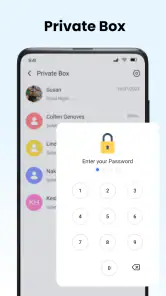
In a time where privacy is paramount, this app doesn’t skimp on security features. Messages are encrypted, ensuring that your conversations remain private. The app doesn’t store your messages on its servers, so you can text away knowing that your data isn’t being harvested for some dubious purpose.
For my own use, I would still avoid treating a general privacy promise as a reason to send highly sensitive information without checking how the relevant conversation works. SMS and RCS are not interchangeable with every secure-messaging service, and the other person’s setup matters. I would also review notification previews and chat organization on my phone if messages might appear on a shared screen. Those small choices can matter just as much as a theme or bubble color in day-to-day privacy.
A practical privacy habit is to think about what someone could see without opening the app. If you leave your phone on a shared desk or hand it to another person, notification previews may reveal more than you intend. I would check the phone’s notification settings and use a screen lock that fits my routine, rather than assuming a messaging app’s privacy features cover every point where a message might appear. For conversations that require a particular level of protection, I would choose a service designed for that purpose and make sure the other participant uses it too.
Trade-offs before switching
A texting app is only convenient if it behaves well with the people and devices you actually communicate with. Before making it your default, I’d test a normal SMS exchange, a group conversation, and a photo or other media message. That gives you a practical check of the parts you rely on, rather than assuming every conversation will have the same capabilities. If an important contact needs a particular feature that does not work as expected, keeping your existing messenger for that thread may be the better choice.
I would also check how the app handles the conversations that matter most to me before relying on it as my only texting routine. Try a reply from an existing thread, start a group exchange, and make sure you can tell which contact is which. This is not a complicated test, but it is more revealing than browsing menus: the app’s value is in making real exchanges convenient, not simply in offering options on a settings screen.
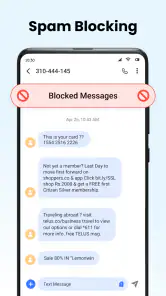
Spam blocking is part of the app’s appeal, but I would not assume that it catches every unwanted message or that a legitimate sender can never be flagged. If a message disappears from the usual flow, check the app’s available spam controls before deciding it was never delivered. This is a worthwhile trade-off to keep in mind: filtering can reduce interruptions, but it should not replace attention to messages you are expecting.
Filtering works best as a helper, not as a reason to stop checking carefully. If I am expecting a confirmation from an unfamiliar number, I would look through the app’s spam area before concluding that the sender never replied. Conversely, if a suspicious text reaches the inbox, I would avoid engaging with it just because it passed through the filter. That cautious approach keeps spam controls useful without treating them as a guarantee.
Who is likely to get value
I’d recommend giving it a try if you want a free, customizable SMS option and prefer a focused texting experience over a large social app. It is also a reasonable fit for someone who likes to separate ordinary phone-number conversations from chats in broader platforms. The app is rated for Everyone, and its current version is 1.33; it requires Android 8.0 or later. It has passed one million installs, which shows it has reached a substantial audience, though that alone is not a guarantee of a perfect fit for your device.
It is especially appealing to someone who wants to personalize a basic inbox without needing to persuade friends or family to install a new service. That can be useful for a person coordinating errands, keeping in touch with relatives who prefer SMS, or separating everyday text threads from social-platform messages. The app’s free starting point also makes it easier to compare its feel with the phone’s existing option before committing to a new habit.
I would skip it if your main requirement is a single app for all your friends’ conversations, or if you depend on a particular encrypted messenger’s shared features. It is also not an obvious choice for someone who is fully satisfied with their phone’s existing messaging app and has no need for extra customization or spam controls. Switching the default SMS app can take a little adjustment, so there is little reason to do it just for the sake of trying something new.
It may also be the wrong fit if you want one consistent experience across different operating systems, or if your essential conversations rely on a shared service that everyone in your circle already uses. In those cases, the convenience of staying where your contacts are can outweigh a cleaner SMS inbox. I would not switch simply because a new app offers more personalization; the change is worthwhile only if it improves a real part of your routine.
Final Thoughts
In a market saturated with messaging apps, Messages: SMS Message Text App stands out by doing the basics extremely well. It’s not trying to reinvent the wheel; instead, it offers a reliable and enjoyable texting experience. If you’re tired of bloated apps that promise the world but deliver little, give this one a try. Its simplicity, reliability, and security make it a compelling choice for anyone looking to streamline their communication. Whether you’re a tech-savvy user or someone who just wants to text without the fuss, this app is worth a download. Happy texting!
With a 4.2 average and more than one million installs, it has attracted a sizeable audience, but I would still treat those figures as context rather than a promise about how it will behave on a particular phone. The age rating is Everyone, and the Android requirement is version 8.0 or later, so those details are worth checking before installing. The app comes from iStrom Apps and is currently at version 1.33. For me, the deciding test remains whether its everyday texting flow suits the contacts I actually message.
My practical verdict is to start with the free option and judge it against the conversations you actually have, not against every feature offered by larger messaging platforms. The optional $1.49-per-item purchases make it worth checking what an item includes before spending; I would only pay for something I know I will use. If simple SMS, personal touches, and spam filtering are your priorities, it is an easy app to test. If you need a specific service-wide feature or want every contact on one platform, your current messenger may serve you better.
Messages: SMS Message Text App Frequently Asked Questions
Can I use Messages: SMS Message Text App on my phone?
Messages: SMS Message Text App is a communication app for Android. It requires Android 8.0 or later, so check your device’s software version before downloading. The app is developed by iStrom Apps and is free to install, making it an option for people looking for an SMS messaging app with spam blocking, privacy features, and customization.
How many people have downloaded or rated Messages: SMS Message Text App?
The app has over one million installs and an average rating of 4.2 from around 34,000 ratings. Those figures suggest that many people have tried it, though individual experiences can still differ depending on a person’s device and messaging needs. It is also helpful to read recent user feedback to see what others say about day-to-day use.
What does Messages: SMS Message Text App offer for everyday messaging?
Messages: SMS Message Text App is designed for SMS messaging, with spam blocking, privacy, and customization highlighted as key features. It may appeal if you want a messaging app that combines basic text communication with tools for managing unwanted messages and adjusting the experience to your preferences. The app’s store description is simply “Messages.”
Does Messages: SMS Message Text App need to be set as my default SMS app?
Before installing, consider how you want it to fit into your messaging setup. An SMS app commonly needs to handle text messages as the phone’s default messaging app to manage conversations, but the exact setup can depend on your Android device. During installation or first use, review the prompts carefully and choose the messaging app you want to use.
Does Messages: SMS Message Text App block spam messages?
Spam blocking is one of the app’s advertised features, which may help users manage unwanted messages alongside their regular conversations. It is designed as a fast SMS messaging app, but how useful spam filtering feels can depend on the messages you receive and how you prefer to handle them. Review the app’s settings after installation to explore its available controls.
Pros
- User-friendly interface
- Supports multimedia messages
- Fast message delivery
- End-to-end encryption
- Customizable notifications
Cons
- Contains ads
- Limited themes available
- No backup options
- Requires internet for some features
- Lacks advanced search filters
- Category
- Communication
- Version
- 1.33












