Local Weather:Weather Forecast
- 14.10K
- 4.9
- Installs
- 10.00M
- Price
- Free

Screenshots
Analysis by Reviewed
I judge a weather app by a simple test: does it help me decide what to wear or when to leave without turning a quick check into a chore? Local Weather: Weather Forecast aims to make that everyday decision easier, with a local outlook that I can consult before stepping outside. It is a free weather app from Enjoy Life Studio, and its straightforward purpose is useful if you want a forecast close at hand rather than a collection of complicated charts.
When checking the weather becomes a chore
The recurring problem this app addresses is small but familiar: I want a useful answer quickly, but a weather check can become a chain of screens, maps, and details I never needed. For deciding whether to carry a light layer or shift an errand, a clear local forecast is usually enough. I value an app most when it removes that little pause from my day instead of asking me to become an amateur forecaster.
That does not mean a fast glance should settle every decision. Weather changes, and a forecast is an estimate rather than a promise. I use a general outlook to make ordinary plans, then pay closer attention when the timing matters or the consequences of getting it wrong are more serious. That distinction is central to getting practical value from a simple local weather app.
A quick check should answer a real question
Weather forecasts matter most when they change a plan: whether a school run needs a raincoat, whether to move a walk earlier, or whether outdoor errands can wait. I find it helpful to check the hourly view for timing, then use the broader forecast to get a sense of the days ahead. That two-step habit is more practical than treating a single daily summary as a guarantee.
A realistic morning example: I’m getting ready to leave and the sky looks uncertain. I can check the forecast before choosing a jacket, then look at the hours around my return trip. If the weather appears unsettled later, I can bring an umbrella rather than discovering the problem halfway home. The app is most useful in moments like this, when a brief glance can prevent an avoidable inconvenience.
Getting Started with Local Weather
Downloading the Local Weather: Weather Forecast app is a breeze. It’s available on both Android and iOS, so no one’s left out in the rain. Once installed, the app greets you with a clean and intuitive interface. The first thing that caught my eye was how user-friendly it is. You don’t need to be a tech wizard to navigate through its features. Everything is laid out in a way that just makes sense.
Setting it up for the places you actually go
For a first check, I would start with the place that shapes most of my decisions: home, work, or the area where I usually run errands. The useful test is whether the location shown is relevant to the plan I’m making, not whether I can collect a long list of places. If I’m heading somewhere outside my usual area, checking that destination separately is a sensible step before leaving.
More From Our News Desk

Weather by Xiaomi Review: Clear at a Glance, Less Clear Up Close

X Under Pressure: Can It Recover When Posting Goes Wrong?

Clash of Clans Is Won Between the Battles

Android Auto Makes the Case for Quieter Car Software

MobiOffice: Transforming Mobile Productivity with Seamless Integration

EA SPORTS FC™ Mobile Soccer: Redefining Mobile Sports Gaming
That small routine also helps avoid a common weather-app mistake: reading a local forecast as if it applies to an entire journey. A short walk around the neighborhood and a cross-town trip are different decisions. I would check the destination when conditions matter, then return to the local view for the everyday choices it handles well. It keeps the app quick without asking one forecast to represent every place I might pass through.
Features that Shine
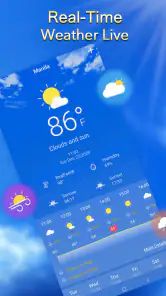
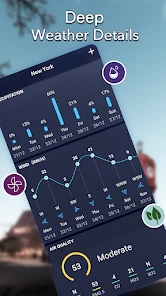
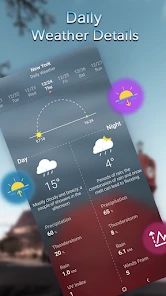
One of the standout features of this app is its real-time weather updates. I loved how the app provides detailed forecasts, not just for the day but also for the week ahead. It’s like having a personal meteorologist in your pocket. The app updates its data frequently, ensuring that you’re always getting the most accurate information possible.
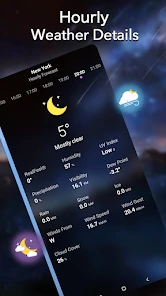
Another feature worth mentioning is the hourly weather forecast. This is particularly handy for planning outdoor activities. Whether you’re planning a picnic, a hike, or just a walk in the park, knowing what the weather’s going to be like hour by hour is incredibly useful.
Reading the outlook without overplanning
I get the most out of an hourly forecast by matching it to a specific decision. For example, if I can choose between walking before lunch or later in the afternoon, I compare those time windows rather than repeatedly checking the current conditions. That turns the forecast into a planning tool, not a running distraction. It also makes it easier to accept that the view may change as the day develops.
The broader forecast has a different job. I use it to spot days that may call for a flexible plan, not to lock in exact details far ahead. If a weekend outing depends on comfortable weather, I can use the outlook to decide whether to keep a backup indoor option. I would still check again nearer the time before making a commitment that is hard to change.
For someone new to weather apps, a good rule is to ask one question before opening the forecast: what decision am I trying to make? The current conditions can help with what to wear now; the hourly view is more useful for timing; and the longer outlook is best treated as an early planning cue. That simple approach keeps the information focused and reduces the temptation to interpret every change as a definite prediction.
Making forecasts easier to use
One small habit makes the hourly view more valuable: check the time window that matches your actual plans, not just the current conditions. If I’m deciding whether to walk now or later, I compare those hours and keep a backup option in mind. Forecasts are guides rather than promises, so I would still reassess if the sky changes quickly, especially before a longer outing.
For a hike or a full afternoon outdoors, I would use this app as a convenient planning aid, not as my only source for decisions where changing conditions could matter. A general local forecast can help with timing and clothing, while a dedicated source for severe-weather alerts or specialist mountain conditions may be the better choice when safety depends on fine-grained information. That distinction keeps a simple forecast useful without asking it to do a different job.
Daily routines where a quick forecast pays off
For a parent planning a school run, the useful question may be whether a child needs a raincoat on the way home, not simply whether it is raining at the door right now. Looking at the hours around both trips can help make that call. For a commuter, the same check can inform whether to bring an umbrella or leave a little room for a slower journey. These are modest benefits, but they are exactly where a quick forecast can save time and hassle.
I can also see it helping someone who fits exercise around other commitments. If a walk is optional, a glance at the hourly conditions can help choose a more comfortable window. If the weather turns uncertain, the practical choice may be a shorter route or an indoor alternative rather than trying to force the original plan. The app helps frame that decision; it does not make the decision for me.
For errands, I would use the daily view to decide whether to combine several stops or keep them flexible, then check the relevant hours before setting out. This is a useful workflow when the weather affects comfort more than safety. If I were planning a long drive, working outdoors for the day, or arranging an event that depends on precise conditions, I would want more specialized information and would not rely on a simple overview alone.
User Experience
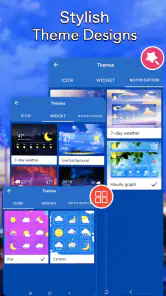
Let’s talk about the user experience for a second. The developers have done a fantastic job of keeping things simple yet effective. The app’s design is sleek and modern, with a calming color scheme that makes checking the weather a pleasant experience. Plus, the app doesn’t bombard you with ads, which is a huge plus in my book.
There’s also a handy widget feature that allows you to check the weather at a glance without even opening the app. This little addition is perfect for those busy mornings when time is of the essence.
Using the widget without losing the useful detail
I would treat the widget as a glanceable reminder, not as the place to make every decision. It is handy when I am already checking my phone and want a quick sense of the local conditions. If I need to compare the timing of a walk with a later trip home, opening the app and looking at the hours is the more considered choice. A widget saves a step, but it cannot replace the context I need for a more involved plan.
One practical way to keep that shortcut useful is to check it at natural decision points, such as before getting dressed or just before leaving. There is little value in checking repeatedly when no plan is changing. I would use a quick glance to notice whether I should take a closer look, then open the forecast only if the answer could affect what I do.
Where the convenience has limits
The widget is best for quick awareness; when I need to compare hours or look further ahead, opening the app gives me more room to consider the forecast. That makes it a useful shortcut, not a replacement for checking details before a plan that depends on the weather. If you prefer a map-first view, radar layers, or specialist alerts, a more feature-heavy weather service may suit you better. I’d choose this one when speed and a simple local overview matter more than advanced controls.
It also helps to think about what “local” means in practice. A forecast for the area around you is useful for everyday routines, but conditions can differ across a large city or between a town and nearby hills. If your route crosses several areas, check the destination as well as where you are before setting off. That extra stop is a sensible trade-off when a single local view might not reflect the whole journey.
Compared with a built-in weather app, this one is worth trying if you want a dedicated place to check a local outlook and its hourly view. If your phone’s existing forecast already answers your routine questions clearly, switching may not save you much time. At the other end of the category, services built around radar, severe-weather tracking, or detailed maps can offer more tools, but those extras may be unnecessary for someone who mainly wants to decide what to wear or when to run an errand.
There is also a trade-off in keeping the experience straightforward: a simple overview is easier to consult, but it is not the same as a specialist forecast for every activity or location. Someone who needs to plan around rapidly changing conditions should seek a source suited to that need. For ordinary plans, though, extra layers can make a quick check feel like work. I would choose based on the decisions I make most often, rather than assuming that the app with the most screens is automatically the most useful.
Who will get the most from it?
I’d recommend it to someone who checks the weather often but wants the process to stay quick: commuters, parents planning the school run, or anyone deciding when to run errands. It can also help with low-stakes outdoor plans, such as choosing a likely dry window for a walk. Someone who wants detailed meteorological tools, extensive customization, or a forecast they can treat as certain should compare it with alternatives before relying on it as their main weather resource.
It’s free to download, rated for Everyone, and has a 4.9 average from around 559,000 ratings, with over 10 million installs. The app first appeared on December 8, 2020, and version 1.9.2 supports Android 6.0 and later. Optional in-app purchases range from $0.99 to $4.99 per item, so I’d check the purchase details in the app before paying for anything. Enjoy Life Studio is the developer.
The age rating makes it broadly suitable for a household looking for a basic forecast, while the free download lowers the barrier to trying it. Still, I would not assume that the optional purchases are needed for everyday use; I’d first see whether the free experience answers my normal questions. If a purchase is presented, I would read what it covers and decide whether that specific benefit solves a problem I actually have.
On a practical compatibility note, Android users need version 6.0 or later. If you are using an iPhone or iPad, check its current store page for device requirements before installing. That quick check is more useful than assuming every phone will support the same release. The app is a better fit for someone who wants an uncomplicated forecast than for a user shopping specifically for a configurable weather dashboard.
Final Thoughts
All in all, the Local Weather: Weather Forecast app is a solid choice for anyone who wants to stay ahead of the weather. With its accurate forecasts, easy-to-use interface, and thoughtful features, it’s no wonder why it’s gaining popularity among users. So, if you haven’t already, give it a try and see for yourself how it can make your daily planning a whole lot easier.
Remember, whether it's sunny skies or a looming storm, being prepared makes all the difference. Happy weather watching!
Local Weather:Weather Forecast Frequently Asked Questions
What should I check before installing Local Weather: Weather Forecast?
Local Weather: Weather Forecast is a weather app intended to act as a personal local forecast assistant. Before installing, check that your Android device runs version 6.0 or later and consider whether its local-weather focus matches what you need. It is free to download, though optional in-app purchases are available. The app has an Everyone content rating.
Does Local Weather: Weather Forecast receive regular updates?
The current version of Local Weather: Weather Forecast is 1.9.2. Keeping an app updated can help you use its latest available version, so check your device’s app store for updates after installing. The app’s description presents it as a personal, around-the-clock local weather forecast assistant, making it a practical option to consider if you want weather information as part of your daily routine.
Can I use Local Weather: Weather Forecast to check conditions in more than one place?
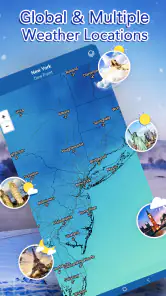
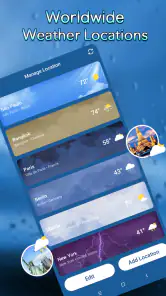
The app is described as a personal local weather assistant, and its store summary highlights local forecasts. If you want to follow several places, such as home and a destination, check the app’s location options after installation to see how they fit your routine. This can be especially useful when planning a trip or keeping an eye on weather away from home.
Who is Local Weather: Weather Forecast designed for, and what devices can run it?
Local Weather: Weather Forecast is a weather app for people who want local forecast information. Its content rating is Everyone, so it is presented as suitable for a broad audience. It runs on Android devices with version 6.0 or later. If you use an iPhone or iPad, check the relevant app store for availability and compatibility before downloading.
What features does the Local Weather: Weather Forecast app offer?
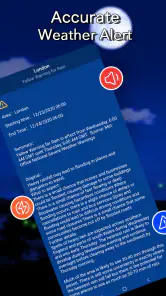
The Local Weather: Weather Forecast app offers a comprehensive suite of features designed for weather enthusiasts and casual users alike. It provides real-time weather updates, detailed forecasts, radar maps, and severe weather alerts. Users can customize notifications and access weather information for multiple locations, making it suitable for travel planning.
Pros
- Accurate weather predictions
- Intuitive and user-friendly interface
- Real-time weather alerts
- Detailed weather maps available
- Customizable notification settings
Cons
- Contains in-app advertisements
- Requires internet for updates
- Limited free features
- Occasional notification delays
- High battery consumption
- Category
- Weather
- Version
- 1.9.2











