Language Translator App
- 104.00
- 4.1
- Installs
- 10.00M
- Price
- Free
Screenshots

Analysis by Reviewed
When I rely on a translation app, the connection can matter as much as the translation itself. A quick phrase at a café is different from a longer conversation in a noisy station, and I don’t want to assume a tool will behave the same way in both places. My view of Language Translator App is that it makes sense as a flexible aid for everyday exchanges, provided you treat it as a helper rather than an infallible interpreter.
When the network is part of the conversation
A translator is most useful when it keeps a conversation moving: checking a short question, understanding a sign, or drafting a reply before showing it to someone. The app is listed as supporting more than 130 languages, which gives it broad potential for travel and casual communication. But language coverage alone does not tell me how well every pair handles idioms, names, or specialist terms. For anything important, I would keep sentences short, check the result, and ask the other person to confirm the meaning.
That habit also helps when a connection is slow or unreliable. I would prepare essential phrases before reaching a busy terminal or entering a shop, rather than waiting until a conversation is already under pressure. The app’s current version is 2.4.53, and it is developed by Map Zone Studio; I’d still make my own judgment based on how it handles the languages and situations I actually need.
Phone use in the middle of a real day
On a trip, I can imagine using it to work out a menu item, ask whether a bus goes to a particular stop, or read a notice posted near a station. A practical trick is to translate one question at a time and keep the wording concrete. That makes it easier to spot a strange result before repeating it aloud. For a longer discussion about a booking, medication, or a work agreement, I would not rely on a quick translation alone; I’d use a qualified person or a trusted bilingual contact where accuracy matters.
This is where a phone translator differs from a pocket phrasebook. A phrasebook can be dependable for a small set of prepared expressions and does not require composing a sentence on the spot, while an app is more adaptable when the wording changes. A human interpreter remains the better choice for nuance, sensitive information, or consequences that could follow from a misunderstanding. I see this app as filling the everyday gap between those options, not replacing either one.
What to do when a translation misses
If a result sounds odd, I would not keep repeating the same sentence more loudly or add several ideas at once. I’d try a simpler version, remove slang, and separate the request into short parts. For example, instead of asking a driver a long question about a route and arrival time together, I would ask where the bus goes first, then ask when it leaves. That gives me a clearer chance to notice whether the translation has gone off track.
It is also worth having a recovery plan for moments when the network is unavailable or too slow to be useful. Save an important address in writing, keep a destination visible on a map, and learn a few essential phrases for the language you expect to encounter. I would not count on any particular offline behavior without checking it in advance. A quick test before leaving home can show whether the functions I plan to use are ready in the conditions I expect.
More From Our News Desk

Weather by Xiaomi Review: Clear at a Glance, Less Clear Up Close

X Under Pressure: Can It Recover When Posting Goes Wrong?

Clash of Clans Is Won Between the Battles

Android Auto Makes the Case for Quieter Car Software

MobiOffice: Transforming Mobile Productivity with Seamless Integration

EA SPORTS FC™ Mobile Soccer: Redefining Mobile Sports Gaming
Keeping use sensible and focused
For ordinary travel questions, I would avoid entering personal or confidential details unless I was comfortable with how that information is handled. A translation tool is convenient, but convenience is not a reason to paste private messages, financial details, or sensitive workplace material into it. When I only need to ask for directions, a generic question usually does the job without exposing anything unnecessary.
The app is free to download, with optional in-app purchases priced from $5.49 to $17.99 per item. Its average rating is 4.1 from around 10,000 ratings, and it has passed 10 million installs. Those figures suggest it has reached a broad audience, but they cannot tell me whether it suits a particular traveler’s language pair or expectations. It is rated for Everyone, and it runs on Android 6.0 and later.
Trying it in everyday situations
Have you ever found yourself in a situation where language barriers got in the way of your travel adventures or business dealings? Well, let me tell you about my experience with the Language Translator App. This app is a game-changer for anyone who needs to communicate across different languages with ease.
The First Encounter
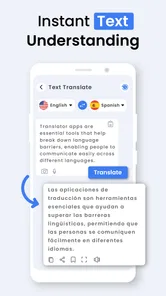
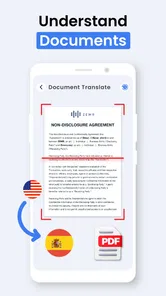
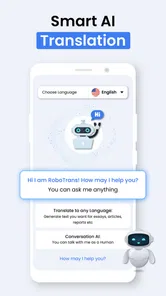
When I first downloaded the Language Translator App, I was curious to see how it would perform compared to other translation tools I've used. The installation was quick and painless, and right off the bat, I was impressed by the sleek and intuitive interface. The app boasts support for over 100 languages, which is pretty remarkable. I found it easy to navigate and get started with translating text, voice, and even images. Yes, you heard that right – it can translate text from images!
Features That Stand Out
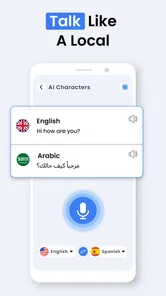
One of the most impressive features of this app is the real-time voice translation. Imagine having a conversation with someone speaking a different language and being able to understand and reply almost instantly. This feature is not only accurate but also surprisingly fast, making interactions smoother than ever. Additionally, the app offers offline translation for many languages, which is a lifesaver when you're traveling without a reliable internet connection.
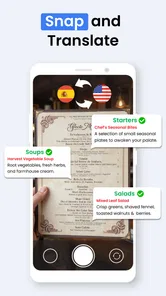
Another feature worth mentioning is the camera translation. Simply point your phone's camera at any text, and the app does the rest. It's like having a personal interpreter in your pocket. This feature came in handy while navigating street signs and menus during my recent trip abroad.
User Experience
Using the app felt as natural as chatting with a friend. The developers have done a fantastic job of making it user-friendly, with a straightforward layout and clear instructions. It didn’t take long to get the hang of it, and the learning curve was minimal. The app also provides a phrasebook feature, which is perfect for learning common phrases in different languages. I found this particularly useful for picking up some basic phrases in French before my trip to Paris.
As for performance, I encountered no significant lags or crashes, and the translations were mostly accurate and contextually appropriate. The app update frequency keeps it fresh and bug-free, which is always a plus.
Final Thoughts
The Language Translator App is a must-have for globetrotters, business professionals, and anyone keen on breaking down language barriers. It’s a powerful tool packed with features that not only translate but enhance your language learning experience. Whether you’re ordering a coffee in Italy or sealing a deal in Japan, this app has got you covered.
In a world where communication is key, having a reliable language translator in your arsenal is essential. So if you're looking for an app that delivers on its promises and then some, give this one a shot. You won't regret it!
Where it fits, and where I would choose something else
I’d recommend this kind of translator to someone who wants quick help with everyday wording and is willing to check the output rather than accept it blindly. It can be especially handy when plans change: a restaurant is full, a sign points to an unfamiliar entrance, or a simple question needs to be phrased in a language I do not speak. The useful workflow is to keep the request brief, review the translation, and use the result as a starting point for a human exchange.
I would skip it as my only plan for high-stakes communication, complex negotiations, or a setting where every nuance matters. A dedicated language-learning tool may be better for structured study, and a human interpreter is better for delicate or consequential conversations. The app’s broad language reach is helpful, but it does not remove the need to consider context, accents, and ambiguity.
My connectivity verdict
In practice, I would install it before a trip, try a few phrases in the languages I expect to use, and check that the functions I care about work in my usual conditions. Then I’d keep a small backup plan for essential information instead of assuming a phone will always have a usable connection. That preparation is a sensible trade-off: it lets the translator help with spontaneous moments without making a weak signal the deciding factor in a stressful one.
Overall, I see Language Translator App as a convenient companion for low-pressure communication, with the best results coming from concise wording and a willingness to verify. Its strongest role is helping me get started across a language gap; its limits become more important when the exchange is sensitive, complicated, or dependent on uninterrupted connectivity.
Language Translator App Frequently Asked Questions
What is Language Translator App, and who is it for?
Language Translator App is a productivity app designed to help people communicate across language barriers. Its store summary describes support for more than 130 languages, making it relevant for travelers, students, and anyone who needs language help in everyday situations. It is free to download, has an Everyone content rating, and is developed by Map Zone Studio.
Which devices can run Language Translator App?
The app requires Android 6.0 or later, so checking your device’s operating system before downloading is a practical first step. Language Translator App is listed as a free app, with optional in-app purchases priced from $5.49 to $17.99 per item. Its current version is 2.4.53, and it was released on October 20, 2020.
What languages does the Language Translator App support?
The Language Translator App supports a wide array of languages, including English, Spanish, French, German, Chinese, Japanese, Korean, and many more. It is designed to cater to global users, ensuring effective communication across various languages. The app regularly updates its database to include new languages and dialects, making it a versatile tool for travelers, students, and professionals alike.
Does the Language Translator App work offline?
Yes, the Language Translator App offers an offline mode for its users. This feature allows you to download specific language packs and use the app without an internet connection. It's particularly useful for travelers or in areas with poor network coverage. However, it's important to note that offline translations might be less accurate than online translations due to the lack of real-time updates.
Is the Language Translator App free to use?
The Language Translator App offers a free version with basic features, which is sufficient for casual users. However, for advanced features such as offline mode, voice translation, and access to premium language packs, users may need to purchase a subscription or pay a one-time fee. The pricing structure is designed to provide flexibility and cater to different user needs.
Pros
- Supports multiple languages seamlessly.
- User-friendly interface design.
- Fast and accurate translation results.
- Offline mode available for travel use.
- Voice input feature enhances usability.
Cons
- Some language pairs lack nuance.
- Requires internet for best accuracy.
- Occasional ad interruptions.
- Limited support for regional dialects.
- Premium features behind paywall.












