Know Weather: Live Radar
- 446.00
- 4.5
- Installs
- 5.00M
- Price
- Free
Screenshots
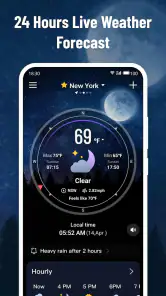
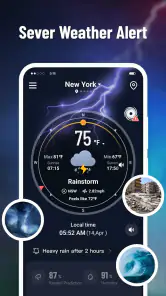
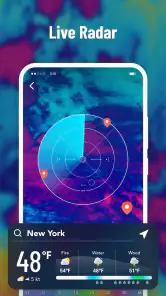
Analysis by Reviewed
I used to waste time checking the sky, opening a forecast, then checking again before leaving because the weather can shift while I’m getting ready. Know Weather: Live Radar is aimed at that familiar problem: putting forecasts and a moving radar view in one place so I can make a quicker call about a walk, a commute, or what to pack. Its value is less about replacing every weather source and more about reducing those small, repeated checks.
A quick setup that pays off
My most useful first step is to choose the location I actually need, then decide which alerts deserve my attention. That keeps the app relevant to the places I go, rather than turning it into a stream of weather details I won’t act on. I’d start with a small number of alerts—such as storms or sharp temperature changes—and adjust only after seeing what is genuinely useful in daily life.
The app is free, developed by ReadMore, and made for a broad audience: its age rating is Everyone. It has a 4.5 average from around 16,000 ratings and has passed 5 million installs, so it is a well-established option rather than an obscure experiment. It was released on June 20, 2024, and version 1.2.33 is the current release. Those details are useful context, but my practical test is simpler: can I answer “Should I take a jacket?” without digging through several screens?
That first setup is also a chance to decide what “useful” means for you. If you mostly travel between home and work, concentrate on those locations and avoid adding places you rarely visit. If your plans change from day to day, keep the setup flexible and check the place you are heading to before leaving. A weather app becomes quicker when its first screen reflects an actual decision, not a collection of destinations you added once and forgot.
Getting to Know Weather
Know Weather: Live Radar is like having a meteorologist in your pocket. The app provides real-time weather updates, and let me tell you, it's pretty spot-on. I've used other weather apps before, but this one? It's got a radar feature that feels like it's straight out of a sci-fi movie. Imagine watching those storm clouds roll in, in real-time, right on your phone screen. It's both fascinating and practical.
Features That Make It Stand Out
One of the coolest things about this app is its live radar feature. You can literally track weather patterns as they move across the map. It's super handy when you're planning a day out and want to avoid getting caught in the rain. The radar is detailed and updates frequently, so you’re always in the loop.
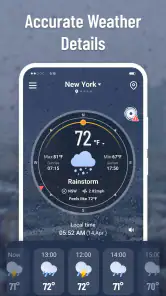
Another feature I really appreciate is the daily and weekly forecasts. The app gives you a heads-up on what to expect weather-wise. And it doesn't just stop at rain or shine; it goes into details about humidity, wind speed, and UV index. If you're into the nitty-gritty details, this app has got you covered.
More From Our News Desk

Weather by Xiaomi Review: Clear at a Glance, Less Clear Up Close

X Under Pressure: Can It Recover When Posting Goes Wrong?

Clash of Clans Is Won Between the Battles

Android Auto Makes the Case for Quieter Car Software

MobiOffice: Transforming Mobile Productivity with Seamless Integration

EA SPORTS FC™ Mobile Soccer: Redefining Mobile Sports Gaming
From forecast to an actual plan
A useful way to read a radar map is to focus on the direction and movement of weather, not just the colored area nearest your location. If I’m deciding whether to cycle home, I check whether rain appears to be approaching along my route and compare that with the day’s forecast. That is more actionable than treating a single map snapshot as a guarantee. Radar helps me judge timing; it does not make a changing forecast certain.
For a weekend outing, I’d check the weekly view while choosing a day, then return to the radar shortly before setting off. For gardening or a dog walk, the same routine can prevent an unnecessary trip outside, while wind and humidity give extra context beyond a simple rain symbol. The trade-off is that detailed information is only helpful when it changes a decision. If I just need a broad sense of the day, the daily forecast is faster than studying every available detail.
A practical detail I keep in mind is that a route is not the same as a saved destination. When my plans involve a journey across town, I use the map to understand the broader direction of conditions, then treat the forecast for where I am going as a separate check. That avoids assuming the weather over my starting point tells the whole story. For longer trips, I’d check again closer to departure rather than make a decision hours ahead from one radar view.
User Experience
The user interface is clean and intuitive. Even if you're not tech-savvy, you'll find navigating the app to be a breeze. Everything is laid out in a way that makes sense, with easy-to-read graphics and minimal clutter. It's clear that the developers put a lot of thought into the design, making sure that it's user-friendly and accessible for everyone.
Notifications are another big win. The app sends alerts for severe weather conditions, which is crucial for staying safe during unexpected weather changes. You can customize which alerts you want to receive, so you’re not bombarded with unnecessary notifications. Personally, I keep it set for storms and temperature drops because, let’s face it, nobody likes being caught off guard.
For a busy morning, I’d use alerts as a prompt to check conditions, not as a replacement for looking at the forecast. A notification can catch my attention while I’m occupied, but the useful follow-up is deciding whether to change my clothes, carry an umbrella, or leave earlier. If an alert keeps appearing without affecting what I do, I’d turn that category off. The best notification setup is personal: it should interrupt me only when the information is likely to change my plans.
Where it fits among weather apps
Compared with a basic weather app that shows only a current condition and a daily outlook, this one is more useful when I want to see weather moving across a map and check more than rain or sunshine. It also keeps everyday details such as wind, humidity, and UV index in the same weather-planning experience. If I need an official warning or advice for a serious local emergency, I would still check the relevant local weather authority; a convenient app should not be my only safety source.
It suits people who make outdoor plans, commute on foot or by bike, or want a quick forecast before deciding what to wear. Someone who only checks the temperature once a day may find a simpler app less distracting. Likewise, if your priority is specialist information for a particular activity, such as highly technical aviation or marine conditions, a dedicated service is the better fit than a general-purpose weather app.
One everyday example is a school run followed by an outdoor appointment. I’d glance at the daily outlook before getting dressed, then check radar before walking out if the sky looks unsettled. If rain is already moving across the area, that second look can help me choose a coat or adjust when I leave; if the map gives no clear reason to change plans, I can stop checking and get on with the morning. The benefit is not perfect prediction—it is replacing repeated, aimless checking with two purposeful decisions.
The same approach works for people who exercise outside, but the details matter differently depending on the activity. A runner may care about wind and the timing of rain, while someone tending a garden may pay closer attention to the day’s broader outlook. The app’s combination of radar and everyday forecast information makes it convenient for these ordinary choices. I would still use a specialist source when the decision depends on technical conditions rather than a general view of local weather.
Limits and verdict
Radar can make the weather feel more predictable than it is. A map view is a guide to changing conditions, not a promise about exactly when rain will reach a particular street. I also recommend being selective with notifications: alerts are valuable when they prompt action, but too many can become background noise. Keeping only the warnings that affect your plans makes the app more useful and less intrusive.
There is a small but important trade-off in having several kinds of weather information together: more detail can help, but it can also tempt me to keep checking after I already have enough to decide. I try to give each visit a question—whether to bring a layer, when to leave, or whether an outdoor plan needs a backup. If I cannot name a decision that the extra screen will change, I close the app. That habit preserves the time-saving benefit instead of turning a quick check into another routine to manage.
I would also avoid treating a quiet-looking radar as a reason to ignore a serious warning or local advice. Weather tools are most useful for everyday planning, while urgent decisions call for the appropriate official guidance. That distinction does not make the app less handy; it sets a sensible boundary around what I expect a general weather app to do. For people who want a quick, visual read on changing conditions, it has a clear role. For those who need authoritative emergency instructions or specialized forecasting, another source should take priority.
In a world where weather can be unpredictable, Know Weather: Live Radar is like having a crystal ball. It's reliable, easy to use, and packed with features that make it a standout choice for anyone looking to have the latest weather information at their fingertips. Whether you're planning a weekend getaway or just trying to figure out if you should bring an umbrella to work, this app is a must-have.
So, go ahead and give it a try. Download it, play around with the features, and see for yourself why this app has become my go-to weather resource. Trust me, once you start using it, you’ll wonder how you ever managed without it.
Know Weather: Live Radar Frequently Asked Questions
Does Know Weather: Live Radar need an internet connection?
An internet connection is useful for weather apps because forecasts, radar views, and alerts rely on updated information. If you plan to check conditions while traveling or away from Wi-Fi, you can use mobile data, subject to your carrier’s plan. For the best experience, open the app while connected so its weather information can refresh.
Is Know Weather: Live Radar suitable for the whole family?
Know Weather: Live Radar is rated for everyone, making it suitable for a general audience. Its purpose is to help users stay informed about the weather, which can be useful for planning everyday activities with family members. As with any app, parents can review its screens and settings with younger users and decide how it fits their needs.
What devices can run Know Weather: Live Radar?
Know Weather: Live Radar is a weather app for Android devices running Android 6.0 or later. It is listed as suitable for everyone, and its straightforward purpose is to help users stay informed about weather conditions. Before downloading, check that your device meets the minimum Android requirement and has enough space for the app.
Who makes Know Weather: Live Radar, and what do users think of it?
Know Weather: Live Radar is developed by ReadMore and has an average rating of 4.5 from around 16,000 ratings, with 446 written reviews. That gives prospective users a useful snapshot of its reception, though individual experiences can vary. The app is in the Weather category and its short description is simply “Know Weather.”
What features does Know Weather: Live Radar offer?
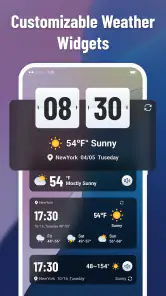
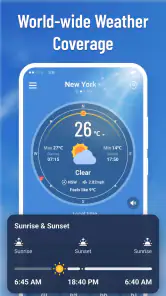
Know Weather: Live Radar offers a comprehensive suite of features to keep you informed about the weather. It provides real-time radar updates, detailed forecasts, severe weather alerts, and customizable notifications. The app also includes interactive maps that allow users to track storms and view weather patterns globally. Additionally, it offers widgets for quick access to weather updates directly from your home screen.
Pros
- Accurate weather predictions
- Real-time radar updates
- User-friendly interface
- Customizable notifications
- Global coverage
Cons
- Frequent ads
- Requires internet connection
- Limited free features
- Battery consumption
- Occasional bugs
- Category
- Weather
- Version
- 1.2.33












