Daily Forecast: Weather&Radar
- 3.15K
- 4.6
- Installs
- 10.00M
- Price
- Free
Screenshots
Analysis by Reviewed
I treat a weather app as a practical tool, not a guarantee: it can help me decide when to leave or what to pack, but the forecast still needs a quick reality check when conditions matter. Daily Forecast: Weather&Radar is aimed at everyday planning, combining a glanceable outlook with radar and alerts. That mix makes it more useful to me than a bare temperature display, though it is not a substitute for official warnings or local judgement during dangerous weather.
What I look for before relying on it
Weather apps can ask for location access so they can show conditions for where someone is, and that choice is worth considering before setup. I prefer to allow only the access needed for the way I use an app and to review the phone’s permission controls if my needs change. I don’t assume a particular data practice from the app’s appearance; instead, I look for the controls and explanations shown on the device and make a choice I’m comfortable with.
That matters most when I’m checking the forecast away from home. If I want a general idea before a trip, I can search or select a place rather than making every glance depend on my current location, if that option is available in my setup. For a commute, location-based information may be more convenient. My advice is to decide which of those habits fits you and check the permission prompt carefully rather than accepting everything automatically.
Choosing a forecast routine that fits
The useful question is not simply whether the app has enough information; it is how often you actually need to look. I’d start with a saved destination or the place I check most, then use the main screen for a quick morning decision. For a less routine day, I’d open the detailed view and compare the expected conditions with the hours I’ll be outside. That keeps a glanceable forecast from becoming a reason to check the phone every few minutes.
Location choice also affects the practical feel of a weather app. Someone who commutes between home and work may prefer conditions for their current area, while a person arranging a visit may care more about a destination. I’d check the displayed place before interpreting a forecast, particularly after travelling. It is a small habit, but it prevents a correct forecast for the wrong town from becoming a poor planning decision.
First Impressions
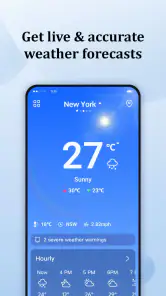
When you first open Daily Forecast: Weather&Radar, it greets you with a sleek and user-friendly interface. No frills or unnecessary clutter—just straight to the point, which I personally appreciate. The main dashboard displays the current temperature, weather conditions, and even a cute little icon representing the day's outlook. It feels like having your personal weather station right in your pocket.
Features Galore
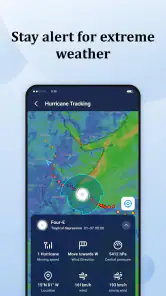
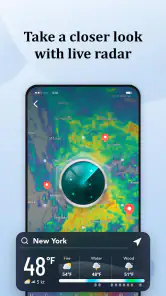
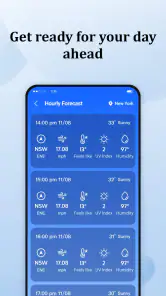
This app isn't just about telling you whether to bring a jacket. Oh no, it goes above and beyond. With a tap, you can access detailed hourly forecasts for the entire week. Planning a weekend getaway or a spontaneous picnic? You'll know exactly what to expect. The app also includes an interactive radar, which lets you track storms and precipitation in real time. It's like having a meteorologist whispering updates in your ear.
More From Our News Desk

Weather by Xiaomi Review: Clear at a Glance, Less Clear Up Close

X Under Pressure: Can It Recover When Posting Goes Wrong?

Clash of Clans Is Won Between the Battles

Android Auto Makes the Case for Quieter Car Software

MobiOffice: Transforming Mobile Productivity with Seamless Integration

EA SPORTS FC™ Mobile Soccer: Redefining Mobile Sports Gaming
Another feature that stood out to me is the weather alerts. The app sends you notifications for severe weather conditions, so you're never caught off guard. Whether it's a thunderstorm or a heatwave, you'll be in the loop and can plan accordingly. Plus, the UV index feature is a nice touch for those who want to protect their skin under the sun.
Reading detail without over-trusting it
I get the most out of an hourly view when I use it to choose a window, not to promise myself a perfectly dry day. If rain is forecast around the school run or a walk, I check again shortly before leaving and use radar as context for what may be moving through. A forecast can shift, and radar is a picture of current precipitation rather than a guarantee about what will reach my exact street.
For a day out, I would check the forecast for both the destination and the hours I expect to be outside. The practical trade-off is that more detail can invite overconfidence: a tidy row of hourly conditions looks precise, but plans should stay flexible when a shower or storm is possible. I’d keep a lightweight rain layer handy if being caught in a brief change would spoil the day.
One useful workflow is to use the hourly view to identify when a plan is most exposed, then use radar closer to departure for a sense of what is happening nearby. I would not treat a radar animation as a street-level promise or use it alone to decide that a hazardous situation is safe. It is best as another clue alongside the forecast and local conditions, not as a replacement for judgement.
Permissions, alerts, and everyday control
Alerts are useful only if they fit the way I want my phone to behave. I’d enable weather notifications if I need timely prompts, then use the device’s notification settings to quiet or disable them if they become distracting. That gives me a simple way to balance awareness with fewer interruptions, especially overnight or during a busy workday.
For privacy-conscious users, the sensible routine is to revisit location and notification permissions whenever circumstances change, such as after a trip or when the app is no longer part of a daily commute. Those are user-level controls, not a complete account of how an app handles information, so I avoid treating a permission choice as proof of broader data practices. I’d make the decision based on the controls I can actually see.
When weather checks involve personal routines
Weather information can reveal habits indirectly when a phone repeatedly checks conditions around the same places, so I think about convenience and control together. If I only need a forecast before leaving home, I may choose a more limited location setup and check the relevant place manually. If I depend on local updates through the day, a more convenient location choice may be worth it. Neither approach is automatically right for everyone; the point is to choose deliberately and review the device settings when that choice no longer suits.
Notifications deserve the same personal test. I’d keep them on only if they help me act, rather than letting every prompt become background noise. A severe-weather alert could be valuable when I’m away from home, but a phone that interrupts constantly can make it easier to ignore the alert that matters. If the timing or frequency feels wrong, I’d adjust notifications at the device level and rely on a deliberate check when I need one.
Performance and Usability
One thing I always look for in an app is how smoothly it runs. Nobody likes a laggy app, right? Thankfully, Daily Forecast: Weather&Radar performs like a dream. The transitions between screens are seamless, and the data loads quickly. Even on my older smartphone, I didn’t experience any hiccups. Navigating through the app is intuitive, and even if you're not tech-savvy, you'll get the hang of it in no time.
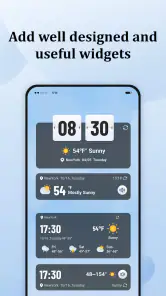
Also, I can't help but mention the customizable widgets. You can place them on your home screen for quick access to weather updates without even opening the app. It's little touches like these that make the user experience all the more satisfying.
Getting value from a widget
A widget works best when it answers a question I ask repeatedly, such as what the day looks like before I leave. I’d place it where it is easy to notice but not so prominently that a quick glance turns into a habit of second-guessing every change. It can reduce friction for routine checks, while the full app is better when I need to inspect the hourly outlook or radar. If I rarely look at weather during the day, the widget may add little beyond taking up home-screen space.
Widgets can also make location accuracy more important: a convenient display is only useful if it is showing the place I care about. After a trip or a change in routine, I would verify the location rather than assuming the glanceable view has followed my plans. That is a quick check with practical value, especially when using weather information to decide what to wear or whether to carry a rain layer.
Who it suits—and where alternatives win
This is the sort of weather app I’d recommend to someone who wants the day’s conditions, a closer look at changing hours, and a radar view without building a complicated routine. A widget is particularly handy if you check the weather while getting dressed: it saves a tap, while the full app remains there for a more deliberate look before a longer journey.
Compared with a phone’s built-in weather screen, the appeal here is the combination of radar, alerts, and the forecast view in one place. But if you mainly need severe-weather guidance, I’d also follow the official local service for authoritative warnings. If you want an elaborate meteorological dashboard with specialist maps and analysis, a dedicated professional weather tool may suit you better. The simpler layout is a strength for quick decisions, not a reason to treat every forecast as certain.
A realistic use case is a parent deciding whether to walk or drive to school. I’d check the morning conditions first, look at the expected hours around the trip, and use radar again if rain appears likely. If the app points to uncertain or worsening weather, I’d leave extra time and choose the option that keeps the day manageable rather than trying to time a narrow dry gap. For an outdoor event, the same approach helps with packing, but I’d still have a backup plan instead of treating an hourly forecast as a promise.
For a casual user, this app’s combination of a simple overview and more detail should be enough for many ordinary decisions. People who need specialist forecasting, extensive map layers, or a formal source for emergency instructions may be better served by other tools alongside it. I see the choice as one of fit: convenience for everyday planning is valuable, but it does not make every weather app equally suitable for every location or risk.
Final Thoughts
In a world where weather can be as unpredictable as a game of roulette, having a reliable weather app is a must. Daily Forecast: Weather&Radar not only delivers accurate and timely weather information but does so with style and efficiency. Whether you're planning your daily commute or a weekend adventure, this app has got your back.
There are a few practical questions I’d settle during setup: whether I want location access, whether alerts are worth the interruptions, and whether a home-screen widget fits my routine. I’d also check that the forecast location is right before acting on it, particularly when travelling. Those small habits make a weather app more useful than simply glancing at a number and assuming the day will follow it.
ReadMore’s free weather app is rated for Everyone and has reached over ten million installs. Its average rating is 4.6 from around eighty-one thousand ratings, which suggests broad interest, though ratings can’t tell me whether its forecasts will match conditions in my area. It was released in January 2024; version 2.5.25 supports Android 6.0 and later. Those details make it an accessible option for many Android users, while the experience I’ve described is best judged on the phone and in the locations where you plan to use it.
If you're tired of second-guessing the weather, give this app a try. It's like having your personal weather assistant, minus the small talk. So, next time you step out, do it with confidence, come rain or shine!
Daily Forecast: Weather&Radar Frequently Asked Questions
How much storage space does Daily Forecast: Weather&Radar need?
Storage needs can vary by device and by how the app is used, so it is sensible to check the available space shown on your phone before installing. Daily Forecast: Weather&Radar is a weather app for everyday forecasts, and Android users need version 6.0 or later. Keeping some free space available also helps your device continue handling app updates and other downloads comfortably.
Can I use Daily Forecast: Weather&Radar when I travel?
It may be useful when planning trips because the app is designed to provide live weather forecasts for everyday life, and its published features include forecasts for multiple locations. You can add cities or regions and switch between them to check conditions beyond your usual area. Remember that weather can change, so checking the forecast again as your plans approach is a practical habit.
What should I know about Daily Forecast: Weather&Radar before downloading it?
Daily Forecast: Weather&Radar is a weather app from ReadMore, with a focus on live forecasts for everyday use. It is free and rated for Everyone, and it runs on Android 6.0 or later. The app has an average rating of 4.6 from around 81,000 ratings, giving prospective users a sense of its reception while they decide whether its weather tools suit their needs.
What features does Daily Forecast: Weather&Radar offer?
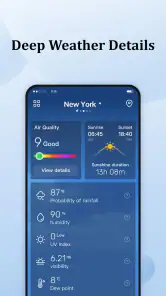
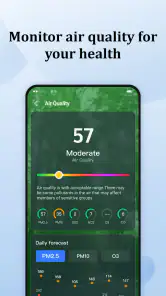
Daily Forecast: Weather&Radar provides users with accurate and up-to-date weather forecasts, including hourly and weekly predictions. The app includes radar maps to show real-time weather movements, alerts for severe weather conditions, and customizable widgets for quick access. Users can also view detailed information such as humidity, wind speed, and UV index.
Is Daily Forecast: Weather&Radar free to use?
Yes, Daily Forecast: Weather&Radar is free to download and use on both Android and iOS platforms. However, the app offers in-app purchases for premium features, such as removing ads and accessing more detailed weather data. Users can choose to upgrade to the premium version for an enhanced experience.
Pros
- Accurate local weather updates.
- User-friendly interface design.
- Real-time radar visuals.
- Customizable weather alerts.
- Multiple language support.
Cons
- Contains ads in free version.
- Some features require subscription.
- Occasional radar data delays.
- Limited widget customization.
- Frequent notifications can be annoying.
- Category
- Weather
- Version
- 2.5.25












