Kling AI: AI Image&Video Maker
- 1.57K
- 4.5
- Installs
- 5.00M
- Price
- Free

Screenshots
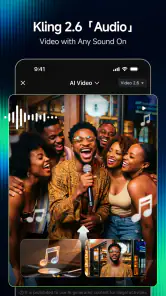
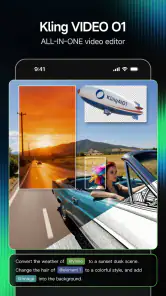
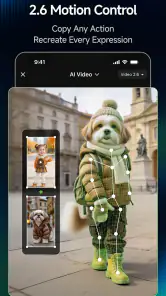
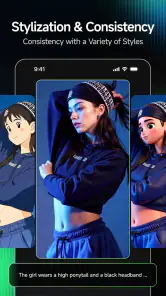
Analysis by Reviewed
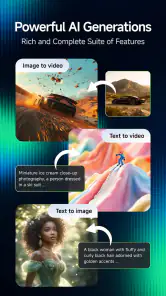
I find Kling AI: AI Image&Video Maker easiest to understand as a mobile creative studio for people who want to turn an idea into an image or short video without beginning in a complicated editing suite. It sits in the art and design space, and its appeal is the chance to create and edit both kinds of media in one place. That makes it worth considering if you like experimenting visually but do not want every project to become a technical lesson.
Where it fits in a creator’s routine
The practical question is not whether an AI app can replace a full creative workflow; it is whether it can help you get from a rough idea to something worth sharing. I would use Kling AI for a mood image, a quick social post, or a visual draft when speed matters more than precise control. For a polished campaign, detailed retouching, or frame-by-frame video work, a dedicated editor is still the better choice.
A realistic use case is making a birthday announcement after work: I could start with a simple visual concept, try a few treatments, and then shape the result into something suited to a message or social post. The useful habit is to decide the purpose and format before generating anything. A clear brief—subject, mood, and where the result will appear—gives the creative process direction and makes it easier to judge whether a variation is actually better.
Choosing between AI creation and familiar editors
Compared with a conventional image editor, an AI-first tool can feel more approachable when I have an idea but lack the skills or time to build every visual element manually. Compared with a dedicated video editor, the all-in-one approach is convenient for trying image and video ideas side by side, but it may not offer the detailed timeline control that experienced editors rely on. I see it as a starting point and an experimentation tool, not a universal replacement for established software.
One trade-off is that automated suggestions can speed up decisions while also steering a project toward familiar-looking results. I would treat them as options, not instructions: compare the suggested treatment with the unedited version, and keep the one that serves the brief rather than the one that merely looks more dramatic. For a consistent series of posts, save your own reference choices and reuse a clear visual direction instead of accepting every new suggestion.
Who is likely to enjoy it—and who may not
This app makes the most sense for casual creators, small social accounts, and curious beginners who want to explore AI-assisted visuals without learning a large desktop workflow first. It can also help someone create a rough concept to discuss with a designer. If you need exact brand colors, reliable text rendering, repeatable character details, or meticulous control over every edit, I would compare the result carefully and finish the work in a more specialized tool.
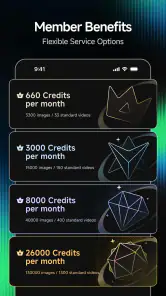
It is free to download, with in-app purchases ranging from five dollars to $1,099.99 per item, so I would check the purchase screen before committing to a paid option. The age rating is Teen. On Android, it supports devices running version 5.0 or later. Those details matter if you are installing it on an older phone or sharing a device with a younger user.
More From Our News Desk

Weather by Xiaomi Review: Clear at a Glance, Less Clear Up Close

X Under Pressure: Can It Recover When Posting Goes Wrong?

Clash of Clans Is Won Between the Battles

Android Auto Makes the Case for Quieter Car Software

MobiOffice: Transforming Mobile Productivity with Seamless Integration

EA SPORTS FC™ Mobile Soccer: Redefining Mobile Sports Gaming
Its developer is Lohas Games Pte. Ltd., and the app has an average rating of 4.5 from around 167,000 ratings, with over five million installs. Those figures suggest a sizable audience, but they cannot tell me whether a particular output will match my taste. I would test it with a small personal project before making it part of a regular publishing routine.
For anyone weighing the practical details, the current version is 2.11.11.241, and the app was released on January 20, 2025. I would read the version number as a useful marker of the current build, not proof by itself that a specific feature has changed. The sensible approach is to update when a newer build is available, then check whether the tools you rely on still fit your workflow before moving an important project into the app.
Making a small project easier to judge
For a first try, I would choose a task with a clear finish line rather than a vague prompt such as “make something cool.” A poster-like image for a community event, a visual for a private group chat, or a short concept clip gives me something concrete to assess. I can ask whether the subject reads clearly, whether the mood fits, and whether I would actually share the result. That is more useful than generating a large pile of images without knowing what I want from them.
When I am exploring a visual idea, I would change one part of the brief at a time. If I alter the subject, setting, and mood together, it becomes difficult to tell why one result feels stronger. Keeping the central idea steady while adjusting the atmosphere or composition makes the comparison more meaningful. It also helps me notice where the tool is following my direction and where its interpretation is taking over.
Another practical distinction is between a draft and a finished asset. AI output can be a fast way to find a visual direction, but that does not automatically make it ready for a business page, event notice, or portfolio. I would inspect small details at the size where people will see the work, especially any lettering or fine elements, and use a conventional editor if they need correction. Treating the first result as a starting point prevents a quick experiment from becoming an avoidable publishing mistake.
What an all-in-one workflow changes
Having image and video creation together is useful when one idea needs to be explored in more than one format. I might sketch the look of a weekend market announcement as an image first, then decide whether that same direction deserves a moving version. The benefit is not necessarily that every step is more powerful than a specialist app; it is that I can test the relationship between the formats without changing tools immediately.
There is a corresponding compromise. Image editing and video editing ask for different kinds of precision, and a single mobile workspace cannot be assumed to match the deepest controls of a dedicated application in both. If I need exact timing, a carefully arranged sequence, or detailed adjustments across many frames, I would move to a video editor designed around those tasks. If my priority is simply to explore a visual direction or make a quick draft, staying in one app can be more convenient.
For social content, I would settle the intended destination before spending time on variations. A square graphic, a story-style post, and a clip viewed on a phone all have different practical needs. Even without overcomplicating the process, thinking about where the piece will appear helps me avoid a result that looks attractive in the editor but is awkward in its final setting. That simple planning step is especially valuable when I am making something quickly between other tasks.
Costs, access, and sensible expectations
The free download makes it easy to try the app, but the wide range of in-app purchase prices is a reason to pause before buying anything. I would first work out what I need from the paid option and whether I expect to use it repeatedly, rather than treating a purchase as a shortcut to better creative judgement. If I only want to experiment once, the free starting point may be enough to decide whether the workflow suits me.
People also often want to know whether an app like this can replace a professional designer or editor. In my view, it is better understood as a way to explore and prepare ideas, not as a guarantee of a finished professional result. A designer can interpret context, make deliberate choices, and refine details in ways that an automated output may not match. For personal experiments and early concepts, that distinction matters less; for identity-sensitive or high-stakes work, it matters a lot.
The Teen content rating is relevant for families considering a shared device, while the Android minimum of version 5.0 gives older-device owners a clear compatibility reference. I would still think about the actual person using the phone and the kind of creative work they plan to make. A younger user may enjoy image experiments, but an adult should be comfortable with the app’s purchase options before handing over a device with access to payment methods.
Where I would draw the line
I would not choose this as my only tool for a project where every element must remain consistent across a long series. A recurring character, a strict visual identity, exact typography, or carefully controlled edits can demand more predictable handling than an AI-first workflow offers. In those cases, I would use it to explore possibilities, then do the important finishing work in software that gives me direct control over the details.
I would also avoid relying on a single generated result for something that needs a particular message to be unmistakable. If a poster needs precise wording or a video has to communicate an instruction clearly, I would check the final output closely and add or correct text in a conventional editor when necessary. The more important accuracy becomes, the less I would leave to an automated interpretation.
That does not make the app unhelpful; it clarifies where it earns its place. It is strongest when I can be flexible about the exact appearance and when a quick visual experiment is valuable by itself. It is weaker when a project has strict production requirements, a lot of revisions, or a need for repeatable results. Knowing that boundary makes it easier to use the app with realistic expectations rather than asking it to replace every other creative tool.
Hey folks, let me tell you about an app I recently stumbled upon called Kling AI: AI Image&Video Maker. If you’re someone who loves to dabble in creating images and videos but wants an easier way to do it, this app might just be your new best friend. So, buckle up and let's dive into what makes this app tick!
Unleashing Creativity with Kling AI
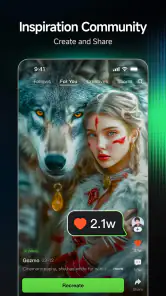
Right off the bat, Kling AI: AI Image&Video Maker is all about harnessing the power of artificial intelligence to amp up your creative projects. Whether you’re whipping up a quick video for social media or crafting a stunning image, Kling AI has got you covered. The app is packed with features that make editing a breeze. I mean, who doesn’t love a tool that makes them look like a pro without breaking a sweat?
Features That Stand Out
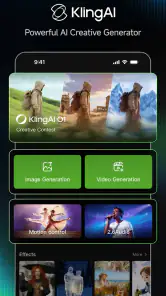
What really caught my eye is the app’s intuitive user interface. Even if you’re not tech-savvy, you’ll find it super easy to navigate. Kling AI offers a variety of templates and filters that you can apply with just a tap. Plus, the AI-powered suggestions are a game changer—they provide real-time tips on how to enhance your content, making sure you never miss a beat.
Another feature worth highlighting is the app’s ability to handle both images and videos seamlessly. You can switch between the two mediums without any hitches, which is perfect for those who like to mix things up. Also, the app supports high-resolution outputs, ensuring your creations look crisp and clear.
Personal Experience
Now, let’s get personal. Using Kling AI was like having a creative assistant right in my pocket. I’ve tried my hand at a few apps in this category, but this one really stands out for its simplicity and effectiveness. I was pleasantly surprised at how quickly I could put together a polished video with dynamic transitions and effects. And the best part? It didn’t take hours of editing!
I also loved how the app suggests enhancements. It's like it knows what you’re thinking and offers just the right tweak to make your project pop. It’s these little touches that make the difference between a good app and a great one.
Looking ahead as the app evolves
The current build number and release date provide useful context for where the product stands, but they do not tell me which specific tools have changed or how a future release will behave. I would treat version 2.11.11.241 as a point of reference when comparing my experience after an update. For existing users, the practical test is whether their familiar workflow still feels dependable and whether any new options improve a task they actually do.
When an update arrives, I would avoid moving an urgent project into an unfamiliar workflow until I have tried a small, low-pressure task. That gives me a chance to see whether the app still handles the sort of image or video I use it for, without risking a deadline. For someone just starting out, the same principle applies in reverse: explore with a disposable idea first, then decide whether the app deserves a regular place in a publishing routine.
What I would watch over time is whether the experience continues to balance quick creation with enough control to make results feel personal. More options are only useful if they help me reach a result more clearly; they can also make a simple task feel crowded. I would also pay attention to how well the image and video sides support the kinds of projects I actually make, rather than assuming that an all-in-one label means equal depth in both.
Final Thoughts
In conclusion, if you’re on the hunt for a versatile app that makes creating images and videos a walk in the park, give Kling AI a shot. It’s user-friendly, packed with features, and it leverages AI like a champ. Whether you’re a seasoned creator or just getting started, this app will make your creative journey smoother and more enjoyable.
So, why wait? Dive into the world of Kling AI: AI Image&Video Maker and unlock your creativity today!
Kling AI: AI Image&Video Maker Frequently Asked Questions
Can Kling AI create both images and videos?
Yes. Kling AI is an AI-powered image and video generation and editing studio, so it is intended for both kinds of creative work rather than only one format. You can use it to explore visual ideas and make or edit content in the app. The exact workflow depends on what you want to create, but its central focus is bringing image and video tools together.
Who develops Kling AI, and what kind of app is it?
Kling AI: AI Image&Video Maker is an Art & Design app developed by Lohas Games Pte. Ltd. Its focus is AI-powered image and video generation and editing, making it a creative tool for people who want to work with visual content. If you are looking for an app centered on AI-assisted art and video rather than a general-purpose editor, Kling AI is built around that kind of creative use.
What Android version do I need to install Kling AI?
For Android, Kling AI requires Android 5.0 or later. Before downloading, check your device’s software version to make sure it meets that requirement. The app is also available for iOS, so users on Apple devices can look for it in the Apple App Store. The required Android version is a useful compatibility check, especially if you are using an older phone or tablet.
Is Kling AI free to download, and what should I know about optional purchases?
Kling AI is free to download, so you can install it without an upfront purchase. It also offers in-app purchases, with items ranging from around five dollars to over a thousand dollars. These purchases are optional; consider the available options and your budget before buying, and check the purchase details in the app so you understand what each option provides.
What is Kling AI: AI Image&Video Maker?
Kling AI: AI Image&Video Maker is a cutting-edge application designed to help users create stunning images and videos using artificial intelligence. It offers a variety of tools and features that enable you to transform your creative ideas into reality, whether for personal projects, social media content, or professional use. It is an Art & Design app developed by Lohas Games Pte. Ltd., focused on AI-powered image and video generation and editing.
Pros
- Creates stunning AI-generated content
- User-friendly interface for beginners
- High-quality image and video outputs
- Fast processing of media files
- Supports multiple languages
Cons
- Requires a stable internet connection
- Occasional bugs in video rendering
- Limited free features available
- High subscription cost for premium
- Consumes significant device storage
- Category
- Art & Design
- Version
- 2.11.11.241