KBZPay
- 1.24K
- 4.5
- Installs
- 10.00M
- Price
- Free
Screenshots
Analysis by Reviewed
I judge a mobile wallet by what happens at the moment I need to pay, not just by how tidy its menus look. KBZPay is a finance app from KBZBANK.COM, and its everyday appeal is straightforward: it brings payments and transfers onto a phone. That convenience depends on a practical detail worth considering before you rely on it: a wallet needs a working connection when you are trying to complete an action.
Choosing the right moment to use a wallet
Connectivity is only one part of deciding whether to use a phone wallet. The other is how much certainty the situation calls for. For a familiar, low-pressure purchase, I am comfortable opening the app and working through the payment. For a time-critical bill or a purchase I cannot easily postpone, I would first make sure I have another way to pay if the connection or phone causes trouble.
That distinction is useful for anyone deciding whether to make a wallet their default. I would start with routine purchases at places I already know accept the payment method, rather than relying on it for every expense from day one. A few uncomplicated uses help me learn the screens and confirmation flow without creating pressure at a busy counter.
Where the connection matters
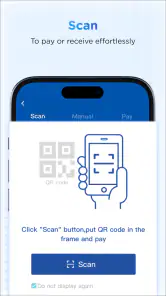
For a QR payment, the useful workflow is to check that the shop accepts this payment method, open the app, and scan while you are still at the counter. I would not treat a QR code as proof that a payment has gone through; wait for the app’s confirmation before leaving. If the connection is slow, pausing to check the result is safer than scanning again immediately, since a delayed response can make it unclear whether the first attempt completed.
The same caution applies to transfers. I would enter the recipient details carefully, review them before sending, and keep the confirmation screen until the transaction’s status is clear. That small habit matters most when someone is waiting for the money or when I am paying in a busy place. A wallet can make the steps quicker, but it does not remove the need to verify the destination and outcome.
Useful on the move, with a little planning
The app is most appealing when I want to pay without carrying cash or a card, or when I need to send money to a friend or family member. Picture stopping at a participating shop on the way home: I can scan its QR code and complete the payment from my phone rather than search through my bag. That is a convenient option, provided my phone is charged, the shop supports the method, and I can get online.
Before heading out, I would make sure I can unlock my phone and access the account, especially if I expect to use the wallet for an essential purchase. This is not a reason to avoid digital payments; it is sensible backup planning. I would still keep another way to pay for situations where the network is unreliable, the shop does not accept the wallet, or my phone is unavailable.
What to do when a payment feels stuck
Occasional lag can be frustrating, particularly during busy periods. If a screen takes longer than expected, I would avoid repeatedly tapping the payment control. First, I would give the current action time to return a clear result, then check the transaction status in the app before deciding what to do next. For a transfer, confirming with the recipient is also more useful than assuming that a slow screen means the money failed to move.
If the app becomes unresponsive, I would wait until I have a stable connection before trying again and make sure I am signing back into the correct account. For an urgent payment, switching to a familiar alternative may be less stressful than troubleshooting in front of a queue. The main trade-off is simple: a phone wallet saves steps in normal conditions, but it makes connectivity and a working device part of the payment routine.
Keeping mobile use practical
I would use Wi-Fi or mobile data I trust when handling account access and payments, and avoid starting a transfer when I know my connection is about to drop. That is a practical precaution rather than a claim about any particular network setting. If data use matters to you, open the app for the task you need, complete it, and close it rather than leaving it running without a reason. For a QR purchase, doing this at the counter also makes it easier to confirm the result promptly.
First-time setup is another moment to choose carefully: use your own phone number and take time with the personal details, since account access is tied to registration and phone verification. If you change phones or cannot receive a verification message, expect account access to require extra attention rather than assuming you can complete a payment immediately. I would sort out access before depending on the wallet for a time-sensitive errand.
What is KBZPay?
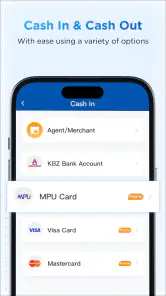
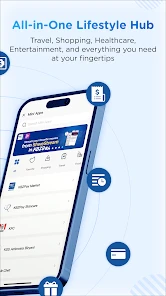
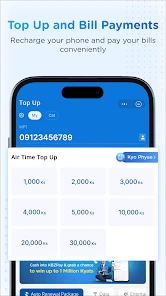
So, what exactly is KBZPay? It's a digital wallet app developed by KBZ Bank. The app is designed to simplify your financial transactions. With just a few taps, you can pay bills, transfer money, and even make purchases at participating stores. The app's interface is pretty user-friendly, which is a huge plus if you're not the most tech-savvy person.
Setting Up
Getting started with KBZPay is a breeze. I downloaded the app from the Play Store, and the installation was quick and painless. After opening the app, I was prompted to register. The registration process requires your phone number and some personal details, which is pretty standard. Once that's done, you’ll receive a one-time password to verify your account. Easy peasy!
Because registration includes phone verification, I would complete it while I have reliable reception and access to the number I intend to use. That avoids discovering a verification snag just as I am trying to pay. The app is free, rated for Everyone, and currently at version 5.8.3; it supports Android 8.0 and later. It has been available since June 29, 2018, and its broad audience is reflected in more than 10 million installs, a 4.5 average from around 142,000 ratings, and roughly 1,200 written reviews. Those figures suggest it is widely used, though they cannot tell me whether a particular merchant accepts it or how well it fits my own payment habits.
Features That Stand Out
Now, onto the features. KBZPay offers a range of functionalities that caught my attention. One of the standout features is the QR code payment option. It's super convenient when you're shopping at outlets that support it. Just scan and pay—no need to fumble around for cash or cards.
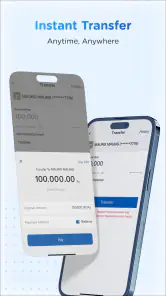
Another feature I found quite useful is the money transfer option. Whether it's sending money to friends or family, the process is straightforward. Plus, the app supports multiple languages, which is great for users who might not be fluent in English.
In practice, I would treat these tools as a useful addition to my usual payment options, not a replacement for every one of them. Compared with carrying cash, a QR payment can be quicker at a participating outlet; compared with a bank’s other ways to manage money, the wallet’s draw is having payment and transfer tasks in one phone app. Its usefulness still depends on the people and businesses I need to pay. If most of my regular transactions happen somewhere that does not accept it, a familiar bank channel or cash will be more dependable.
A small workflow improvement is to separate “scan” from “confirm” in my mind: scan the merchant’s code, check that the payment details make sense, then wait for a completed result. For sending money, I would verify the recipient before entering the final confirmation step. These checks take only a moment, but they reduce the chance of turning convenience into a rushed mistake. The app suits people who make frequent supported payments or send money to people they know; it is less compelling for someone who mainly wants budgeting tools or rarely pays digitally.
User Experience and Design
Aesthetically, the app is pleasing to the eye. The color scheme is relaxing, and the navigation is intuitive. I found myself quickly adapting to the layout, which makes using the app a pleasant experience. However, I did notice there can be occasional lags during peak hours, but nothing too disruptive.
That lag is worth weighing against the setting in which I use a wallet. At home, a brief wait is an annoyance; with a line behind me, it can become pressure to tap again before I know whether the first attempt worked. I prefer to step aside, check the outcome, and only retry when the status is clear. That is not a clever hidden setting, just a safer way to use a connected payment app when speed and certainty pull in different directions.
Security and Reliability
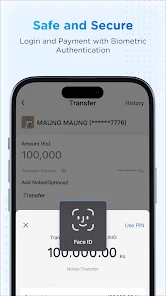
In terms of security, KBZPay uses encryption to protect your data, which gives peace of mind when dealing with financial transactions. The app also requires a PIN or biometric authentication for added security, which is always a good thing. I've been using it for a while now, and I haven't encountered any major issues with reliability.
For my own routine, the useful balance is to keep the phone’s lock and the app’s authentication in mind without assuming that either removes the need to check payment details. I would avoid sharing a PIN and would not rush through a transfer just because biometric access makes opening the app quick. If a transaction is unclear, I would pause and establish its status before attempting it again. That approach is especially helpful when a connection delay makes the screen less reassuring than usual.
Making it work in everyday routines
One realistic use is splitting a familiar household expense: I could send money to a relative after agreeing on the amount, then make sure the transfer has a clear result before we both consider it settled. I would keep the amount and recipient in mind before opening the app, so I am less likely to rush through the details while distracted. For a shop purchase, the equivalent habit is to check the total and the merchant information before confirming.
There is also a practical difference between a one-off payment and relying on a wallet throughout the day. A single planned QR purchase is easy to accommodate; several errands across unfamiliar locations require more confidence that the businesses accept it and that I can connect when needed. I would learn acceptance gradually by asking at places I visit often, rather than assuming that a payment method used by one shop will be available at the next.
If I were helping a less confident phone user get started, I would walk through registration and a simple transaction together, then let them repeat the steps at their own pace. The useful lesson is not merely where to tap; it is how to recognize a completed payment and what to do if a screen is delayed. That confidence matters more than speed, especially for someone who is new to mobile payments.
Who will get the most from it
I would recommend trying it if your regular shops support QR payments, you often send money to friends or family, and you are comfortable using your phone for financial tasks. It is also a sensible choice for someone who appreciates multiple language options and wants routine transactions to take fewer steps. The app is less suited to people who need payments to work regardless of mobile service, prefer not to register with a phone number, or have few opportunities to use a digital wallet. In those cases, cash or another payment method accepted where you shop may be the better everyday choice.
Before making it your main wallet, I would test it with a low-pressure transaction at a place you already visit, then learn where the confirmation appears and how you can check the result. That gives you a feel for the process before a time-sensitive purchase. I would also keep a backup payment method while I learn which of my usual merchants accept it. This is a more useful test than installing a wallet and assuming it will fit every errand.
It is also worth asking what you want from a finance app. If your main need is quick payments and transfers, the focus here makes sense. If you are looking for a detailed budget, spending analysis, or a broad set of account-management tools, I would compare it with services built around those jobs instead of expecting a wallet to cover them. Choosing by the task you actually repeat is a better guide than choosing by the number of options on a screen.
My connectivity verdict
Overall, my experience with KBZPay has been pretty positive. It's an app that delivers on its promise to make digital transactions easier and more accessible. Whether you're paying bills or transferring money, it handles it all with ease. So if you're looking for a new way to manage your finances, KBZPay might just be worth checking out.
My recommendation comes with one clear condition: treat connectivity as part of the payment, not as a background detail. When the signal is steady and the merchant supports the wallet, scanning or transferring can be convenient; when either condition is missing, a backup is still valuable. I see it as a practical option for supported day-to-day transactions, rather than a reason to leave every other way to pay behind.
For me, that makes this a wallet to use deliberately rather than blindly. Try it where acceptance is familiar, take a moment to verify each result, and keep another payment route for situations where a phone or connection is not dependable. If that balance fits the way you shop and send money, KBZPay is a useful option to have on hand; if you need universal acceptance or offline certainty, a different payment method should remain your first choice.
KBZPay Frequently Asked Questions
Can I use KBZPay if I do not bank with KBZ Bank?
KBZPay is a mobile wallet application offered by KBZ Bank, so it is intended for people who want to use the bank’s customer app on a smartphone. Before downloading, consider whether its services fit the way you handle payments and other financial transactions. Account registration involves a mobile number and personal details, so have those ready if you decide to get started.
What should I consider before installing a finance app like KBZPay?
Think about whether you are comfortable managing financial activity through a mobile app and keeping your phone and account credentials secure. KBZPay is free to download, but individual services or transactions may have fees. It is also worth checking that your phone meets the app’s operating system requirement and that you can connect to the internet when you need to use its features.
Can KBZPay be used without an internet connection?
KBZPay is a smartphone app for financial transactions, and a working internet connection is important when using its payment features. If you expect to make a payment or transfer, check your connection before starting and wait until the app displays the transaction details. For everyday use, it is sensible to keep access to a reliable connection rather than assume that financial actions will work offline.
What devices can run KBZPay?
KBZPay is a finance app for smartphones, and its minimum operating system requirement is version 8.0. Before downloading, check that your device meets this requirement and has enough available storage for the installation. The app is free to download, and it is intended for customers who want to use KBZPay on their phone.
Who develops KBZPay, and what is its age rating?
KBZPay is developed by KBZBANK.COM and is rated Everyone, making it suitable for a general audience. The app has been available since June 29, 2018, and its current version is 5.8.3. If you are considering installing it, you can also review its app-store page for the latest compatibility and version details before proceeding.
Pros
- User-friendly interface for easy navigation.
- Quick and secure transactions via QR code.
- Multi-language support enhances accessibility.
- 24/7 customer support for assistance.
- Regular updates improve app stability.
Cons
- Limited merchant acceptance in rural areas.
- Occasional app glitches during transactions.
- Requires stable internet for smooth operation.
- Limited features compared to other e-wallets.
- Some users report slow customer service response.
- Category
- Finance
- Version
- 5.8.3











