JW Library
- 78.49K
- 4.8
- Installs
- 50.00M
- Price
- Free

Screenshots


Analysis by Reviewed
For readers who want Bible study and related material in one place, JW Library is a focused, practical option rather than a general-purpose reading app. I find its main strength is the way it brings text, publications, and media together; its main trade-off is that the experience is most useful to people who want the material and study approach it is built around. It is free, made by Jehovah's Witnesses, and belongs to the books and reference category.
A reading routine that travels with you
A typical use might be opening a passage before the day gets busy, marking a line worth revisiting, then returning to it later without needing a connection if the relevant content has been downloaded. That combination makes the app useful for a short daily reading as well as a longer, more deliberate study session. I would download the material I expect to use before travelling, rather than assume every item will be available offline automatically.
The app can also suit someone who studies in more than one language. Its reach is unusually broad: the library covers over 1,000 languages, which is valuable for readers who want to switch languages or access material in a less commonly supported one. Still, language choice alone does not make it a neutral reference shelf; the content reflects the publisher's religious perspective, so readers seeking a range of denominations should pair it with other sources.
Exploring the Features
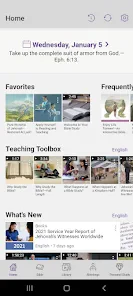
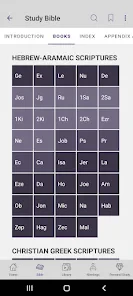
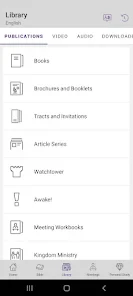
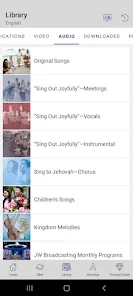
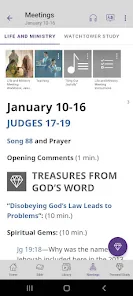
So, the first thing I noticed about the JW Library is how amazingly well-organized it is. The interface is clean, straightforward, and incredibly user-friendly. You can easily navigate through various sections like the Bible, publications, videos, and music. The app supports multiple translations of the Bible, which is fantastic if you love comparing different versions or if you’re learning a new language.
Another cool feature is the ability to highlight text and add notes, which is a lifesaver for people like me who tend to forget key insights. Plus, you can download content for offline use. This means you can take your study sessions anywhere—whether you’re on a plane or in a remote area without internet access. Handy, right?
Make notes useful, not just plentiful
One practical way to get more from highlighting is to keep a consistent purpose for each mark: a question to investigate, a passage to compare, or a thought to return to. Notes are most helpful when they preserve why a verse caught your attention, rather than simply repeating its wording. If you use the app for study across several topics, a brief, distinctive note can make it easier to recognize the point when you revisit the passage.
There is a trade-off to offline access: downloaded material takes preparation and device space, so it is worth choosing what you need instead of saving everything indiscriminately. For a commuter, downloading a publication and the related media before leaving home can make a useful routine; for someone who mainly wants instant access to a broad range of independent commentary, a dedicated reference resource may be a better fit.
More From Our News Desk

Weather by Xiaomi Review: Clear at a Glance, Less Clear Up Close

X Under Pressure: Can It Recover When Posting Goes Wrong?

Clash of Clans Is Won Between the Battles

Android Auto Makes the Case for Quieter Car Software

MobiOffice: Transforming Mobile Productivity with Seamless Integration

EA SPORTS FC™ Mobile Soccer: Redefining Mobile Sports Gaming
Getting more from a focused library
The best way to judge whether this app fits your routine is to try a small, complete study session rather than browse its shelves at random. Choose a passage, read it in the translation you normally use, mark a point that raises a question, and add a note explaining what you want to follow up. Then look for related material in the library and see whether that path feels natural. This reveals more than simply scrolling through the available sections: it tests whether the app supports the way you actually think and read.
I would also keep notes searchable in spirit, even if you are writing them for yourself rather than trying to build a formal archive. Starting with a clear subject or question makes a note more useful weeks later than a vague reaction such as “interesting.” If you are exploring a topic across several passages, record the connection you noticed and what remains unresolved. That small habit makes the app’s highlighting and note tools work as part of a process, not just as decoration on the page.
There is a useful distinction between keeping material available and downloading everything you might conceivably read. A modest offline selection is easier to manage: save the Bible material and publications you expect to use during the week, then add other items when a specific need comes up. This is especially sensible if your device also holds music, photos, or other large files. The app is more convenient when you make offline access deliberate instead of treating downloads as a one-time setup task.
Content Variety and Accessibility
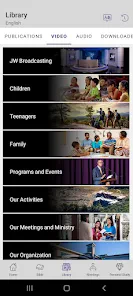
Now, let’s talk about content. The app isn’t just about reading; it’s packed with a variety of multimedia resources. There are videos, podcasts, and music that cater to different learning preferences. I personally love the videos—they’re well-produced and provide a fresh perspective on various biblical stories and principles.
Moreover, the app is available in numerous languages, making it accessible to a global audience. I think this is a major plus because spirituality knows no borders, and everyone deserves access to these resources regardless of their native language.
When several languages matter in practice
For a multilingual household, a broad language selection can be more than a convenience. One person might prefer to read in the language they use every day, while another wants to follow along in a different language. Being able to move between language materials can make a shared reading session easier to organize, particularly when relatives or friends are more comfortable with different wording. I would still check that the specific resources you want are available in your chosen languages rather than assume every item appears in every language.
A practical approach is to decide which language is your main reading language and which one you use for comparison. That keeps a study session from turning into constant switching, while still letting you consult another version when a phrase is difficult or unfamiliar. For language learners, the app can provide useful reading practice with material they already care about; it is not, however, a substitute for a dedicated language course or a general bilingual dictionary.
The media can also help when sitting down with a long block of text is not realistic. A short video or audio item may fit into a break, while a quieter moment later can be used to return to the passage or publication that prompted it. I would treat that variety as a change of format, not as proof that every subject is covered from every angle. The material remains tied to the app’s religious publisher, so readers should choose it for that perspective rather than expect a broad survey of religious scholarship.
Where it differs from general Bible apps
Compared with a typical Bible reader, which may concentrate on scripture text, search, and cross-references, JW Library feels more like a publisher's study library: reading sits alongside publications and audiovisual material. That integrated approach is convenient if those are the resources you want to use together. It is less suitable if your priority is comparing interpretations from many traditions or building a study plan around materials from different publishers.
Before relying on it for a particular study method, I would try a small workflow: find a passage, add a note, then return to it after switching to another section. That gives you a feel for whether the organization matches your habits. A reader who prefers paper may also find that a physical Bible is easier for extended reading, while the app is stronger for carrying several kinds of material in one device.
A realistic week of use
Imagine you have a few minutes before leaving home and want to read a passage, but later you expect to be somewhere with unreliable service. I would open the app while connected, select the material I plan to use, and download it in advance. During the commute, I could read and mark a line without depending on a live connection. At lunch, a saved note could remind me why I marked it; in the evening, I could return to the passage and consult a related publication or media item. The useful part is not that every step is automatic, but that the text and other material can sit together in a routine I control.
That same example also shows where the app asks for a little planning. If I forget to download something, offline access will not magically provide it, so I would not make a last-minute trip or study session depend on an item I have not prepared. And if the goal is to check competing academic interpretations quickly, I would open a separate reference source rather than try to make this library serve a job it was not designed for. Knowing which tool answers which question saves frustration.
My Personal Take
Alright, let’s get personal. I’ve found the JW Library to be an incredible companion for my daily spiritual routine. It’s like having a mini library in my pocket, ready to offer guidance and wisdom whenever I need it. The app runs smoothly, and I haven’t encountered any glitches so far, which is a huge relief. There’s nothing worse than an app crashing in the middle of a deep study session!
For context, it has a 4.8 average from around 1.7 million ratings, and more than 50 million installs. It is free, rated for Everyone, and version 15.5.1 requires Android 7.0 or later. It was released on July 3, 2013, and has accumulated around 78,000 written reviews. Those figures suggest a well-established audience, but they do not tell you whether its religious content is right for you; that depends on what you want from a study library.
Who will get the most from it
I would recommend it first to people who already want Jehovah's Witnesses material, especially if they read regularly and like having publications and media close to the Bible text. It can also be a sensible choice for someone who wants a free reading and study companion, needs to prepare content for offline use, or shares material with people who read in different languages. The app is most compelling when its collection matches what you are looking for; the focused scope is part of its appeal, not something every reader will value.
On the other hand, I would not choose it as my only resource if I wanted a neutral academic overview, a wide comparison of Christian traditions, or commentary selected from many independent publishers. In those cases, a general reference app, a library resource, or a printed study Bible with a different editorial approach may suit the job better. A paper Bible may also be preferable for readers who want fewer screen distractions or find long reading sessions more comfortable away from a device. Using this app alongside another source is a reasonable middle ground if you appreciate its organization but want a wider range of viewpoints.
People deciding whether to use it often wonder whether it is useful without a constant internet connection. The practical answer is yes for material that has already been downloaded; preparation matters, and it is wise to open the item before leaving a reliable connection. They may also wonder whether it is suitable for a child because it carries an Everyone rating. That rating is a content classification, not a personal recommendation, so a parent should consider the religious material and decide whether it fits their family.
Another question is whether the app can replace a general Bible reference tool. I would say it depends on the task: it brings its own Bible-related material and publications together, but someone seeking independent commentary or a broad range of denominational views should use another resource as well. If you mainly want to read, mark passages, and revisit related content from this publisher, the focused collection can be enough. If your study routinely involves comparing sources, it is better treated as one shelf in a larger library.
My recommendation is clearest for readers already interested in Jehovah's Witnesses material, people who value offline reading, and anyone who wants text and media together without paying for the app. If you want a neutral academic reference, broad denominational comparison, or a reading experience without publications and media, I would choose a different resource or use this alongside one. The app is marked for Everyone, but parents should still decide whether its religious content suits their child.
In essence, if you’re searching for an app that combines reliability, variety, and accessibility, then the JW Library might just be what you need. With its wealth of content and user-friendly design, it’s no wonder it has a dedicated following. So, why not give it a try and see how it enhances your spiritual journey?
Thanks for sticking with me through this review! I hope it gives you a good sense of what the JW Library app is all about. Happy exploring!
JW Library Frequently Asked Questions
Does JW Library work on both Android and iOS?
JW Library is available for Android and iOS, so you can use it on a compatible phone or tablet. Before downloading, check that your device meets the operating system requirements for the version offered in your app store. The app is intended for reading and studying Bible-related material, and a larger screen may be convenient when following publications or other content.
How much storage space should I have available before downloading content?
The app is free to download, but saved publications and media use space on your device. The amount needed depends on what you choose to keep available, so consider your available storage before downloading a large collection of material. You can start with the resources you expect to use most often and manage your saved content as your needs change.
Can I use JW Library in my preferred language?
JW Library is designed to make Bible study and related material accessible to readers around the world. It offers content in over 1,000 languages, so users can choose resources that suit their language needs. The range of available material can make it easier to read, study, and follow along with publications in a familiar language.
Is JW Library free to download?
Yes. JW Library is a free Books & Reference app developed by Jehovah's Witnesses. You can explore its Bible and study resources without paying to download the app. If you plan to save publications or media for offline use, make sure your device has enough storage space for the material you choose.
What is JW Library and who is it for?
JW Library is a comprehensive app designed for members of the Jehovah's Witnesses faith. It offers a wide range of resources such as various Bible translations, publications, videos, and audio content that are essential for personal study and meeting preparation. This app is particularly useful for those who wish to deepen their understanding of the Bible and Jehovah's Witnesses teachings.
Pros
- Comprehensive Bible resource
- Regularly updated content
- Offline access available
- User-friendly interface
- Multiple language options
Cons
- Large app size
- Limited customization options
- Requires periodic internet connection
- No social sharing features
- Audio playback issues on some devices
- Category
- Books & Reference
- Version
- 15.5.1