Apple TV
- 3.87K
- 3.7
- Installs
- 50.00M
- Price
- Free

Screenshots



Analysis by Reviewed
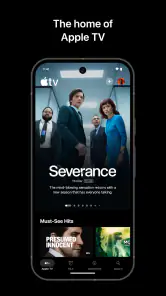
My first impression of Apple TV is that it tries to make choosing something to watch feel simple rather than turning the home screen into another chore. I can see the appeal in a quiet moment when I want to browse Apple Originals, live sports, and other entertainment without starting from scratch. That first-week convenience is real, but it is not enough by itself to earn a permanent place on my phone. The better question is whether the app fits the way I already watch and remains useful after the novelty of exploring fades.
Who Gets the Most from the First Week
I think the app has its strongest opening week when you arrive with a reason to use it: a particular show to try, a live event to follow, or a wish to see what Apple’s own programming is like. With that purpose, the home screen is a launch point rather than a puzzle. If you install it only because you want a new place to browse, the first few sessions may be pleasant, but the novelty can wear off before you have found a regular viewing habit.
It is also worth separating the app from the viewing setup around it. This is an entertainment app from Apple, available as a free download, but a free install does not mean every program or channel is included at no cost. I would decide what I want to watch first, then check the individual purchase or subscription screen before committing. That simple order makes the first week more useful and helps avoid treating a polished interface as a reason to pay for something I may not finish.
Getting Started with Apple TV
First things first, let's talk about the interface. The moment you dive into Apple TV, you’re greeted with a sleek and user-friendly design. It’s like walking into a well-organized library where everything you need is right where you expect it to be. Navigating through the app is smooth, and I absolutely love how intuitive it feels. Whether you're a tech wizard or someone who's just figuring out how to work their smartphone, you’ll find this app incredibly accessible.
Content Galore
Now, onto the real meat of the app – the content. Apple TV offers a plethora of shows and movies, catering to every mood and preference. Are you in the mood for a heart-wrenching drama or perhaps a light-hearted comedy? You name it, and it’s probably there. Plus, with the addition of Apple Originals, you get to explore exclusive content that you won't find anywhere else.
One of my personal favorite features is the ability to subscribe to premium channels directly through the app. It’s like having your own personal cinema at home, minus the sticky floors and overpriced popcorn! This feature makes it super convenient to manage all your subscriptions in one place. Trust me, it’s a game changer.
Making It Part of a Routine
The app makes the most sense to me when I treat it as a place to resume a planned watch, not as an endless source of things to sample. A realistic routine might be opening it after dinner, checking a show I already meant to continue, and saving the rest of the evening for watching rather than browsing. That small habit helps answer a practical question: it is useful for casual viewers as well as people who follow Apple Originals, but it has more staying power if there is something in its catalog you actually intend to watch.
More From Our News Desk

Weather by Xiaomi Review: Clear at a Glance, Less Clear Up Close

X Under Pressure: Can It Recover When Posting Goes Wrong?

Clash of Clans Is Won Between the Battles

Android Auto Makes the Case for Quieter Car Software

MobiOffice: Transforming Mobile Productivity with Seamless Integration

EA SPORTS FC™ Mobile Soccer: Redefining Mobile Sports Gaming
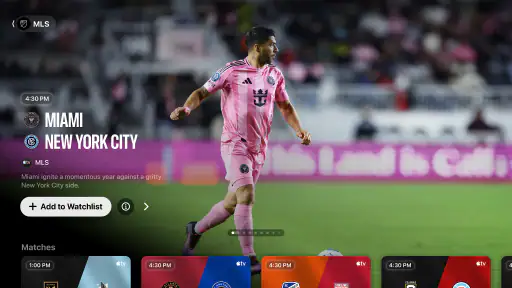
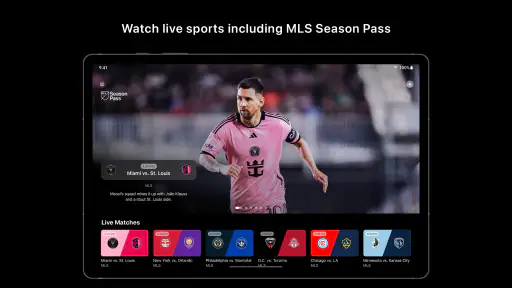
Live sports can give the app a different role from a typical series-and-film service. If a match is the reason I open it, I’m less likely to spend time scrolling through recommendations. The trade-off is that sports are tied to particular events and schedules, so this part of the experience may matter a lot to one viewer and very little to another. I would not choose it solely for sports without first checking whether the events I care about are available in my region and at the times I can watch.
Seamless Integration
Let’s talk about the integration capabilities because this is where Apple TV truly shines. If you already live in the Apple ecosystem, you’re in for a treat. The app syncs effortlessly across all Apple devices, ensuring you can start a movie on your iPhone and finish it on your iPad or Apple TV without missing a beat. It’s this kind of seamless experience that makes you appreciate the thought Apple puts into its products.
And let's not forget about the Family Sharing feature. As someone who loves sharing good content with family, this feature is a blessing. You can share your subscriptions with up to five family members without them having to cough up extra cash.
Small Habits That Reduce Browsing
One useful way to make the app feel less like another crowded menu is to choose a single next action before opening it. I might decide that I am continuing a series, checking a live event, or comparing a channel I am considering. That keeps the session focused and makes it easier to tell whether I came away with something worthwhile. It is a modest habit, but it matters in an app where the temptation to keep browsing can compete with the time I set aside to watch.
For a household, I would also make the choice of paid viewing a shared decision rather than assuming that convenient access means everyone has the same plan. A quick conversation about who wants a channel and for how long can prevent a trial viewing interest from becoming a recurring expense nobody actively chose. The app’s role is to bring viewing options together; the household still has to decide which ones deserve regular attention.
Subscriptions Without Surprise Decisions
When I consider whether to keep using an entertainment app, I separate the convenience of browsing from the cost of what I choose to watch. Apple TV is free to download, but some content involves in-app purchases, with listed item prices ranging from $9.49 to $239.99. I’d check the purchase screen carefully before starting a channel or title, especially if I only want one program for a short time. The app can help organize viewing, but that does not automatically make every paid option good value for my household.
That distinction also matters when comparing it with the usual alternatives. A general streaming service may be a better fit if I want one subscription whose catalog is the main reason I open the app every week. Apple TV is more compelling when its particular originals, sports, or channel options line up with my interests, and when I value having viewing organized alongside Apple devices. If I mostly watch content from other services, adding another destination can create more browsing and billing to maintain without changing what I watch.
Choosing Between a Hub and a Single-Service App
The practical comparison is not simply about which app has the most choices on its screen. I would ask whether I want a focused service that earns its place through a specific set of programs, or a broader viewing destination that can put several kinds of entertainment within reach. Apple TV can suit the second approach, especially when its channels and Apple Originals are relevant to me. A service built around one familiar subscription may be easier if I want to open one app, pick from its included catalog, and avoid keeping track of separate paid options.
If I watch mostly on a non-Apple device, I would also weigh the cross-device benefit differently. The app’s continuity across Apple devices is valuable when those devices are already part of my routine; it is less persuasive if I rarely switch between them. In that situation, I would compare the actual programs I expect to watch rather than paying extra attention to ecosystem convenience. The best choice is the one that reduces friction in my real viewing pattern, not the one with the most appealing promise on paper.
Maintenance and Staying Power
The upkeep is mostly a matter of being intentional: review which paid channels you still use, avoid keeping a subscription just because it is easy to access, and make a note of the show or event you want to return to. That is a more reliable way to judge month-to-month value than counting how many tiles appear on the screen. For a family sharing subscriptions, it is also worth agreeing on who is choosing paid options so convenience does not turn into confusion about what the household is watching or paying for.
There are reasons the app might not become a daily habit. A broad catalog can still feel like a narrow fit if its distinctive programs do not appeal to you, and browsing can become tiring when you open it without a specific plan. If you prefer one familiar service and do not use Apple devices, the cross-device advantage may carry less weight. The app is rated for teens, so I would also make viewing choices with that age guidance in mind when younger family members are involved.
When the Routine Starts to Feel Like Work
Entertainment should be easy to fit into a day, and the app is not automatically the right choice for someone who wants to avoid managing several viewing decisions. If I have to remember which program belongs to which paid option, check whether a specific sports event suits my schedule, and keep an eye on channels I no longer use, the convenience can turn into light but persistent maintenance. None of that is difficult on its own; the issue is whether the extra choices are worth it for the shows and events I actually watch.
I would be cautious about using a large selection as a measure of value. A catalog can look generous while still offering little that matches my taste, and regular browsing is not the same as regular enjoyment. To judge it fairly, I would track the titles or events I return to over a few weeks, then decide whether the app is helping me reach them or simply giving me another place to search. That approach is more revealing than judging it after one evening.
Final Thoughts
In conclusion, if you’re looking for an app that offers a wide range of content, seamless integration, and an effortless viewing experience, Apple TV should definitely be on your radar. It’s like having a world of entertainment in your pocket. Whether you’re a die-hard Apple fan or just someone in search of a reliable streaming app, give Apple TV a whirl. You might just find it to be the perfect addition to your digital life.
My longer-term verdict is more measured: I would keep it close if I regularly return to its originals, live sports, or the convenience of watching across Apple devices, but I would not keep paying for channels out of habit. Apple, the developer, has built an entertainment app with a free download and a 3.7 average rating from around 72,000 ratings; it has over 50 million installs and is rated for teens. Those figures suggest broad reach, but they do not decide whether it belongs in your routine. I’d install it, follow one or two things I genuinely want to watch, and see whether I still open it once the first-week curiosity has passed.
A Practical Test for Month-to-Month Value
My test would be simple: after the initial exploration, can I name something I am looking forward to watching here, and can I find it without turning the evening into a search session? If yes, the app has a clear job in my routine. If the answer is no, I would not keep a paid channel merely because it is already available through the same interface. I would let the viewing itself—not the neatness of the app—make the case for staying.
This is also why I would not recommend it equally to everyone. It is a sensible option for viewers who want Apple Originals, follow sports that are available to them, or already move between Apple devices. It is less convincing for someone who wants a single low-effort catalog and rarely watches the app’s distinctive offerings. For that viewer, a familiar service with the programs they already enjoy may be the better everyday choice, even if Apple TV remains useful for the occasional title or event.
Final Word on Keeping It Installed
For me, lasting value comes from the app shortening the path between deciding to watch and actually watching. Apple TV can do that when I use it with a specific show, event, or channel in mind; it is less effective as a default answer to boredom if its selections do not match my tastes. I would give it a place in my rotation, then let a month of ordinary evenings decide whether it has earned more than a spot on the home screen.
Apple TV Frequently Asked Questions
What devices and software do I need to install the Apple TV app?
Apple TV is an entertainment app from Apple, and it is available on supported devices beyond Apple hardware. Before downloading, check that your device offers the app in its app store and can run it. You do not need an Apple-made phone or computer simply to use the app, although compatible devices may offer different features and viewing options.
Who develops the Apple TV app, and what does it offer?
Apple develops the app, whose focus is entertainment. It brings together Apple Originals, live sports, and more, giving you a place to explore Apple TV content on a compatible device. What you can watch depends on the content and services you choose, so the app itself should not be mistaken for a guarantee that every show, event, or channel is included at no extra cost.
How much storage or internet access does Apple TV need?
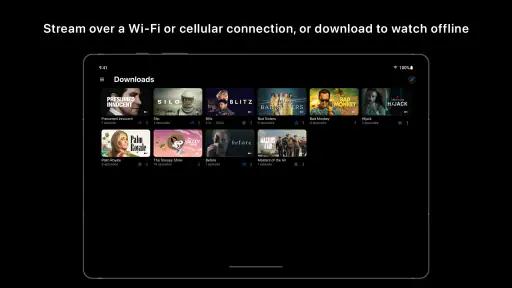
Apple TV is designed for streaming entertainment, so a reliable internet connection is important when you want to watch content. The connection available to your device can affect playback quality and convenience. If you plan to stream using mobile data rather than Wi-Fi, keep your data allowance in mind; watching video can use a substantial amount of data, depending on your viewing habits and connection.
Can I watch Apple TV content while travelling or in another country?
You can use the Apple TV app on supported devices, but the content and services available may vary by region. If you travel, the selection you can access may differ from what you see at home, and particular services can have their own availability rules. It is sensible to check what is accessible in your destination before relying on the app for a specific show or event.
Does Apple TV include live sports and Apple Originals?
Apple TV’s app summary highlights Apple Originals, live sports, and more. That describes the kinds of entertainment associated with the app, but it does not mean every title or sporting event is automatically included with a free download. Access can depend on the content, your location, and whether a subscription or separate purchase is required, so review the terms before you start watching.
Pros
- High-quality streaming experience.
- Access to exclusive Apple Originals.
- Seamless integration with Apple devices.
- User-friendly interface and navigation.
- Wide selection of TV shows and movies.
Cons
- Requires Apple device for full functionality.
- Limited third-party app support.
- Higher subscription cost compared to some competitors.
- Content availability may vary by region.
- No offline viewing option for certain titles.
- Category
- Entertainment
- Version
- Varies with device