Move to iOS
- 14.58K
- 3.7
- Installs
- 100.00M
- Price
- Free

Screenshots
Analysis by Reviewed
When I help someone move from Android to an iPhone, I treat the transfer as a small project rather than something to start while rushing out the door. Move to iOS is most useful when the new iPhone is still being set up: it gives you a guided route for bringing familiar personal information along, while leaving you in control of what you need to prepare and check afterward.
Before you begin, make the switch easier
My first practical tip is to check the Android phone before opening the transfer flow. Decide whether you need every photo and video on the new phone right away, and make sure you know which accounts and services you use. That little inventory helps you avoid treating the move as a perfect clone: some things transfer, while apps and music need separate attention.
I would also plan for both phones to stay available until you have reviewed the result. A successful transfer is not the same as confirming that every important item is where you expect it. Check a few recent contacts, calendar entries, and photos before wiping or trading in the Android device. This is especially useful if you rely on older message conversations or bookmarks that you rarely open but may need later.
The Latest on Move to iOS
A good fit for a clean, one-time migration
The app is aimed at a specific moment: moving from Android to a new iPhone or iPad. It is not a general-purpose file manager, a way to sync two phones indefinitely, or a tool for keeping Android and iOS in lockstep. If your goal is a straightforward first setup, that narrow focus is a strength. If you only need to move a handful of files after the iPhone is already configured, a manual method may be less disruptive than starting over.
That distinction matters in everyday life. Imagine replacing an Android phone after work and wanting your contacts, photos, and message history ready before the next morning. I would start the transfer when I can leave both devices alone, then use the rest of the evening to reinstall the apps I actually use and sign back into key services. It is a calmer plan than trying to do everything in one rushed sitting.
Seamless Transition
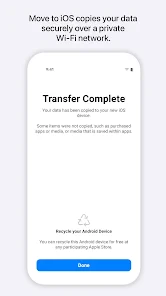
Switching phones can be a real pain, but Move to iOS takes the hassle out of the equation. All you need to do is download the app on your Android device, and you’re halfway there. The app establishes a private Wi-Fi connection between your Android device and your new iPhone. It’s like a secret handshake, ensuring your data moves securely.
What Can You Transfer?
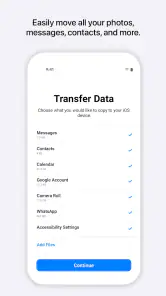
Here’s where Move to iOS really shines. You can transfer almost everything you need: contacts, message history, photos, videos, web bookmarks, mail accounts, and calendars. Even your wallpaper makes the jump, so your new iPhone feels just like home. Anything not nailed down—like apps and music—will have to be re-downloaded, but hey, it’s a small price to pay for a fresh start.
More From Our News Desk

Android Auto Makes the Case for Quieter Car Software

MobiOffice: Transforming Mobile Productivity with Seamless Integration

EA SPORTS FC™ Mobile Soccer: Redefining Mobile Sports Gaming

How Microsoft OneDrive Became a Mobile Productivity Giant

How Google Translate Breaks Language Barriers Effortlessly

Why Google Sheets Is the Ultimate Mobile Productivity Tool
That difference between personal data and apps is worth planning around. I’d use the move to carry across the information that gives the phone continuity, then choose which apps to install again instead of recreating every old habit automatically. For music, check how you access it on Android before switching; a streaming account or a separately stored library may call for its own setup. This two-stage approach makes the transfer less of an all-or-nothing bet.
User Experience
Using the app is straightforward and doesn’t require a tech degree to understand. Once both devices are connected, you’ll receive a security code on your Android device. Enter this code on your iPhone, and the transfer begins. You can grab a cup of coffee while it does its magic. The whole process is surprisingly quick, although the time it takes can vary depending on how much data you’re transferring.
For a smoother attempt, I avoid using either phone for other tasks while the transfer is underway and keep them close enough to follow the connection instructions. If a connection hiccup interrupts the process, I’d check the setup steps on both devices and try again rather than assuming the data has moved completely. The code-based pairing is easy to follow, but the process still depends on a stable connection and patience; starting it when you need to leave soon is asking for stress.
Settings and habits that make setup calmer
I would make a short checklist before beginning: confirm the new iPhone is at its initial setup stage, decide what matters most on the Android phone, and make sure you can access the accounts you will need afterward. This is less about changing obscure settings and more about removing avoidable interruptions. If you are unsure whether an old account still works, checking it before the transfer is easier than discovering the problem while trying to settle into the new phone.
Experienced users can also make the handoff more repeatable without expecting the app to do everything. I keep a simple note of the services I need to sign into, the apps I want back, and any files that have their own storage or backup routine. That list is useful after the transfer because it separates what arrived through the migration from what still needs attention. It also helps avoid reinstalling apps just because they were present on the old device.
One practical trade-off is photo selection. If the Android phone holds a large library, decide whether you need the whole collection immediately or only the photos you rely on day to day. That choice affects how much you ask the transfer to handle and how soon you can move on to checking the iPhone. I would rather make that decision in advance than wait through a transfer and then realize I had a different priority.
Faster patterns for a less stressful move
A useful rhythm is to separate migration from personalization. First, use the guided transfer for supported personal information. Next, verify a few examples from each important category. Only then reinstall the apps you actually use and sign into the services that matter. This order gives you a clearer sense of what the transfer accomplished, instead of mixing troubleshooting with a long list of app downloads and account prompts.
If the move is part of a phone replacement on a work night, I would start only when I can stay nearby and let both devices complete the process without interruption. Once it finishes, I can prioritize essentials such as messaging, email, and any calendar access I need the next morning; less urgent apps can wait. This is a small change in routine, but it makes the switch feel manageable rather than like an all-evening test of patience.
For people who switch phones regularly, the most valuable shortcut is not a secret button but a consistent preparation habit. Keep the old phone available, know your account credentials, and verify important information before deciding the migration is complete. That discipline is especially helpful when a familiar-looking contact list creates a false sense that everything else has arrived too.
Where the handoff has limits
Compared with copying files manually or relying on separate cloud services, this app is more convenient for a broad first move because it gathers several kinds of information into one guided setup. The trade-off is that it is designed around that Android-to-Apple transition, not every possible migration problem. It will not make app availability, music setup, or account sign-ins disappear, and it is not the best answer for a few isolated documents or a phone that is already fully configured.
Apple makes this free Tools app, which is rated for Everyone and has reached over 100 million installs. Its average rating is 3.7 from around 214,000 ratings, so I see it as a widely used helper with a practical purpose rather than a flawless transfer guarantee. The app first appeared in 2015, and version 4.0.3 supports Android 6.0 and later. Those details make it accessible to many Android users, though the actual experience still depends on the devices and connection involved.
The usual alternatives make more sense in a few specific cases. If the iPhone is already configured and you only need one document or a small batch of photos, a direct file-sharing or cloud-storage method can be more targeted than restarting setup. If you mainly want access to email, contacts, or calendars, signing into the relevant accounts may be enough for those items. On the other hand, when you want several kinds of personal information brought over during a new-device setup, handling each category separately can become a fiddly series of tasks; that is where this guided route earns its place.
I would also be cautious about treating a transfer as a backup. The app is for moving to iOS, not for keeping a second, continuously updated copy of an Android phone. If you need an ongoing archive or plan to keep both devices active, use the services and backup methods that fit that goal instead. Likewise, anyone expecting every app, purchase, local music file, or sign-in state to be recreated automatically should adjust expectations before starting.
One question people often have is whether they can move just a few things. The most natural use is the broad migration during initial setup; for a small, later transfer, I would compare the effort of a manual route with the disruption of changing the phone setup. Another common concern is whether a finished progress screen means the new phone is ready. I still recommend opening representative contacts, photos, calendar entries, and conversations, because checking the actual items you care about is more reassuring than relying on a general completion message.
People also ask whether they should erase the Android phone once the transfer appears complete. I would not do that immediately. Keep it accessible until you have checked the iPhone and confirmed you can sign into the important services. And if a first attempt is interrupted, do not assume that partial progress equals a complete move; revisit the setup instructions and verify the outcome before making the old device unavailable.
Who should choose another route?
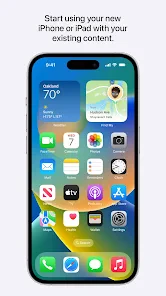
This is a strong fit for someone setting up an iPhone or iPad from Android who wants a guided start and is prepared to finish a few tasks manually. It is particularly useful if contacts, photos, messages, and familiar account details are more important than carrying every old app across unchanged. The guided process reduces the number of separate decisions you have to make at the start, while still leaving room to rebuild the new phone more thoughtfully.
I would skip it if your iPhone is already organized and you only need to send a couple of files, or if your real goal is ongoing synchronization between two phones. It is also not ideal for someone who must be available on both devices throughout the transfer or cannot spare time to verify the result. In those situations, smaller account-based or manual transfers can be easier to control and less disruptive.
There is a useful distinction between switching ecosystems and simply replacing a device. If you are moving to iOS, this app can reduce the initial gap by bringing across supported information. If you are staying within Android, or merely moving a few items between devices that are already set up, a platform-specific restore or a direct sharing method may fit better. Choosing the right tool for the scale of the move matters more than trying to force one migration path onto every situation.
Final Thoughts
So, is Move to iOS worth it? Absolutely. It’s a nifty little app that does exactly what it promises, with minimal fuss. Sure, there’s the odd hiccup—like the occasional failure to connect on the first try—but these are minor compared to the convenience it brings. For anyone looking to make the leap from Android to iOS, this app is like having a friendly guide helping you every step of the way.
My recommendation comes with one condition: treat it as the start of the move, not the end. Keep the Android phone intact until you have checked the things you care about, and expect to reinstall apps and sort out anything outside the transfer. That habit is more valuable than trying to rush through setup or assuming a familiar-looking home screen means the whole job is done.
In conclusion, if you’re on the fence about switching ecosystems, Move to iOS might just tip the balance in favor of Apple. It’s user-friendly, efficient, and makes the daunting task of moving data feel like a breeze. So, go ahead and give it a whirl. You might find that the grass really is greener on the other side!
Move to iOS Frequently Asked Questions
Do I need to prepare anything before starting a Move to iOS transfer?
Before you begin, have both devices with you, make sure they have enough battery for the transfer, and keep them close together while they connect. It also helps to decide which information you want to bring across and to avoid interrupting the process. Move to iOS is intended to be used during setup of the new iPhone or iPad, so plan to start it before completing that setup.
Is Move to iOS safe to use for personal information?
Move to iOS is designed to transfer personal information securely from an Android device to an iPhone or iPad. It establishes a private Wi-Fi connection between the devices for the transfer, rather than requiring a cable. As with any device migration, keep both devices in your possession and follow the prompts on each screen so you can confirm that they are connected to each other.
Will my Android phone still have my data after using Move to iOS?
Move to iOS is used to transfer selected information to your new iPhone or iPad; it is not a replacement for deciding what to keep on your Android device. Before starting, make sure you understand which items you want to move and keep a separate copy of anything especially important if you want an additional backup. The transfer process is intended to bring information to the new device, not to make the Android phone your only copy.
Is Move to iOS available for Android, and what does it cost?
Yes. Move to iOS is an app for Android users preparing to switch to an iPhone or iPad, and it is free to download. It is developed by Apple and focuses on helping people bring selected personal information to their new device. You will need access to both your Android device and the iOS device during the transfer.
What is Move to iOS and how does it work?
Move to iOS is an application designed to make the transition from an Android device to an iOS device seamless and straightforward. It wirelessly transfers your essential data including contacts, message history, photos, videos, web bookmarks, mail accounts, and calendars to your new iOS device. It establishes a secure private Wi-Fi network between the devices to facilitate this transfer, ensuring your data is safely relocated without the need for extensive manual efforts.
Pros
- Seamlessly transfers data from Android to iOS.
- User-friendly interface.
- Supports a wide range of data types.
- Free to use without in-app purchases.
- Reliable and secure transfers.
Cons
- Requires both devices to be connected to Wi-Fi.
- Some data types may not transfer.
- Can be slow with large data.
- Only works with new or reset iOS devices.
- Occasional connectivity issues.
- Category
- Tools
- Version
- 4.0.3









