Beats
- 5.62K
- 3.7
- Installs
- 10.00M
- Price
- Free

Screenshots
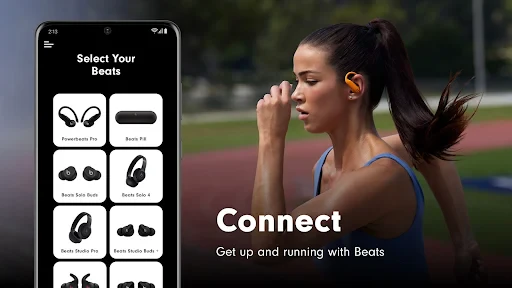
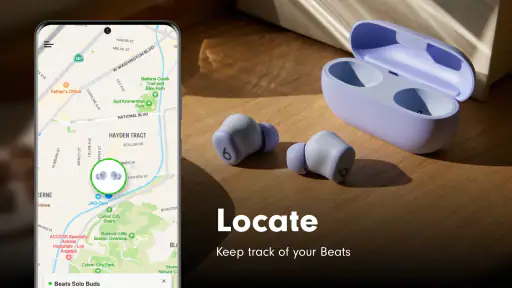
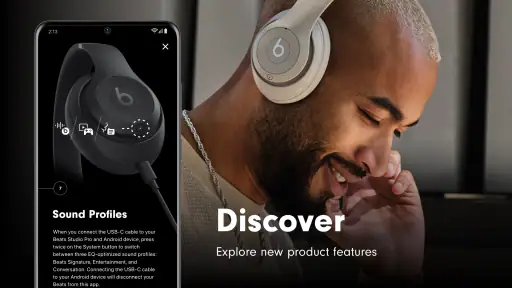

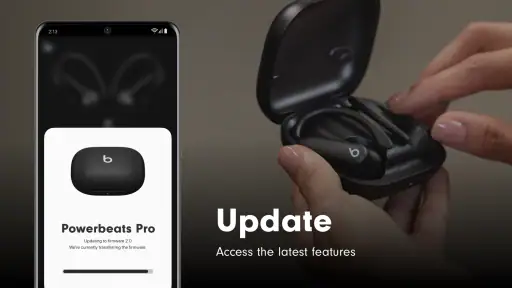
Analysis by Reviewed
Before I rely on any audio tool on the move, I ask a practical question: what still works when the connection becomes unreliable? With Beats, I’d treat network-dependent tasks and listening controls as separate parts of the experience. The app is a free tools app from Apple, and its purpose is tied to getting more from Beats listening rather than replacing every music service or player on a phone.
When the connection matters
Connectivity is most relevant when the sound source or the listening setup depends on another service or device. I’d check that the music I want is already available in the player I plan to use, then test the controls I care about before leaving home. That simple habit helps distinguish a problem with the connection from a setting or playback issue, instead of discovering the difference midway through a commute.
For a short routine—adjusting sound before a walk, then leaving the phone in a pocket—the main benefit is convenience, not a richer network experience. If I expect to change settings often, I’d make those changes while the phone is easy to reach and confirm the result with a familiar track. A small adjustment can sound very different across earbuds, headphones, and a car system, so I wouldn’t assume one choice will suit every listening situation.
On the move, and when something goes wrong
A realistic use case is setting up a preferred sound before heading out, then making only occasional changes during the day. On a noisy bus, for example, I’d avoid repeatedly adjusting controls while trying to listen; I’d pause, make one deliberate change, and compare it with the previous setting. That is safer and more useful than chasing a perfect sound in a changing environment.
If a control or connection stops behaving as expected, I’d first check the basics: whether the listening device is active, whether the phone is connected as intended, and whether playback itself is working. Then I’d close and reopen the app and retry the task. This kind of step-by-step check is more sensible than immediately changing several settings at once, since it keeps the cause of a problem easier to identify.
Who benefits from a focused Beats tool?
I’d consider this app most useful for someone who already uses compatible Beats listening gear and wants a dedicated place to manage the experience. It is less compelling if you mainly need a full music library, streaming discovery, playlists, or a general-purpose audio editor; those jobs are better handled by the services and tools built around them. Compared with opening a music app’s own settings or using a phone-wide sound control, a dedicated Beats app makes most sense when its device-focused controls are the ones you actually need.
For data-conscious use, I’d do setup and any connection-dependent checks over a trusted network, then avoid assuming that every function will behave the same when coverage drops. I’d also keep app use purposeful rather than leaving it open without a reason. The useful question is not simply whether a phone has signal, but whether the particular task I’m trying to complete needs that connection.
More From Our News Desk

Weather by Xiaomi Review: Clear at a Glance, Less Clear Up Close

X Under Pressure: Can It Recover When Posting Goes Wrong?

Clash of Clans Is Won Between the Battles

Android Auto Makes the Case for Quieter Car Software

MobiOffice: Transforming Mobile Productivity with Seamless Integration

EA SPORTS FC™ Mobile Soccer: Redefining Mobile Sports Gaming
Choosing it for the right listening routine
I’d especially consider Beats if I use compatible gear regularly and want to make a few considered adjustments rather than spend time managing an entire music library. For example, someone who listens during a morning walk, takes calls during the day, and relaxes with music at home may value a dedicated place to check the listening setup. The benefit is less about turning a phone into a studio and more about reducing the hunt for the relevant controls when the same headphones are part of a daily routine.
It is a weaker fit if I change between unrelated headphones, speakers, and audio apps and expect one profile to follow every situation. In that case, a phone’s general sound settings or the controls built into the music service I use may be easier to manage. I’d also skip it if I rarely adjust my listening setup: a companion app is only worthwhile when its specific controls solve a recurring problem.
A practical test is to pick one situation I want to improve—such as vocals sounding clearer on a familiar commute—and make a single change before leaving. If I can hear a useful difference without repeatedly reopening the app, that is a good sign it fits my routine. If the change only seems helpful in one room or with one track, I would avoid treating it as a universal setting.
Have you ever craved a way to get lost in your music while still having the power to control the sound like a professional DJ? If yes, then let me introduce you to the Beats app. This app is not just another music player; it’s a full-on auditory experience crafted for the true music enthusiast.
Getting Started with Beats
Right off the bat, installing the Beats app is a breeze. Available for both Android and iOS, it’s just a download away from turning your smartphone into a mini studio. The user interface is sleek and modern, with a dark theme that’s easy on the eyes, perfect for those late-night jam sessions. Navigating through the app is intuitive, even if you’re not tech-savvy. Everything is designed to be where you’d expect it, making the experience seamless from the get-go.
Features that Stand Out
Now, let’s talk features. Beats comes packed with an equalizer that lets you tweak your sound to perfection. Whether you’re into bass-heavy hip-hop or the intricate layers of classical music, this app has you covered. The equalizer presets are a great starting point, but the real fun begins when you start customizing your settings.
Another cool feature is the crossfade option. It’s a subtle feature but makes a world of difference when you’re in the zone. It smoothly transitions from one song to the next, maintaining the vibe without abrupt stops that kill your mood.
Usability and Performance
Performance-wise, Beats runs like a charm. It doesn’t hog your phone’s resources, which is a relief because the last thing you want is your music app lagging. The app supports a wide range of audio formats, so whether your library is full of MP3s or high-quality FLAC files, you’re all set.
The app also syncs effortlessly with cloud services, making it easy to access your music collection from anywhere. Plus, the offline mode is a lifesaver when you’re out of data or in an area with poor connectivity.
Why You’ll Love It
If you’re someone who loves to tweak and personalize every little detail, you’ll feel right at home with Beats. It offers a level of control that few other music apps can match. The freedom to adjust your listening experience to suit your mood is something that really stands out.
Moreover, the app is regularly updated, constantly adding new features and improvements. This ensures that it’s not just a one-time wonder but a companion that grows with your musical journey.
In conclusion, the Beats app is a must-have for anyone serious about their music. It combines functionality with an aesthetic appeal that’s hard to beat. So, if you’re ready to take your audio experience to the next level, give Beats a try. Trust me, your ears will thank you!
A quick reality check before installing
I’d also keep expectations tied to the app’s actual role: its store summary is about enhancing Beats, so I wouldn’t choose it as a substitute for a streaming subscription, a file organizer, or a studio mixing package. That distinction matters if you are comparing it with broad audio tools. A general equalizer may be more flexible across unrelated headphones, while a dedicated companion is more sensible when your goal is to manage a Beats listening setup without digging through unrelated menus.
Apple is the developer, and the app is listed for Everyone. It has a 3.7 average from around 23,000 ratings, with about 5,600 written reviews and over 10 million installs. Those figures suggest a widely used tool with mixed experiences, not a guarantee that every feature or connection will behave identically on every phone. It is free, currently at version 2.11, and was released on October 29, 2015; I’d still check compatibility and current behavior on my own device before building a routine around it.
Small habits that make sound adjustments useful
One non-obvious tip is to make changes with a reference track you know well, rather than judging a preset from a song you have never heard. Familiar vocals, bass, and cymbals make it easier to notice whether an adjustment is helping or simply making everything louder. I’d change one setting at a time and give it a short listen; otherwise, it is easy to confuse the effect of several tweaks and end up with a profile I cannot reproduce later.
I’d also think about where I listen before settling on a preference. A setting that feels lively in a quiet room may become tiring during a long trip or sound unbalanced through a different output device. If the app offers controls tied to a particular listening setup, I’d treat those as practical conveniences rather than universal corrections. For someone who switches between several brands of headphones, a phone-wide audio option may be less fiddly.
Working through interruptions without guesswork
If I lose coverage while out, I would first keep the problem small: check whether the audio is still playing and avoid changing several app and phone settings at once. That helps identify whether the interruption concerns playback, the connection to the listening device, or a particular control. Once service returns, I’d retry only the action that failed instead of repeating the whole setup process.
For a data-conscious commute, I’d prepare the listening source in the music service or player I normally use before heading out, then use Beats for the device-focused adjustments I actually need. I wouldn’t assume that the companion app supplies the audio or makes every task independent of a network. This division of roles makes the routine easier to troubleshoot and avoids using mobile data just to revisit settings that are already where I want them.
My connectivity verdict
For me, Beats is worth considering when its device-focused purpose matches the gear I already use and I want a straightforward way to shape that experience. I would not make it essential to a travel routine until I had tested the actions I rely on, both at home and in a place with weaker coverage. Keeping expectations modest, checking settings before leaving, and having a familiar playback option ready are sensible ways to avoid frustration.
The app is not automatically the right pick for listeners who want one tool to handle music discovery, library management, and broad audio customization. But if your need is narrower—fine-tuning a Beats-oriented listening experience—its focused approach can be more convenient than searching through unrelated controls. I’d install it for that specific job, try a few deliberate adjustments, and keep it only if those changes make everyday listening easier.
Beats Frequently Asked Questions
Who develops Beats, and what is the app intended to do?
Beats is a Tools app developed by Apple. Its short description is “Beats,” and its summary is “Enhance your Beats,” indicating that it is intended to help users enhance their Beats experience. If you are looking for a general-purpose music player or streaming service, consider whether this app’s focus matches what you want before downloading.
What does the Everyone age rating mean for Beats?
Beats has an Everyone content rating, so it is presented as suitable for a broad audience. Parents and other users can still decide whether an app is appropriate for their circumstances by reviewing its store information and the permissions requested during installation. The rating is a helpful starting point, but it does not replace checking that the app fits your own preferences.
What devices and system requirements should I check before downloading Beats?
Beats is a Tools app developed by Apple, and its store description is simply “Beats,” with the summary “Enhance your Beats.” Before downloading, make sure you are choosing the version intended for your device and that your operating system is compatible with it. The app is free, so you can install it and explore its purpose without paying an upfront download price.
Is Beats free, and is it suitable for everyone?
Beats is free to download and has an Everyone content rating, so it is presented as suitable for a broad audience. It is an app in the Tools category, intended to help users enhance their Beats experience rather than serve as a general music streaming service. As with any app, it is sensible to review the permissions requested during installation and decide whether they fit your preferences.
What is Beats and what are its main features?
Beats is a popular music streaming app that offers users access to a vast library of songs from various genres and artists around the world. The app features curated playlists, personalized recommendations, high-quality audio streaming, and offline playback. Users can also create and share their own playlists with friends. Additionally, Beats provides exclusive content, such as podcasts and artist interviews, to enhance the overall music experience.
Pros
- High-quality sound output
- User-friendly interface
- Wide range of music genres
- Offline listening available
- Customizable playlists
Cons
- Requires subscription for premium features
- Can be data-intensive
- Limited free trial period
- May have occasional ads
- Not compatible with all devices
- Category
- Tools
- Version
- 2.11









