Hue Light App Remote Control
- 589.00
- 4.2
- Installs
- 1.00M
- Price
- Free

Screenshots
Analysis by Reviewed
I judge a smart-lighting app less by how many controls it presents than by how quickly I can get a useful room setting without stopping what I’m doing. Hue Light App Remote Control is aimed at people who want to manage Hue lighting from a phone, with scenes, widgets, and sound-related control as part of its appeal. The idea is convenient, but the day-to-day value depends on how well it fits the lights and habits you already have.
It is a free House & Home app from Smart Widget Labs Co Ltd, with optional in-app purchases priced from $2.99 to $24.99 per item. It is rated for Everyone and has an average rating of 4.2 from around 30,000 ratings, with over a million installs. The current version is 7.1, and it requires Android 6.0 or later. Those details make it accessible to many Android users, though they do not guarantee the same experience on every phone or lighting setup.
Start with the control you reach for most
Before adding scenes, widgets, or sound-related controls to your routine, I’d decide what currently makes adjusting the lights inconvenient. Is it having to open the usual controller, change several bulbs one by one, or walk across the room to find a switch? That small audit helps you judge whether this app solves a real problem. If the answer is simply “I want more lighting options,” it may still be worth exploring, but a specific annoyance gives you a fairer test than novelty alone.
There is also a practical difference between a control that looks useful and one that earns a permanent place on your phone. A scene you use while cooking, for example, should be easy to reach with clean hands and should work for the room’s actual layout. A setting meant for quiet reading should not be buried among several near-identical versions. I’d begin with a couple of clearly distinct choices and add more only after I know what is missing.
Because the app is centered on Hue lighting, it makes the most sense when Hue is already part of your home. I would not choose it as a general smart-home controller on the assumption that it will replace every brand’s app or every household automation. Its value is narrower and more useful when judged on its own terms: whether its phone controls and shortcuts make Hue lighting easier to manage.
Speed, setup, and the first useful scene
The first thing that struck me about the Hue Light App Remote Control is its clean and intuitive interface. I downloaded it on a whim because I was tired of manually adjusting my lights, and boy, was I in for a treat. Setting it up was a breeze. All I had to do was connect it to my Wi-Fi network, and I was good to go. There’s something incredibly satisfying about controlling all your lights from your phone, especially when you’re all snuggled up on the couch and don’t want to get up.
Scenes are most useful when they solve a routine
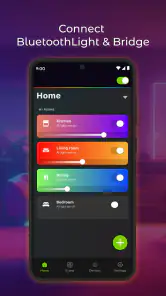
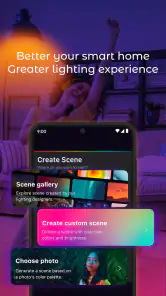
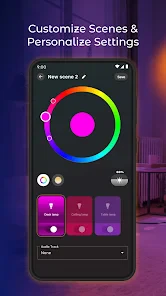
Once I got into the nitty-gritty, I discovered a whole slew of features that make this app a must-have. For starters, you can control multiple lights at once, which is perfect for setting the mood in your entire house with just a swipe. There’s also the ability to create scenes, which basically means you can have your lights dimmed to your preferred setting for movie nights or have them bright and energizing for when you’re working from home.
More From Our News Desk

Weather by Xiaomi Review: Clear at a Glance, Less Clear Up Close

X Under Pressure: Can It Recover When Posting Goes Wrong?

Clash of Clans Is Won Between the Battles

Android Auto Makes the Case for Quieter Car Software

MobiOffice: Transforming Mobile Productivity with Seamless Integration

EA SPORTS FC™ Mobile Soccer: Redefining Mobile Sports Gaming
That kind of scene control is more helpful when it replaces a sequence of small adjustments than when it simply adds another preset to browse. I’d start with a few distinct situations—settling in for the evening, focusing at a desk, and winding down—rather than creating many similar scenes. The payoff is faster selection later, especially when you’re carrying something or already seated. If a room has several bulbs, grouping their behavior into one deliberate choice can also make a single tap feel worthwhile.
What to expect during busy moments
Another cool feature is the scheduling option. I’ve set my lights to gradually brighten in the morning to simulate a sunrise, which makes waking up a lot less jarring. And if you’re worried about security, there’s a neat little trick where you can set your lights to turn on and off randomly when you’re not home. It’s like having a high-tech guard dog!
In practical use, schedules are best treated as a convenience rather than something to depend on for every situation. A morning routine is easy to appreciate when it works quietly in the background; a last-minute change is where direct controls matter more. I’d check that a schedule still matches your current routine after changing how you use a room, and keep a simple manual option handy for days when you wake earlier or later than planned. Random switching can make an empty home look occupied, but it is not a substitute for a security system.
Busy moments also reveal whether your control choices are sensible. If you are cooking, carrying laundry, or helping children get ready, a short route to one reliable room setting is more useful than a long list of fine adjustments. I’d put the most-used option where it can be reached without navigating through several menus, then leave less common experimentation for when there is time to browse. This is a small habit, but it keeps an app meant to save effort from becoming another task.
Sound sync deserves a similar bit of planning. I’d try it when lighting is part of watching or listening, then switch back to a stable scene when the room needs to support reading, conversation, or focused work. The trade-off is that a changing effect can add atmosphere but may be distracting when you want the room to feel consistent. Keeping an everyday scene separate from entertainment-oriented use makes it easier to return to a comfortable baseline.
Controls, connection, and recovery
Now, let’s talk about the user experience. One of the things I really appreciate is how user-friendly the app is. Even if you’re not super tech-savvy, you’ll find navigating through the options to be straightforward. The controls are responsive, and there’s minimal lag when you adjust the settings. Plus, the app integrates seamlessly with voice assistants like Alexa and Google Assistant, which is a huge plus if you’re a fan of voice commands like me.
However, I did notice a couple of hiccups. Occasionally, the app might lose connection with the lights, which means you’ll have to go through the pairing process again. It’s not a dealbreaker, but it can be a bit annoying if you’re in a hurry.
When a command seems slow or a light does not respond, I would avoid repeatedly tapping different scene controls: that can make it harder to tell whether the issue has cleared. I’d pause, check whether the connection is back, then try one simple control before relying on a more elaborate scene. If the same problem keeps interrupting a particular room, the practical question is whether the app remains a convenient shortcut there or whether the usual Hue control route is the less frustrating fallback. That distinction matters most when you need light immediately, such as entering a dark hallway with your hands full.
For a calmer check, I’d test one bulb before changing a whole-room scene. That helps separate a temporary connection problem from a scene that simply is not producing the result you expected. If the single-light control responds but a broader choice does not, retrying one carefully selected scene is more informative than rapidly switching among several. It also reduces the chance of leaving the room in a state you did not mean to set.
Where it fits among lighting options
Compared with using only the usual Hue controls, this app makes sense if you want its particular combination of phone-based scenes, widgets, and sound sync in one place. The official lighting controls may be the more natural choice if you already have a setup and routines that work, or if you want to minimize the number of apps involved. A voice assistant is handy when your phone is out of reach, while a phone app is better when you want to see and choose a specific scene quietly. I would not add another control layer unless its shortcuts solve a real annoyance in your home.
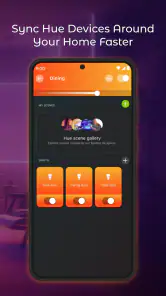
The widget angle is most useful for a repeatable action you make often: placing one dependable control on the home screen can reduce the friction of opening an app and searching for a scene. I’d reserve that space for a setting I actually use, not a novelty I try once. Sound sync is a different kind of choice: it may suit a room where lighting is part of entertainment, but it is less compelling if you mainly want predictable task lighting or calm evening brightness. In other words, the features are not equally valuable to every household.
There is a useful trade-off between a widget and a voice command, too. A widget is a visible, quiet option when you are near your phone and want to select a known setting; voice can be easier when your hands are occupied, but it is not always the right choice in a shared or quiet space. I would keep the method that fits each room and situation instead of trying to make one control style do everything. If you already use a voice assistant for simple on-and-off commands, the app’s advantage is more likely to be scene selection than basic switching.
For someone comparing this with a basic remote-style app, the appeal here is the mix of controls rather than a promise that every extra feature will matter. If you mostly turn lights on and off, the simplest route you already have is probably enough. If you routinely adjust several lights to suit different activities, scenes can reduce repeated work; if you enjoy experimenting with atmosphere, sound sync may justify a closer look. My test would be whether the app makes a frequent task easier within a normal week, not whether it offers the largest menu.
Who will appreciate it, and who may not
I can see this being a good fit for someone who already has Hue lights, likes adjusting the atmosphere by activity, and wants quick access from a phone. It is also appealing if you are willing to spend a little time deciding which scenes and shortcuts deserve a place in your routine. A useful everyday example is coming home with shopping: instead of walking through the rooms to adjust several bulbs, you can reach for a saved setting that makes the main living space comfortable while you unpack.
I would skip it if your current lighting controls already do everything you need, if you rarely change brightness or mood, or if a connection hiccup would be especially disruptive. It also may not suit someone who expects a new app to remove every setup step or make every bulb respond instantly under all conditions. The free starting point lowers the barrier to trying it, but optional purchases mean I would explore the controls I actually need before paying for anything. That is a better test than assuming every customization will earn a permanent place in your routine.
One way to decide whether it belongs in your routine is to give it a specific job for a few evenings: perhaps a reading scene, a convenient whole-room setting, or a shortcut for the lights you use most. If you find yourself reaching for that control without thinking, it is earning its place. If you still default to another app or switch, that is useful evidence too; there is no benefit in maintaining a second control layer just because it has more options.
It is also worth being clear about what “remote control” means for your household before you settle in. The experience described here is about controlling Hue lights through the app and your home connection, not a guarantee that every light will be reachable in every circumstance. I would first make sure the normal phone-to-light workflow is dependable in the rooms where you need it, then build routines around that. For a person who cannot tolerate interruptions to essential lighting, keeping a familiar fallback is more sensible than relying on any one app.
Final thoughts
All in all, the Hue Light App Remote Control is a solid choice for anyone looking to up their lighting game. It offers a lot of flexibility and customization options that make it more than just a remote control for your lights. Whether you’re a tech enthusiast or just someone who loves convenience, this app has something to offer.
If you’re on the lookout for an app that brings your home lighting to the 21st century, this might just be it. Give it a try, and let me know what you think!
Hue Light App Remote Control Frequently Asked Questions
Who develops Hue Light App Remote Control, and what is it designed for?
Hue Light App Remote Control is a House & Home app developed by Smart Widget Labs Co Ltd. It is designed for people who want to control Hue smart lighting from a mobile device, with options to personalize scenes, use widgets, and sync lighting with sound. Before downloading, consider whether its lighting controls and personalization features match the way you want to manage lights at home.
What is the app’s age rating, and is it appropriate for general household use?
Hue Light App Remote Control has an Everyone content rating, so its stated audience is broad rather than limited to adults. Its purpose is controlling and personalizing smart lighting, which can be useful to different members of a household. As with any app that operates connected devices, it is sensible to decide who should have access to the phone and lighting controls in your home.
Is Hue Light App Remote Control free to download, and are there paid features?
Hue Light App Remote Control is free to download, so you can try its lighting controls without paying upfront. The app also offers in-app purchases, with individual items ranging from around three to twenty-five dollars. Check the purchase details in the app before confirming anything, especially if you are interested in optional personalization features or want to keep use entirely free.
What phone requirements should I check before installing Hue Light App Remote Control?
The app is available for Android devices running version 6.0 or later. Before downloading, check your phone’s operating system and make sure it meets that minimum. Hue Light App Remote Control is a House & Home app from Smart Widget Labs Co Ltd, intended for managing lighting through a mobile device, so you will also need compatible smart lights to make use of its controls.
What is the Hue Light App Remote Control and how does it work?
The Hue Light App Remote Control is a mobile application designed to manage and control Philips Hue smart lighting systems. Users can adjust the lighting settings, change colors, and set schedules for their lights directly from their smartphone. The app connects to the lights via a wireless network, enabling seamless control over your home’s lighting environment.
Pros
- Intuitive user interface for easy navigation.
- Seamless integration with smart home systems.
- Wide range of customizable lighting effects.
- Responsive customer support team.
- Supports voice control via major assistants.
Cons
- Requires Philips Hue Bridge for full features.
- Limited functionality without internet.
- Initial setup can be time-consuming.
- Updates may occasionally disrupt settings.
- Some advanced features are paywalled.
- Category
- House & Home
- Version
- 7.1











