Smart Light Smart Home Control
- 1.53K
- 4.3
- Installs
- 1.00M
- Price
- Free

Screenshots
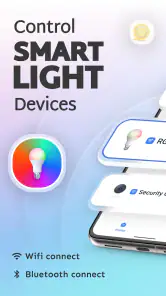

Analysis by Reviewed
I would treat any smart-lighting app as part of the home’s everyday infrastructure, not just as a colorful way to change a room’s mood. That is why I look beyond the first successful tap: I want to know whether the controls fit the devices I already own, whether I can keep a simple fallback, and whether the choices shown during setup feel clear. Smart Light Smart Home Control is a lifestyle app from Metaverse Labs for controlling compatible smart lights and Bluetooth devices. Its appeal is practical when it gives you a convenient way to manage the equipment you actually use; it is less compelling if you are looking for a complete home-automation platform.
Getting a Useful Setup Without Overcomplicating It
First off, let's talk about the setup process. It's as simple as pie. The app guides you through each step, ensuring that even those who aren't particularly tech-savvy can get their smart lighting system up and running in no time. All you need is a smartphone, a reliable Wi-Fi connection, and of course, compatible smart bulbs. Once you've got those checked off, you're halfway to a smarter home.
That straightforward approach is most useful if your goal is a few practical controls rather than a complicated home-automation project. I’d start with one bulb in a room you use every day, check that it responds reliably, and only then decide whether it is worth expanding. A single test also makes it easier to spot whether a problem is with the bulb, the home network, or the way the app is being used.
Start With a Small, Deliberate Routine
Before connecting several rooms, I’d write down the two or three jobs I actually want the app to handle. That might be switching on a lamp without getting up, changing brightness before reading, or controlling a Bluetooth device from the same phone. Starting with a short list helps distinguish useful convenience from features that sound attractive but would rarely become part of your day.
It also gives you a simple way to judge whether the setup is working. Try the same control from the same spot on a few ordinary occasions, then test it when you are in a different room or using the phone for something else. If the experience is dependable for your routine, adding another compatible light may make sense. If it is already awkward with one device, adding more can multiply the confusion rather than solve it.
Features That Shine Bright
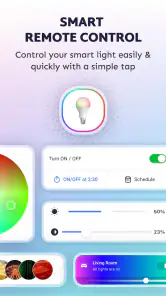
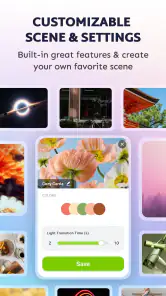
The app isn't just about turning lights on and off. Oh no, it's packed with features that will make your home the envy of the neighborhood. Imagine setting the perfect mood with customizable lighting scenes. Whether you're hosting a dinner party or winding down for the night, the app lets you adjust the brightness and color of your lights to suit any occasion. How cool is that?
A useful way to keep scenes from becoming clutter is to make each one answer a real need: a comfortable setting for relaxing, a brighter one for reading, and a welcoming level for guests. That gives you a small set of choices you can use without adjusting every bulb each time. Color changes can be fun, but for everyday use I’d prioritize brightness and a setting that remains comfortable for the room.
More From Our News Desk

Clash of Clans Is Won Between the Battles

Android Auto Makes the Case for Quieter Car Software

MobiOffice: Transforming Mobile Productivity with Seamless Integration

EA SPORTS FC™ Mobile Soccer: Redefining Mobile Sports Gaming

How Microsoft OneDrive Became a Mobile Productivity Giant

How Google Translate Breaks Language Barriers Effortlessly
One of my favorite features is the scheduling option. You can set up your lights to turn on or off at specific times, giving the illusion that someone’s home even when you're on vacation. It's not only convenient but also a great way to enhance your home security. Plus, the app supports voice control through popular assistants like Alexa and Google Assistant. So, if you're feeling particularly lazy, you can just tell your lights what to do!
For a normal weekday, I’d use a schedule for a predictable moment, such as switching a hallway light on around the time I usually get home, and keep a manual control available for days when plans change. A fixed routine is convenient, but it should not be treated as proof that someone is home or as a substitute for a proper security system. If you travel, consider whether a repeated lighting pattern suits your needs before relying on it.
Think Through the Everyday Details
A small but useful planning step is deciding what should happen when your routine changes. If you work late, have guests, or leave home earlier than usual, a schedule based on your normal day may no longer be helpful. I’d keep the most important action easy to reach manually, and use timed controls only for patterns that are genuinely predictable. That makes automation a convenience rather than another routine you have to monitor.
For a realistic evening, imagine coming in with shopping bags while the hallway is dim. A light that is already set to a comfortable level can be genuinely useful, and a quick phone adjustment can spare you from searching for a switch. But if your phone is in another room, its battery is flat, or the connection is uncooperative, the ordinary wall switch remains the more dependable tool. I would plan the setup around that reality instead of designing a routine that only works when everything is ideal.
The User Experience: Smooth and Intuitive
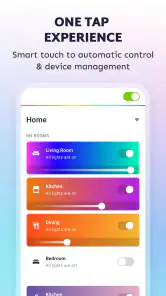
Now, let's chat about the user experience. The app's interface is sleek, intuitive, and user-friendly. Navigating through the app is a breeze, thanks to its well-organized layout. Everything is where you'd expect it to be, allowing you to focus on creating the perfect ambiance for your home rather than fumbling through confusing menus.
As a lifestyle app from Metaverse Labs, it sits in a crowded smart-lighting space where many people already have a bulb maker’s app or a broader smart-home hub. The practical distinction is convenience: this app is worth considering if it brings your compatible lights and Bluetooth devices into a control routine you actually want to use. If you already have a dependable setup that handles your devices well, switching simply for another interface may add little. Compatibility is the decision to make before installing; a control app cannot make an unsupported bulb work.
When choosing between an app like this and a manufacturer-specific alternative, I’d favor the manufacturer’s app if you need device-specific setup or troubleshooting, and a broader hub if you want one place to coordinate many kinds of equipment. For a household mainly interested in straightforward lighting adjustments, a dedicated control app can feel less overwhelming. The trade-off is that a simpler focus may not suit someone expecting every device in the home to work together through one comprehensive system.
On the trust side, I would avoid assuming that a smart-home app is private or secure just because the interface feels simple. Before connecting devices, I’d read the permission prompts and decide whether each requested access makes sense for the task. I’d also review the choices shown during setup and in the app, and keep account or device access limited to people who need it. Those are sensible checks for any connected-home tool; they do not require treating a lighting controller as a security product.
There is a personal data-sensitive moment whenever lights are controlled remotely or on a schedule: household routines can become visible through the way devices are used. I’d choose schedules with care, avoid sharing access casually, and remove a device from the setup if I no longer use it. If you are uncomfortable connecting home equipment to another app, using the bulb’s existing control method—or simply operating the light manually—may be the better choice.
Choosing What to Connect and Who Can Use It
When more than one person lives in the home, I’d agree on a simple naming scheme before adding several lights. Names based on the room and purpose are easier to understand than a row of vague labels, especially when you want to change one light without affecting another. This is a modest organizational habit, but it can prevent the app from feeling less clear as the setup grows.
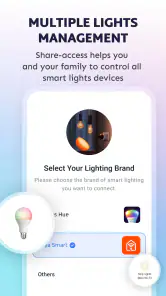
I’d also think about who genuinely needs access before making the app part of a shared household routine. A person who only wants to switch on a lamp may not need to change schedules or reorganize devices. Where the app presents account or sharing choices, take a moment to understand them rather than tapping through automatically. If you cannot tell which control grants access or what it changes, pause and use the existing physical control until you are comfortable.
Moreover, the app's reliability is commendable. It responds quickly to commands, ensuring that your home lighting adjusts instantly to your needs. No more waiting around for things to catch up, which is something I truly appreciate in a smart home app.
Still, a quick response in ordinary use does not remove the usual connected-device friction. A command can depend on the phone, the connection, and a compatible device all being ready, so I would keep a physical switch accessible rather than making an app the only way to light an important room. That small fallback matters most in kitchens, hallways, and other places where waiting for a phone is inconvenient.
People often wonder whether they need a subscription to begin, whether the app can control every smart bulb, and whether it is suitable for a child to use. It is free to download, though in-app purchases are offered at different prices; compatibility still depends on the particular device. The age classification is Everyone, but that does not replace an adult’s judgement about connected devices and household access. The app has a 4.3 average from around 114,000 ratings, with more than a million installs, which suggests broad use without guaranteeing that every bulb or home setup will behave the same way.
Who Is Likely to Get the Most From It?
I think it makes the most sense for someone who already has compatible lighting or Bluetooth equipment and wants a convenient phone-based way to handle a few everyday adjustments. It may suit a renter or a small household that wants to experiment with smart lighting without immediately building a large system, provided the devices are supported and the app’s controls match the job. The free download makes a cautious trial possible, while the in-app purchase range means I would check what is included before deciding to spend.
I would be more hesitant to recommend it to someone who expects every brand of bulb to work, wants detailed device diagnostics, or needs a single command center for a large mix of home equipment. A manufacturer’s own app may be the better choice when setup and device-specific support matter most; an established hub may be preferable when coordinating different types of equipment is the priority. And if you do not want to use a phone or connect household devices to an additional service, a regular switch is not a compromise—it is the simplest tool for that preference.
One question worth answering before you install is whether your phone can run it. The current version is 6.1.2, and the minimum Android requirement is Android 11, so I’d check the operating system first rather than troubleshooting an incompatible device later. Another practical question is whether a particular bulb will work: I would confirm that with the device’s own compatibility information before buying hardware or moving an existing setup. Those checks are less exciting than choosing colors, but they prevent the most avoidable disappointment.
Wrapping Up: Is It Worth It?
So, is the app worth your time and investment? In my opinion, it can be, as long as you approach it as a focused controller for compatible devices rather than a promise to automate an entire home. Its ease of use and the combination of lighting adjustments, schedules, and voice-control support are appealing for people who want a few convenient routines. The key is keeping expectations realistic and checking compatibility before you build around it.
My recommendation is more cautious for anyone whose priority is a fully unified smart home, detailed device management, or avoiding additional connected services. In those cases, compare the app with the control tools already supplied for your devices before changing anything. The current version is 6.1.2, and it runs on Android 11 or later, so checking your phone’s software compatibility is a sensible first step. For people who want accessible control of compatible lighting and Bluetooth devices, the free starting point makes it reasonable to try; purchases within the app are optional costs to weigh against the features you actually plan to use.
Whether you're new to the world of smart technology or a seasoned pro, this app offers something for everyone. Its ability to transform your living space with just a few taps on your phone is nothing short of magical. So go ahead, give it a try and take the first step towards a smarter, brighter home!
Smart Light Smart Home Control Frequently Asked Questions
Can I use Smart Light Smart Home Control to operate devices over Bluetooth?
Smart Light Smart Home Control is described as a home assistant for controlling smart light bulbs and Bluetooth devices. That makes it relevant if you want to manage lighting or other compatible Bluetooth devices from an app. The available controls can depend on the devices you use, so consider whether the app’s purpose matches your setup before downloading.
Is Smart Light Smart Home Control intended for beginners or experienced smart-home users?
The app is designed for smart-home control, with a focus on smart light bulbs and Bluetooth devices. Its stated purpose may appeal both to people starting to explore connected lighting and to users who already have compatible devices. Your experience will still depend on your particular equipment and needs, so it is sensible to check that your devices suit the app before installing.
Is Smart Light Smart Home Control suitable for everyone in the household?
Smart Light Smart Home Control has an Everyone content rating, so its age classification is suitable for a broad audience. It is a lifestyle app for controlling smart light bulbs and Bluetooth devices, rather than an entertainment title. Whether it works for each person in your home depends on access to the compatible devices and the phone they use.
Will my phone be able to run Smart Light Smart Home Control?
Smart Light Smart Home Control is a lifestyle app, and it requires Android 11 or later. Before downloading, check your device’s operating system version in its settings to make sure it meets that requirement. The app is free to install, though it offers in-app purchases, so you may also want to review those details in the store before deciding whether it is right for you.
Is Smart Light Smart Home Control free to download, and does it include purchases?
The app is free to download, so you can try it without paying an upfront price. It also offers in-app purchases, with items priced from $2.99 to $24.99. Those purchases may matter if you want access to additional options, so check the available purchase details before buying anything. Smart Light Smart Home Control is rated for Everyone.
Pros
- User-friendly interface
- Compatible with multiple smart devices
- Remote control access
- Energy-saving mode
- Customizable settings
Cons
- Limited compatibility with older devices
- Requires stable internet connection
- In-app purchases for premium features
- Occasional connectivity issues
- No offline functionality
- Category
- Lifestyle
- Version
- 6.1.2