Grammar Check by AI Writing
- 619.00
- 4.3
- Installs
- 1.00M
- Price
- Free

Screenshots
Analysis by Reviewed
I find a grammar checker most useful when it helps me feel more certain about a message without making me hand over my voice. Grammar Check by AI Writing is an education app from Metaverse Labs that gives everyday writing a quick review, with tools for correction, paraphrasing, and word lookup. It is free to install, rated for Everyone, and has an average rating of 4.4 from around 22,000 ratings. That gives me a useful sense of its reach, but the real question is whether its approach fits the way you write.
For me, that question also includes who can comfortably use the app, in what situations, and where a quick checker is simply not enough. Its appeal is practical rather than complicated: put a piece of writing in front of it, consider the suggestions, and decide what to keep. That can be a helpful routine, as long as the writer remains in charge of the message.
Checking Grammar with a Tap
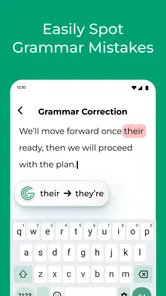
With Grammar Check by AI Writing, you get a virtual writing assistant that you can keep in your pocket. Whether you're writing an email, a blog post, or even a text message, this app diligently scans your text for any grammatical errors or awkward phrasing. It's like having a grammar-savvy friend who’s always ready to lend a hand—or a brain!
Readable feedback, with you in control
The first thing you notice about this app is its super intuitive interface. I mean, who doesn’t love an app that's easy to navigate, right? With just a few taps, you can copy your text into the app and watch as it goes to work. The app highlights potential errors, offering suggestions for corrections that are both clear and easy to understand. It's almost like magic!
That quick, text-first workflow can be helpful if a crowded screen or a long editing process makes writing feel harder. I would still read each suggestion rather than accept changes automatically: a correction can fix grammar while shifting tone, emphasis, or meaning. For a message where warmth matters, such as an apology or a note to a teacher, I treat the app’s output as a second opinion and keep the final wording mine.
One useful way to reduce the mental load is to paste only the section you are actively reviewing. A full page can make it harder to notice which change matters, while a paragraph or a few sentences give you a clearer before-and-after comparison. I also find it helpful to read the revised sentence aloud, or silently at a slower pace, before using it. If the grammar looks cleaner but the line no longer sounds like something I would say, I restore the original phrasing or edit the suggestion myself.
This distinction matters for people who are learning English, managing attention, or simply trying to write while tired. A checker can flag a possible issue, but a suggestion is not the same as an explanation tailored to your situation. Rather than tapping through a whole batch of edits, I would use one or two examples to notice a recurring pattern, then decide whether that lesson applies to the next sentence. That turns a quick correction into a small learning opportunity without making every message feel like homework.
More From Our News Desk

Weather by Xiaomi Review: Clear at a Glance, Less Clear Up Close

X Under Pressure: Can It Recover When Posting Goes Wrong?

Clash of Clans Is Won Between the Battles

Android Auto Makes the Case for Quieter Car Software

MobiOffice: Transforming Mobile Productivity with Seamless Integration

EA SPORTS FC™ Mobile Soccer: Redefining Mobile Sports Gaming
Useful across different writing tasks
But wait, there’s more! This app isn't just about catching those pesky grammatical slip-ups. It also helps improve your overall writing style. You'll receive suggestions to make your sentences more concise and impactful. It’s like having a personal editor who’s not afraid to give it to you straight. Plus, for those of us who struggle with writer's block, the app can help spark creativity by offering alternate phrasing and word choices. Pretty neat, huh?
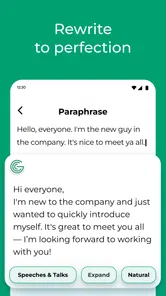
A practical way to use those options is to revise in passes. First check for basic errors, then consider whether a suggested alternative actually sounds like you. If I am stuck on one clumsy sentence in a school assignment, paraphrasing can offer a fresh starting point; I would not use a rewritten passage as a substitute for understanding the material or checking its meaning. Keeping the original sentence nearby makes it easier to spot when a smoother version has introduced a claim I never intended.
That side-by-side habit is especially valuable when the writing contains names, dates, subject-specific vocabulary, or a carefully qualified point. A fluent rewrite may remove a hedge such as “usually” or “in some cases,” even though that small phrase is important to the claim. I would check those details manually instead of assuming a more polished sentence is more accurate. For academic work, I would also follow the teacher’s rules on writing assistance and make sure any final submission reflects my own understanding.
Everyday access and practical trade-offs
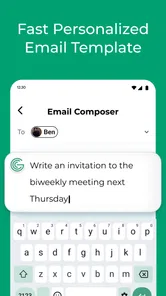
For a realistic routine, imagine drafting a short work email on your phone while waiting for a meeting. I would paste in the message, check the grammar, compare any rephrasing with my original, and make a final read-through before sending. That is a manageable use for a focused writing app. It may be less suitable for a long report that needs document-wide organization, tracked revisions, or collaboration; a full word processor is usually better for that kind of editing.
The app also includes a dictionary, which can make it handy when I want to check a word rather than rewrite a whole sentence. Still, switching between correction, paraphrasing, and lookup is most useful when I have a specific question in mind. If I ask an AI tool to reshape every line, I risk losing the details and personality that made the draft mine. A useful habit is to accept only changes I can explain and defend.
For someone who regularly writes in more than one language or is still building confidence with formal English, that mix of checks can be more convenient than moving among separate tools. But the convenience has a trade-off: a general writing assistant may not understand the conventions of a particular workplace, class, or specialist field as well as a purpose-built editor or a human reader. I would use it to catch ordinary sentence-level problems, then ask a knowledgeable person to review an important document where precision has real consequences.
On the practical side, it is free to install, while in-app purchases range from $3.99 to $99.99 per item. The current version is 1.9.33, and it supports Android 5.0 and later. With more than one million installs and 559 written reviews, it has reached a broad audience, though those figures cannot tell me whether its suggestions will suit a particular writing style. I would try the free experience on ordinary, low-stakes text before deciding whether any paid option is worth considering.
Because there are in-app purchases, I would make the decision to spend only after trying the tasks I actually care about, rather than assuming every feature is necessary. If all I need is an occasional spelling or grammar check, the free experience may be enough for my routine. If I mainly want definitions, a dedicated dictionary could be a simpler fit; if I need formatting and a long document’s structure, a word processor is the more sensible starting point. The right alternative depends on the job, not on how many tools an app can put in one place.
AI suggestions need a human check
The true beauty of this app lies in its AI-powered engine. It's constantly learning and evolving, which means its suggestions get better over time. And trust me, you’ll start noticing improvements in your writing before you know it. The AI doesn’t just correct; it educates. You’ll find yourself picking up new grammar tips and tricks as you use it, which is a win-win in my book.
I would be careful, though, about treating a polished sentence as automatically correct for every audience. A tool can help with grammar and phrasing, but it cannot make the judgment calls for you: whether a message should sound formal, whether a technical term is right for your field, or whether a rewrite still reflects what you mean. For learners, the best payoff comes from comparing a suggestion with the original and noticing the pattern, not simply tapping through edits.
There is also a useful boundary between checking and authorship. If I am writing a personal note, I may welcome a correction but not want the wording to become unusually formal. If I am writing a public-facing statement, I would be more cautious still, because a small change in emphasis can affect how a reader understands responsibility or intent. In both cases, I treat the tool as a reviewer of sentences, not as the final judge of what I should say.
Who it suits, and where it falls short
At the end of the day, Grammar Check by AI Writing is a solid choice for anyone looking to enhance their writing skills. It's user-friendly, efficient, and packed with features that go beyond basic grammar checking. Plus, it’s a great confidence booster for those who might feel a bit insecure about their writing abilities. So, if you're on the hunt for a reliable grammar tool, why not give this app a shot? It might just become your new best friend in the world of words.
I see the strongest fit for students polishing short assignments, people writing in a second language, and anyone who wants a quick check before sending everyday messages. Someone who needs extensive formatting, a shared editing workflow, or a careful human review of high-stakes legal or professional writing should look to a more specialized option instead. A standalone dictionary may also be a simpler choice if word definitions are all you need.
It is also a reasonable option for someone who wants one phone-based place to check a short note, reconsider an awkward sentence, and look up a word. I would be less likely to recommend it to a writer who needs extensive control over a long manuscript, a team commenting on the same draft, or strict editorial consistency across a large project. Those jobs benefit from tools designed around documents and collaboration, while a focused mobile checker is better suited to quick, individual decisions.
If you are unsure whether the workflow will suit you, start with a low-stakes paragraph that you already understand well. Check one sentence, compare the original with the suggestion, and see whether the feedback is easy for you to interpret. That short trial can answer practical questions that a rating cannot: whether you like reviewing text on your phone, whether the phrasing options preserve your voice, and whether the dictionary is useful enough to keep in your routine.
For everyday access, I would avoid making the experience more demanding than it needs to be. A quiet moment and a short passage make it easier to focus on what changed; when rushed, distracted, or working in an uncomfortable setting, I would postpone anything that needs careful judgment rather than approve edits quickly. The app can make an editing step more approachable, but it cannot remove the need to see, read, and assess the text in the way that works for you.
In conclusion, this app is not just a tool; it’s a companion in your writing journey. Whether you're a student, a professional, or just someone who enjoys crafting the perfect sentence, Grammar Check by AI Writing is here to guide you every step of the way.
My inclusive verdict is positive but measured: the simple copy-and-check flow may reduce the effort of getting started, yet it is not a substitute for a comfortable device setup or a reader’s own judgment. If you have difficulty typing, reading small text, or working in a noisy or distracting setting, the experience will depend on the phone and conditions you use; I would test it with a short, low-pressure paragraph first. For an accessible writing routine, keep drafts brief, review suggestions one at a time, and pause whenever the app’s wording feels less clear than your own.
That is why I would describe its accessibility in terms of a useful, uncomplicated workflow rather than a promise that it will suit every need. The app may help someone who prefers short editing sessions, but typing, reading, and comparing alternatives can still be tiring on a small screen. If those steps are difficult, using a device setup and writing environment that already feel comfortable matters more than pushing through a lengthy review. My recommendation is to keep the tool as an optional aid, use it on manageable pieces of text, and trust your own judgment whenever a suggestion does not feel right.
Grammar Check by AI Writing Frequently Asked Questions
Can I use Grammar Check by AI Writing to revise essays, emails, or other everyday documents?
Yes. Grammar Check by AI Writing is aimed at everyday writing tasks, and its tools include grammar checking, paraphrasing, autocorrection, a dictionary, and writing assistance. Those features can be useful when reviewing an essay, polishing an email, or checking a draft before sharing it. Treat suggestions as support rather than a substitute for your own final review.
Is Grammar Check by AI Writing suitable for beginners learning English?
It may be useful for learners who want help checking written text, since the app’s stated tools include grammar checking, autocorrection, a dictionary, and writing assistance. These can help draw attention to possible issues while you draft or revise. As with any automated writing tool, it is worth considering each suggestion and learning from it rather than accepting every change without thought.
Does Grammar Check by AI Writing offer paraphrasing and dictionary tools?
Yes. The app’s summary highlights both paraphrasing and a dictionary, alongside grammar checking, autocorrection, and writing assistance. These features can make it useful for more than spotting errors: you can also explore alternate wording or look up a word while working on a draft. Review paraphrased text carefully to make sure it preserves your intended meaning and tone.
Is Grammar Check by AI Writing suitable for children and families?
The app is listed with an Everyone content rating, so its stated age classification is suitable for a broad audience. Its focus is writing support, including grammar checking, paraphrasing, autocorrection, and dictionary access. Families can still decide whether the app fits a child’s needs and guide younger users in reviewing automated suggestions rather than treating them as authoritative.
Does Grammar Check by AI Writing have a free download, and are there paid options?
The app is free to download, and it also offers in-app purchases priced from $3.99 to $99.99 per item. Before choosing a paid option, review the purchase details displayed in the app so you understand what is included and whether it suits your needs. You can start by considering the writing assistance you want and whether the free experience is sufficient.
Pros
- Accurate grammar correction.
- User-friendly interface.
- Fast processing speed.
- Supports multiple languages.
- Offers style suggestions.
Cons
- Requires internet connection.
- Limited offline features.
- Subscription for advanced tools.
- Can miss complex errors.
- Ads in free version.













