HD Video Downloader App - 2022
- 2.96K
- 4.6
- Installs
- 100.00M
- Price
- Free

Screenshots
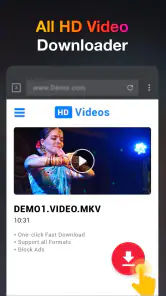
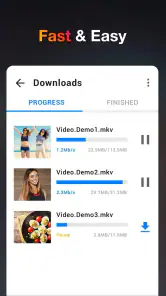
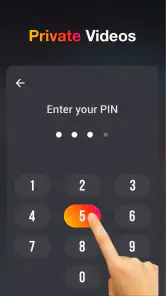
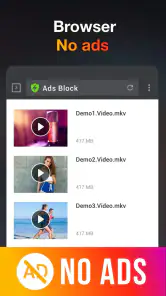
Analysis by Reviewed
I judge a downloader less by how quickly it promises to work than by whether it fits into a sensible viewing routine. HD Video Downloader App - 2022 is aimed at people who want to keep online videos handy for offline watching, and that simple purpose is its strongest appeal. I’d consider it when I have a specific clip to save, but I wouldn’t treat it as a universal way to copy anything I find online: availability and the creator’s rights still matter.
A practical role for saved videos
A useful everyday case is preparing for a commute or a trip: find a video you’re allowed to save while connected, then watch it later without relying on a steady connection. Tutorials are another good fit, especially when I expect to revisit a particular step. Saving a short how-to can be more convenient than searching for it again, though downloaded files also take up storage, so I’d keep the collection intentional rather than saving every clip that catches my eye.
Before downloading, I’d check that the source permits saving and that I’m choosing a quality suited to the job. A spoken recipe or a lesson viewed on a phone may not need the largest file available; detailed footage benefits more from higher quality. That small decision can make an offline library easier to manage and helps avoid spending space on detail I won’t notice.
Where it fits among alternatives
Compared with watching inside a social app, a downloader is useful when offline access is the point, but the two approaches serve different needs. Staying in the original app is often simpler for browsing, following creators, and keeping content in its intended context. For videos covered by an official offline-viewing option, I’d check that first: it may be a better fit than managing separate files. A general downloader makes more sense when a permitted video needs to be available outside that viewing session.
There is a trade-off here: moving a video into a local collection can make it easier to find later, yet it separates the clip from its source and any surrounding context. I’d note where an important tutorial came from rather than assume a saved copy will stay current. If the creator replaces or corrects the original, a local file may not reflect that change.
Seamless Download Experience
First things first, the app makes downloading videos a breeze. Whether you’re looking to grab the latest viral video or save a tutorial for offline viewing, the HD Video Downloader App - 2022 streamlines the process with its user-friendly interface. All you have to do is paste the link, and voila, your video is on its way to your device. It even supports a plethora of formats, so no worries about compatibility issues!
Quality Options Galore
Now, we all know that not all downloads are created equal. Sometimes, you just want that crisp, high-definition quality, and other times, you might want to save on data. This app understands that, offering a range of quality options to suit your needs. From standard to full HD, you decide what works best for you. This flexibility is definitely a highlight!
More From Our News Desk

Weather by Xiaomi Review: Clear at a Glance, Less Clear Up Close

X Under Pressure: Can It Recover When Posting Goes Wrong?

Clash of Clans Is Won Between the Battles

Android Auto Makes the Case for Quieter Car Software

MobiOffice: Transforming Mobile Productivity with Seamless Integration

EA SPORTS FC™ Mobile Soccer: Redefining Mobile Sports Gaming
Another nifty feature? The app supports batch downloading, which means you can queue up multiple videos and let the app work its magic while you binge-watch your favorite series. No more waiting around for one download to finish before starting another.
Choosing when to use it
The app is free to download, with optional in-app purchases priced at $3.99 per item. It comes from Leap Fitness Group, is rated for Everyone, and its current version is 1.3.9, compatible with Android 6.0 and later. Its 4.6 average from around 350,000 ratings and over 100 million installs suggest broad use, though popularity alone doesn’t tell me whether it suits a particular source or workflow. It sits in the video players and editors category, and its release date was March 29, 2019.
I’d recommend it most to someone who already has a clear, permitted video to save and values a direct link-based workflow. It is less compelling if you mainly browse inside social platforms, rely on official offline playback, or want one app to manage a polished, searchable media library. In those cases, the platform’s own tools or a dedicated media player may be a better match.
Security and Privacy
In today’s digital age, security is paramount, and this app takes it seriously. It doesn’t require unnecessary permissions, and it keeps your data safe and sound. You can download your heart’s content without worrying about compromising your privacy. Plus, the app is regularly updated, ensuring it stays ahead of any security vulnerabilities.
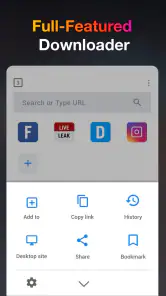
One of the standout features is the in-app browser, allowing you to browse and download videos without ever leaving the app. It’s a one-stop shop for all your video needs!
Everyday workflow and limits
For a straightforward routine, I’d locate the source, copy the link, paste it into the app, then review the available quality before starting a download. If I’m saving several clips, the original article describes a batch queue; I’d still add a few at a time and check the results before leaving them unattended. That makes it easier to spot a link that did not produce the video I expected and avoids building a queue of unusable files.
The app’s link-based approach is convenient, but it depends on the particular site and video being supported and accessible. A link that works in a browser is not automatically guaranteed to download through a separate app, and restrictions can vary by source. If a clip cannot be retrieved, I’d use the platform’s own viewing or saving options rather than repeatedly trying workarounds. That is a practical limit, not a reason to assume every social video is available to download.
I’d also keep expectations realistic about the word “HD”: selecting a quality option cannot improve a source video beyond its original resolution. Higher quality can mean a larger file, while a smaller option may be more convenient when storage is tight. For a long trip, I’d check that the download completed and that the clip opens before relying on it offline; doing that at home is less frustrating than discovering a problem when connectivity is poor.
Making a small offline collection useful
I would treat the downloads as a temporary, purposeful collection rather than a replacement for a streaming service or a full media library. For example, if I’m following a repair tutorial, I’d save the specific clip I need, give the file a recognizable name if the app or device allows it, and remove it when the job is done. That habit makes a phone easier to navigate and leaves room for the material I actually use.
For a family outing, the same approach can help with a few suitable videos for a child to watch where reception is unreliable. I’d prepare them beforehand, confirm they play, and keep the device’s age-appropriate settings and supervision in mind. The app itself is rated for Everyone, but that rating does not determine whether every video reached through it is suitable for every viewer; the source content still deserves a quick check.
There is also a useful distinction between saving a clip for convenience and keeping it as an archive. A downloader can make a permitted video available locally, but I would not assume the file includes captions, comments, creator details, or other material from the original page. If those details matter for a class, project, or later citation, I’d retain the source information separately and use the video only in ways the creator allows.
Small checks that prevent wasted downloads
Before queuing a video, I’d check that the link points to the actual clip rather than a profile, a playlist, or a page with several embedded items. That is a simple way to avoid saving the wrong thing, especially when I am collecting multiple links quickly. I would also start with one test download from a source I am permitted to use, then confirm the saved file behaves as expected before relying on a larger batch.
When space is limited, I’d decide whether a video needs to remain on the device after I have watched it. Short clips that are easy to find again rarely need permanent storage, while a lesson I revisit may earn a place in the collection. This is a more useful way to manage space than choosing the highest quality by default. A larger file is worthwhile only when the extra visual detail matters on the screen where I plan to watch.
One question people often have is whether a download will work without an internet connection afterward. The purpose of saving a file is offline viewing, but I’d still verify the completed download before travelling; the initial retrieval depends on access to the source, and a failed or incomplete save will not become usable simply because I have left home. A quick playback check is the most dependable part of the routine.
What the app does not replace
For casual browsing, the social platform itself is usually the smoother option. It keeps recommendations, creator pages, and the original context together, while a separate downloader adds a step and creates files I have to manage. If I only want to watch a clip once, opening it where I found it is often simpler. The downloader earns its place when I have a specific reason to keep an accessible copy and the source allows it.
It is also not the choice I’d make when I need professional editing tools. Its place among video players and editors reflects the broad category, but the core use described here is saving videos, not producing polished edits. Someone who needs trimming, captions, a timeline, or detailed export controls should look for an editor built around those tasks. Likewise, a person who wants a searchable catalog across many devices may prefer a dedicated media-management setup.
The free entry point makes it easy to try the basic workflow, while the optional purchases are a reason to check what an upgrade offers before spending. I would first see whether the everyday download routine already meets my needs rather than assume a paid item is essential. That keeps the decision tied to actual use: if I only save an occasional permitted clip, I may have little reason to buy anything; frequent users can decide whether the available paid options justify their cost.
Who will get the most from it
I see the best fit as someone who is comfortable copying a link, wants a few videos ready for a commute or a place with unreliable connectivity, and is willing to check that each source permits saving. It can also suit students or hobbyists who revisit specific demonstrations, provided they keep track of where the material came from and do not mistake an offline copy for a current version.
I would steer away from it if my main goal were to collect every video from a social network, bypass a creator’s restrictions, or avoid all file management. Those expectations do not match a responsible downloader workflow. Someone who mainly wants reliable access to a subscription library should use that service’s official offline feature where available; someone who values context and discovery should stay in the original app.
For Android users, the minimum operating-system requirement is version 6.0, which gives a clear compatibility check before installing. The app has been available since March 29, 2019, and its current release is 1.3.9. I would still make the practical decision based on whether it works with the specific sources I use and whether I am happy managing saved files, rather than treating its long availability or large user base as a guarantee for every link.
Final Thoughts
So, what’s the verdict? The HD Video Downloader App - 2022 is a solid choice for anyone looking to download videos quickly and efficiently. It combines ease of use with powerful features that cater to both tech novices and seasoned pros. Whether you're on a long flight or just prefer offline viewing, this app has got you covered. Just grab your phone, download the app, and start building your video library today!
In conclusion, if you're in the market for a reliable video downloader, this app is definitely worth checking out. Happy downloading!
HD Video Downloader App - 2022 Frequently Asked Questions
How much storage space should I have before downloading videos?
It is worth checking your available device storage before using HD Video Downloader App - 2022, especially if you plan to save several videos for offline viewing. Video files can take up space, and higher-quality files may need more room than smaller ones. Keep some storage free for the app and your other downloads, and remove saved videos when you no longer need them.
Can I use downloaded videos without an internet connection?
The app is intended to help users save videos for offline viewing, so a saved file can be useful when you are away from an internet connection. You will need internet access to locate and download online videos in the first place. Once saved, playback depends on the file being available on your device and compatible with its video player.
What should I check before downloading a video from an online service?
Before saving a video, check the service’s rules and make sure you have permission to download and keep that content. Some platforms restrict downloading or require a specific authorization, even when a video is publicly viewable. Respecting those conditions helps avoid misuse of someone else’s work and makes it easier to decide whether a particular video is appropriate to save.
What devices and operating systems can run HD Video Downloader App - 2022?
Before downloading, check that your device runs Android 6.0 or later, the app’s stated minimum operating-system requirement. It is a mobile video downloader in the Video Players & Editors category, intended for saving videos to watch offline. The app is free to download, though some optional in-app purchases are available.
Who makes HD Video Downloader App - 2022, and is it widely used?
HD Video Downloader App - 2022 is developed by Leap Fitness Group. It has an average rating of 4.6 from around 350,000 ratings, with roughly 3,000 written reviews and over 100 million installs. Those figures suggest that many people have tried it, though individual experiences can differ depending on device, available storage, and the source of the video.
Pros
- Fast download speeds
- Supports multiple video formats
- Easy to navigate interface
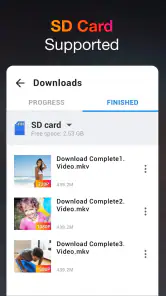
- Download manager included
- Background download feature
Cons
- Contains ads
- Limited to Android devices
- No in-built video player
- May require additional permissions
- Occasional download failures
- Category
- Video Players & Editors
- Version
- 1.3.9