GPS Speedometer : Odometer HUD
- 458.00
- 4.5
- Installs
- 10.00M
- Price
- Free
Screenshots
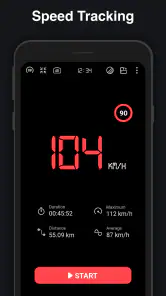
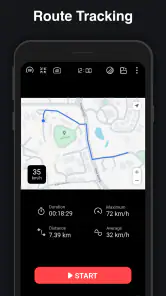
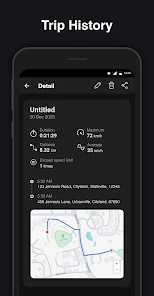
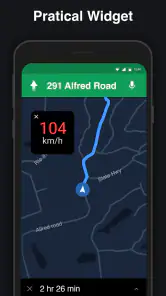
Analysis by Reviewed
I find GPS Speedometer : Odometer HUD most useful when I want a quick, at-a-glance sense of movement rather than a full navigation system. It turns a phone into a dedicated readout for speed and trip distance, which can be handy in a car, on a bicycle, or during a run. The interface and display matter especially when you’re checking information in motion, so I’d treat it as a companion to sensible, safe travel—not a reason to look at your phone while moving.
Where a focused display fits
When I’m deciding whether to open this app or a familiar map, I start with the question I need answered. If it is simply “How fast am I going?” or “How far have I travelled?”, a speedometer view avoids the extra layers and choices that come with navigation. If I need to find an address, avoid traffic, or choose between routes, the map app is still the more useful tool. These apps solve different problems, and I would not expect this one to replace a proper navigation system.
That narrower purpose can also make the app easier to approach for someone who finds busy screens tiring. A single-purpose readout can be less demanding than a map full of roads, labels, and route prompts. Still, a simple layout only helps if the figures are comfortable for the person using it to see, and no display should encourage checking a phone while driving. I’d prepare it before setting off and leave interaction until I’m safely stopped.
Readability and finding your way around
First things first, downloading and setting up the GPS Speedometer : Odometer HUD app is a breeze. Available on both Android and iOS, you can find it in your respective app store. Once installed, the app greets you with a sleek interface that's easy on the eyes and straightforward to navigate. No need to fumble through endless menus or settings—everything is right where you'd expect it to be.
A simple speed display has a practical advantage over opening a map app: it keeps the job focused. If I only want to compare my pace on a familiar route or check how far a trip has gone, turn-by-turn directions and map layers are extra visual material I don’t need. The GPS Speedometer : Odometer HUD is a better fit for that narrow task, while a navigation app remains the more useful choice when I need route planning, traffic details, or directions to an unfamiliar destination.
What the readouts are useful for
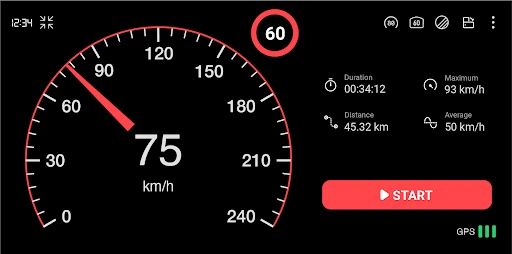
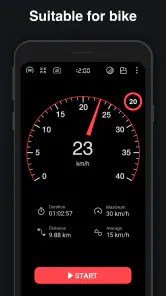
Now, let's talk features. The app not only displays your current speed but also tracks your distance traveled, average speed, and even your maximum speed. It's like having a mini dashboard right in your pocket. One of the coolest features is the Heads-Up Display (HUD) mode. By projecting your speed onto your car's windshield, it allows you to keep your eyes on the road while staying informed. Trust me, this feature feels like something out of a sci-fi movie!
For a cleaner record, I’d start a trip when the journey begins and check its summary only after stopping. That makes the distance and speed figures easier to interpret than trying to remember separate readings later. Mileage can also be useful for work travel, but I’d compare a sample trip with the vehicle’s odometer before relying on any phone-based record for reimbursement or tax paperwork. GPS readings are a helpful reference, not a substitute for records your employer or tax authority specifically requires.
You May Like

Clash of Clans Is Won Between the Battles

Android Auto Makes the Case for Quieter Car Software

MobiOffice: Transforming Mobile Productivity with Seamless Integration

EA SPORTS FC™ Mobile Soccer: Redefining Mobile Sports Gaming

How Microsoft OneDrive Became a Mobile Productivity Giant

How Google Translate Breaks Language Barriers Effortlessly
Motor and sensory considerations
Another great aspect is its ability to work offline. Thanks to its reliance on GPS, you don't need to be constantly connected to the internet. This is perfect for those of us who love taking road trips through areas with spotty service.
Offline use is also useful for people who prefer not to depend on a data connection while traveling. It does not remove every practical constraint: GPS reception can be affected by surroundings, and a phone still needs to be positioned where its display can be checked safely. I would set up the view before moving, use the HUD only if it is genuinely legible in the vehicle, and avoid trying to adjust settings while driving.
For sensory comfort, a visual speed display may suit someone who wants information without audio prompts. That can be less distracting than spoken navigation for a short, known route, though it is not a universal accessibility solution. If reading a screen is difficult, or if a person relies on spoken cues, a display-led speedometer may not meet their needs; a vehicle display or a navigation option with suitable audio guidance could be a better match.
Choosing a safe setup for different situations
The way I’d use the app depends on the journey, not just the vehicle. In a car, I would mount the phone before starting and use the display as a secondary glance, never as a replacement for the dashboard. A windshield reflection can be hard to judge in changing light, and the HUD is only helpful when it is visible without pulling attention away from the road. If it is washed out or distracting, I’d switch back to the ordinary display or leave the phone alone.
On a bicycle, the same caution applies in a different way. I would not handle the phone while riding, and I’d avoid mounting it somewhere that compromises my view of traffic or the path. For someone who wants distance but not a live readout, starting the trip before leaving and reviewing it after parking is a lower-distraction workflow. Runners can use the same approach: treat the recorded distance as a reference for a familiar route, rather than trying to watch the screen with every step.
A small but useful habit is to decide in advance which number matters for the outing. If I’m checking a steady drive, current speed is the relevant figure; if I’m comparing two walks or rides, distance after stopping is easier to use. Trying to monitor speed, average speed, maximum speed, and distance at once adds little value and invites unnecessary glances. Keeping one purpose in mind makes the tool feel more like a quiet instrument than another screen demanding attention.
Everyday situations and sensible limits
So, who exactly is this app for? Honestly, anyone who wants to keep track of their speed and travel history. Whether you're a cyclist, a runner, or just someone who wants to monitor their driving habits, this app has got you covered. During my test runs, I found it incredibly helpful for maintaining a steady pace during my workouts and keeping tabs on my driving speed. It’s like having a personal speed coach by your side!
Picture a familiar weekend drive where the car’s built-in display is hard to read from the passenger seat, or a cycling route where you want to review distance once you stop. A separate GPS readout can answer those small questions without making you build a route in a map app. For a run, I’d use it as a rough pace and distance reference, then check the figures afterward rather than staring at the phone mid-stride.
The trade-off is that a phone’s GPS-based readings are not the same as a calibrated vehicle instrument. Buildings, tunnels, tree cover, and how the phone is placed can affect reception, so momentary changes should not be treated as precise proof of speed. For legal speed checks, navigation, or detailed fitness coaching, the relevant vehicle instrument or a purpose-built tool is the safer choice. This app makes most sense when a convenient extra readout is enough.
Moreover, the app's odometer function is a handy tool for those who need to track mileage for work or tax purposes. It logs your trips, which can be reviewed later, making it easier to keep accurate records without the hassle of manual entry.
Keeping trip records useful
For occasional personal tracking, a trip log can spare me from writing down a distance immediately after every outing. For formal mileage claims, though, I would use it as one part of a record-keeping routine rather than assume a GPS log alone meets every requirement. I’d note the purpose of each work journey separately and keep any required receipts or employer records alongside it. The practical benefit is convenient distance tracking; the limitation is that convenience does not make a phone reading an official measurement.
It is also worth thinking about how a trip starts and ends. If I forget to begin tracking until I have already travelled, the recorded distance will not represent the whole journey. If I leave a trip running after arriving, the summary may not match the drive I meant to record. A quick check while parked at the beginning and end helps keep the log meaningful without needing to interact with the phone on the move.
Compared with a vehicle’s built-in odometer, the phone is easier to move between vehicles and useful when I want a separate trip figure, but it depends on GPS reception and phone placement. Compared with a fitness tracker, it may be a straightforward extra reference for a walk or ride, but I would choose a dedicated training tool when coaching, structured workouts, or more detailed exercise analysis matters. The right alternative depends on whether I value a simple readout or a richer record.
Who will get the most from it
KTW Apps’ free Maps & Navigation app has reached more than ten million installs and holds a 4.5 average from around fifty-six thousand ratings. It is rated for Everyone, with in-app purchases listed at $4.49 per item. That makes it easy to try as a basic speed and distance companion, while the paid options are worth considering only if their specific details suit your needs.
I’d recommend it to drivers who want a supplementary speed readout, cyclists who prefer a simple distance check, and people who like reviewing a trip after it ends. I would skip it if you need dependable turn-by-turn directions, a verified mileage ledger, or a hands-free spoken interface. Those needs are better served by a dedicated navigation system, official vehicle instrumentation, or an accessibility tool designed around audio interaction.
Before a longer trip, I’d test the display while parked and check that the phone has a stable GPS signal in the place you plan to mount it. On a familiar route, comparing the app’s distance with a known journey can also show whether its readings are consistent enough for your personal use. These quick checks help set realistic expectations without turning a simple utility into something you have to manage constantly.
Remaining barriers and a balanced recommendation
The biggest barrier is not complexity so much as reliance on a visual display and a phone’s position. Someone who has difficulty reading changing figures, cannot safely mount or reach the device, or needs spoken guidance may be better served by a different setup. The same is true for a driver who already has a clear built-in speed display and no reason to keep another screen in view. I would not choose an app simply because it offers more information; the extra readout has to make a real task easier.
In conclusion, the GPS Speedometer : Odometer HUD app is a versatile and user-friendly tool that's perfect for anyone looking to gain insights into their travel habits. Its sleek design, coupled with practical features like the HUD and offline functionality, makes it a standout option in the realm of speedometer apps. Whether you're using it for fitness, driving, or just out of curiosity, it’s sure to enhance your journey.
So, if you're on the hunt for a reliable and feature-packed speedometer app, give this one a go. You might just find it becomes a staple on your smartphone, just like it has on mine.
GPS Speedometer : Odometer HUD Frequently Asked Questions
Is GPS Speedometer: Odometer HUD suitable for keeping track of mileage on regular journeys?
The app’s mileage settings and trip meter may be useful if you want to monitor distance during everyday drives, commutes, or longer trips. Its focus is on speed and trip-related tracking, rather than replacing a full navigation app. Before setting off, check that the mileage preferences and units suit your needs, then keep your attention on the road while driving.
Can I use this app as a replacement for my car’s speedometer or navigation system?
GPS Speedometer: Odometer HUD is a driving utility for tracking speed, mileage, and routes, but it should not be treated as a guaranteed replacement for your vehicle’s built-in instruments or a full navigation system. GPS readings depend on reception and conditions, so use the app as a supplementary reference and follow your vehicle’s equipment and road signs. Set it up before driving.
Is GPS Speedometer: Odometer HUD free to download?
GPS Speedometer: Odometer HUD is free to download, so you can try its speed-tracking and trip-related tools without paying upfront. The app also offers in-app purchases, listed at $4.49 per item, which may matter if you are considering optional extras. It is rated for Everyone, making it suitable for a broad audience, though drivers should use it responsibly and avoid interacting with the screen while moving.
Who develops GPS Speedometer: Odometer HUD, and how popular is it?
The app is developed by KTW Apps and is in the Maps & Navigation category. It has more than 10 million installs and an average rating of 4.5 from around 56,000 ratings, suggesting that it has reached a substantial audience. Those figures offer useful context before downloading, but individual experiences can still vary depending on the phone, GPS reception, and how the app is used.
What features does the GPS Speedometer: Odometer HUD app offer?
The GPS Speedometer: Odometer HUD app provides a variety of features including real-time speed tracking, an odometer, a heads-up display (HUD) mode for safe driving, trip logging, and customizable speed units. It also offers alerts for speed limits and GPS accuracy, making it a comprehensive tool for drivers who want to monitor their vehicle's performance.
Pros
- Accurate speed tracking.
- User-friendly interface.
- Real-time updates.
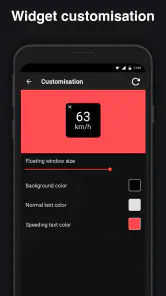
- Customizable display.
- Offline functionality.
Cons
- May drain battery quickly.
- Ads can be intrusive.
- No integration with maps.
- Limited free features.
- Requires GPS access.

- Category
- Maps & Navigation
- Version
- Varies with device