GPS Navigation & Map Direction
- 2.04K
- 4.3
- Installs
- 10.00M
- Price
- Free
Screenshots



Analysis by Reviewed
When I set out somewhere unfamiliar, I want directions first and extra travel tools second. GPS Navigation & Map Direction aims to cover both: it is a free maps-and-navigation app from Sharp Apps Studio, with a route finder alongside a compass, translator and currency converter. That mix makes it most appealing when a trip involves more than following a familiar commute, though I would still treat it as a practical aid rather than an all-purpose travel planner.
Start with the trip, not the extra tools
My useful first step is to decide what I need from the app before leaving: a route, orientation help, or quick reference while travelling. Trying to explore every utility at once can turn a simple departure into unnecessary screen time. If I am driving, I would set up the destination while parked and check that the planned route makes sense before moving. That small habit matters more than a crowded feature set when attention needs to stay on the road.
For an everyday example, imagine heading across town to meet someone at an unfamiliar address, then continuing to a shop nearby. I would use the route finder for the first leg, then use the map to orient myself for the short onward trip. If the destination is in an area with unreliable mobile service, preparation becomes more important: check what will remain available before setting off instead of assuming every map function works offline. This is the sort of detail that can prevent a navigation app from becoming a distraction at the worst moment.
Useful beyond the route
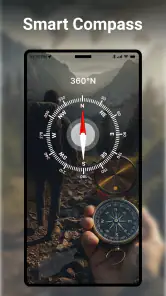
The compass, translator and currency converter give the app a broader travel role than a basic map. I can see the appeal for someone moving between unfamiliar places who wants a few common tools together, rather than switching between several apps for every small question. Still, I would use those extras as convenient references, not as a substitute for checking an important translation or financial calculation when accuracy has real consequences.
That combination also comes with a trade-off: a dedicated navigation app may make route planning its whole focus, while this one spreads attention across several travel utilities. If I only need dependable daily directions and detailed control over route choices, I would compare it with the navigation app I already know before making a switch. If I value having orientation and travel references close at hand, the broader toolkit is more persuasive.
Intuitive Design and User-Friendly Interface
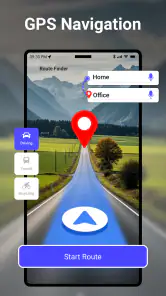
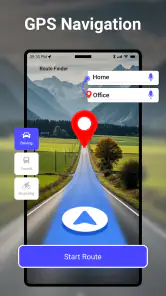
One of the first things you'll notice about GPS Navigation & Map Direction is its sleek and intuitive design. The developers have done a fantastic job in ensuring that even the least tech-savvy individuals can navigate through the app with ease. The interface is clean, with essential features just a tap away. No more fumbling around trying to input your destination while driving. Just speak your destination, and let the app do the work.
For a first trip, I would keep the workflow simple: choose the destination before setting off, review the route, and then rely on spoken guidance only as support while moving. A voice prompt can reduce the need to keep looking at the screen, but it does not remove the need to watch the road or confirm that a turn is safe. If I am walking, I would pause somewhere out of the way before checking the map or compass, especially in a busy station or at a crowded crossing.
More From Our News Desk

Weather by Xiaomi Review: Clear at a Glance, Less Clear Up Close

X Under Pressure: Can It Recover When Posting Goes Wrong?

Clash of Clans Is Won Between the Battles

Android Auto Makes the Case for Quieter Car Software

MobiOffice: Transforming Mobile Productivity with Seamless Integration

EA SPORTS FC™ Mobile Soccer: Redefining Mobile Sports Gaming
Real-Time Traffic Updates
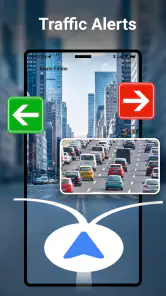
We've all been there – stuck in traffic, watching the minutes tick away, and wondering why we didn't take another route. This app provides real-time traffic updates, allowing you to dodge traffic jams and reach your destination faster. It's like having a traffic helicopter in your pocket! The app analyzes current road conditions and suggests alternative routes to save you time and hassle.
For a routine commute, an alternate route is useful only if it is genuinely practical. I would compare the suggested detour with the roads I know, especially if it sends me through unfamiliar streets or complicated junctions. Traffic guidance can help me reconsider a route, but I would not follow a last-second change blindly; a few minutes saved are not worth making a rushed manoeuvre.
One useful habit is to decide in advance how much inconvenience I am willing to accept for a faster arrival. A detour through a neighbourhood I know may be worth considering, while a sequence of tiny turns in an unfamiliar area may add stress without making the trip meaningfully better. If I am already close to the destination, sticking with a clear route can be wiser than reacting to every prompt.
Offline Maps for Uninterrupted Service
Traveling to an area with spotty internet coverage? No worries! GPS Navigation & Map Direction offers offline map downloads, so you're never left without guidance. This feature is a game-changer for those who love to explore remote areas or travel internationally without racking up roaming charges. Just download the maps you'll need ahead of time, and you're good to go.
I would prepare for an offline stretch before leaving a reliable connection, and check that the intended area is covered rather than assuming a downloaded map includes every road or service I might need. Offline access is especially valuable for a planned drive through a rural region, but it is less helpful if I have not prepared or expect live traffic information to work without a connection. Keeping the destination and general direction in mind gives me a backup if service drops.
That preparation is also a useful test of whether this app fits a particular journey. Before travelling, I would open the planned area while connected and make sure I can recognise the route and destination on the map. If the trip depends on finding a last-minute fuel stop, a changing appointment location or other current details, I would not assume offline maps can answer those questions. The offline option is most valuable as a fallback for the route I have already considered, not as a promise that every connected service will follow me into a dead zone.
Points of Interest and Discoveries
Beyond just getting you from point A to B, this app is like having a local tour guide. Discover hidden gems and popular attractions with the "Points of Interest" feature. Whether you're in a new city or exploring your hometown, the app highlights restaurants, museums, parks, and more. It's perfect for spontaneous adventures and planned excursions alike.
For a low-pressure city outing, I would use nearby places to choose a stop after reaching the main destination, rather than letting recommendations dictate the whole day. That keeps the route useful while leaving room for personal judgement: a point on the map is a lead, not a promise that a venue suits my timing or needs. If I am meeting someone, I would still agree on a clear address instead of relying on a broad attraction label.
This works particularly well when the main journey is settled but I have time to fill. I might reach a meeting early and look for a nearby park or café as a possible stop, then decide based on what is actually convenient. For a reservation, accessibility requirement or time-sensitive visit, I would verify the destination separately rather than treating a map result as confirmation of opening hours or suitability. That small distinction keeps discovery useful without letting a broad location suggestion become a risky assumption.
Voice-Guided Navigation for Safe Travels
Eyes on the road, hands on the wheel – safety first, right? With voice-guided navigation, you can keep your focus where it needs to be. The app provides clear, turn-by-turn instructions, ensuring you never miss an exit or turn. Plus, it's available in multiple languages, making it a versatile choice for travelers worldwide.
Voice directions are most helpful when I set the trip before driving and let instructions support what I see on the road. They do not replace attention to signs, lane markings or changing conditions. If a spoken instruction arrives too late to act on safely, I would continue on and let the route adjust rather than make a sudden turn.
There is a handoff here between the app and the person travelling: the app can suggest where to go, but I still have to choose when and how to act on that information. A passenger can handle destination changes or check a confusing map view, which is a much better arrangement than trying to do it while driving. On foot, I would use voice prompts to understand the next direction, then step aside before looking closely at the screen instead of stopping in the middle of a walkway.
Who will get the most from it
I would recommend trying it if you want navigation with travel utilities in one place, especially for occasional trips, unfamiliar neighbourhoods or journeys where a compass or quick translation may be handy. It is also a reasonable option for people who prefer a free starting point: the app is rated for Everyone, runs on Android 6.0 or later, and offers optional in-app purchases. Its current version is 3.8.4; the wider audience is reflected in an average rating of 4.3 from around 67,000 ratings, with over 10 million installs.
The app is particularly suited to someone who does not want a separate tool for every small travel question. A visitor arriving in a new city might use directions to reach a hotel, the compass to regain a sense of direction after leaving a station, and the translator or currency converter for quick reference later. That is a convenient chain of tasks, even if a specialist map or translation app may offer more depth for someone who travels this way constantly.
I would be more cautious if you depend on advanced route customisation, have a strict need for consistently precise live traffic, or are travelling somewhere where connectivity and map coverage are uncertain. In those cases, I would compare it with a dedicated navigation service and keep a second source of directions available. The app has around 2,000 reviews, and its extra tools may suit a general traveller better than someone who wants a map-only interface with fewer decisions on screen.
Compared with the usual alternatives, the clearest distinction is its combination of navigation and travel utilities rather than a single-purpose approach. A familiar, dedicated navigation app may be the better choice if I already trust its route options and want to keep my attention on driving alone. A paper map or saved directions can be a sensible backup when I want to avoid relying on a connection, while a specialist translator is preferable when a conversation needs more than a quick reference. I would choose this app when convenience across several small tasks matters more than having the deepest version of any one tool.
Where the journey can become less smooth
The main friction is that a single app cannot make every part of a trip equally reliable. Route guidance, traffic information, offline preparation and travel references answer different questions, and each needs the right conditions and a little checking from me. I would not assume the translator or currency converter is a replacement for a specialist tool, nor assume a downloaded map means every live feature will remain available. Thinking of the app as a helpful companion, rather than the sole authority, is the sensible way to use it.
Another limitation is the attention a multipurpose interface can ask for. Having several travel tools together is handy when I need them, but it can also tempt me to browse while I should be preparing to leave or concentrating on the journey. I would decide which tool I need before opening the app and avoid exploring other sections mid-trip. If a clutter-free map is my priority, a more focused alternative may feel calmer even if it means switching apps for translation or currency questions.
Cost is another practical consideration. The app is free to install, while optional in-app purchases range from $1.99 to $46.99 per item. I would start with the free experience and only consider a purchase if I understood what it adds and expected to use it regularly. That keeps the decision tied to an actual need instead of paying simply because a feature appears during setup.
For someone wondering whether it can replace a regular navigation app, my answer is: try it on an ordinary, low-pressure trip first. That gives you a chance to judge the route presentation and the travel extras without depending on it for an airport transfer, a tight appointment or a remote drive. If the route feels clear and the additional tools fit your habits, it may earn a place in your routine; if you mainly want one dependable map, there is little reason to switch from a service you already know works for you.
In conclusion, GPS Navigation & Map Direction is more than just a map app; it's a comprehensive travel companion that caters to all your navigation needs. Whether you're exploring new territories or commuting daily, it's designed to make your journey smoother and more enjoyable. So, next time you're heading out, let this app lead the way. Trust me, your future self will thank you!
GPS Navigation & Map Direction Frequently Asked Questions
Does GPS Navigation & Map Direction need an internet connection to find a route?
GPS Navigation & Map Direction is intended for route finding, and its store summary also highlights a compass, translator, and currency converter. Whether you are planning a journey or using the app while traveling, connection needs can matter. If you expect to be somewhere with limited service, consider preparing before you leave and check which functions are available to you in that situation.
What should I check before installing GPS Navigation & Map Direction on my phone?
Before downloading, check that your device runs a compatible operating system and that you are comfortable with the app’s available permissions and optional purchases. The app is in the Maps & Navigation category and is rated for Everyone. Reviewing the app’s current store page on your own device is a practical way to confirm it can be installed and to understand the choices presented during setup.
Who developed GPS Navigation & Map Direction, and what kind of app is it?
GPS Navigation & Map Direction is a Maps & Navigation app developed by Sharp Apps Studio. It is intended for users looking for navigation tools and related utilities in one app. The app is free to download, is rated for Everyone, and has a current version of 3.8.4. Its broad set of tools may suit both everyday trips and travel planning.
What features does the GPS Navigation & Map Direction app offer?
The GPS Navigation & Map Direction app offers a range of features, including real-time turn-by-turn navigation, offline maps for areas with no internet connection, traffic updates, and points of interest like restaurants and gas stations. It also provides voice guidance and supports multiple languages, making it convenient for international travelers. Its store summary also highlights a route finder, compass, translator, and currency converter, adding practical travel utilities beyond directions.
Is the GPS Navigation & Map Direction app free to use?
The app is free to download and use, but it offers in-app purchases for premium features such as ad-free experience, advanced map details, and additional voices for navigation. Users can enjoy basic navigation features without cost, while premium options enhance the overall user experience. In-app purchases range from $1.99 to $46.99 per item, so it is worth checking the available options before buying.
Pros
- Accurate real-time traffic updates.
- User-friendly interface and easy navigation.
- Wide coverage of maps globally.
- Customizable route preferences.
- Offline maps available for no data use.
Cons
- Consumes significant battery power.
- Frequent ads can be distracting.
- Requires constant updates for accuracy.
- Limited features in free version.
- Occasional GPS signal loss in remote areas.
- Category
- Maps & Navigation
- Version
- 3.8.4











