Garage Ringtones
- 332.00
- 3.7
- Installs
- 10.00M
- Price
- Free

Screenshots



Analysis by Reviewed
I like a ringtone app best when it helps me make one or two useful changes without turning my phone into a permanent customization project. Garage Ringtones is aimed at people who enjoy browsing sounds, shaping short clips, and giving a few callers their own cues. Its appeal is easy to understand in the first week; whether it earns a lasting place depends on how often you actually want to revisit those choices.
First-week appeal: a quick change of sound
The first few days with a ringtone app are often the most entertaining: every incoming call becomes a chance to try a different mood. Garage Ringtones suits that impulse well if you enjoy browsing sounds and want your phone to feel less like everyone else’s. It is a free music and audio app from Must Have Apps SRL, and the combination of sound choices and tools for making a personal tone gives it more to explore than a simple ringtone picker.
There is a practical reason to try more than one sound before settling. A tone that seems funny while browsing may become irritating when it plays repeatedly in a quiet room or during a busy day. I’d test possible choices at a low volume and imagine hearing them in ordinary settings before assigning one to calls or alerts. A distinctive sound is useful only if I can still recognize it without wishing it would stop.
Unleashing the Sound
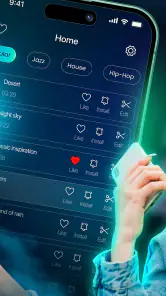
Alright, let’s get into the nitty-gritty of Garage Ringtones. The app boasts a vast library of sounds, ranging from classic rock riffs to quirky animal noises. You know how sometimes you just need that perfect ringtone or notification sound that screams "this is so me"? Yeah, this app has got you covered.
Easy Navigation
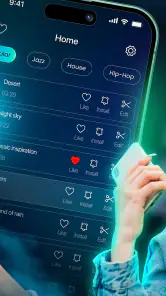
One of the first things I noticed was how easy it was to navigate through the app. As soon as you open it, you’re greeted with a clean interface that doesn’t drown you in ads. Hallelujah! You can browse through categories or use the search bar if you’re looking for something specific. It’s smooth sailing, even for those who might not be the most tech-savvy.
That straightforward browsing makes it handy for a small, specific job: replacing a default alert without turning the process into a long customization project. If you already have a sound in mind, searching is a better starting point than scrolling through everything. If you don’t, I’d browse with a purpose—perhaps looking for a tone that is easy to distinguish from messages—rather than collecting several options I’m unlikely to use.
Customization Galore
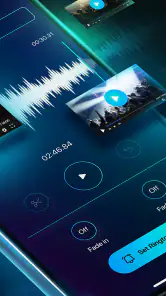
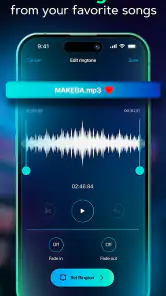
What I really dig about this app is the level of customization it offers. Not only can you choose from a plethora of pre-made ringtones, but you can also tinker with the sounds to create something uniquely yours. Want to mash up a bit of Beethoven with some beats? Go for it! The app provides tools to trim, cut, and mix sounds to your heart’s content.
More From Our News Desk

Weather by Xiaomi Review: Clear at a Glance, Less Clear Up Close

X Under Pressure: Can It Recover When Posting Goes Wrong?

Clash of Clans Is Won Between the Battles

Android Auto Makes the Case for Quieter Car Software

MobiOffice: Transforming Mobile Productivity with Seamless Integration

EA SPORTS FC™ Mobile Soccer: Redefining Mobile Sports Gaming
The editing tools are most useful when a full track has only a brief moment that works as a ringtone. I’d trim around the recognizable hook or opening, then listen to the result as a standalone clip rather than judging it in the context of the original song. A ringtone needs a clear start and a quick identity; a long lead-in can make it feel like the phone is ringing with no useful sound. This is a small workflow choice, but it can save repeated edits later.
Quality of Sound
Let’s talk sound quality. I’ve downloaded a few ringtones in my time, and sometimes they sound like they were recorded in a tin can. But not with Garage Ringtones. The audio is crisp, clear, and definitely doesn’t sound like it was ripped from a 2003 YouTube video. It’s like having a mini recording studio right in your pocket.
Another cool feature is the ability to set different ringtones for different contacts. So, if you want a dramatic theme song every time your best friend calls, you can totally make that happen.
Making it useful beyond the novelty
Contact-specific tones can do more than add a joke to a call. I’d reserve a familiar, easy-to-hear sound for people whose calls I genuinely need to recognize, and keep a less urgent tone for general callers. That turns personalization into a modest bit of organization. It also avoids assigning a loud or elaborate clip to every contact, which could quickly make the phone feel noisy rather than distinctive.
For a realistic everyday example, imagine choosing a short, recognizable sound for a family member and a softer notification for routine messages. Once set, the difference can help you decide whether to check the phone immediately or wait until a convenient moment. Garage Ringtones is best for that kind of light, practical adjustment, not for someone trying to manage every part of their phone’s sound system from one place.
Month-to-month value and maintenance
The app’s lasting value depends on whether you enjoy revisiting your sound choices. If you like changing a ringtone now and then, making a clip from a sound, or giving a few contacts individual cues, it has a reason to stay installed after the first burst of experimentation. If you normally set one tone and forget about it, the appeal may fade once that choice is made. I would treat it as an occasional creative tool rather than something that needs daily attention.
Maintenance can stay simple: keep only the tones you actually use, and revisit your choices when a sound starts blending into the background or becoming tiresome. Before editing, decide what the clip needs to do—stand out in a noisy place, remain unobtrusive at home, or identify a particular caller. That decision makes the trimming tools more useful and reduces the temptation to keep making variations without a clear purpose.
A useful habit is to make a change only when there is a real reason: a current tone has become easy to miss, a caller deserves a distinct cue, or a clip no longer suits where you spend your day. This keeps the app from becoming a drawer of half-finished experiments. If you do make several versions, listen to them in the same context and keep the one that works at normal phone volume; a tone that only sounds good when you turn it up is unlikely to be a satisfying everyday choice.
Where it fits among ringtone options
Compared with the usual alternatives, this app is more appealing than a basic picker if you want to shape a sound yourself, while a built-in phone tone selector is simpler when you only need a quick default change. People who already have a specific audio file and prefer using familiar system tools may not need another app. Garage Ringtones makes more sense when browsing, editing and contact-based personalization are part of the fun, rather than chores you want to finish as quickly as possible.
One trade-off is that a broad selection can invite more browsing than decision-making. I’d choose a small set of useful sounds rather than continually swapping them just because new options are available. Also, the app’s feature set should not be confused with a full audio workstation: its appeal is focused on ringtone-sized personalization, not elaborate music production or deep sound management.
That distinction matters if you are comparing it with a dedicated audio editor. An editor is the better fit when you need detailed control over a recording or want a broader production workflow. A phone’s own sound settings are more direct if the goal is simply to select an existing alert and move on. Garage Ringtones sits between those options: it is for someone who wants to discover or shape a short sound, but does not need a full creative suite.
Who should give it a try
I’d recommend it to someone who enjoys distinctive alerts, likes trimming audio into a short personal cue, or wants different sounds for a few important callers. It may also suit people who enjoy playful options but still want the phone to be practical. I’d skip it if I rarely change default sounds, prefer a minimal setup, or expect advanced editing controls and a complete library-management system. Those users are likely to be happier with the phone’s built-in options or a more specialized audio editor.
The choice is also about how you use your phone in shared spaces. If you work, study, or commute around other people, a subtle, recognizable cue may be more useful than a loud novelty sound. Someone who keeps the phone silent most of the time may get less from a large selection, while a person who relies on audible calls could appreciate assigning different tones selectively. The best reason to install it is not simply having more sounds; it is having a particular sound problem you want to solve.
Garage Ringtones is free to install, rated for Everyone, and has a 3.7 average from around 25,000 ratings, with over 10 million installs. Its current version is 2.24, and it supports Android 8.0 and later. Optional in-app purchases range from $2.49 to $29.99 per item, so I’d check what is offered before spending; the basic appeal is the chance to personalize sounds, not a reason to buy something automatically.
That makes it easy to try without treating installation as a commitment, but I would still approach any paid option deliberately. First see whether the free experience covers the simple task you had in mind; only consider spending if an offered item solves a specific need you have. The app’s value is personal rather than automatic, so an appealing sound library matters only if you find a tone you will actually keep using.
Sources of fatigue
The novelty can wear off if every alert is treated as an opportunity for a new sound. A ringtone that grabs attention in a quiet room may be awkward in a shared space, and a joke tone can become less amusing after repeated calls. I’d keep the most expressive choices for a small number of contacts and use something restrained for routine notifications. That balance is more likely to remain pleasant over time.
There is also a difference between enjoying a sound in isolation and wanting it to interrupt the day. Before committing to a clip, listen to it more than once and consider whether its opening is recognizable at the volume you normally use. If the result needs constant adjustment or makes you dread hearing it, the customization has missed its purpose. In that case, a simple built-in tone is the better choice.
Another source of friction is the gap between finding a sound and deciding where it belongs. A clip can work beautifully for calls but feel too insistent for frequent alerts, so I would not assume that one favorite should handle every notification. Try matching the character of each sound to its job: a short, clear cue for something important, and a less intrusive choice for routine interruptions. That restraint helps the phone remain identifiable without making every buzz or ring demand attention.
Long-term verdict
In conclusion, Garage Ringtones is a must-have for anyone looking to spice up their phone’s sound profile. It’s user-friendly, packed with options, and offers high-quality audio that doesn’t disappoint. Whether you’re a casual user or a ringtone aficionado, this app is definitely worth checking out.
So, if you’re ready to let your phone ring out in style, give Garage Ringtones a whirl. Who knows, you might just find the perfect sound that turns heads next time your phone goes off.
My longer-term recommendation is more measured: give it a try if you can name a caller or alert you want to make easier to recognize, or if trimming a short sound sounds enjoyable in itself. Keep the setup small, listen to your choices in the situations where they will actually play, and remove the novelty tones that stop being fun. If you only want a one-time change to a standard alert, the built-in picker is likely enough; if you enjoy occasional sound-tweaking, this app has a clearer reason to stay.
Garage Ringtones Frequently Asked Questions
Can I choose a ringtone by sound style before installing Garage Ringtones?
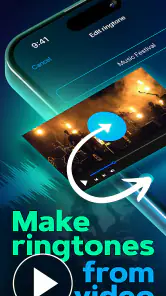
If you prefer browsing ready-made options over creating a ringtone yourself, consider whether Garage Ringtones suits the way you like to choose audio. The app is presented as a ringtone app, and its store summary highlights creating ringtones using sounds, video, and TikTok content. That may appeal if you want to explore ringtone options as well as personalize one, though your choice will depend on the sounds and tools you find in the app.
Who develops Garage Ringtones, and what kind of app is it?
Garage Ringtones is a Music & Audio app developed by Must Have Apps SRL. Its focus is ringtone creation and customization, with the store summary describing ways to create a ringtone using sounds, video, and TikTok content. If you are looking for a general music player or a full audio-editing workstation, its ringtone-centered purpose is worth keeping in mind before you download it.
Can I create a ringtone from my own sounds or videos?
Garage Ringtones is described as an app for creating ringtones using sounds, video, and TikTok content. That makes it worth considering if you want to personalize a ringtone rather than simply choose a premade option. The app is in the Music & Audio category, and its main purpose is to help you turn audio or video material into a ringtone for your phone.
What should I know about the app’s age rating and compatibility before downloading?
Garage Ringtones is rated Everyone and is intended for users on compatible devices. Its current version is 2.24, and it requires Android 8.0 or later on Android phones. Checking your device’s operating system before installing can help avoid compatibility problems. The app is published by Must Have Apps SRL and is focused on ringtone creation and customization.
What is Garage Ringtones and how does it work?
Garage Ringtones is a mobile application that allows users to customize their phone ringtones by selecting from a wide variety of sounds and music tracks. Users can browse through different categories, such as classic, pop, rock, and more, to find the perfect ringtone. The app provides an easy-to-use interface where you can preview, download, and set ringtones directly from the app.
Pros
- Vast collection of unique ringtones.
- Easy to navigate user interface.
- High-quality audio files.
- Regular updates with new ringtones.
- Customizable ringtone settings.
Cons
- Contains in-app ads.
- Limited free content.
- Requires internet for full access.
- Occasional app crashes.
- No ringtone preview before download.
- Category
- Music & Audio
- Version
- 2.24











