Friend Location: Phone Tracker
- 64.00
- 3.3
- Installs
- 500.00K
- Price
- Free

Screenshots
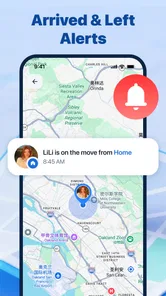
Analysis by Reviewed
I look at a location-sharing app differently from a map app built to plan a route. Its main job is to help a small circle of people answer a practical question: where is everyone, and is there anything that needs attention? Friend Location: Phone Tracker is aimed at that kind of everyday coordination, with location sharing and safety notifications for friends who have authorized one another. That focus makes it potentially useful, but it also means the experience depends on shared participation and on location updates working when you need them.
Quick location checks, not route planning
In my view, the useful speed question here is not whether the app can calculate a drive quickly; it is whether opening it can replace a string of “Where are you?” messages. A location-sharing tool earns its place when a friend can check the group’s whereabouts and make a decision without interrupting everyone. That is a different task from finding a business, comparing routes, or navigating an unfamiliar neighborhood, where a full navigation app is the more natural choice.
The name, Friend Location: Phone Tracker, makes the purpose clear, while the developer is MG-MagicSoftGaming. It sits in the maps and navigation category, though I would think of it more as a companion for coordinating with trusted people than as a replacement for a conventional map. The distinction matters: a map app is useful alone, while this one only becomes meaningful when friends choose to share their locations with one another.
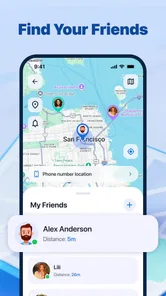
For a realistic use case, imagine meeting friends at a busy venue. Rather than repeatedly asking who has arrived, a person can check the shared location and decide whether to wait, walk toward the entrance, or send a message. That can save small bits of time and reduce avoidable interruptions. It is not a substitute for agreeing on a meeting point, though: a moving dot can show where someone’s phone is without explaining which entrance they are using or whether they are ready to meet.
What feels quick—and what can slow the moment down
A location screen can only be as current as the location information reaching it. That makes perceived speed different from ordinary app loading: the interface might open promptly, yet an old position could still leave you uncertain. I would treat a displayed location as a useful cue for coordination, not a promise of second-by-second precision. If timing is critical, a quick message or call remains the sensible backup.
There is also a setup cost before the first useful check. Friends need to authorize sharing, and everyone needs to understand who is included. That is a small but important trade-off: a group that agrees on sharing in advance can use the app with less back-and-forth, while someone who installs it alone should not expect it to reveal a friend’s whereabouts automatically. The emphasis on authorized friends is reassuring as a principle, but it also makes consent part of the workflow, not an optional detail.
I would prepare the group before relying on it for a time-sensitive meeting. Agree on who will share, open the app while there is still time to sort out any confusion, and keep a familiar messaging option available. That simple habit is more useful than assuming every location-sharing session will work instantly. It also helps distinguish a genuine delay from a friend who has not joined or has not chosen to share.
More From Our News Desk

Weather by Xiaomi Review: Clear at a Glance, Less Clear Up Close

X Under Pressure: Can It Recover When Posting Goes Wrong?

Clash of Clans Is Won Between the Battles

Android Auto Makes the Case for Quieter Car Software

MobiOffice: Transforming Mobile Productivity with Seamless Integration

EA SPORTS FC™ Mobile Soccer: Redefining Mobile Sports Gaming
Busy days and repeated checks
The app’s value is easiest to picture during moments when several people are moving independently: friends arriving at an event, relatives coordinating a pickup, or a group trying to reconnect after splitting up. In these situations, repeated location checks may be more convenient than asking each person to send updates. Safety notifications add another reason to keep the app in mind, but I would not treat them as an emergency service or assume they replace a direct call when a person needs immediate help.
Frequent checking can also become counterproductive. If everyone watches the map constantly, small delays or imperfectly fresh positions may prompt needless worry. I prefer a clear purpose—such as checking whether a friend has reached the agreed area—over continuous monitoring. A useful social rule is to share for coordination, not to pressure friends to account for every stop. The app’s authorized-sharing model suits that approach better than treating location access as an unspoken expectation.
For a group that rarely meets in person, another consideration is whether installing a separate app is worth the effort. If everyone already coordinates comfortably through a familiar service, adding another place to check may create friction rather than remove it. Friend Location makes more sense when the group has a recurring reason to see locations together, especially when a simple map check is more convenient than several separate messages.
Reliability, trust, and sensible backups
Reliability is not only a technical question for a friend-tracking app. It is also about whether people have joined, whether they are comfortable sharing, and whether the group knows what the map can and cannot tell them. A location does not explain someone’s plans, mood, or ability to respond. I would use the app to support a conversation, not to interpret silence or draw conclusions about why a person is somewhere.
One practical workflow is to agree on a limited, concrete purpose before sharing: for example, helping one another find the group at a crowded public place. That gives everyone a reason to participate and an easy point at which the check-ins are no longer needed. It also avoids turning a short coordination task into an expectation of ongoing visibility. This is a more respectful way to use any friend-location tool, and it fits the app’s emphasis on authorization.
When the information matters, keep a fallback. If a friend’s position appears confusing or seems behind what you expect, ask them directly instead of repeatedly refreshing and guessing. If the group is trying to meet, a named landmark and a brief message can be clearer than a map alone. This is not a criticism unique to this app; it is a limitation of relying on location data as a complete account of what another person is doing.
Compared with ordinary navigation apps, Friend Location is narrower and more social. Navigation tools are better for directions, traffic decisions, and exploring places on your own. Compared with messaging, this app may reduce the need for repeated location explanations, but a message still communicates context that a position cannot. I see the strongest case for using both in complementary ways: the app for a quick shared-location check, and a conversation for plans, changes, or anything that needs clarification.
Device fit and everyday expectations
The app is free, rated for Everyone, and supports Android 7.0 or later. Its current version is 1.0.4. Those details make it accessible to many Android users, but an operating-system requirement alone does not tell me how smoothly it will behave on every handset. Older or heavily loaded devices can feel different from newer ones, so I would judge responsiveness on the phone and network I actually use rather than assume a uniform experience.
Location tools also involve a practical device trade-off: staying useful requires the phone to be able to provide location information when a friend checks. I would make sure the app is set up as intended and avoid relying on a low battery or a phone that has been left behind. I cannot treat a location-sharing app as a substitute for carrying the device, keeping it charged, or making a direct plan for a meeting.
On a phone with limited free space or many apps competing for attention, it is reasonable to keep expectations modest and see how the app behaves during a normal day before making it part of a routine. I would check whether opening it feels convenient and whether the shared location is useful for the group’s actual habits. If checking requires more effort than sending one message, the app may not be the right fit for that group, regardless of its intended purpose.
Who is likely to find it worthwhile
I can see this app suiting friends who regularly coordinate in person and are comfortable sharing locations by mutual agreement. It may also help people who want a quick way to see whether others have reached a common area, rather than asking each person for a separate update. The key benefit is not elaborate mapping; it is reducing a small coordination burden when everyone involved has opted in.
I would skip it if you need detailed turn-by-turn directions, if your friends do not want to share their locations, or if you expect a location screen to guarantee exact, uninterrupted updates. Someone who only needs to meet a friend once may find a message and a clear landmark simpler. Likewise, anyone who is uncomfortable with location sharing should not feel obliged to install it just because a group prefers the convenience.
Its audience appears sizeable, with over 500,000 installs, while its average rating is 3.3 from 552 ratings and it has 64 written reviews. I read that modest rating as a reason to approach it with practical expectations rather than assume a polished, universally loved experience. The right test is whether your particular group can set up authorized sharing easily and whether the resulting checks genuinely save effort.
My performance verdict
I would recommend Friend Location to a friend who already has a trusted group and a recurring need to coordinate whereabouts. It is more appealing as a focused companion for shared location and safety notifications than as an all-purpose map, and its free access lowers the commitment involved in trying it. I would start with a low-stakes meetup, establish who is sharing, and keep messaging available if a location needs context.
My main reservation is that usefulness depends on people and circumstances as much as on the app itself. A location check can simplify a busy moment, but it cannot guarantee freshness, explain a friend’s situation, or replace a direct conversation. If that boundary is clear, the app has a practical role. If you need reliable navigation or a tool that works without other people opting in, a standard maps app or your usual messaging method is likely the better choice.
A low-pressure way to try it
I would introduce the app to a group around a specific plan rather than asking everyone to install it “just in case.” A shared outing gives people a clear reason to authorize one another and a natural end point for the location check. It also makes it easier to judge whether the extra app genuinely reduces coordination. If the group falls back to chat for every decision, that is useful evidence that the simpler routine already works well enough.
There is a small but important distinction between checking a location and using it to infer a person’s intentions. If someone appears to be near the venue, that does not tell you whether they are inside, waiting outside, or still on the way. I would use the map to narrow the search, then ask a direct question when the next step depends on exact context. That approach makes the tool more helpful without expecting it to answer questions it cannot settle.
When another tool is the better fit
For a one-off rendezvous, a message with a precise landmark is often quicker to arrange and easier for everyone to understand. For a trip across town, a conventional navigation app is the better choice because directions and route decisions are the main task. Friend Location sits between those use cases: it is most compelling when a trusted group repeatedly needs to see where its members are, rather than when one person simply needs to get somewhere.
I would also be cautious about making the app the only plan for a pickup or a crowded event. Agree on a fallback meeting point that still makes sense if a phone is unavailable or the location seems unclear. That does not undermine the app; it keeps a convenient check from becoming a single point of failure. For friends who are happy to share, that mix of shared visibility and ordinary communication is more practical than expecting the map to handle every wrinkle.
Making the choice with realistic expectations
The main question I would ask before installing it is whether your group has a recurring coordination problem that a shared map can actually reduce. If the answer is yes, and everyone is comfortable opting in, the app has a clear role. If the need is occasional, or if location sharing would make anyone uneasy, there is little reason to add another step to the group’s routine. Convenience is only a benefit when the people involved agree that it is worth the trade-off.
My recommendation remains a measured one: try it for a simple, low-stakes meetup, notice whether the checks are timely enough for your group, and decide whether the app saves more effort than it creates. I would keep a message or call as the way to clarify anything important. Used with that boundary, Friend Location can be a practical companion for coordinating with trusted friends; used as a navigation system or a guarantee of constant awareness, it is the wrong tool for the job.
Friend Location: Phone Tracker Frequently Asked Questions
What is Friend Location: Phone Tracker, and how does it work?
Friend Location: Phone Tracker is designed to help people share and view location information with friends or family. Apps in this category typically rely on a phone’s GPS and internet connection to display a user’s position on a map, but the exact features and setup can vary by version. Check the app’s current listing and privacy details to confirm how location sharing works before installing it.
Does Friend Location: Phone Tracker track someone without their knowledge?
You should not assume that this app can or should locate another person secretly. Location-sharing tools generally require the person being located to install the app, grant permission, and agree to share their location. Use it only with informed consent, and talk with friends or family about when sharing is active and who can see their location. Do not use a tracker to monitor someone without authorization.
What permissions and personal information might the app require?
A location tracker may request access to precise location, and it may also need background location permission to update a position when the app is not open. Depending on its features, it could request notifications or other access as well. Review each permission prompt, the app’s privacy policy, and its store disclosures; grant only what is necessary and disable sharing when you no longer want to be visible.
Can Friend Location: Phone Tracker show a person’s location accurately in real time?
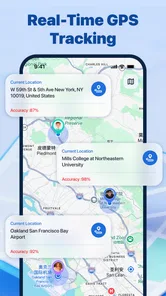
No phone-location app can guarantee a perfectly accurate, continuous live position. Results may be delayed or less precise indoors, in areas with weak GPS or mobile coverage, when battery-saving settings restrict background activity, or when the phone is switched off. Treat map positions as estimates rather than proof of someone’s exact whereabouts, and confirm important plans directly with the person.
Is Friend Location: Phone Tracker free, and is it available for Android and iOS?
Availability, pricing, and included features can differ by platform, country, and app version. Before downloading, check the Google Play or Apple App Store listing for supported devices, subscription or in-app purchase details, developer information, and recent reviews. Also verify that the app’s stated features meet your needs; do not assume that every feature is free or that the same version is offered on both platforms.
Pros
- Easy way to share your location with friends and family.
- Can help coordinate meetups when plans change.
- Useful for checking that loved ones have arrived safely.
- Location sharing can make group outings easier to manage.
- May provide peace of mind during trips or daily commutes.
Cons
- Requires location access
- which can affect battery life.
- Friends must agree to share their location for tracking to work.
- Continuous location sharing can raise privacy concerns.
- Accuracy may vary indoors or in areas with weak GPS coverage.
- Some features may depend on an internet connection or paid access.











