FordPass™
- 41.35K
- 4.7
- Installs
- 10.00M
- Price
- Free

Screenshots
Analysis by Reviewed
My first question with a car companion app is practical: will it help me make a real trip easier, or just give me another screen to check? FordPass™ is Ford Motor Co.’s free lifestyle app, now presented as the Ford app, and its usefulness is closely tied to owning a Ford and having access to the vehicle functions it supports. I’d treat it as a digital link to the car, not as a general driving tool that replaces every other app.
Starting with the car, not the phone
The best way to approach it is to begin with your vehicle and the task you want to handle. If you want to check on the car before leaving, locate it in a busy car park, or use a supported remote function, those are concrete reasons to open the app. The key trade-off is that this is not equally useful to every driver: someone without a Ford, or someone whose vehicle does not support the feature they want, has little reason to make it part of a daily routine.
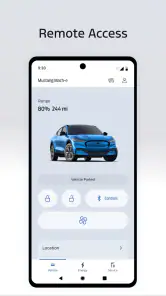
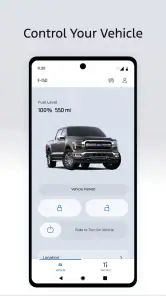
In an ordinary morning scenario, I might check the vehicle before heading out, start it remotely if that option is available, then use the locator later when I return to a large lot. That sequence is more convincing than opening the app out of habit. It turns a few specific moments of uncertainty into tasks I can handle from my phone, while leaving the actual driving and most trip decisions to the car and my usual navigation tools.
A useful routine, with a few checks
For a first setup, I’d keep the goal narrow: connect the vehicle, learn where its status and controls appear, and test only the functions that matter to me. I would not wait until a cold morning or a crowded parking garage to work out the controls. A short practice run at home makes it easier to tell whether a command has gone through and what the app can actually do for that particular vehicle.
There is also a difference between an app showing information and a feature being available for every car. Vehicle equipment and support shape the experience, so it is sensible to check the controls on your own vehicle rather than assume that another Ford owner’s setup will match yours. The app is most valuable when that expectation is clear: it can make an available function more convenient, but it cannot add hardware or capabilities a car does not have.
Where it fits among driving apps
Compared with a general navigation app, Ford’s app has a narrower job. A dedicated maps app is often the better choice when I want flexible route planning across different vehicles; Ford’s tool is more compelling for vehicle-related tasks tied to my own car. I would use each for what it does best rather than expect one to replace the other. That division also keeps the phone workflow simple: vehicle checks and supported controls in one place, broader journey planning in another.
It has a substantial audience, with over 10 million installs and a 4.7 average from around 332,000 ratings. For me, those figures are useful context, not proof that every feature will suit every owner. It is free and rated for Everyone, so trying it is straightforward; the more important question is whether your Ford and your routine give you a reason to keep it installed.
You May Like

Clash of Clans Is Won Between the Battles

Android Auto Makes the Case for Quieter Car Software

MobiOffice: Transforming Mobile Productivity with Seamless Integration

EA SPORTS FC™ Mobile Soccer: Redefining Mobile Sports Gaming

How Microsoft OneDrive Became a Mobile Productivity Giant

How Google Translate Breaks Language Barriers Effortlessly
What to check before relying on it
A practical question is whether the app can be useful if I only need one function occasionally. I think it can, provided that one function solves a recurring annoyance, such as locating the car after shopping or using a supported remote control before leaving home. A small, reliable convenience can justify keeping an app; there is no need to turn it into the centre of every drive. If I rarely need its vehicle-specific tools, I would not feel obliged to check it daily.
I would also separate convenience from certainty. A phone command is not a substitute for looking at the vehicle or confirming a real-world situation. If I send a remote request, I would check the app’s response and use the car itself as the final confirmation where it matters. That is a sensible habit for any connected-car tool: treat the phone as a helpful handoff, not as proof that a physical action happened exactly as expected.
For a household with more than one driver, it is worth deciding who will use the app and for what before relying on it. One person may mainly want vehicle information, while another wants a supported remote function. Agreeing on a simple routine avoids the unhelpful situation where one driver assumes the other has already checked something. I would keep the workflow clear: identify the car, use the specific control or information needed, then confirm the outcome before acting on it.
Choosing the right tool for the job
In the wider lifestyle-app category, this is a specialised companion rather than a broad organiser or all-purpose driving service. Its advantage is the connection to a Ford vehicle; the trade-off is that it has little value for someone who wants a single app to plan routes, compare transport options, or manage cars from different manufacturers. If I switch between vehicles, I would still reach for a neutral navigation app for directions and use Ford’s app only when I am dealing with the Ford.
That distinction matters on a long day with several stops. I would use a map app to build the journey and handle route changes, then open the Ford app for a vehicle-specific check or control when needed. Moving between them is a handoff, not a flaw by itself, but it does mean the Ford app should not be judged as if it were designed to replace maps. Its usefulness comes from doing a narrower job alongside the tools I already use.
There is a small but meaningful setup tip here: try each relevant control while parked and with time to understand what the screen reports. That gives me a baseline for how the app presents a successful request, and helps me avoid learning the interface when I am rushed. I would also revisit the available options after changing vehicles, because a familiar app does not guarantee that a different Ford has the same supported functions.
When another option makes more sense
I would skip it if I do not own or regularly use a supported Ford, if the vehicle functions I care about are not available on my car, or if I prefer not to manage vehicle tasks through a phone. In those cases, the app may add another login and another place to check without changing my routine. A driver who mainly wants navigation is better served by a dedicated maps app, while someone comparing several makes needs a tool that is not tied to one manufacturer.
Even for a Ford owner, a phone-based workflow is not always the easiest one. If I am already beside the car, using its physical controls may be quicker and more direct. The app is most persuasive when distance or uncertainty is the point: checking before I walk out, finding the car later, or using a supported function without standing next to it. That is the difference between a genuinely useful shortcut and a feature I open just because it exists.
Transforming Your Driving Experience
So, I’ve been using the FordPass™ app for a while now, and let me tell you, it has completely transformed how I interact with my vehicle. The app is not just a tool; it’s like having a personal assistant for your car. You can do everything from checking your fuel levels to finding the best parking spots around town.
App Features: More Than Just Connectivity
One of the coolest features I found is the ability to remotely start your car. Imagine those chilly mornings where you can start your car from the comfort of your bed, and by the time you’re ready to leave, it’s all warmed up! Another fantastic feature is the vehicle locator. If you’re anything like me and often forget where you parked, this is a game-changer.
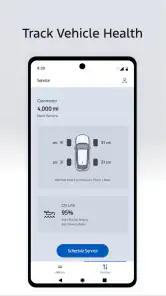
Moreover, the app provides you with vehicle health alerts. It’s like having a mechanic in your pocket. The app notifies you about any issues before they become serious problems, saving you both time and money. The FordPass Rewards program is another highlight, allowing you to earn points for service visits that can be redeemed for discounts on future services or even a new vehicle.
Navigation and Assistance
The integrated navigation system is slick. It doesn’t just guide you to your destination; it also provides real-time traffic updates, so you can avoid those annoying traffic jams. And if you ever find yourself in a bind, the app offers 24/7 roadside assistance. It’s like having a safety net wherever you go.
What’s more, the app’s interface is super intuitive. You don’t have to be tech-savvy to use it. Everything is laid out in a way that makes sense, and the app runs smoothly without any hiccups.
Using the information without over-relying on it
For me, vehicle information is most useful when it changes what I do next. If an alert appears, I can use it as a prompt to pay attention and decide whether the car needs checking or service. I would not treat an app notification as a diagnosis or a replacement for professional advice. Its practical value is early awareness: it can bring a vehicle concern to my attention, while the next step still depends on what the car is doing and the guidance appropriate to that issue.
That same distinction applies to remote functions. I would use them as a convenience when they fit the moment, not as a reason to stop paying attention to the vehicle’s surroundings. Before using a remote control, I would think about where the car is and whether the action makes sense there. The app can make an interaction easier from a distance, but good judgement still belongs to the person using it.
People often wonder whether a manufacturer app replaces roadside help or a mechanic. I would not make that assumption. The app can offer a route to certain vehicle-related services and information, but an alert or a support option does not mean every problem can be resolved from the screen. If I have a serious issue, I would focus on getting appropriate assistance rather than repeatedly refreshing an app and hoping it will explain everything.
A better fit for some owners than others
The strongest case is for someone who drives a Ford regularly and has a supported vehicle function they will actually use. That might be a driver who often forgets where the car is parked, or one who wants to check vehicle information without first getting into the car. The benefit is not that every drive becomes dramatically different; it is that a few recurring tasks can become less awkward.
It is less compelling for a person who borrows a Ford only now and then, changes between several brands, or does not want car controls on a phone. I would also be cautious about adopting it solely because connected features sound impressive. The right test is simple: name a real situation in which the app would help, then see whether the relevant control is available on your vehicle and whether you prefer that method to using the car directly.
My overall view is that the app works best as a supporting tool, not a promise of a completely seamless ownership experience. Ford Motor Co. released it on April 28, 2016, and the FordPass name has since given way to the Ford app in its current presentation. That change makes it sensible to look for the current Ford app when installing, while remembering that what matters day to day is the vehicle connection and the options available for your car.
Ending Thoughts
In conclusion, the FordPass™ app is more than just an app; it’s a way to enhance your driving experience. Whether it’s the convenience of starting your car remotely, the peace of mind from knowing your car’s health status, or the ease of finding a parking spot, this app has you covered. It’s a tool that truly makes owning a Ford vehicle a seamless and enjoyable experience.
So, if you haven’t tried it yet, I highly recommend downloading the FordPass™ app and exploring all it has to offer. Trust me, once you start using it, you’ll wonder how you ever got by without it!
FordPass™ Frequently Asked Questions
Do I need a Ford vehicle to use FordPass™?
You can install FordPass™ without owning a Ford, but the app is designed around Ford vehicles and the ownership experience. That makes it most useful when you own or manage a Ford and want to explore vehicle-related tools. If you are considering a Ford, you can still look through the app, while access to vehicle-specific functions may depend on having a compatible vehicle.
Who develops FordPass™, and what is the app’s category?
FordPass™ is developed by Ford Motor Co. and is a Lifestyle app focused on Ford vehicles and ownership tasks. Its purpose is to bring vehicle-related tools into a mobile experience, so it is especially relevant to drivers who want to manage aspects of Ford ownership from their phone. People without a Ford can still explore the app, though some functions are vehicle-specific.
Is FordPass™ free to download, and what should I know before installing it?
FordPass™ is free to download and is listed for everyone. It is the Ford app for managing connected vehicle and ownership tasks, so its usefulness depends on what you want to do and whether your Ford vehicle supports the features you need. Before installing, consider which tools matter to you, such as checking vehicle information or handling maintenance tasks.
Who develops FordPass™, and is it intended only for Ford owners?
FordPass™ is developed by Ford Motor Co. and is designed around Ford vehicles and the ownership experience. The app may be most useful if you own or manage a Ford, particularly when you want to use vehicle-related tools. Even if you are still considering a Ford, you can review the app’s features, but access to vehicle-specific functions may depend on having a compatible vehicle.
What is FordPass™ and what can it do for me?
FordPass™ is a mobile application designed to enhance the driving experience for Ford vehicle owners. It offers features such as remote start, vehicle status monitoring, and the ability to schedule maintenance. Additionally, the app provides access to roadside assistance, fuel price comparisons, and parking space locators, making it a comprehensive tool for managing your vehicle and travel needs.
Pros
- Comprehensive vehicle control features
- User-friendly and intuitive interface
- Real-time vehicle status updates
- Integrated with FordPass Rewards
- Remote start and lock/unlock capabilities
Cons
- Limited compatibility with older models
- Requires stable internet connection
- Subscription needed for premium features
- Occasional app crashes
- High battery consumption on smartphones

- Category
- Lifestyle
- Version
- Varies with device