Famio: Connect With Family
- 1.40K
- 3.6
- Installs
- 10.00M
- Price
- Free

Screenshots

Analysis by Reviewed
When family schedules rarely line up, it can be reassuring to have one place to check in rather than sending a string of messages. Famio: Connect With Family is a family-focused lifestyle app from Gismart, built around keeping relatives connected. I’d approach it as a shared tool that works best when everyone agrees on how to use it—not as a substitute for a conversation or a guarantee of anyone’s safety.
What to expect from a family-focused app
The basic appeal is straightforward: bring family members into a shared space for staying in touch. Famio is free to install, rated for Everyone, and has reached over ten million installs. Its average rating is 3.6 from around 108,000 ratings, which suggests plenty of people have tried it, though popularity alone does not tell you whether its approach will suit your household.
It’s worth being clear about the trade-off before inviting anyone. Location sharing and safety tools can make coordination easier, but they also involve personal information and expectations. I’d talk through who wants to participate, what kinds of check-ins feel useful, and when sharing should be paused. If a family member would rather use ordinary calls or messages, respecting that choice matters more than getting everyone onto one app.
Getting Started with Famio
First things first, setting up Famio is a breeze. Just download the app, and you're good to go. The interface is super user-friendly, which means even your tech-challenged uncle can get the hang of it. Once you're in, you can add family members by sending them an invite. Easy peasy!
Make the first setup useful, not rushed
For a smoother start, I’d begin with the smallest group that has a real coordination need—perhaps the adults who arrange school pickup or help an older relative get to appointments. Send invitations when you can explain the purpose in person, rather than making an unexpected request that could feel intrusive. Agree on what the app is for before you turn a practical check-in into a family-wide expectation.
After joining, take a moment to review the available settings together and decide which alerts are genuinely helpful. A location notification can save a phone call when someone is travelling, but too many alerts can become background noise. Start with the few situations that matter most to your household; you can adjust your routine after you see what people actually use.
Features That Stand Out
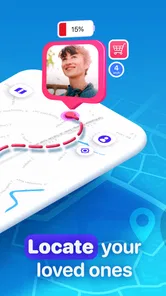
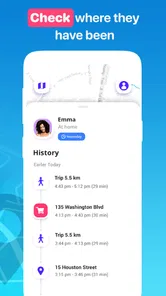
Famio isn't just about tracking locations. Nope, it's got a whole bunch of features packed in. The real-time location tracking is accurate to a fault. You can literally see if your kid made it to school or if your partner is stuck in traffic. And the best part? It updates super fast, so you're never left hanging.
More From Our News Desk

Weather by Xiaomi Review: Clear at a Glance, Less Clear Up Close

X Under Pressure: Can It Recover When Posting Goes Wrong?

Clash of Clans Is Won Between the Battles

Android Auto Makes the Case for Quieter Car Software

MobiOffice: Transforming Mobile Productivity with Seamless Integration

EA SPORTS FC™ Mobile Soccer: Redefining Mobile Sports Gaming
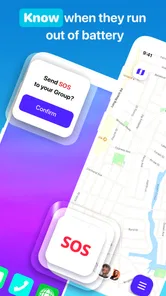
Another cool feature is the SOS button. Imagine being in a sticky situation and needing help ASAP. Just hit that button, and your family gets an instant alert. It's like having a safety net, always there when you need it.
A practical first success—and where to be cautious
A realistic first win is a school pickup: one caregiver can check whether the other has arrived, then use a message to settle any change of plan. That is more useful than repeatedly refreshing a map just to watch someone move. For an older relative travelling to an appointment, the same shared check-in can reduce unnecessary calls, provided they are comfortable participating.
I wouldn’t treat a map or SOS alert as a replacement for emergency services, direct contact, or a pre-agreed safety plan. Phones can be unavailable, and any location-based tool depends on the device and the person using it. The sensible approach is to use Famio as one layer of coordination, while keeping a normal way to reach each other for anything urgent.
Staying Connected
Communication is key, and Famio gets that. The in-app chat feature is quite handy. You can send messages, share photos, and even create group chats. It’s like having a mini social network just for your family. And the best part? No more spam or unwanted ads cluttering your conversations.
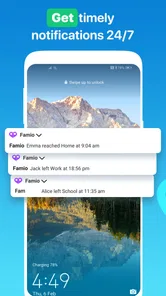
One of my favorite things about Famio is the geofencing feature. You can set up zones, like home, work, or school, and get notifications when someone enters or leaves. It's perfect for making sure the kids are where they should be, without having to keep texting them every five minutes.
Make alerts fit the household
Geofencing works best when the places and alerts reflect a real routine, rather than every location a family member visits. Start with a destination that prompts a useful action, such as knowing a child has reached school, and avoid turning every arrival into a reason to check the app. This keeps notifications meaningful and makes it easier for relatives to feel trusted rather than monitored.
Chat can also be a practical fallback for a quick change of plans: a short message about a delayed pickup is easier to act on than an ambiguous location update. For families already using a group chat, Famio may help keep location-based coordination alongside those conversations. If everyone is happy with their existing messaging app and does not need shared location tools, switching may add more steps than value.
Who it suits, and when another option is better
I can see Famio working well for households with busy schedules, caregivers coordinating with relatives, or parents who want a shared way to handle agreed check-ins. It is less suited to someone who wants a private, individual planner, or to families who do not want location sharing. A standard messaging app is often enough for simple updates; a phone call is still clearer when a situation needs immediate discussion.
There is also a learning curve that is less about tapping buttons and more about setting boundaries. Decide who should receive alerts and what they mean, then revisit that agreement if the app starts causing worry or unnecessary checking. That small conversation is a useful setup step, not an optional extra.
Why You Should Consider Famio
In today's world, where everyone's on the go, having an app like Famio is a game-changer. It offers peace of mind, knowing that your loved ones are just a tap away. Plus, the app doesn't drain your battery, which is a massive win in my book.
The app is free, but it includes in-app purchases ranging from $4.99 to $79.99 per item, so I’d check the purchase details before paying for anything. Its current version is 1.43.2, and it requires Android 11 or later. Those practical details are worth checking against your device and budget before inviting your family to build a routine around it.
So, if you're looking for a way to stay connected with your family without being overbearing, give Famio a shot. It's not just an app; it's like an invisible thread that keeps you all linked together, no matter where life takes you.
In conclusion, Famio: Connect With Family is a must-have for anyone who values family safety and connection. It's practical, reliable, and genuinely a joy to use. So why not give it a try and see for yourself how it can make your life a little bit easier?
Choose a first routine everyone can understand
For a first-time user, I’d make the first success deliberately small: invite one relative who already helps with a recurring plan, agree on one check-in that would genuinely save time, and try it during that plan. For example, if two adults share pickup duties, the person driving can send a brief chat update if traffic changes the handoff. The other person can use the agreed location check only when it answers a real question, rather than treating the map as something to watch continuously.
This approach also makes it easier to tell whether Famio is earning a place on everyone’s phone. If the family completes the handoff with fewer calls and less uncertainty, the shared space has a clear job. If the routine still depends on lengthy explanations or people forget to open the app, simplify it instead of adding more alerts. A useful family tool should reduce coordination effort, not create a new chore that one person has to manage.
Think through location sharing before relying on it
A location display can be helpful, but I would not interpret every point on a map as a complete account of what someone is doing. A person may be travelling, indoors, or simply unable to respond at that moment. If an arrival matters, pair the location check with a clear expectation—such as sending a message when plans change—rather than assuming that a map alone confirms everything. This is especially important when coordinating with children or older relatives, where reassurance should not depend on an app being the only channel.
It is also worth deciding how the family will handle a temporary pause. Someone may want to stop sharing during a private outing or may not want location access to become a permanent condition of being included in the group. I’d make that boundary explicit from the beginning. Famio is most useful when participation is a practical agreement, not a test of trust, and a person who opts out should still be able to reach the family by ordinary means.
Keep alerts selective and review the habit
One non-obvious trade-off with arrival zones is that the alert itself can become the routine. If every departure and return produces a notification, family members may start ignoring all of them, including the one that would have helped. I’d begin with a single place where an arrival genuinely changes what someone else needs to do, then remove or adjust alerts that do not lead to a useful response. The point is not to collect updates; it is to make a specific handoff easier.
After a few days of normal use, ask whether the app has reduced uncertainty or simply moved it to a different screen. If people are checking the map repeatedly, agree on a better trigger for contact—for instance, a message only when an expected plan changes. That small review keeps the tool proportional to the family’s needs and helps prevent a safety feature from turning into constant monitoring.
How it compares with familiar alternatives
Compared with a standard family group chat, Famio’s appeal is that location-oriented coordination and conversation can sit in the same family-focused setting. A group chat remains the simpler choice when relatives mainly need to share plans, photos, or quick updates and do not want location features. If your family already has a reliable chat and rarely needs to coordinate arrivals, moving everyone to another app may not improve anything.
Compared with a phone call, the app can make routine coordination less interruptive: someone can check a planned arrival or send a short update without expecting an immediate conversation. But a call is better when the situation is ambiguous, emotionally important, or urgent. I’d treat these options as complementary rather than competing. Famio can handle the ordinary “who is picking up?” question; it should not be the only route for a problem that needs a direct response.
Who may want to skip it
I would skip Famio if the family’s main concern is privacy and no one is comfortable sharing location, or if members do not want to agree on common check-in habits. The app’s central strength is also its limitation: it is designed around family connection, so it adds little for someone seeking a solo lifestyle organizer or a general-purpose calendar. A shared calendar may be a better fit when the real problem is remembering dates and appointments rather than knowing whether someone has arrived.
It may also be a poor match for a household where one person expects instant replies from everyone. A location tool cannot make relatives available, and frequent checking can raise tension rather than relieve it. Before setting it up for a child or an adult who relies on family support, I’d explain what the app is for in language they understand and give them room to ask questions. Consent and reasonable expectations are part of a successful setup, not a technical detail.
Costs, compatibility, and a sensible trial
There is no need to assume that every family member should buy anything just to test the basic idea: the app is free to install, while optional in-app purchases are listed from $4.99 to $79.99 per item. I’d inspect the purchase screen carefully before confirming a charge and make sure the household agrees on any spending. Because the range is broad, a free trial of the family routine—using only what is already available—can help you decide whether the app is useful before considering an upgrade.
One practical compatibility point is that the listed Android requirement is version 11 or later. If a relative uses an older Android phone, check that before organizing a shared routine around their participation. Famio is also available as an app in a fast-moving product category, so it makes sense to keep expectations grounded in the version you actually install; the current version is 1.43.2. I would not promise a particular experience across every device or household, especially when location tools depend on both the app and the person’s phone being usable.
My recommendation for a first-time user
My preferred way to try Famio is to start with one concrete question the family asks repeatedly, such as whether the pickup driver has arrived. Invite only the people involved, agree on whether a message or location check is the appropriate signal, and use it for that routine before expanding the group. If it makes the exchange calmer and quicker, keep it; if it prompts more monitoring or confusion, return to the communication method the family already trusts.
That is why I see Famio as a useful option for relatives who want shared check-ins and are willing to set boundaries together, rather than a universal solution for every family. Its chat, location sharing, geofencing, and SOS tools give it a more coordination-focused role than an ordinary messaging app, but they work best alongside clear expectations and direct contact when needed. For a household that values that balance, it is worth trying; for one that only needs occasional conversation, a familiar group chat may be the easier choice.
Famio: Connect With Family Frequently Asked Questions
Can Famio help my family coordinate everyday plans as well as stay in touch?
Famio is intended to help families stay connected and keep loved ones safe, so it may be useful when your household wants a shared way to coordinate. Its family-focused purpose can complement everyday communication, but each person’s experience depends on which features they choose to use and how the family agrees to organize its plans.
What age rating does Famio have, and should families talk about location sharing first?
Famio has an Everyone content rating, which makes it suitable for a broad audience. The app’s family-focused purpose may appeal to households looking for a shared way to communicate and coordinate. Since it includes location sharing, families should discuss how they plan to use that feature and make sure each participant understands and agrees to the arrangement.
Does Famio: Connect With Family require family members to install the app too?
Famio is designed to help family members stay connected, so the people you want to coordinate with will need access to the app and its relevant features on their own devices. Before downloading, consider whether everyone in your family is comfortable using a shared app for communication and location sharing. Its usefulness depends on family members choosing to participate and keep the app available.
What is Famio: Connect With Family and how does it work?
Famio: Connect With Family is a mobile application designed to help family members stay connected and organized. It offers features like real-time location tracking, shared calendars, and messaging to enhance communication and coordination among family members. The app aims to provide peace of mind by ensuring everyone in the family is aware of each other's whereabouts and daily schedules.
Is Famio: Connect With Family free to use?
Famio is free to download and offers both free and premium versions. The free version provides basic features such as location sharing and messaging. However, to access advanced features like detailed location history, priority customer support, and additional customization options, users need to subscribe to the premium plan. In-app purchases range from $4.99 to $79.99 per item, so check the options shown in the app before subscribing.
Pros
- Easy-to-use interface for all ages
- Reliable GPS tracking for family safety
- Instant messaging feature included
- Family calendar syncs seamlessly
- Low battery usage for prolonged monitoring
Cons
- In-app ads can be intrusive
- Limited features in free version
- Occasional syncing issues
- Requires internet for full functionality
- No support for wearable devices













