Cryptogram - Word Brain Puzzle
- 7.53K
- 4.4
- Installs
- 10.00M
- Price
- Free
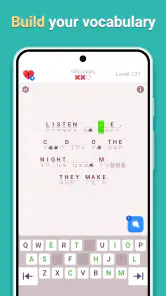
Screenshots
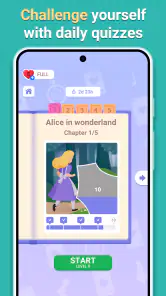
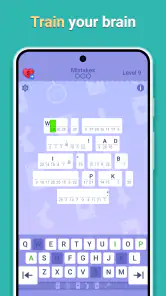
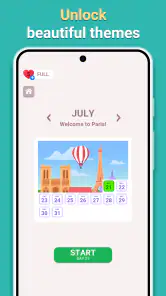
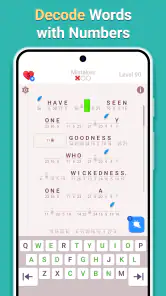
Analysis by Reviewed
I usually judge a word puzzle by what happens after the first few easy answers: does it give me a reason to slow down and notice patterns, or does it become routine? Cryptogram - Word Brain Puzzle is aimed at the first kind of player. It turns letter substitution into a compact deduction task, which makes it a good fit when I want to focus on one small challenge rather than settle in for a long game.
Who will enjoy the puzzle style
I’d recommend it to people who like spotting repeated letters, testing a hunch, and revising it when the sentence stops making sense. A cryptogram rewards careful attention more than quick tapping, so I find it especially satisfying when I have a few quiet minutes and can work through a message at my own pace. It is less suited to anyone looking for a fast action game, a broad vocabulary lesson, or a crossword built around clues and general knowledge.
That distinction matters when choosing among word games. In a conventional crossword, a clue points toward an answer; here, the puzzle asks me to infer a letter mapping from the message itself. Compared with word searches, there is less scanning and more reasoning. If I want a clear clue for every answer, a standard crossword is the better choice. If I enjoy seeing a pattern emerge from partial information, this format has a different kind of appeal.
A practical way to approach a tricky message
When I hit a difficult stretch, I try not to guess several letters at once. I look for a short word or a repeated pattern, enter only a theory I can explain, then check whether it makes the surrounding text more plausible. If one guess creates nonsense in multiple places, I treat that as a signal to back up rather than build a whole solution on it. This small habit makes the puzzle feel more like deduction and less like random trial and error.
I also treat hints as a way to restart my thinking, not as a button to press whenever progress slows. A brief pause can be useful: I reread the remaining pattern and see whether I overlooked a repeated symbol. If I still cannot move forward, a hint may help, but using one too early can remove the most rewarding part of a cryptogram. That trade-off is worth considering if you prefer solving every step unaided.
Where users can get stuck
The main friction is not complicated controls; it is the moment when a plausible letter guess fails to fit the rest of the message. That can make a puzzle feel stubborn, particularly if you are playing while distracted. I get better results by doing one puzzle in a focused break instead of trying to solve it while switching between messages or other tasks. If a screen seems unresponsive, I first check that I tapped the intended letter or puzzle area and give the game a moment before repeating the action; rapid taps can make it harder to tell what changed.
Setup checks and recovering your flow
Before assuming a problem is in the game, I check that the app has finished loading and that the device is responding normally. If progress or an input appears out of step, I pause, review the puzzle, and avoid making more guesses until I understand the current state. Closing and reopening an app can be a sensible general troubleshooting step when it stops responding, though I would not do that mid-puzzle unless I was prepared for the possibility that the current screen might not remain as I left it.
More From Our News Desk

Weather by Xiaomi Review: Clear at a Glance, Less Clear Up Close

X Under Pressure: Can It Recover When Posting Goes Wrong?

Clash of Clans Is Won Between the Battles

Android Auto Makes the Case for Quieter Car Software

MobiOffice: Transforming Mobile Productivity with Seamless Integration

EA SPORTS FC™ Mobile Soccer: Redefining Mobile Sports Gaming
For everyday use, I can see this working well during a coffee break or a quiet commute when I have enough attention to read the emerging message. It is not my first pick for a noisy wait or a moment when I need to keep looking away: cryptograms reward continuity, and losing track of a tentative substitution can make the next attempt feel harder than it is. If that happens, I return to the repeated patterns and rebuild the solution one decision at a time.
Unraveling the Mystery
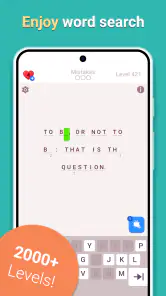
First off, let me explain what Cryptogram Letters and Numbers is all about. As the name suggests, this app is a puzzle game where you decode hidden messages. Each puzzle is a cryptogram, where a number or a letter represents another letter. The challenge? Figure out the substitution to reveal the hidden message. It’s like solving a mystery, one letter at a time!
Getting Started
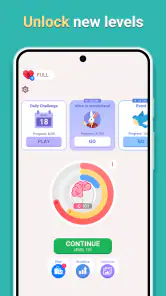
Jumping into the game is as straightforward as it gets. The app has a clean and intuitive interface, making it easy for anyone to pick up and start playing. You’re greeted with a variety of cryptograms to solve, each varying in difficulty. And if you’re a newbie, don’t worry. The game eases you in with simpler puzzles before ramping up the difficulty.
The Gameplay Experience
One of the things I love about this app is how it keeps my brain engaged. It’s not just about guessing letters; you have to think critically, analyze patterns, and sometimes, make educated guesses. It’s a mental exercise, but in the best way possible. Plus, there’s something incredibly satisfying about cracking a tough puzzle after some head-scratching!
Another cool feature is the hint system. If you’re ever stuck, the app provides hints to nudge you in the right direction. But be warned – using too many hints can take away from the challenge, so use them sparingly!
Choosing it with realistic expectations
The game is free to download, and its Everyone age rating makes it suitable for a broad audience. Gismart develops it, and its word-puzzle focus is clear from the start. I would not mistake that accessibility for unlimited free play: optional in-app purchases range from $1.99 to $99.99 per item, so I’d check any purchase prompt carefully and decide whether spending fits my own preferences before proceeding. The game has a 4.4 average from around 300,000 ratings and has passed 10 million installs, which suggests many players have tried it, but those figures do not tell me whether its particular puzzle style will suit you.
One useful way to decide is to try the basic rhythm before making any purchase: do I enjoy the process of testing substitutions, or am I only eager to reveal the final sentence? If the deduction itself is fun, the game has a clear reason to stay on my device. If I mainly want themed clues, varied puzzle formats, or a story that carries me between rounds, I’d look elsewhere rather than expecting this cryptogram approach to become something it is not. Its current version is 2.7.1, and it requires Android 10 or later, details worth checking against your device before installing.
Why You’ll Love It
What sets Cryptogram Letters and Numbers apart is its ability to cater to both casual gamers and hardcore puzzle enthusiasts. Whether you’re looking to kill time during your commute or challenge your brain during a lazy afternoon, this app has got you covered. Plus, there’s a sense of accomplishment that comes with solving each cryptogram that’s hard to beat.
Also, the app doesn’t bombard you with ads or push you to make in-app purchases, which is a huge plus in my book. It respects the player's experience, letting you focus solely on the puzzles.
Making a small session count
I find the game most useful when I set a modest goal: work on one message, rather than treating a short break as a race to clear several puzzles. A cryptogram can be left mentally unfinished even when I put the phone down, so I make a quick note to myself about the strongest unresolved pattern—such as a repeated two-letter group—before switching tasks. That gives me a clear place to resume without entering speculative answers just to feel that I made progress.
This approach also helps me tell whether I am genuinely enjoying the challenge. If I keep returning to the message because I want to test a new pattern, the format is working for me. If I am only tapping letters to get past a screen, I stop and come back later; pushing through while tired tends to turn deduction into guesswork. It is a small but useful distinction for a game whose appeal depends on paying attention to the text.
How it compares with other word games
Among casual word games, this sits on the reasoning end of the spectrum. A word-search puzzle usually gives me a bank of words to locate, while a crossword supplies direct clues and a grid that constrains answers. Here, the text itself is the evidence, so I need to use repetition and sentence structure together. That makes it more satisfying for someone who enjoys inference, but less welcoming if they want every step signposted or prefer a changing mix of mechanics.
It is also not the best choice when I want an open-ended vocabulary workout. Solving a substitution message is about uncovering its intended wording, not freely building words or learning definitions. For a quick brain teaser with a single line of reasoning, that focus is a strength. For a longer session with varied clue types, a traditional crossword or a broader collection of word puzzles would give me more variety.
Questions worth considering before installing
One practical question is whether it suits a first-time cryptogram player. I think it can, because the basic task is easy to understand and the puzzles begin with simpler examples. Still, understanding the rules is not the same as finding every message easy: if letter patterns and sentence logic are not enjoyable to you, a gentle start may not change that. I would treat the early puzzles as a chance to see whether the solving method clicks, not as a promise that every later puzzle will feel effortless.
Another consideration is how to handle a wrong answer. Rather than adding more guesses around it, I return to the message and check which other appearances of that symbol have changed the reading. The useful question is not only “Could this letter fit here?” but “Does it make the other occurrences more believable too?” That cross-check is the simplest way I know to limit a chain of bad assumptions, and it works whether I am solving unaided or deciding that a hint is worthwhile.
If I am choosing it for a child or playing with someone else, I would keep the appeal in perspective. The Everyone age rating signals broad suitability, and the word-based format can make for a calm shared activity, but the puzzle still asks the player to read carefully and tolerate uncertainty. I would sit alongside a younger player and model how to test a pattern instead of giving away the answer. That turns a stuck moment into a useful reasoning exercise without pretending the game is a formal lesson.
When another option is the better fit
I would skip this one if I mainly wanted a competitive score chase, action, a narrative campaign, or a steady stream of unrelated mini-games. The core pleasure here is deliberately narrow: infer a substitution and see whether the message resolves. That focus is exactly why it can be calming, but it also means it may feel repetitive to someone who needs a new kind of task every few minutes. A clue-driven crossword is a better fit when I want external prompts; a word-search is better when I want a lighter visual scan.
I would also avoid starting a puzzle at a time when I cannot give it even a little continuity. If I know I will be interrupted every few seconds, I am more likely to forget which guesses were strong and which were tentative. In that situation, I choose a game that is easier to pause mentally, or I wait until I have a quieter stretch. The practical benefit is less frustration, not a claim that this game demands a long uninterrupted session.
Keeping purchases and expectations in balance
Because the game is free to install but includes optional purchases, I would make the spending decision separately from the question of whether I like the puzzles. First, I would try the core solving loop and see whether I naturally want another message. Then I would read any purchase screen carefully before confirming anything, especially if I am handing the device to someone else. That is a sensible habit for any game with paid items, and it avoids treating a moment of impatience as a reason to spend.
I also would not assume that paying is necessary to enjoy the central deduction. The game’s defining activity is already clear without turning a purchase into a measure of skill or commitment. If a hint seems tempting because I am tired, a short pause may be the better first move; if I am still stuck and want help, I can decide whether the available option is worth it after checking its terms on screen. This keeps the choice personal and deliberate rather than making spending part of the puzzle strategy by default.
Final Thoughts
In the end, Cryptogram Letters and Numbers is an absolute gem for anyone who loves a good puzzle. It’s challenging, engaging, and most importantly, fun! So, if you’re looking to give your brain a workout while having a blast, I’d highly recommend downloading it. Just remember, patience is key, and don’t be afraid to make mistakes – after all, that’s part of the fun!
My recommendation is strongest for someone who wants a focused letter-deduction game they can approach at their own pace, and softer for anyone hoping for a varied word-game collection. The key question is whether working out the substitution feels enjoyable before the answer appears. If it does, this is an approachable way to spend a short, thoughtful break; if it does not, a clue-led crossword or a word search is likely to suit you better.
Cryptogram - Word Brain Puzzle Frequently Asked Questions
Is Cryptogram - Word Brain Puzzle a good choice for a quick play session?
It may suit short breaks if you enjoy focusing on a word puzzle and trying to uncover a hidden message. The core idea is to examine letter patterns, make guesses, and work toward a solution, so a single puzzle can provide a compact mental challenge. It also works for players who prefer to settle in and spend longer thinking through a tricky code.
What is the age rating for Cryptogram - Word Brain Puzzle?
Cryptogram - Word Brain Puzzle has an Everyone content rating, so its listed age classification is suitable for a broad audience. Its word-based format centers on decoding messages and solving spelling challenges. As with any game used by children, parents may still want to check the app and manage device settings themselves, particularly if they want to control optional in-app purchases.
What kind of word puzzles can I expect in Cryptogram - Word Brain Puzzle?
Cryptogram - Word Brain Puzzle is a word game built around decoding messages and solving spelling challenges. Its store summary invites players to guess words and work through a logic-based quest, so it may appeal to people who enjoy looking for patterns in letters rather than simply filling in ordinary crossword clues. The central attraction is the satisfaction of working out what a coded message says.
Is Cryptogram - Word Brain Puzzle free to download, and what should I know about purchases?
The game is free to download, so you can try its word-puzzle format without paying upfront. It also offers optional in-app purchases, with prices ranging from $1.99 to $99.99 per item. Purchases are not required to understand the basic premise of decoding and guessing words, but it is worth checking the available options and your device’s purchase settings before playing.
What is Cryptogram Letters and Numbers?
Cryptogram Letters and Numbers is a challenging puzzle game that combines elements of cryptography and problem-solving. Players are presented with encoded messages that must be deciphered using a key. The game offers various levels of difficulty, making it suitable for both beginners and experienced puzzle enthusiasts. Available on Android and iOS, it provides a fun way to test and enhance your logical thinking and analytical skills.
Pros
- Challenging puzzles enhance cognitive skills.
- Visually appealing interface.
- Wide variety of cryptograms available.
- Regular updates with new content.
- No intrusive ads.
Cons
- Limited hints can frustrate beginners.
- Some puzzles are too complex.
- Occasional app crashes.
- No multiplayer option.
- Requires internet for updates.
- Category
- Word
- Version
- 2.7.1













