DuckDuckGo Browser, Search, AI
- 372.91K
- 4.7
- Installs
- 50.00M
- Price
- Free

Screenshots





Analysis by Reviewed
I judge a privacy browser less by grand promises than by whether it fits the small decisions I make online: what to search, which links to open, and when I want to clear a session. DuckDuckGo Browser, Search, AI brings private search and browsing together, with chat and other privacy tools in the same app. That makes it appealing if you want a simpler alternative to your usual browser, though it is not automatically a replacement for every tool you already rely on.
A browser for the small tasks that fill a day
I find the clearest way to assess this app is to imagine using it between other tasks, not as a grand digital makeover. I might search for a lunch spot, read a few reviews, check the menu, and then look up a return policy for something I bought. Those are ordinary searches, but they can leave a trail of tabs and browsing activity in a browser I use for everything else. DuckDuckGo gives me a separate place to do that kind of quick research and offers a direct way to clear the session when I am done.
That separation can be useful even if I do not switch every account or habit over at once. For example, I can use it to look up a health question or compare a product without first changing settings in my main browser. I still need to judge the sources and decide what information I am comfortable entering. A privacy-oriented browser can change the browsing experience, but it cannot make a misleading page trustworthy or make a careless click harmless.
What a privacy-first routine looks like in practice
The app’s fire button is more than a decorative privacy symbol if I use it deliberately. I can treat the end of a browsing session as a small boundary: finish reading, clear the activity, and close the app rather than leaving a pile of unrelated tabs behind. That can be handy on a shared device or after researching a surprise gift. It is also a blunt tool if I have pages I meant to return to, so I would make sure I am finished before tapping it.
For repeat tasks, I would avoid clearing everything automatically just because the option is there. A session may contain a page I need for a recipe, a travel detail, or a form I have not completed. My practical approach is to finish anything important first, keep useful information somewhere appropriate, and then clear browsing activity when a session is genuinely over. This is a small workflow choice, but it helps the privacy feature feel intentional rather than disruptive.
It is also worth separating privacy from anonymity. Tracker blocking and privacy-minded browsing can reduce some forms of unwanted tracking, but they do not turn a person invisible online. A site may still recognize someone who signs into an account, and information deliberately entered into a form is still shared with that service. I would use the app to make routine browsing more private, not as a reason to share sensitive details casually.
Privacy at Its Core
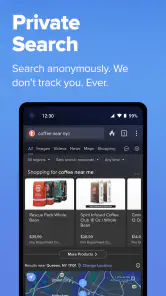
The first thing that strikes you about DuckDuckGo Private Browser is its unwavering commitment to privacy. This isn’t just a regular browser; it’s designed with privacy as its main mission. No tracking, no data collection, nada. It’s like having a personal bouncer that keeps all those pesky advertisers at bay. You can search, browse, and shop without leaving any breadcrumbs. Now, isn’t that a relief?
You May Like

Clash of Clans Is Won Between the Battles

Android Auto Makes the Case for Quieter Car Software

MobiOffice: Transforming Mobile Productivity with Seamless Integration

EA SPORTS FC™ Mobile Soccer: Redefining Mobile Sports Gaming

How Microsoft OneDrive Became a Mobile Productivity Giant

How Google Translate Breaks Language Barriers Effortlessly
A straightforward daily browsing routine
Using the app, I found it to be incredibly user-friendly. The interface is clean and minimalistic, which I love because it means no distractions. It’s all about you and the web. What’s more, the app runs smoothly without any hiccups. You tap, and it’s there—quick and efficient, just as you’d hope.
That simplicity is useful when I’m looking up a recipe while cooking, checking a shop’s return policy, or searching for a place to meet a friend. I can keep those quick, unrelated searches in one browser rather than opening several apps. Search quality and results are still a matter of taste, though: if you depend on another search engine’s ranking, maps, or personalized results, compare the answers before switching your routine completely.
Another cool feature is the fire button. With one tap, you can burn your browsing data to ashes, ensuring no trace is left behind. It’s almost cathartic, like wiping the slate clean with a single click.
What the privacy tools change
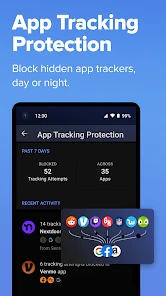
Don’t be fooled into thinking this is just another browser. DuckDuckGo Private Browser is loaded with features that make it stand out. There’s built-in tracker blocking, encryption enforcing, and even a privacy grade rating for websites. It’s like having a virtual privacy advocate working tirelessly for you 24/7.
The privacy grade is most useful as a quick signal, not a guarantee that a site is safe or that every privacy concern has disappeared. I treat it as a prompt to pause before sharing information, especially on unfamiliar shopping or sign-in pages. A practical habit is to use the browser for searches and casual reading, then handle sensitive accounts with the extra care those services require rather than assuming any browser removes every risk.
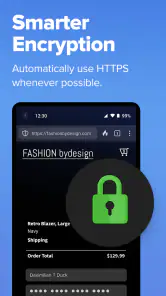
Plus, it’s not just about keeping your secrets. The app also ensures you get the most secure version of websites. Whenever possible, it forces sites to use encrypted connections. So, you’re not just private, you’re also secure—two birds, one stone!
Search habits, chat, and useful boundaries
Search is the part I would test first, because a browser’s privacy focus matters less if I do not like the answers it gives me. I would try a few queries where I already know what a useful result looks like: a local business, a technical question, and a broad product comparison. That gives me a more honest sense of whether the results fit my needs than searching only for familiar topics where I already know the answer.
The app also brings chat into the same privacy-focused experience. I would treat that as a convenient option for a quick question or a first pass at an idea, rather than assuming it will replace a specialized research tool or a carefully sourced answer. When accuracy matters, I still want to check important claims against reliable pages. Keeping search and chat close together can reduce app switching, but it does not remove the need to evaluate what either one returns.
A useful distinction is whether I want convenience or continuity. If I am asking a one-off question while browsing, having chat nearby can be handy. If I need a long-running project with a particular account, saved context, or a work process built around another service, I would stick with the tool that already supports that workflow. DuckDuckGo makes most sense when I want a lighter, privacy-conscious way to handle everyday browsing rather than a complete replacement for every digital tool.
Where it fits among alternatives
Compared with a mainstream browser built around a broader ecosystem, this app puts privacy tools and a quick way to clear browsing activity closer to the center of the experience. That focus is the draw if you want a dedicated place for everyday searches without making privacy settings a project. On the other hand, people who rely on extensive browser customization, synced workflows, or a particular search engine’s ecosystem may prefer to keep their current browser, or use both for different tasks.
One useful approach is to make it your browser for casual research and shopping, while keeping a second browser for work logins or sites that behave better there. The trade-off is an extra app and a split browsing history, but it gives you room to see whether DuckDuckGo’s search results and site compatibility suit you before committing. If you regularly need the same tabs and account setup across devices, check that your preferred workflow is comfortable before making it your only browser.
That comparison is not simply about which browser has more features. Mainstream alternatives can be a better fit when I depend on a particular ecosystem, familiar account syncing, or a browser setup I have carefully customized. DuckDuckGo’s appeal is narrower and clearer: put privacy tools within easy reach and make a clean, separate browsing routine straightforward. If I rarely change browser settings and want everything tied to one existing setup, the convenience of staying put may matter more than adding a privacy-focused option.
Cost, access, and the choice to switch
DuckDuckGo is free to install, and its Everyone age rating makes it broadly accessible. The current version is 5.259.2, with Android 8.0 as the minimum operating system requirement. The app also lists in-app purchases ranging from $9.99 to $99.99 per item, so free access and paid options should not be confused: you can try the browser without paying, while any purchase is a separate decision. I would judge paid value by whether the specific option you want is useful to your routine, rather than assuming the browser itself requires a subscription.
That makes trying the core browsing experience a low-commitment decision, but it does not make every paid option automatically worthwhile. I would first use the free access for the tasks I actually care about, then consider a purchase only if I understand what it adds and expect to use it. The listed range covers very different amounts, so the sensible question is not whether paid access sounds premium; it is whether a particular item solves a real need for me. I would not pay simply because I like the browser’s privacy focus.
As a productivity app, its value is less about organizing projects and more about reducing friction around routine web tasks. DuckDuckGo, the developer, has built a widely adopted product: it has a 4.7 average from around 2.4 million ratings and over 50 million installs. Those figures suggest plenty of people have tried it, but they cannot tell you whether its search style or browsing habits will suit you personally.
Its popularity is useful context, not a reason to assume every site will behave exactly as it does in another browser. If I depend on a work portal, a specialist service, or a particular sign-in process, I would test that before moving important activity over. It is easy to keep two browsers while deciding: the extra app takes a little attention, but it avoids forcing a permanent switch before I know whether the day-to-day details work for me.
Who is likely to get the most value
I would recommend giving it a try if you want private search and browsing without turning setup into a project, or if you like keeping casual searches separate from your main browser. It can also suit someone who shares a device and wants a clear way to end a browsing session. The straightforward interface is part of the value: I do not need to be enthusiastic about privacy settings to make use of a browser that puts its privacy tools close at hand.
I would be more cautious if my routine depends on deep customization, a particular search engine’s personalized results, or a tightly connected browser ecosystem. People who regularly move between devices and expect the same tabs, account state, and habits everywhere should make sure the app fits that pattern before relying on it as their only browser. Likewise, if I need a specialized research workflow, I would choose the tool that handles that work best and use DuckDuckGo for the browsing tasks where its focus is a better match.
For a realistic trial, I would use it for several ordinary errands rather than judging it from one search: find a place for dinner, compare a product, open a site I already use, and see whether the pages load and behave as I expect. Then I would try the fire button after finishing, paying attention to whether clearing activity fits how I browse. That short test answers practical questions—search relevance, compatibility, and whether the privacy routine feels comfortable—better than a feature checklist.
My Two Cents
All in all, if privacy is your main concern and you’re tired of feeling like Big Brother is watching your every move, DuckDuckGo Private Browser is definitely worth a try. It’s not just about the peace of mind that comes with knowing your data isn’t being sold to the highest bidder. It’s about enjoying the web without the worry, and frankly, that’s priceless. So go ahead, give it a whirl. Who knew browsing could be this liberating?
My recommendation is to try it as a practical second browser first: search for something you know well, visit the sites you use most, and see whether their pages work as expected. Keep it if the privacy-focused routine feels natural; skip it as your main browser if you need deeper customization, dependable compatibility with a specialized workflow, or search results tailored to your existing habits. The best reason to choose it is that its privacy features make ordinary browsing feel easier to manage—not that any app can make every online activity risk-free.
DuckDuckGo Browser, Search, AI Frequently Asked Questions
Is DuckDuckGo Browser, Search, AI free to download, and are there optional purchases?
DuckDuckGo Browser, Search, AI is free to download on Android and iOS. Some in-app purchases are available, ranging from $9.99 to $99.99 per item, so it is worth checking the purchase details before choosing any optional offering. The free download makes it possible to try the browser without paying upfront.
Who develops DuckDuckGo Browser, Search, AI?
DuckDuckGo Browser, Search, AI is developed by DuckDuckGo. It brings the company’s private search and browsing experience together with features described in the app’s store summary, including chat, ad blocking, and VPN protection. The app is in the productivity category and is rated Everyone, making it suitable for a general audience.
Is DuckDuckGo Browser, Search, AI suitable for everyday use?
Yes. DuckDuckGo brings private search and web browsing together in one app, so it can serve as a regular option for looking things up and visiting websites. Its focus on privacy is central to the experience, while the app also describes features such as ad blocking, AI chat, and VPN protection. It is a productivity app from DuckDuckGo.
What Android version does DuckDuckGo Browser, Search, AI require?
The Android version of DuckDuckGo Browser, Search, AI requires Android 8.0 or later. If your device runs an older version, you will need to update it before installing the app. Checking your device’s Android version first is a simple way to avoid download or compatibility problems; iPhone and iPad users can get the app through the Apple App Store.
What is DuckDuckGo Private Browser?
DuckDuckGo Private Browser is a mobile web browser designed to protect users' privacy. It offers features like tracker blocking, private search, and encryption to ensure a secure browsing experience. Unlike other browsers, it doesn't track your online activities, making it ideal for those who prioritize privacy.
Pros
- Fast browsing experience
- No user tracking
- Built-in ad blocker
- Simple user interface
- Protects privacy
Cons
- Limited customization
- Occasional site incompatibility
- No cloud sync
- Limited extension support
- Fewer features than mainstream browsers

- Category
- Productivity
- Version
- 5.259.2











