Donna AI Song & Music Maker
- 9.16K
- 4.7
- Installs
- 5.00M
- Price
- Free

Screenshots
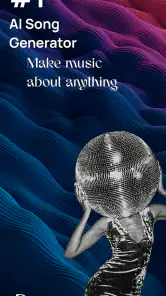
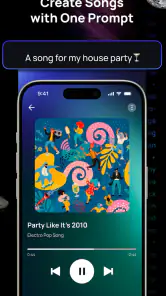
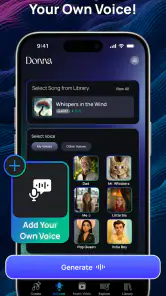
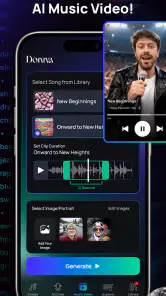
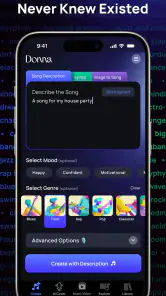
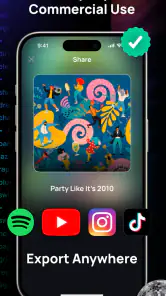
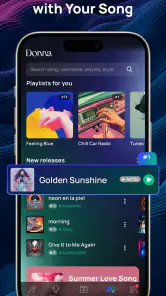
Analysis by Reviewed
I like how Donna AI Song & Music Maker makes starting a musical idea feel less intimidating than opening a full desktop production setup. It is a music-making app from MOBIVERSITE YAZILIM BILISIM REKLAM VE DANISMANLIK, built around AI-assisted song creation. If you are curious about turning a mood or a genre into a track, it gives you a place to experiment without needing to begin with music theory.
A simple way to turn an idea into a draft
My most useful approach is to decide what I want the song to feel like before I start: playful, reflective, energetic, or calm. Then I treat the first result as a sketch, not a finished release. That small change in expectations matters. AI can help get a musical direction onto the screen, but choosing a direction and deciding whether the result fits are still the human parts of the process.
For example, if I have a few minutes between tasks, I can try shaping an idea around a genre rather than waiting for a perfect lyric or melody to arrive. Rap, pop, rock, gospel, and other styles give a newcomer a useful starting vocabulary. I would make one clear choice at a time and listen for whether the overall mood is working before changing several things at once. That makes it easier to tell what actually improved the draft.
Where it fits among music apps
Donna is best understood as a creative starting point, not a replacement for every kind of music software. Compared with a conventional audio workstation, an AI song maker can feel more approachable when you want a quick idea without building every musical element yourself. But if you need precise control over recording, editing, arrangement, or mixing, a dedicated production tool is likely a better fit. I would use Donna to explore possibilities, then move to a more hands-on workflow if a track needs detailed polishing.
It also suits a different purpose from a streaming app: you are there to make something, not simply choose what to hear. That makes it appealing to curious listeners, casual creators, and songwriters looking for a prompt to react to. It is less suitable if you want a guaranteed professional result, or if you prefer composing every note and sound yourself.
Small habits that make experiments more useful
I would keep a simple mental brief for each attempt: the mood, the style, and the one thing I want to find out. If the first draft feels too far from that brief, change one choice and try again rather than starting over without a reason. This is a practical way to learn what kinds of prompts and genre directions lead closer to your taste, without assuming the app has hidden controls or a particular production workflow.
One everyday use is making a playful musical idea for a friend’s birthday or a family gathering. I would treat it as a personal creative gesture, listen through before sharing, and be ready to revise if the tone does not match the occasion. The app can help overcome the blank-page problem, but the final judgment about whether a track feels appropriate still belongs to you.
More From Our News Desk

Weather by Xiaomi Review: Clear at a Glance, Less Clear Up Close

X Under Pressure: Can It Recover When Posting Goes Wrong?

Clash of Clans Is Won Between the Battles

Android Auto Makes the Case for Quieter Car Software

MobiOffice: Transforming Mobile Productivity with Seamless Integration

EA SPORTS FC™ Mobile Soccer: Redefining Mobile Sports Gaming
Getting Started with Donna AI Song & Music Maker
When I first downloaded Donna AI Song & Music Maker, I was a bit skeptical. I mean, can an app really help me create music that doesn’t sound like a cat walking on a piano? Surprisingly, it can! The app welcomes you with a user-friendly interface, making it super easy for anyone to dive into the world of music production. Whether you’re a newbie or a seasoned musician, this app has got you covered.
The Features That Set It Apart
One of the standout features of this app is its AI-powered capabilities. The AI assistance is like having a virtual producer guiding you through every step. You can choose from a variety of music genres, and the app helps you craft melodies, beats, and harmonies effortlessly. It’s like magic! Plus, the app offers a vast library of sounds and loops that you can mix and match to create your unique tracks.
Another cool feature is the ability to collaborate with other users. You can share your creations, get feedback, and even work together on projects. It’s a fantastic way to connect with a community of music enthusiasts and grow your skills.
Why You Should Give It a Try
Now, you might be wondering, why should I give Donna AI Song & Music Maker a try? Well, for starters, it’s incredibly fun. Even if you’re not planning to become the next big music producer, it’s a great way to relax and express yourself creatively. Plus, the app is constantly updated with new features and sounds, keeping things fresh and exciting.
Another aspect worth mentioning is its accessibility. You don’t need any fancy equipment or instruments; just your smartphone and a passion for music. The app does the heavy lifting, allowing you to focus on what matters most – creating music that resonates with you.
What to check before settling into a routine
There are a few practical details I would check early. Donna is free to download, but it includes optional in-app purchases ranging from $0.99 to $79.99 per item, so I would review any purchase prompt carefully before confirming it. The app is rated for Everyone, has a 4.7 average from around 278,000 ratings, and has passed 5 million installs. Those figures suggest a well-used app, but they do not tell you whether its creative approach will suit your taste; trying it yourself is the useful test.
I would also check that your device meets the minimum requirement of Android 8.0 and that the app is running version 1.0.70. If you are comparing versions or setting up a regular creative habit, it helps to know what is installed before blaming a result on the way you prompted it. The app was released on April 26, 2024, and its rating reflects a broad audience, not necessarily the needs of someone looking for detailed studio control.
Who will get the most from it
For a beginner, the main benefit is momentum: you can explore a musical direction before learning a complicated production interface. For someone who already writes songs, it may be more useful as a source of alternative ideas than as the place to finish a polished arrangement. I would keep expectations modest when a draft is meant for a public or commercial release; listen critically and check that the result meets your own standards before treating it as finished work.
There is also a real trade-off in letting AI do part of the creative lifting. It can help you get past hesitation, but it may steer the result toward choices that feel less personal than something you build note by note. If that is the part of music-making you enjoy most, a traditional instrument, recording app, or full workstation may be more satisfying. Donna makes more sense when you want quick exploration and are comfortable deciding what to keep.
Sharing, cost, and a realistic first session
In a short first session, I would pick one style, make a draft for a clear purpose, and listen once for the overall feel before deciding whether to share it. The app’s sharing and collaboration options can make feedback part of the process, but I would ask a listener a specific question—such as whether the mood comes across—rather than simply asking if they like it. That produces more useful guidance without turning a casual experiment into a high-pressure project.
Because purchases are available, it is sensible to explore the free experience first and decide whether any paid option is worth it for your own routine. I would not pay just because a first attempt needs work: try refining the idea and see whether the creative process itself feels enjoyable. For casual play, that may be all you need; for serious production, the value depends on whether Donna’s AI-led approach complements the tools you already use.
A more grounded verdict
Donna AI Song & Music Maker is a welcoming way to experiment with song ideas, especially if starting from a blank page is the hardest part. I would recommend it to curious beginners and to writers who want a quick source of inspiration, while keeping a conventional production app in mind for detailed editing and control. Its best role is as a low-friction creative companion: useful when you want to explore, less convincing when you need every musical decision in your hands.
Donna AI Song & Music Maker Frequently Asked Questions
What does Donna AI Song & Music Maker let me create?
Donna AI Song & Music Maker is designed for making songs with the help of AI, with styles including rap, pop, rock, gospel, and more. It may appeal if you want to explore different musical directions or turn an idea into a track without starting from traditional production tools. The app focuses on song creation, so consider whether that creative approach fits what you want from a music app.
Who develops Donna AI Song & Music Maker?
Donna AI Song & Music Maker is developed by MOBIVERSITE YAZILIM BILISIM REKLAM VE DANISMANLIK. Knowing the developer can help you identify the app when browsing or checking its store page. It is a Music & Audio app focused on AI-assisted song generation and music creation, rather than a general-purpose audio player, so it is most relevant to people interested in making music.
Is Donna AI Song & Music Maker free to download and use?
Donna AI Song & Music Maker is free to download, so you can try an AI-assisted approach to making music without paying upfront. The app also offers in-app purchases, with individual items ranging from $0.99 to $79.99. Check the purchase details in your app store before buying, and review any subscription or purchase terms shown in the app so they suit your needs.
What is Donna AI Song & Music Maker?
Donna AI Song & Music Maker is an innovative application designed for both amateur and professional musicians who want to create and compose music easily using AI technology. It offers a user-friendly interface where users can experiment with beats, melodies, and harmonies, enabling even those with little musical background to craft beautiful music effortlessly. Its music-making focus spans styles such as rap, pop, rock, and gospel, making it an option for exploring different sounds.
How does Donna AI Song & Music Maker work?
The app uses advanced artificial intelligence algorithms to assist users in composing music. Users can input their preferences for genre, tempo, and mood, and the AI generates music that aligns with these settings. Additionally, users can manually adjust different elements of the song to refine their creations and achieve the desired sound. This combination of generation and hands-on adjustments lets you shape a track rather than relying only on an automatic result.
Pros
- User-friendly interface
- easy navigation.
- Wide variety of music genres available.
- High-quality audio output.
- Regular updates with new features.
- Compatible with various devices.
Cons
- Limited free version features.
- Occasional app crashes reported.
- Requires internet for some features.
- In-app purchases can be pricey.
- Ads in free version can be intrusive.
- Category
- Music & Audio
- Version
- 1.0.70












