Digital Compass for Android
- 36.00
- 3.7
- Installs
- 500.00K
- Price
- Free
Screenshots
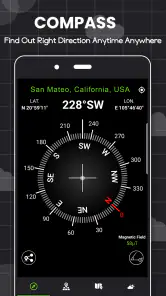
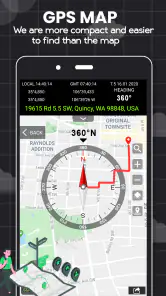
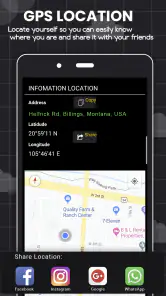
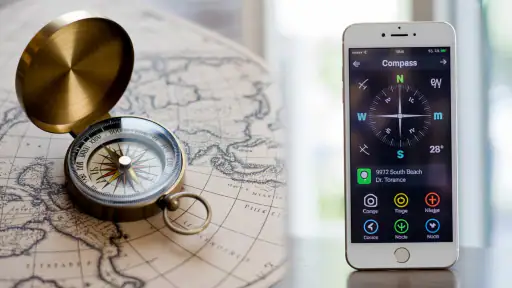
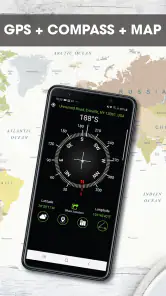
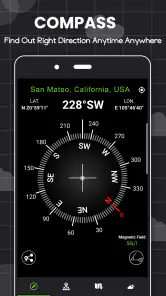
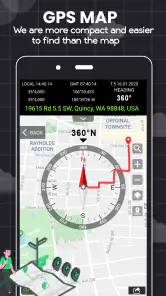
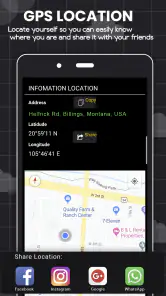
Analysis by Reviewed
When I need a quick sense of direction, I want a compass that opens without turning a simple check into a project. Digital Compass is a free Android navigation app built around that basic job. My impression is that its appeal lies in being a lightweight, direct alternative to opening a full map when all I need is to know which way I’m facing. That simplicity is useful, but it also means it should be treated as a compass rather than a substitute for route planning or dependable navigation in every situation.
A small tool for a specific moment
I find this app most useful when I already know what I’m trying to do and only need to settle one question: which way should I start walking? That could be stepping out of a building and matching a paper itinerary to the street, or deciding whether a park path heads toward the exit I expect. These are modest tasks, but they are exactly where a focused compass can save me from opening a map, zooming in, and interpreting a whole screen of information.
It is less useful when I don’t know the destination, need to compare routes, or want an address. In those cases, the map is doing the important work, and a compass reading alone won’t get me there. I’d also skip relying on it as my only guide when a wrong turn could create a safety problem. Its convenience comes from having a narrow job, not from replacing every navigation tool I might carry.
Quick direction checks without a full map
The everyday case is easy to picture: I leave a station, emerge onto a street I don’t recognize, and want to orient myself before choosing a route. A map app can show roads and my location, but it may take longer to load or require a closer look at the screen. A digital compass offers a more focused question: which direction am I facing? For a quick check before walking on, that narrower purpose can be an advantage.
The app is listed in Maps & Navigation, and the developer name shown for it is Photo and video apps. Its store description presents it as a digital compass, so I would approach it with modest expectations: useful for orientation, not a replacement for a map’s street detail, transit directions, or turn-by-turn guidance. If I’m trying to find a particular café, I still want a map. If I already know the destination and need to get my bearings, a compass can be the simpler tool.
Digital Compass is free and rated for Everyone. It has an average rating of 3.7 from around 360 ratings, with 36 written reviews. More than 500,000 installs suggest that plenty of Android users have tried it, though popularity alone does not tell me whether it will suit a particular phone or use case. It was released in late 2023, and version 1.9 is listed for Android 6.0 and later.
What “fast” should mean for a compass
For this kind of app, speed is less about a flashy launch animation and more about how quickly I can get a readable direction when I need one. A compass is most useful when it reduces friction: open it, hold the phone steadily, and check the heading. I wouldn’t judge it by the speed of a route search, because route calculation is not the point. The meaningful test is whether it helps me orient myself without pulling me into a larger navigation task.
More From Our News Desk

Weather by Xiaomi Review: Clear at a Glance, Less Clear Up Close

X Under Pressure: Can It Recover When Posting Goes Wrong?

Clash of Clans Is Won Between the Battles

Android Auto Makes the Case for Quieter Car Software

MobiOffice: Transforming Mobile Productivity with Seamless Integration

EA SPORTS FC™ Mobile Soccer: Redefining Mobile Sports Gaming
There is an important distinction between an app responding quickly and a compass reading being trustworthy. A digital compass depends on the phone’s magnetic sensor, and nearby metal, magnets, or electronic equipment can affect that sensor. So if the heading looks erratic, I would not assume the app itself has frozen. I’d first move away from a car, speaker, metal railing, or magnetic case, then hold the phone level and give the reading a moment to settle.
This is a practical habit rather than a special feature claim. In a city, I might check the direction in the middle of an open sidewalk instead of beside a parked vehicle. At home, I would avoid taking a reading right next to a laptop or a pile of tools. Those small choices can matter more than repeatedly reopening the app when the compass seems uncertain.
Using it during a longer outing
A single glance is a different job from keeping a compass open while walking, hiking, or exploring. In a short check, I can read the direction and put the phone away. During a longer outing, I need to think about screen visibility, battery use, and whether the phone’s compass remains stable as I move. I would use the app intermittently rather than leave the screen on continuously, especially if I also need the phone for photos, calls, or maps later.
One useful workflow is to pair the compass with a map rather than ask either tool to do everything. I can use a map to identify a road or landmark, then use the compass for a quick directional check when the surroundings make the map’s orientation confusing. This is particularly handy when I’m standing still at a junction and want to confirm which way a path runs before setting off. The trade-off is that switching between tools takes a little attention, so it is less convenient than a navigation app that keeps my position and route together.
For outdoor use, I would not rely on a phone compass as my only safety aid. A compass can help with orientation, but it does not tell me whether a trail is open, whether a route is safe, or how far I am from help. In unfamiliar terrain, I’d keep a map or a dedicated navigation option available and use this app as a supplementary direction check. That’s not a criticism unique to this app; it is a sensible limit for a phone-based compass.
Reliability and how I’d handle a jumpy reading
A compass earns trust through consistency, and consistency depends partly on the phone and the surrounding environment. If the direction shifts unexpectedly while I’m standing still, I’d pause before acting on it. I would hold the phone flat, move to a clearer spot, and compare the indicated direction with an obvious reference such as the street layout or a map. If the reading still seems implausible, I’d use another navigation method rather than keep walking on the strength of one uncertain indication.
This kind of cautious check is especially useful in dense urban areas. Tall buildings can make it harder to judge the landscape, while metal structures and vehicles can interfere with a phone’s magnetic sensor. A compass can still be convenient there, but I would treat it as one clue, not an unquestionable answer. In a park or open space, it may be easier to get a clean reading, although the phone’s sensor remains a factor.
I also wouldn’t expect a compass app to recover from every bad reading by itself. Sometimes the right fix is simply to change position and give the sensor a steadier environment. That is a useful distinction for new users: if the app opens but the direction feels wrong, closing and reopening it may not solve the underlying problem. Check the surroundings and the way you’re holding the phone first.
Device fit, resource expectations, and alternatives
The listed minimum is Android 6.0, which makes the app available to a broad range of Android devices on paper. Compatibility, however, is not the same as having the sensor needed for a reliable compass. Before depending on any digital compass, I’d check that the phone itself supports magnetic heading and behaves consistently. An app cannot turn a poor or missing sensor into a dependable instrument.
I would expect a single-purpose compass to be less demanding than a full map with live navigation, but I would not treat that as a guarantee about battery use or performance on every device. The practical approach is to open it when needed, take a reading, and close or switch away when finished. If I’m planning a long trip, I’d preserve battery for the map, communication, and other tools I may need more urgently.
Compared with the compass built into a general navigation app, this one has a narrower role. A map app is better when I need addresses, traffic, route choices, or a view of nearby streets. A physical compass is a better fallback when phone battery or sensor behavior is a concern, provided I know how to use it. Digital Compass makes most sense between those extremes: a convenient tool for a quick orientation check when my phone is already in hand.
People who want a detailed interface full of route planning, saved places, or turn-by-turn instructions should choose a full navigation app instead. Likewise, someone who needs a dependable instrument for remote travel should bring suitable backup rather than treating a phone app as a complete safety solution. The focused design is a benefit only if the task is also focused.
My performance verdict
My overall view is that Digital Compass is worth trying if I want a free, straightforward way to check direction on an Android phone. Its strongest use is a brief, practical one: confirming orientation at a street corner, checking which way a path runs, or getting my bearings before opening a map. I’d keep the phone level, avoid nearby magnetic interference, and cross-check a reading that seems off.
The main limitation is not a complicated menu or a missing route feature; it is the nature of phone compasses. Readings rely on the device’s sensor and the environment, so a quick answer is not automatically a reliable answer. For casual orientation, that trade-off is reasonable. For exact route guidance, long outdoor trips, or situations where a mistake would matter, I’d choose a map and carry an appropriate backup.
With its 3.7 average rating, this is not an app I’d recommend blindly to everyone, but the purpose is clear enough to judge against your needs. If you regularly want a direct heading and already understand that a phone sensor can be affected by its surroundings, it can be a handy addition. If you want navigation from one place to another, I’d reach for a map app instead—and use this one only when a simple directional check is all I need.
When a quick check fits the day
One realistic use is a weekend visit to a neighborhood I don’t know well. I can check a map before leaving a station, identify the street I plan to follow, and use the compass briefly at the exit to confirm which direction I’m facing. Once I’m moving, the map remains the better tool for finding turns and landmarks. That division of labor keeps the compass useful without asking it to interpret the route for me.
A small but worthwhile habit is to stop before checking rather than trying to read the screen while walking. I can hold the phone level, let the direction settle, and then put it away before crossing a street or entering a busy path. This makes the reading easier to assess and keeps a navigation glance from becoming a distraction. If I’m beside a vehicle or a metal structure, moving a few steps to a clearer place is often more sensible than repeatedly tapping around.
For someone deciding whether to install it, the practical question is whether a direct heading is a recurring need. If I only navigate between addresses, a regular map app is likely enough. If I often need to orient myself at trail junctions, park entrances, or unfamiliar street corners, a dedicated compass can be a useful companion. The key is to use it for the direction check and let a map handle location and route context.
What to expect from a brief session
Because the app has a single, clear purpose, I would expect a short interaction rather than a long session: open it when orientation is unclear, get a reading, and leave it. That makes perceived speed especially important, but it also means I would judge stability by whether the direction stays plausible while I’m holding still—not by whether it offers the breadth of a navigation suite. If the reading wavers, I’d treat the environment and the handset as part of the equation before blaming the app.
There is also a useful distinction between a compass that is convenient and one that is suitable for precision work. For choosing an initial direction on a casual walk, a quick phone reading may be enough when it agrees with the surroundings. For surveying, carefully following a bearing, or navigating where errors have serious consequences, I’d use equipment and procedures intended for that job. A simple app can reduce everyday friction, but it cannot remove the need for judgement.
My performance verdict remains favorable for that limited role: Digital Compass is a sensible free option to try when a standalone direction check is more convenient than opening a map. I would not choose it for turn-by-turn travel or as my only wilderness backup, and I would not assume every phone gives equally dependable results. Used briefly, on a device with a capable sensor and away from interference, it can make the moment of getting oriented feel simpler.
Digital Compass for Android Frequently Asked Questions
What is Digital Compass for Android used for?
Digital Compass is designed to show your approximate direction using your Android phone’s built-in magnetic sensor. It can be useful for basic orientation while walking, traveling, or checking which way you are facing. It is not a substitute for a dedicated navigation app or a professional compass, and its available tools may vary depending on the specific version you install.
Does Digital Compass work on every Android phone?
No. Compass apps generally rely on a magnetometer, also called a magnetic field sensor, and not every Android device includes one. If your phone lacks the required sensor, the compass may not work correctly or may not provide a direction at all. Check your device specifications and the app’s Play Store listing before downloading, especially if compass functionality is essential to you.
Why does the compass show the wrong direction or keep moving?
A phone compass can be affected by magnetic interference from metal objects, speakers, cases with magnets, or nearby electronic equipment. Sensor calibration may also be needed. Move away from potential sources of interference and follow any calibration prompt shown by the app; gently moving the phone in a figure-eight pattern may help. Remember that readings are approximate and can vary by device.
Does Digital Compass need an internet connection or location permission?
A basic compass reading is usually calculated from the phone’s sensors, so it may work without an internet connection. However, features such as displaying your location, a map, or nearby information—if included in your version—may require location permission and connectivity. Review the requested permissions during installation and in Android settings, and allow only those needed for the features you plan to use.
Is Digital Compass accurate enough for hiking or emergencies?
Digital Compass can help with general orientation, but a phone’s sensor readings are not guaranteed to be precise or dependable in every environment. Battery loss, sensor limitations, magnetic interference, and device damage can affect performance. For hiking, boating, or other situations where navigation is important, use a reliable map and appropriate backup equipment, and do not depend on this app as your sole safety tool.
Pros
- Quickly shows your heading and direction in a simple compass view.
- Useful for checking orientation without a mobile data connection.
- Lightweight design is easy to navigate.
- Can help with basic outdoor navigation and map reading.
- Handy for confirming directions while traveling or exploring.
Cons
- Compass accuracy depends on your phone’s magnetometer.
- Nearby metal objects can interfere with readings.
- May require calibration before use.
- Not a substitute for dedicated navigation equipment.
- Phones without a compass sensor may not support it properly.
- Category
- Maps & Navigation
- Version
- 1.9











