Diary with Lock: Diary Journal
- 7.15K
- 4.8
- Installs
- 10.00M
- Price
- Free

Screenshots




Analysis by Reviewed
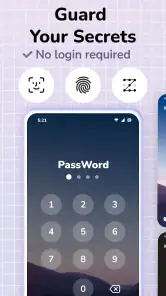
I like a journal best when it makes it easy to write honestly without making a small habit feel like a big project. Diary with Lock: Diary Journal puts a privacy lock at the center of that experience: it gives me a place to record personal thoughts, with fingerprint access as an option. That matters most when I’m writing about something I would rather keep to myself, though a lock is a practical barrier, not a reason to treat a phone as a secure vault for highly sensitive information.
A private space that stays easy to reach
The fingerprint lock is the clearest reason to choose this lifestyle app over a plain notes page. It can make opening a journal feel more private when someone else borrows your phone, while keeping the act of writing relatively straightforward. I see the appeal for quick reflections, recurring worries, or notes about a personal goal that I don’t want sitting openly among everyday reminders.
That balance is useful: privacy should make journaling feel more comfortable, not turn every entry into a complicated ritual. Still, I’d keep the phone’s own lock enabled and avoid writing down passwords or information that would cause serious harm if exposed. An in-app lock can discourage casual snooping, but I wouldn’t assume it replaces broader device security.
How I would make it part of an ordinary day
A realistic routine might be writing a few lines after getting home: what went well, what is still bothering me, and one thing I want to handle tomorrow. If I’m short on time, I can keep the entry brief rather than waiting for a perfect block of quiet. A regular reminder may help establish that routine, but I’d set one at a time that feels welcome; a badly timed nudge can make journaling feel like another chore.
Search becomes more useful when entries include consistent, natural terms. If I’m tracking how a new routine feels, for example, I can mention the routine by name each time and later look for that word instead of relying on memory or scrolling through every day. That small writing habit makes the archive easier to use without requiring a formal template.
Making a journal you can actually revisit
For me, the value of a diary is not only getting thoughts out of my head; it is being able to return to them later without turning the habit into a filing project. I’d use simple recurring words for subjects I expect to revisit, such as a project, a trip, or a change in routine. That gives search a practical job while keeping entries conversational. I wouldn’t try to tag every passing thought: too much organizing can become a reason not to write.
Photos can make a short entry easier to recognize months later. A picture of a meal, a walk, or a small moment at home can help anchor what otherwise might be a few vague lines. I’d add one when it genuinely brings back context, rather than treating every entry as something that needs an image. That keeps the journal personal without adding extra steps to a quick check-in.
More From Our News Desk

Weather by Xiaomi Review: Clear at a Glance, Less Clear Up Close

X Under Pressure: Can It Recover When Posting Goes Wrong?

Clash of Clans Is Won Between the Battles

Android Auto Makes the Case for Quieter Car Software

MobiOffice: Transforming Mobile Productivity with Seamless Integration

EA SPORTS FC™ Mobile Soccer: Redefining Mobile Sports Gaming
Getting Started with Diary with Lock
First off, setting up Diary with Lock: Diary Journal is a breeze. Just download, open, and boom, you’re ready to start pouring out your thoughts. The interface? Oh, it's as smooth as a jazz saxophonist on a Friday night. Everything is laid out intuitively, so you won't be fumbling around trying to find where to jot down your thoughts.
Features That Stand Out
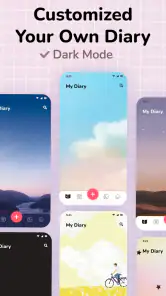
Let’s talk features. This app isn’t just any regular diary app. It’s packed with goodies like fingerprint locking. Yeah, you heard me right. You can lock your secrets away with your fingerprint – talk about high-tech secrecy! Plus, you’ve got a variety of fonts and themes to choose from, so you can really make it feel like it’s your own personal space.
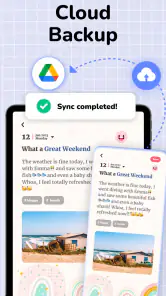
The search function is a lifesaver. Ever tried flipping through a physical diary looking for that one entry? Total nightmare. But here, you just type in a keyword and voila, there it is. Oh, and don’t get me started on the backup feature. It syncs with Google Drive, so your scribbles are safe and sound, even if you switch devices or accidentally delete the app.
My Personal Experience
Writing in the app feels natural. The design is minimalist, which means no distractions. I found myself writing more than I usually do, which was quite therapeutic. The app even lets you add photos to your entries. I added a picture of my dog to a particularly rough day’s entry, and it somehow made me feel a bit better.
Another thing I love is the daily reminders. Life gets busy, and sometimes you forget to journal. But with a gentle nudge from the app, I’m back at it, reflecting on my day and jotting down my thoughts. It’s like having a friendly reminder that self-care is important.
Choosing it for the right reasons
Compared with a paper diary, a phone journal is easier to search and can keep a photo beside a memory; paper, on the other hand, needs no battery and has no app interface to learn. Compared with a general notes app, this one feels more deliberately set up for journaling, especially if a lock and a daily prompt help you return. If you mainly want a flexible workspace for lists, documents, or shared notes, a notes app will probably suit you better.
The app is free to download, with optional in-app purchases priced from under a dollar to just under forty dollars per item. It has a 4.8 average from around 399,000 ratings and has been installed over 10 million times. Simple Design Ltd. develops it; it is rated for everyone, and the current version is 1.078.79.GP, with Android 8.0 as the minimum requirement. Those figures suggest a widely used choice, but they don’t tell me whether its writing style will suit you; the easiest test is to try a few short entries and see whether you naturally come back.
Where the convenience has limits
A digital diary is only dependable if you can still access your writing when you need it. Since the app describes Google Drive backup and sync, I’d check that the backup is working before changing phones or removing the app, rather than assuming every entry has already been copied. I’d also make sure I can sign in to the relevant Google account. That is a sensible habit for any journal that holds years of personal memories.
There is also a trade-off in keeping everything on a phone: it is handy to write in the moment, but notifications and other apps can pull attention away. I’d use a short entry format when I’m tired, then save longer reflections for a quieter time. If I need collaborative editing, a web-first archive, or strict separation between work and personal records, I’d compare other tools before committing my long-term journal here.
Picking a routine that lasts
One useful way to test whether this journal fits is to try two different entry styles during the first week: a quick end-of-day note and a longer reflection when you have time. The short version might be three prompts in your own words—what happened, how it felt, and what you want to remember. The longer version can stay free-form. If the shorter approach feels natural, reminders may help you keep going; if it feels forced, turning them off is better than letting a notification create guilt.
I’d also decide early what belongs in a phone diary and what does not. Personal reactions, small memories, and goals are a natural fit. Account credentials, financial details, or material that would put someone at risk if another person saw it are not. The lock can support privacy in ordinary situations, but sensible boundaries are still part of using any digital journal well.
When another kind of journal makes more sense
A paper notebook is still the better choice if the act of handwriting is part of how you think, or if you want a record that does not depend on a charged phone. A general notes app can be a better home for material that needs to be copied into work, organized alongside lists, or shared with someone else. This app sits between those options: it gives personal writing a more diary-like home, with a lock and ways to revisit entries, without being a full research or collaboration system.
That distinction matters if you plan to keep years of writing. Before making it your only archive, take time to understand the backup routine and make sure you can access the account connected to it. If a web browser, export workflow, or a particular long-term filing system is essential to you, check that your preferred tool supports it before settling in. For someone who mostly wants to write privately on a phone, those needs may never arise; for a careful archivist, they are worth weighing from the start.
Who will get the most from it
I’d recommend it to someone who wants a personal, phone-based diary and finds a lock, searchable entries, photos, and reminders helpful. It should also suit a beginner who wants to start with a few sentences instead of learning a complex planning system. If you prefer handwriting, want a journal that is entirely offline, or need robust organization for research and long documents, a paper notebook or a more specialized tool may be a better fit.
It may also appeal to someone who is comfortable keeping a modest personal archive on a phone and can maintain a simple backup habit. A student could use it to capture reactions to a busy day; someone building a new routine could record how it feels over time; a parent might save small family moments while they are still fresh. These are personal records rather than shared plans, so the app is less suited to people who need several people to edit the same material or who want a diary to double as a task manager.
One question people often have is whether they need to write a lot for the app to be worthwhile. I don’t think so. A line or two can preserve a detail you might otherwise forget, and the search function gives those small entries value later. The key is not writing a polished account every night; it is choosing a rhythm you can keep without resenting it.
Final Thoughts
In the world of diary apps, Diary with Lock: Diary Journal stands out like a beacon for those looking to keep their thoughts private and secure. It’s the perfect blend of simplicity and advanced features, making it suitable for anyone who enjoys journaling, whether you’re a seasoned writer or just starting out.
Overall, if you’re searching for a diary app that respects your privacy and looks good doing it, give this one a shot. It’s a small investment in your mental health that pays off with each entry you make. Who knew locking up your thoughts could feel this good?
Diary with Lock: Diary Journal Frequently Asked Questions
Is Diary with Lock: Diary Journal available for iOS as well as Android?
Diary with Lock: Diary Journal is a mobile journaling app, and its Android version is designed for devices running Android 8.0 or later. If you are considering downloading it on another platform, check the app store on your device for availability before proceeding. The app’s central appeal is a private, password-protected space for recording everyday thoughts and memories.
Who develops Diary with Lock: Diary Journal, and how widely is it used?
Diary with Lock: Diary Journal is developed by Simple Design Ltd. It has a 4.8 average rating from around 399,000 ratings, with more than 10 million installs. Those figures suggest it has reached a broad audience, although individual experiences can vary. The app is intended for people who want a personal digital journal they can keep on their phone.
Is Diary with Lock: Diary Journal free to download, and are there optional purchases?
Diary with Lock: Diary Journal is free to download, so you can try its journaling features without paying upfront. The app also offers optional in-app purchases, with items ranging from $0.99 to $39.99. These purchases are separate from the initial download, so consider whether any paid options suit your needs before buying.
What kind of app is Diary with Lock: Diary Journal, and who is it for?
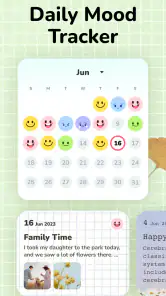
Diary with Lock: Diary Journal is a lifestyle app for people who want to keep personal notes and everyday memories in a digital journal. Its password-protected diary format may appeal to anyone who prefers writing privately on a phone, whether they are recording daily events, adding photos, or keeping track of how they feel.
What features does Diary with Lock: Diary Journal offer?
Diary with Lock: Diary Journal provides users with a secure and personalized journaling experience. Key features include password protection, customizable themes, mood tracking, and the ability to add photos to entries. Users can also back up their entries to cloud storage, ensuring their memories are safely preserved and easily accessible across devices.
Pros
- Intuitive user interface design.
- Strong privacy features with password lock.
- Customizable themes and fonts.
- Daily reminders to encourage journaling.
- Supports multimedia entries like photos.
Cons
- Ads can be intrusive at times.
- Limited features in free version.
- Sync issues across devices.
- Lacks advanced text formatting options.
- No cloud backup in free version.
- Category
- Lifestyle
- Version
- 1.078.79.GP













