Deezer: Music & Podcast Player
- 51.50K
- 4.2
- Installs
- 100.00M
- Price
- Free

Screenshots
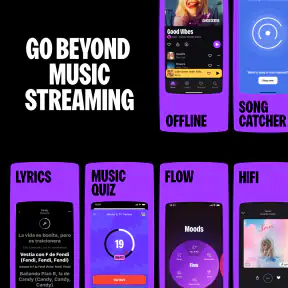

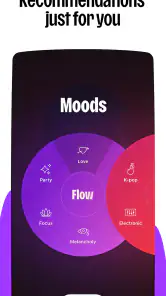


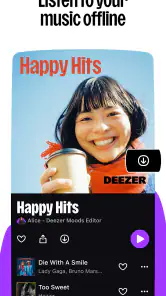

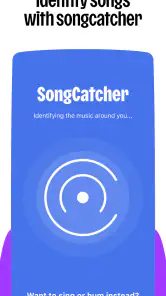
Analysis by Reviewed
Hey there, music lovers! 🎵 If you're anything like me, always on the hunt for that perfect tune to match your mood, then you've probably heard of Deezer: Music & Podcast Player. Now, I decided to give this app a whirl and see if it lives up to the hype. Spoiler alert: it does, with a few quirks here and there!
Choosing a listening routine that fits
I see Deezer as a useful middle ground for people who want both music and podcasts in the same app, rather than a specialist tool built around only one kind of listening. Its strongest case is convenience: I can move from a familiar playlist to spoken audio without changing services. That is especially handy when my listening changes through the day, but it does not automatically make it the best choice for every listener.
For example, someone who spends most of a commute following podcast series may prefer a dedicated podcast app if its episode organization and listening controls better match their habits. On the other hand, if music is the main event and podcasts are an occasional extra, keeping both in Deezer can mean less app-switching. I would choose based on which activity needs the better workflow, not simply on the number of things one app can do.
It also suits listeners who like a mix of discovery and deliberate choice. I can use Flow when I want the app to suggest a direction, then search for a specific artist or choose a playlist when I have a clear plan. That distinction matters: recommendations are most useful when I am open to surprises, while a manually chosen album is more reliable when I need a particular sound for a specific moment.
The Soundtrack of Your Life
First off, let me just say that Deezer has an impressive library. We're talking 73 million tracks, folks! Whether you're into pop, rock, jazz, or something a bit more niche, Deezer's got you covered. I found myself diving into genres I rarely explore, and it was a blast. The app's interface is pretty slick too. It's intuitive and easy to navigate, so you won't need a map just to play your favorite song.
Flow: Your Personal DJ
One of my favorite features has to be the "Flow" function. It's like having a personal DJ who knows exactly what you want to hear. The more you listen, the better it gets at predicting your taste. It's pretty cool, and I found myself discovering new artists that quickly made it to my playlist. Plus, the sound quality is top-notch, especially if you opt for the HiFi subscription. It's like having a concert in your ears!
Making Listening Fit the Day
I find Deezer most useful when I want one app to cover different parts of the day: a familiar mix while getting ready, then a podcast during a walk or commute. Flow works best when I treat it as a starting point rather than a perfect mood selector. When a recommendation misses, I switch to a playlist or search for a specific artist instead of repeatedly skipping and expecting the mix to instantly change direction.
More From Our News Desk

Weather by Xiaomi Review: Clear at a Glance, Less Clear Up Close

X Under Pressure: Can It Recover When Posting Goes Wrong?

Clash of Clans Is Won Between the Battles

Android Auto Makes the Case for Quieter Car Software

MobiOffice: Transforming Mobile Productivity with Seamless Integration

EA SPORTS FC™ Mobile Soccer: Redefining Mobile Sports Gaming
A practical habit is to save music and podcast episodes for offline listening before leaving home, then check that the downloads are available while you still have a connection. That makes a commute less dependent on reception. Offline playback is helpful, but it does mean planning ahead; it is not a substitute for a connection when you want to search for something new on the move.
Making offline listening manageable
I would treat downloads as a small, purposeful queue rather than a copy of my entire listening history. Before a regular commute, I would save the album I expect to replay and a few podcast episodes I actually intend to hear. That keeps the offline selection easy to navigate and reduces the chance that old downloads crowd out the things I need next. It is a more practical approach than saving everything on impulse and sorting it out later.
There is a useful distinction between having audio ready and having the whole app ready for every task. Downloaded listening can help when a connection is unreliable, but finding an unfamiliar artist or deciding what to play still works best when I can browse. If I know I will be underground or travelling through areas with patchy reception, I would decide on the next few listens in advance instead of expecting discovery to work exactly as it does at home.
Podcasts Galore
Now, if you're a podcast junkie like me, you'll appreciate the vast selection Deezer offers. From true crime to comedy, there's something for everyone. I found myself binging on episodes during my commute, and it made the time fly by. The app also allows you to download episodes for offline listening, which is a lifesaver when you're stuck without Wi-Fi.
How It Compares
Compared with choosing a dedicated podcast app alongside a separate music service, Deezer’s appeal is having both kinds of listening in one place. That is convenient if you often move between albums, mixes, and spoken shows, but a specialist app may suit you better if your routine depends on podcast-specific organization. For music, listeners who prefer to build every queue themselves may also favor a simpler player; I like having Flow available, but I would not rely on recommendations alone when I know exactly what I want to hear.
Speed, Stability, and Device Fit
In ordinary use, I judge the experience less by a single quick launch than by how smoothly it handles a change of plan: moving from a song to a podcast, returning to a playlist, or starting something after a short interruption. Deezer can feel less immediate when those transitions stutter, so I would avoid building a workout around constant track-hopping if even brief pauses bother you. For a long album or a settled playlist, that friction matters much less.
On a phone with limited free space or a tight data allowance, I would be selective about what I save for offline listening rather than downloading everything I might someday play. Keep a smaller rotation of albums and episodes ready for a commute, and refresh it when convenient. This is a useful trade-off: offline access can make listening more dependable away from a connection, while a large download habit can take up space. If performance feels inconsistent, closing and reopening the app is a reasonable first step; I would not assume every pause means the music itself is unavailable.
What to expect during heavier use
The moments that ask most of the app are usually not simply pressing play; they are the ones where I combine several habits at once, such as browsing for a new podcast, moving between it and music, and relying on a saved selection while travelling. When I want a smoother session, I make the choice before I leave and let a playlist or episode run rather than constantly changing direction. That is a practical way to avoid turning a small delay into a repeated interruption.
For an everyday example, imagine getting ready at home with Flow, then switching to a saved podcast for the bus. I would choose the episode and confirm it is available offline before walking out, rather than wait until reception becomes unreliable. Later, if I want to hear a particular track, I can search for it when I am back online. This workflow makes Deezer feel more dependable without pretending that every task can be handled equally well without a connection.
Resource trade-offs on a phone
Storage is the clearest device constraint I would plan around, especially if I keep both long podcast episodes and music available offline. The solution is not necessarily to avoid downloads; it is to be selective and remove items that no longer belong in the current rotation. A phone with little spare room is a poor place to build a large offline library, so I would keep only the next few commutes covered and stream the rest when convenient.
If the app seems slow, I would first distinguish between a brief transition delay and a broader phone problem. A busy device, limited free space, or an unstable connection can make switching feel less smooth, and repeatedly tapping controls may only make the experience more confusing. I would give a transition a moment, check whether the selected audio is online or already saved, and then reopen the app if it remains stuck. That is a sensible recovery routine, not a guarantee that every interruption has the same cause.
Room for Improvement
Of course, no app is perfect. There were a few times when the app lagged a bit, especially when switching between songs or podcasts. It wasn't a deal-breaker, but something to keep in mind. Also, while the free version is pretty generous, the ads can get a tad annoying. But hey, that's what keeps the lights on, right?
Who I’d Recommend It To
Deezer is a good fit for someone who enjoys discovering music but still wants direct control when a particular album or artist is on their mind. It also makes sense for listeners who like to alternate between music and podcasts without keeping separate services for each. The app is free to start, with in-app purchases ranging from $2.49 to $218.99 per item; I’d check the available plan details before paying, especially if ad interruptions are the main thing you want to change. Deezer Music develops the app, which has a 4.2 average from around 3.6 million ratings and over 100 million installs. Its Teen age rating is worth noting for families choosing apps together.
The rating and reach suggest that Deezer is a familiar choice for many listeners, but popularity does not settle the more personal questions: whether its recommendations suit my taste, whether I want podcasts in the same place as music, and whether I am comfortable managing offline selections. I would try it with my normal routine first, rather than deciding from a quick browse. A few ordinary commutes are enough to reveal whether Flow feels helpful, whether switching between audio types fits naturally, and whether the free experience suits my tolerance for interruptions.
I would skip it if you want a completely interruption-free experience without considering a paid option, or if your phone is so constrained that keeping music and podcast downloads is impractical. In those cases, a service or player that better matches your storage needs—or a dedicated podcast app if spoken audio is your priority—may be a more comfortable choice.
My performance verdict
For me, Deezer is most convincing when I use it for a settled listening session: a playlist while I work, an album on a walk, or an episode chosen in advance for a commute. It is less compelling if I expect every search, switch, and recommendation to feel instant, or if I constantly change what is playing. The occasional lag described here is a real nuisance, but it does not erase the convenience of combining music and podcasts in one place.
I would give it a fair test on the phone I actually use, with a modest offline rotation and a mix of planned listening and Flow. If that routine feels comfortable, it is a practical everyday music and audio app. If I mostly need a highly organized podcast workflow, the simplest possible player, or a friction-free experience without ads, I would look at alternatives built around that priority instead.
In conclusion, Deezer: Music & Podcast Player is a fantastic choice for anyone looking to expand their musical horizons or dive into the world of podcasts. It's got a little something for everyone, and the "Flow" feature is a game-changer. So go ahead, give it a try, and let the music take you on a journey!
Deezer: Music & Podcast Player Frequently Asked Questions
Can I try Deezer without paying, and what might cost extra?
Deezer is free to download, and it offers a free way to get started. Some features and subscription options involve in-app purchases, so check the plan details shown in the app before choosing one. The app is listed with in-app purchases ranging from around $2.49 to around $218.99 per item, making it sensible to review any purchase screen carefully.
What kind of content and app should I expect from Deezer?
Deezer is a Music & Audio app for listening to music and podcasts, with playlists and personalized recommendations as part of the experience. Its store summary describes music, playlists, and more, including offline and unlimited listening. The app is rated Teen, so it may be useful to consider that age guidance alongside the content the listeners in your household are likely to explore.
Does Deezer need an internet connection, and can I listen offline?
Deezer offers offline listening, allowing users to download their favorite tracks, albums, and playlists directly to their device. This feature is particularly useful for users who want to save on data usage or listen to music where there is no internet connection. Offline content can be accessed anytime, ensuring uninterrupted playback, whether you're on a plane or in a remote area.
What is Deezer: Music & Podcast Player?
Deezer is a music streaming app that allows users to listen to a vast library of music tracks, playlists, and podcasts on their Android or iOS devices. With over 73 million tracks, Deezer offers personalized recommendations, curated playlists, and the ability to create your own playlists. It also supports offline listening, making it a comprehensive music and podcast player.
Is Deezer suitable for teenagers?
Deezer is rated Teen, so it may be worth checking whether its content and listening experience suit the younger people in your household. The app is focused on music and podcasts, and listeners can explore tracks and playlists as well as create their own. Families should consider the age rating alongside their own preferences before installing it.
Pros
- Vast music library with diverse genres.
- High-quality audio streaming available.
- Offline listening for premium users.
- Personalized playlists and recommendations.
- Cross-platform support for seamless use.
Cons
- Ads in the free version can be intrusive.
- Limited offline downloads for free users.
- Some features locked behind paywall.
- Occasional app crashes reported.
- Regional content restrictions present.
- Category
- Music & Audio
- Version
- Varies with device











