Daniel Tiger for Parents
- 258.00
- 3.7
- Installs
- 500.00K
- Price
- Free

Screenshots

Analysis by Reviewed
Daniel Tiger for Parents is the kind of parenting app I would open when I want a young child to think about an everyday situation without turning it into a formal lesson. Developed by PBS KIDS, it uses Daniel Tiger as a familiar guide for small topics such as routines, feelings, and social habits. I found its biggest strength in the way it gives parents a simple starting point for conversation rather than trying to replace a parent, teacher, or real-world practice.
The app is free, carries an Everyone age rating, and is aimed at families with toddlers and young children. It runs on Android devices using version 7.0 or later, so it remains accessible on many older phones and tablets. Its current version is 2.0.0, and the app has passed half a million installs. Those details matter because this is not an expensive specialist tool: it is an easy, low-risk addition for a family that already likes Daniel Tiger.
How I used Daniel Tiger for Parents in everyday routines
My preferred way to use it is not to hand over the phone and walk away. I first choose a calm moment, usually before a routine that is already familiar to the child. If the subject connects with getting dressed, sharing, waiting, calming down, or preparing for bed, I use the app shortly before that activity. The screen then becomes a prompt for something the child is about to experience, instead of an isolated burst of entertainment.
That distinction is important. A toddler may enjoy Daniel Tiger immediately, but the useful part often happens after the screen is closed. I ask a short question, repeat the idea in my own words, and then point to the real situation. For example, after exploring a lesson connected with taking turns, I might mention whose turn it is while we are putting toys away. I would not expect a single session to change behavior, but repeating the same connection makes the activity more meaningful.
The basic workflow is deliberately uncomplicated. I open the app with the child nearby, let the child explore at a comfortable pace, and stay available to explain unfamiliar words or reactions. When the child loses interest, I stop rather than pushing through. Toddlers often learn more from a brief conversation followed by action than from completing every available activity.
This makes the app especially suitable for parents who want a gentle bridge between screen time and real-life learning. It works well as a conversation starter during a transition, after a difficult moment, or when a child is beginning to encounter a new social expectation. It is less useful if the goal is independent academic practice, detailed progress tracking, or a structured preschool curriculum.
What a realistic family session looks like
Imagine a child who becomes upset whenever a parent says it is time to leave the playground. I would not wait until the child is already crying to introduce the app. Instead, I would explore a relevant Daniel Tiger activity earlier in the day, talk briefly about stopping one enjoyable thing, and then create a small repeatable routine: warning, goodbye, and moving to the next activity. The app supports the language, but the parent supplies the consistency.
More From Our News Desk

Weather by Xiaomi Review: Clear at a Glance, Less Clear Up Close

X Under Pressure: Can It Recover When Posting Goes Wrong?

Clash of Clans Is Won Between the Battles

Android Auto Makes the Case for Quieter Car Software

MobiOffice: Transforming Mobile Productivity with Seamless Integration

EA SPORTS FC™ Mobile Soccer: Redefining Mobile Sports Gaming
That is one of the less obvious strengths here. The content can help a parent find words that feel less confrontational than “stop now” or “because I said so.” It gives the child a recognizable character and a familiar emotional frame. Still, it cannot respond to the exact reason a child is struggling, and it cannot adjust a routine when hunger, tiredness, sensory overload, or a change of plan is the real problem.
I also found it helpful to revisit a topic when the child was calm, not only after a conflict. If the app is used exclusively as a reward or emergency distraction, the child may associate it with escaping an uncomfortable moment rather than practicing a skill. A better habit is to use it briefly at predictable times and then reinforce the same idea away from the device.
Settings and preparation that make the experience smoother
Before giving the device to a child, I recommend checking the phone or tablet’s general settings rather than assuming the app will manage every family preference. Screen brightness, sound level, notification behavior, and the device’s child-access controls can make a bigger difference than anything inside the app. A toddler-friendly setup should prevent accidental exits, unexpected interruptions, and uncomfortable volume changes.
I would also open the app once without the child present. That lets me see how the activities are organized, understand the pace, and decide which parts fit the child’s current needs. This small preparation step avoids handing over a device while I am still searching through menus. It also helps me avoid using an activity that is too advanced emotionally or linguistically for that particular day.
Because this is a free app, I would still review the device’s wider download and account settings before installing it for a child. I prefer to handle installation myself, keep the child away from account screens, and use the device’s built-in purchase and app restrictions where appropriate. That is not a criticism of Daniel Tiger for Parents; it is simply a sensible routine for any child-focused app.
The app’s Everyone rating makes it approachable for family use, but an age label should not be confused with a guarantee that every child will enjoy every activity. Toddlers differ widely in language, attention, and emotional development. I would watch the child’s reaction and choose the moments myself rather than treating the rating as a complete usage plan.
Repeatable habits for quicker, calmer use
Experienced use is less about discovering a secret shortcut and more about reducing unnecessary decisions. I keep the app in a predictable place on the device, open it before the child asks, and use one topic at a time. When an activity connects strongly with a current family challenge, I return to that idea on several separate days instead of showing something new every time.
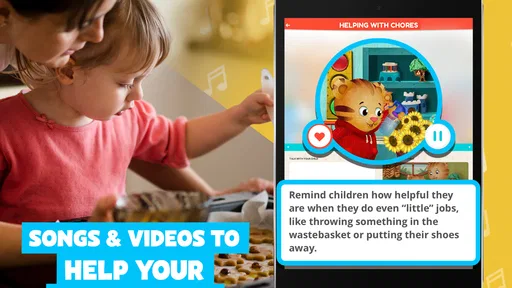
Another useful pattern is to pair each session with one sentence and one action. The sentence names the idea in simple language; the action gives the child a chance to practice it. If the topic involves helping, the child can carry a small item. If it involves waiting, I use a short real-world turn-taking game. This prevents the app from becoming a passive distraction and makes the lesson easier to remember.
I also avoid using the phone as a bargaining tool whenever possible. Saying “behave and you can use Daniel Tiger” may work in the moment, but it can make the app feel like a prize rather than a learning aid. I get better results when I present it as one optional activity in a familiar routine, then end it naturally and move on.
For siblings, I would set expectations before opening it. Decide who holds the device, whether they take turns, and when the session ends. The app may support a shared conversation, but it cannot solve every argument over control of the screen. In that situation, a parent-led book, toy, or cooperative activity may be easier than asking the app to carry the whole interaction.
Where it stands against books, videos, and broader learning apps
Compared with a picture book, this app offers a more interactive route into Daniel Tiger’s familiar world, but the book is often better when I want a slower pace, fewer distractions, or a bedtime activity without a glowing screen. A book also makes it easier to pause on one picture and ask a child what they notice. I see the app as complementary rather than a replacement for reading together.
Compared with a general video service, the app feels more purposeful because I can guide the child toward a particular life skill instead of letting autoplay determine what comes next. The trade-off is that a video may be simpler for a tired child who only wants to watch. If the child is overstimulated, a quiet conversation or familiar book is probably the wiser choice.
Compared with a preschool learning platform, Daniel Tiger for Parents is narrower and more approachable. It is a better fit for emotional language, routines, and social situations than for early mathematics, phonics, handwriting, or a measurable learning sequence. Families looking for reports, curriculum planning, or detailed advancement indicators should choose a dedicated educational product instead.
The character focus is both a strength and a limitation. Children who already recognize Daniel may engage quickly and accept the tone of the activities. Children who do not connect with the character may find the experience less compelling, even if the underlying topic is useful. I would not choose it solely because it is popular; I would choose it because the child responds to this particular style of storytelling.
Limitations parents should understand before relying on it
The app cannot personalize a lesson to the exact family context. A child dealing with a new sibling, a move, a developmental difference, or a serious emotional concern may need more specific guidance than a general activity can provide. I would use it as a supporting tool, never as a substitute for speaking with a pediatrician, educator, or specialist when a concern is persistent or significant.
It also depends heavily on adult follow-through. If I open it only to keep a child occupied, its parenting value is limited. The app can present a friendly example, but it does not know whether the child understood, whether the family’s routine is realistic, or whether a particular strategy is making the situation better. The parent still has to observe, adapt, and decide when to stop.
Another practical limitation is that the best experience may require a parent to remain close. That can be inconvenient during cooking, commuting, or a busy household transition. If I need a genuinely hands-off activity, I would select something designed for independent use, while remembering that independent screen use has its own trade-offs.
The public response is positive enough to show clear interest, with an average rating of 3.7 from roughly eight hundred ratings and more than two hundred written reviews. I treat that as a mixed but respectable signal rather than proof that every family will have the same experience. A child’s age, familiarity with Daniel, device setup, and the parent’s involvement all affect the result.
Who should install it, and who should skip it?
I would recommend it to parents of toddlers and young children who already enjoy Daniel Tiger, want help discussing ordinary routines, and are willing to turn a short digital activity into an offline conversation. It is also a sensible first experiment for families seeking a free parenting app rather than a subscription-based learning system.
I would skip it if I wanted a complete preschool program, detailed developmental tracking, or a large collection of unrelated subjects. I would also hesitate if my child becomes frustrated by character-based activities, if our household is trying to reduce screen use sharply, or if I need content tailored to a very specific behavioral or developmental situation.
The installation requirements are friendly for older Android hardware, and the free price removes one common barrier to trying it. Even so, I would install it with a clear purpose. Pick one routine, use the app at a calm time, and observe whether the child carries any of the language into daily life. If not, the problem may not be the app; the child may simply learn that idea better through play, books, modeling, or direct practice.
My final assessment after building a routine around it
Daniel Tiger for Parents succeeds when I treat it as a small tool inside a larger parenting routine. Its value is not that it can manage a toddler or deliver a complete lesson independently. Its value is that a familiar character can make an ordinary conversation easier to begin, especially when a child is learning how to handle feelings, transitions, and relationships.
PBS KIDS has created an accessible option for families who want something free, gentle, and easy to introduce. I appreciate that it can fit into a short session without demanding a complicated setup, while still giving parents a reason to continue the discussion away from the screen. The strongest results come from repetition, timing, and modeling rather than from simply completing activities.
My verdict is favorable, with realistic expectations. Use it as a conversation starter, not as a digital babysitter or complete parenting solution. If Daniel Tiger is already welcome in your home, this app is worth trying during one specific daily routine and then evaluating by what happens afterward. When the child begins using the ideas in real situations, it earns a regular place in the family’s toolkit; when the child only taps through and forgets, a book, a game, or direct parent-led practice may be the better choice.
Daniel Tiger for Parents Frequently Asked Questions
What age group is Daniel Tiger for Parents suitable for?
Daniel Tiger for Parents is a parenting app intended to help adults support toddlers and preschool-age children. Its focus is on the small, familiar challenges that come up in early childhood, such as handling feelings, sharing, and following routines. Parents and caregivers can use the ideas alongside their own judgment, choosing what fits their child’s age, temperament, and current needs.
Is Daniel Tiger for Parents available for both Android and iOS?
Daniel Tiger for Parents is a mobile app from PBS KIDS. Before downloading, check the app store on your device to confirm that the current release is available for your operating system and that your device meets its requirements. The listed minimum operating system is version 7.0, so it is worth checking compatibility first, particularly if you use an older phone or tablet.
What is Daniel Tiger for Parents, and who is it designed for?
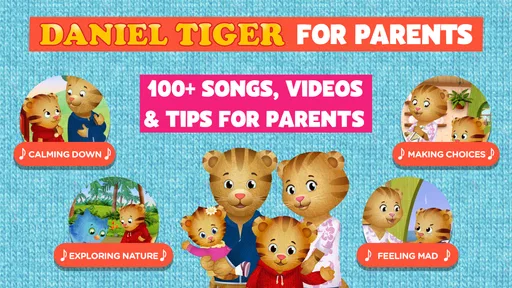
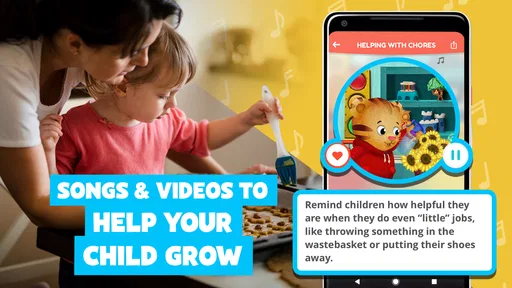
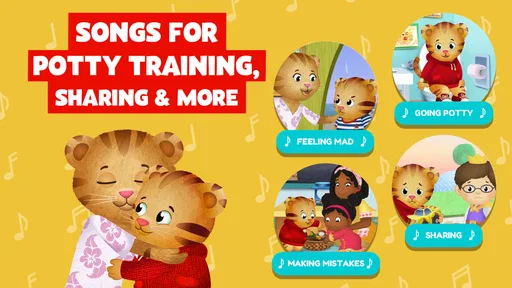
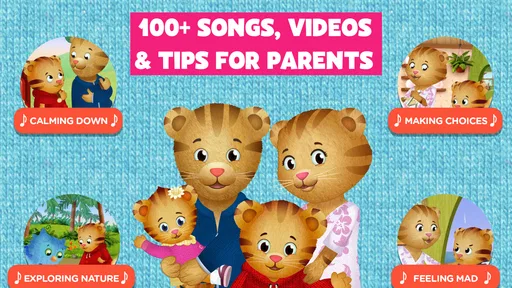
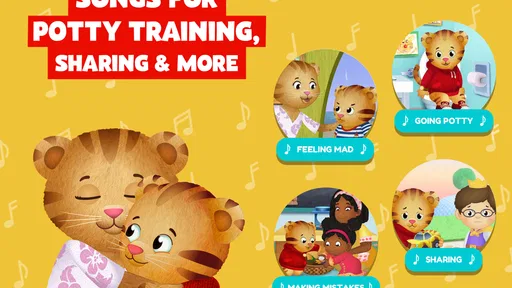
Daniel Tiger for Parents is a family-focused companion app based on the Daniel Tiger’s Neighborhood series. It is designed mainly for parents and caregivers of preschool children, offering practical strategies, short videos, songs, and activity ideas for everyday situations such as bedtime, sharing, feelings, potty training, and transitions. The content is intended to help adults support young children’s emotional and social development.
What kind of activities and parenting resources are included in the app?
The app typically provides themed resources connected to common preschool experiences, including managing big emotions, calming down, trying new things, cleaning up, waiting, and following routines. Parents may find videos, music, conversation prompts, printable or interactive activities, and suggestions for practicing skills together. The Daniel Tiger format makes the advice approachable, although parents should still adapt each activity to their child’s age and personality.
Does Daniel Tiger for Parents require an internet connection or an account?
Some parts of Daniel Tiger for Parents may require an internet connection, particularly when streaming videos, loading new content, or accessing external services. Depending on the version and platform, the app may also offer optional account features, parental settings, or in-app purchases. Before downloading, check the current Google Play or App Store listing for requirements, supported devices, subscription details, and whether selected content can be used offline.
Pros
- Offers practical parenting tips inspired by Daniel Tiger episodes.
- Includes activities that help children practice emotional skills.
- Provides age-appropriate guidance for common daily challenges.
- Simple interface makes content easy for parents to browse.
- Supports conversations about feelings
- routines
- and social behavior.
Cons
- Some content may require an internet connection to access.
- Advice is mainly suited to families familiar with Daniel Tiger.
- Limited appeal for parents seeking broader developmental resources.
- Some features or activities may vary by device or region.
- The app may feel repetitive after frequent use.













