Bandsintown Concerts
- 33.63K
- 4.6
- Installs
- 10.00M
- Price
- Free

Screenshots
Analysis by Reviewed
I gave Bandsintown Concerts a place in my routine to see whether its concert alerts would remain useful after the initial excitement wore off. Its appeal is simple: follow artists you care about, then use the app to keep an eye on upcoming live shows. For me, that makes it less of a music player and more of a practical companion for deciding what to do when a favorite act comes to town.
Why it catches on during the first week
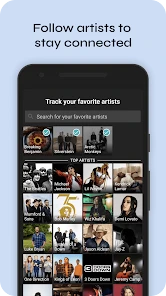
The setup makes the idea easy to understand: tell the app which artists matter to you, and it can surface concert information and notifications. That is especially handy if you follow musicians across several genres or tend to hear about tours only after tickets are already on your mind. I like that the basic purpose is clear without needing to build a complicated system of playlists or schedules.
A useful first step is to be selective when choosing whom to track. Add the artists you would genuinely consider seeing, rather than every name you recognize, and the alerts are more likely to feel relevant. You can widen that list later when you want to explore. This small bit of housekeeping helps make the app feel like a personal concert radar instead of another stream of general music news.
Your Music, Your Way
One of the first things that struck me about Bandsintown Concerts is how incredibly personalized it is. The app lets you track your favorite artists and bands with ease. Once you’ve set up your preferences, it starts working its magic by informing you about upcoming concerts and events that you simply can’t miss. It’s like having a friend who’s always in the know about the best gigs in town.
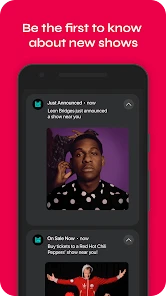
Now, I’m someone who doesn’t want to miss out on any live performance, and this app ensures I never do. The notifications are timely, and trust me, they’ve saved me from the regret of finding out about a concert too late.
Month-to-month discovery, with a little restraint
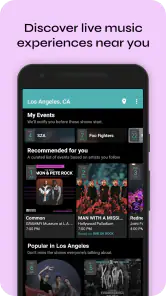
Beyond tracking your current favorites, Bandsintown Concerts also introduces you to new artists and bands that align with your musical taste. I’ve discovered so many hidden gems thanks to its recommendations. The app offers a great way to expand your musical horizons without feeling overwhelmed. It’s like having a personal DJ who knows exactly what you’ll love.
And let’s not forget about the social aspect. The app allows you to see which concerts your friends are attending. It’s a fun way to coordinate plans and make those concert nights even more memorable. Plus, there’s something exciting about knowing you’re part of a bigger community of music lovers.
More From Our News Desk

Weather by Xiaomi Review: Clear at a Glance, Less Clear Up Close

X Under Pressure: Can It Recover When Posting Goes Wrong?

Clash of Clans Is Won Between the Battles

Android Auto Makes the Case for Quieter Car Software

MobiOffice: Transforming Mobile Productivity with Seamless Integration

EA SPORTS FC™ Mobile Soccer: Redefining Mobile Sports Gaming
That discovery works best as a prompt, not a verdict. I treat recommendations as a way to notice an unfamiliar name, then decide for myself whether the artist fits the kind of night I want. If you mainly want to follow a small handful of acts, you can keep your tracked list focused; if your tastes change with the season, adding and removing artists helps the suggestions stay closer to your current interests.
Using it without turning concerts into another chore
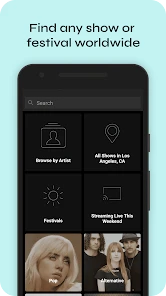
Let’s talk about the interface for a second. It’s sleek, intuitive, and dare I say, quite addictive. Navigating through the app is a breeze, whether you’re searching for concerts, artists, or simply exploring new music. Everything is laid out in a way that makes sense, so you’re not left fumbling around trying to find what you need.
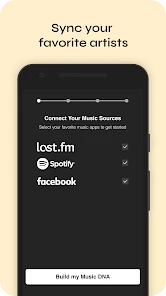
Another thing that deserves a mention is the integration with other platforms. You can sync it with your Spotify or Apple Music, which helps in tailoring concert suggestions even more accurately. It’s these little touches that make the app stand out in a crowded marketplace.
In everyday use, I’d check it when planning a free evening or deciding whether to make a trip for a show, rather than opening it out of habit every day. For example, if a friend asks what to do this weekend, a quick look at relevant artists and local concert options can turn “we should go out” into a concrete plan. The practical trade-off is that a notification is a nudge to investigate, not a complete booking plan; I still compare the event details and make my own decision before committing.
Turning a notification into a workable plan
A useful way to act on an alert is to treat it as the start of a short decision process. I would first check whether the artist is someone I would pay to see, then consider the location and timing before asking friends or changing plans. That order matters: a familiar name can make an event feel urgent, but the practical question is whether the whole evening works. The app can help surface the possibility; it cannot decide whether the travel, schedule, and company make it worthwhile.
For a realistic weekday scenario, imagine getting a show notification while you are commuting home. Rather than trying to settle everything in the moment, I’d save the idea mentally, check the event again when I have time, and send a friend the details if it looks promising. That keeps the alert useful without turning a passing glance at your phone into an immediate commitment. It also makes the app suitable for people who plan socially, not just fans who buy tickets as soon as a favorite artist appears.
When a band has several members or a name that is easy to confuse with another act, I’d take an extra moment to confirm I’m following the right artist before relying on alerts. This is a small but worthwhile bit of setup: a carefully chosen list is more useful than a large one assembled quickly. It is particularly helpful if you listen to side projects or move between genres, since a mistaken follow can create noise while leaving the artists you actually care about less visible.
Who gets lasting value—and who may not
The app is most useful for people who regularly attend live music, follow touring artists, or enjoy discovering acts through recommendations. It can also help a casual concert-goer who tends to learn about shows too late, provided they are willing to keep their artist interests reasonably current. Bandsintown is free, rated for Everyone, and developed by Bandsintown; its music-and-audio focus is reflected in a 4.6 average from around 262,000 ratings, with more than 10 million installs. Version 10.0.0 supports Android 6.0 and later.
If you rarely go to concerts, prefer to find every event through a broad local listings service, or do not want another app sending alerts, the benefit may be limited. A venue calendar can be a better fit when you already know where you like to go, while a general event search is often more useful when the venue or type of event matters more than a particular artist. Bandsintown’s strength is the artist-first approach, and that focus is also its boundary.
Where it sits beside other ways to find shows
The usual alternatives solve slightly different problems. Checking a venue calendar is sensible if you have a favorite room and want to see its full schedule, including acts you have never heard of. Searching social feeds can reveal a tour announcement quickly, especially when friends are sharing it, but it depends on what happens to cross your screen. Bandsintown is more deliberate: it starts with artists you track and gives you a reason to look into a show connected to them.
I would not rely on one source for every kind of night out. If I want to browse everything happening nearby, a broad local events listing is a better starting point; if I already have a particular performer in mind, an artist-focused tracker is more convenient. A practical compromise is to use the app for reminders around followed musicians and check venue or event listings when I want to discover the wider local scene. That division of labor avoids expecting one tool to be both a personal alert system and a complete city guide.
What the routine asks of you
Keeping the app useful takes light but ongoing attention: follow artists you care about, remove ones you no longer follow, and treat recommendations as optional leads. If your listening shifts but your tracked artists do not, the experience can become less personal. I also wouldn’t leave notifications enabled simply because more alerts sound safer; choose the level of interruption that suits you, then check the app when you are actually considering a show. The goal is to catch relevant opportunities, not to make concert planning feel like inbox maintenance.
There is a straightforward maintenance habit that helps: whenever an alert feels irrelevant, ask whether the artist is still worth following or whether the notification simply arrived at a bad time. The distinction keeps you from deleting useful artists just because you are busy one week. Conversely, if several alerts in a row are for acts you would not choose to see, trimming the list is more effective than continuing to tolerate a noisy feed. I’d review it when my listening changes, rather than setting a recurring chore to manage it.
It is also worth deciding what kind of interruption you actually want. Some people want a prompt as soon as a likely show appears; others would rather browse when they have a free evening. Notifications can be useful for the first group, but they may feel like clutter to the second. If that is you, the app can still serve as an occasional planning tool rather than something that demands daily attention. Its lasting value depends partly on fitting it around your habits, not forcing your habits around it.
Compared with relying on social posts or checking a long list of venue calendars, an artist-focused tracker gives you one place to watch for shows tied to your musical interests. Those alternatives still have an edge when you want a complete picture of what is happening nearby or prefer to browse by venue. I see the app as a useful layer alongside those sources, not a reason to stop checking details before making plans.
What to expect before making it a habit
One reasonable question is whether this is an app for discovering music or for managing a concert calendar. In my view, it can help with both, but the artist-following workflow is the more dependable reason to keep it installed. Recommendations can introduce names worth checking out, while tracked artists make the experience personal. If you mainly want an exhaustive list of local events across music, comedy, and other activities, a wider event service is likely to suit you better.
Another practical question is whether it makes sense if you only attend a few shows a year. I think it can, as long as those shows tend to involve artists you already follow. A modest list and occasional checks may be enough to catch an event you would otherwise hear about late. If your concert plans are almost always spontaneous and based on whichever venue has an appealing bill, the artist-first setup offers less of an advantage.
The app is free, so trying it does not require a purchase, but the more important cost is attention. It is worth being deliberate about what you follow and how often you want to hear from it. The Everyone age rating also makes the app broadly suitable from a content-rating perspective, though that does not change the basic advice: choose artists and alerts according to your own interests, rather than treating every suggestion as a recommendation you must act on.
My long-term verdict
In a nutshell, Bandsintown Concerts is a fantastic app for anyone who loves live music and wants to keep their finger on the pulse of the concert scene. Whether you’re a die-hard fan of a specific band or someone looking to discover new music, this app has got you covered.
So, if you haven’t already, give it a try. Who knows, you might just find your next favorite band or catch that concert you’ve always dreamed of attending. Happy concert-going!
Does it earn a lasting place?
For me, it earns that place when live shows are a recurring interest, not just a one-off treat. Its strongest long-term role is quietly keeping an eye on artists I already care about, with occasional recommendations adding a little curiosity. I would not make it a daily destination or expect it to replace every local listing source. Used selectively, it can stay useful after the novelty fades; used without pruning the artist list or setting comfortable notification habits, it can become another source of digital noise.
My advice is to start with a short list of genuinely appealing acts, give the alerts time to prove their relevance, and expand only when you want more discovery. That makes it easier to judge whether the app fits your real concert habits instead of an idealized version of them. If the reminders lead you to consider shows you are glad you heard about, keep it in your routine. If you mostly ignore them, a venue calendar or occasional event search may be all you need.
Bandsintown Concerts Frequently Asked Questions
Will Bandsintown Concerts help me find shows near me?
Bandsintown Concerts is built around finding upcoming concerts and notifying you about shows, with recommendations shaped by the artists and music you follow. That makes it useful for keeping an eye on live events connected to your interests. If you are considering a download, think of it as a way to bring concert discovery and artist updates together, rather than as a general-purpose city events guide.
Can I use Bandsintown Concerts if I mainly follow a few favorite artists?
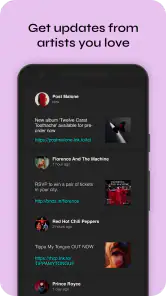
Yes. The app is designed to let you track favorite performers and receive alerts about their upcoming concerts and events. You can use it to keep tabs on the artists you already enjoy, while its discovery features can also introduce you to other performers. It may suit you particularly well if you want show updates centered on your musical tastes.
Do I need an account to get personalized concert recommendations?
Bandsintown Concerts is designed to tailor concert discovery around the artists and music you follow. Tracking favorite performers helps the app surface relevant events and send alerts about upcoming shows. If you are deciding whether to download it, consider whether you want a dedicated place to follow artists and keep up with live performances rather than relying only on general event searches.
What is Bandsintown Concerts and how does it work?
Bandsintown Concerts is a music discovery app that allows users to track their favorite bands and artists to receive alerts about upcoming concerts and events. By syncing with streaming services and user preferences, it provides personalized recommendations and notifications, making it easier for music lovers to stay informed about live performances in their area.
Is Bandsintown Concerts free to use?
Yes, Bandsintown Concerts is free to download and use. The app provides a variety of features at no cost, including tracking artists, receiving concert alerts, and browsing events. However, there may be optional in-app purchases or premium features available for users who wish to enhance their experience further.
Pros
- User-friendly interface
- easy navigation.
- Real-time concert notifications.
- Customizable artist tracking.
- Integration with streaming services.
- Free to use with optional premium features.
Cons
- Occasional notification delays.
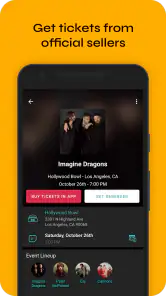
- Limited ticket purchasing options.
- Ads in free version.
- Requires internet for updates.
- Some minor bugs reported.
- Category
- Music & Audio
- Version
- 10.0.0











