Baby & Pregnancy Tracker App
- 1.00
- 4.7
- Installs
- 1.00M
- Price
- Free

Screenshots


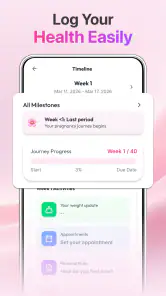
Analysis by Reviewed
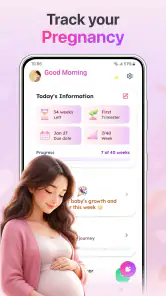
Pregnancy brings a steady stream of small questions: how far along am I, what might be changing this week, and what should I remember to ask at my next appointment? Baby & Pregnancy Tracker is aimed at those everyday uncertainties. I see it as a companion for following pregnancy and baby growth, with size information and pregnancy tips gathered in one place—not as a substitute for a clinician or a detailed medical record.
That distinction matters before you begin. The app is most useful when you want a quick, approachable reference during the week, then plan to discuss health concerns with your care team. If you are looking for diagnosis, personalized medical advice, or a complete system for managing appointments and records, a tracker alone is unlikely to cover the whole job.
From a quick question to a useful routine
Begin with the question you actually have
In my view, the easiest way to make a pregnancy tracker useful is to open it with one practical question rather than expecting it to organize your entire life. You might want to check the current stage of pregnancy, understand a baby-size comparison, or read a tip relevant to where you are now. That narrow purpose makes the app’s focus clear and keeps the experience from turning into another chore.
The app’s central idea is straightforward: follow pregnancy and baby growth, and use stage-related information as a prompt for learning. That can be reassuring when a change feels abstract. A size comparison gives you a simple mental picture; a tip can offer a starting point for thinking about the week ahead. I would treat both as general context, not as a precise assessment of an individual pregnancy.
It is worth checking that the tracker’s timing matches the dates and guidance you are already using with your healthcare provider. Pregnancy timelines can be discussed in different ways, and a tracker’s week-by-week framing should not overrule a clinician’s estimate. If the app’s information seems out of step with your appointment notes, use the medical guidance as your reference and ask your provider about the discrepancy.
Make a small, repeatable check-in
A realistic routine might be to check the app once at the start of the week, read the relevant guidance, and jot down any question you want to bring to an appointment. That is more useful than repeatedly checking for reassurance when nothing has changed. I would keep the habit brief: look for information that helps you understand the current stage, then close the app and return to your day.
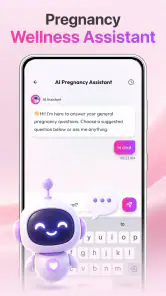
One practical trick is to turn a general tip into a specific question. If something you read raises a concern, write down what you noticed, when it happened, and what you want to ask. The tracker can help you notice topics to discuss, but it should not decide whether a symptom is harmless or urgent. For symptoms that worry you, contact a qualified professional rather than waiting for an app-based answer.
Another useful habit is to share only the parts that help someone else support you. A partner or family member may appreciate hearing what you learned about the current stage, but the app should not become the sole source of information for everyone involved. A short conversation based on a tip can be a good handoff; a claim that the app has confirmed a medical condition is not.
Use the information as a handoff, not a verdict
Pregnancy information often moves between the person using the app, a partner, and a healthcare professional. This tracker can serve as a conversation starter: you can mention a growth comparison or a question prompted by a tip. For an appointment, I would still bring the relevant dates, symptoms, and questions in your own words. A general tracker is not the same thing as a clinical record, and relying on it to preserve important health details would be a poor fit.
This distinction is especially useful when another caregiver is involved. If you share a general update, make clear that it is an educational reference rather than a measurement of your baby or a prediction about what will happen next. That small bit of context prevents a friendly comparison from becoming unnecessary worry or false certainty.
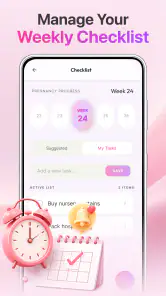
For someone balancing work, appointments, and family responsibilities, the app’s focused role may be a benefit: it gives you a place to check growth-related context without requiring you to build a complicated tracking routine. But if your main need is coordinated calendars, medical documents, medication reminders, or shared records, you may be better served by a dedicated health organizer or by tools your care team already uses.
What you get from the routine—and what you don’t
When used with realistic expectations, the payoff is a clearer sense of where you are in the pregnancy and a few relevant ideas to carry into the week. A size comparison can make development easier to picture, while tips give you a prompt for reading or asking more. The best outcome is not certainty; it is feeling a little more prepared to have informed conversations.
The app is a free parenting app from ZAppsolution, with a 4.7 average from around 1.6 thousand ratings and over 1 million installs. It is rated for everyone, so its audience is not limited to adults, though pregnancy content is naturally most relevant to expectant parents and the people supporting them. The current version is 1.0.12, and it requires Android 8.0 or later.
There are in-app purchases, priced from $1.99 to $11.99 per item. I would start with the free experience and decide whether it already covers your needs before spending anything. That is particularly sensible for a tracker, because your main requirement may be a quick weekly reference rather than extra paid content. The app was released on April 24, 2026, so anyone comparing it with a long-established pregnancy journal may prefer to weigh its focused approach against the broader history and tools offered by alternatives.
How it compares with other ways to follow pregnancy
Compared with a paper journal, a digital tracker is easier to consult for changing stage-related context, but a journal gives you more freedom to record personal details in your own format. Compared with a broad pregnancy platform, this app’s emphasis on growth, size, and tips may feel refreshingly direct. The trade-off is that a more comprehensive alternative may be a better match if you want appointments, checklists, notes, or family coordination in the same workflow.
It also differs from simply searching the web each time a question comes up. A focused tracker can make it easier to return to pregnancy-related information without starting a new search, while web searches can offer a wider range of sources when you need depth. In either case, the quality and relevance of medical advice matter more than convenience. I would use the app for orientation, then rely on a clinician or a trusted medical source for decisions.
Where the flow can break
The biggest limitation is the risk of reading general information too literally. Baby-size comparisons are illustrative, not a personal measurement, and tips cannot account for every pregnancy or medical history. If comparisons make you anxious, or if you find yourself checking repeatedly to make sure everything is all right, this may not be the right tool for you. A calmer approach could be to use it only when you have a specific question and bring persistent worries to your care team.
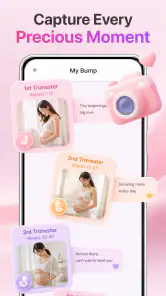
There is also a difference between following growth and keeping a complete record. If you need to track symptoms in detail, store appointment outcomes, coordinate care between several people, or manage newborn routines after birth, check whether your chosen tools actually support those tasks before depending on this app for them. Its stated focus is pregnancy and baby growth, so I would not assume it replaces a journal, a calendar, or professional care.
Some readers may prefer not to use a phone for pregnancy information at all, while others may find the extra app distracting. That is a fair reason to skip it: a simple note, a conversation with a provider, or a more complete organizer may fit your habits better. The strongest case for this tracker is not that every parent needs it, but that some people want a compact way to revisit growth context and tips without turning pregnancy into a project-management exercise.
Who I would recommend it to
I would recommend Baby & Pregnancy Tracker to someone who wants a light, pregnancy-focused reference for growth and stage-related tips, especially if they value quick check-ins and are comfortable treating the content as general information. It can also help a partner follow along and find a natural topic for conversation, as long as both people understand that an app’s comparison is not a clinical finding.
I would skip it if you need detailed medical tracking, prefer a single place for appointments and records, or know that baby-size comparisons tend to intensify your worries. In those situations, a clinician’s guidance, a personal journal, or a fuller pregnancy-management tool is likely to be more useful. For everyone else, my advice is simple: try the free version as a brief weekly companion, keep your important questions for your healthcare provider, and pay only if the available experience genuinely fits your routine.
Baby & Pregnancy Tracker App Frequently Asked Questions
What can you track with Baby & Pregnancy Tracker App?
Baby & Pregnancy Tracker App is designed to help expectant parents record pregnancy-related details and follow changes over time. Depending on the features available in your version, you may be able to view pregnancy milestones, save notes, and keep useful information together in one place. Check the app’s current feature description before downloading, since tools and content can vary by version, device, or region.
Is Baby & Pregnancy Tracker App a substitute for medical advice?
No. Information in a pregnancy tracker is intended to support personal organization and general learning, not to diagnose a condition or replace advice from a doctor, midwife, or other qualified healthcare professional. Pregnancy needs differ from person to person, and app estimates may not reflect your individual circumstances. For symptoms, medication questions, or urgent concerns, contact a healthcare professional rather than relying on the app.
Is Baby & Pregnancy Tracker App free to download and use?
The app’s price and available features may depend on its store listing, country, and current version. Some pregnancy apps are free to install but offer optional purchases, subscriptions, or paid features, so review the listing carefully before downloading. Also check whether a subscription renews automatically and how to cancel it. Do not assume that every feature is available at no cost.
Can I use Baby & Pregnancy Tracker App to follow my baby after birth?
The app’s name suggests pregnancy and baby tracking, but its post-birth tools may differ depending on the version. Before installing, check the current description and screenshots to see whether it includes newborn features such as growth records, feeding logs, or developmental information. If you need a specific tracking function, confirm that it is included and suitable for your needs rather than assuming it is available.
What should I know about privacy before entering pregnancy or baby information?
Pregnancy dates, health notes, and details about a child can be sensitive personal information. Before adding them, review the app’s privacy policy and the permissions it requests, and check whether information is stored on your device, uploaded to an account, or shared with third parties. Use only the details you are comfortable providing, and consult the app’s settings for available data, account, and deletion controls.
Pros
- Tracks pregnancy milestones and baby development week by week.
- Helps log symptoms
- appointments
- and other pregnancy details.
- Offers a convenient way to keep important notes in one place.
- Can help users prepare questions for prenatal appointments.
- Useful for following changes throughout pregnancy over time.
Cons
- Development information is general and cannot replace medical advice.
- Some features or content may require a subscription.
- Frequent reminders may feel intrusive if notifications are enabled.
- Entering details regularly takes time and consistency.
- Pregnancy timelines and estimates may not match every individual's experience.

- Category
- Parenting
- Version
- 1.0.12













