Avast SecureLine VPN & Privacy
- 8.19K
- 4.3
- Installs
- 10.00M
- Price
- Free

Screenshots
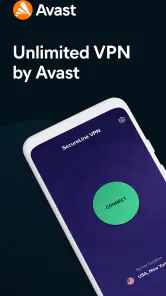
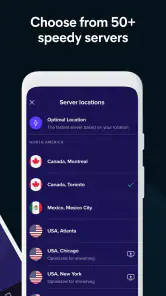
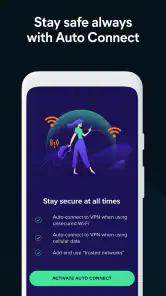
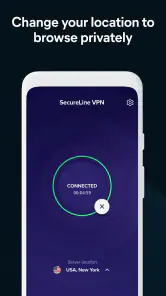

Analysis by Reviewed
In a shared home, a VPN can be most useful in ordinary moments: checking email while waiting for a repair appointment, paying a bill over café Wi-Fi, or browsing on a tablet that moves between rooms. I see Avast SecureLine VPN & Privacy as a privacy tool for the person using a device, rather than a household management system. That distinction matters if several people share a phone or tablet: each person still needs to know when the VPN is on and what account they are using.
One device, several people: agree on the basics
Imagine a parent using a family tablet to check a bank account, then handing it to a teenager for ordinary browsing. A VPN can help protect the connection on untrusted Wi-Fi, but it does not make every website safe, decide what content is suitable, or replace separate device profiles and supervision. I would explain what the VPN does before turning it on for shared use, and make sure each person understands that it protects the network connection rather than hiding activity from someone looking at the device itself.
That is a useful boundary for households: the VPN is about the route internet traffic takes, not about who owns an account or who gets to use a device. If people need separate browsing histories, app access, or parental settings, those need to be handled through the device and relevant services. SecureLine is best treated as one layer in that setup, not as a substitute for it.
Setup is simple, but check who is in control
The low-effort setup is appealing when you do not want to teach every household member a complicated routine. Still, I would have the person responsible for the device install and configure the app, then show other users how to tell whether the VPN is connected. On a shared device, that small handover prevents confusion when a site behaves differently or a connection seems slower than usual.
Before relying on a VPN for a sensitive task, I also like to check that the app is actually connected rather than assuming the setting took effect. If a family member is troubleshooting a banking or work app, temporarily comparing its behavior with the VPN on and off can help identify whether the VPN is involved. That is a diagnostic step, not a reason to leave protection disabled on public Wi-Fi.
Coordination beats assuming everyone has the same needs
Household members may use the same device for very different things. One person might want extra privacy on a public hotspot, while another mainly uses trusted home Wi-Fi and would rather avoid any change to their usual connection. I would agree on a simple routine—such as turning the VPN on before using public Wi-Fi and checking its status before sensitive browsing—rather than expecting everyone to remember an invisible setting.
That routine also helps when something does not load as expected. A VPN can change how a service sees a connection, so a site may ask for an additional sign-in or behave differently. If that happens, I would first check the connection and the app’s status, then decide whether the task can wait until a trusted network is available. It is better than repeatedly changing settings without knowing what caused the problem.
More From Our News Desk

Weather by Xiaomi Review: Clear at a Glance, Less Clear Up Close

X Under Pressure: Can It Recover When Posting Goes Wrong?

Clash of Clans Is Won Between the Battles

Android Auto Makes the Case for Quieter Car Software

MobiOffice: Transforming Mobile Productivity with Seamless Integration

EA SPORTS FC™ Mobile Soccer: Redefining Mobile Sports Gaming
Age and trust need a realistic boundary
The app is rated Everyone, which makes its age context broad, but that should not be confused with a promise that every online destination is appropriate for every user. A VPN does not filter the internet or provide parental controls by itself. For children using a shared device, I would pair any VPN decision with the family’s usual device restrictions and conversations about safe browsing.
Trust also depends on expectations. SecureLine is developed by Avast Software, a familiar security-software name, but installing a VPN still means choosing a service to handle the connection. I would use it when the added privacy is useful, while avoiding the assumption that any VPN makes someone completely anonymous or removes the need for sensible account security.
A practical day away from home
Consider a household member who takes the shared tablet to a café to wait during an appointment. They want to check a message, look up a travel detail, and perhaps pay a bill before heading home. This is the kind of short, ordinary outing where a VPN can be easier to justify than a complicated privacy routine: connect before handling anything sensitive, confirm the connection, and disconnect or reassess when the task is finished. The useful habit is not to assume that every café network is dangerous, but to treat unfamiliar Wi-Fi as a reason to be deliberate.
For a family, it helps to decide in advance who is responsible for the device and what to do if an app or website reacts differently. If a payment page requests another sign-in, pause and check that the address and service are genuine rather than treating the VPN as proof that the page is safe. A VPN can protect a connection layer, but it cannot make a fraudulent message trustworthy or correct a password entered on the wrong site. That distinction is especially worth explaining to less experienced users.
Useful habits for a shared phone or tablet
One small but helpful practice is to treat the VPN status as part of the handover when a device changes hands. The person passing it on can say whether it is connected and whether they changed anything for a particular task. That avoids a common shared-device puzzle: the next person assumes the phone is behaving normally, while a service is responding to a connection state they did not choose. It also makes troubleshooting calmer because users can change one thing at a time instead of tapping through settings at random.
I would also avoid making the VPN the only safety instruction people remember. Keep device passcodes, separate accounts where available, and careful sign-in habits in place. If another person needs their own browsing history or private account access, a VPN does not provide that separation. SecureLine is most useful when the household understands this division of labor: it can add privacy to internet traffic, while the operating system and the people using the device handle identity, access, and supervision.
Who benefits most, and who may prefer another approach
I think the clearest fit is someone who regularly uses public Wi-Fi and wants an uncomplicated way to add a connection-protection layer without turning every outing into a technical exercise. It can also suit a household’s main device manager, who can set expectations and help other users recognize the connection state. The simpler the routine, the more likely people are to use it consistently when away from home.
It is less compelling for someone who rarely leaves a trusted network and does not have a specific reason to route traffic through a VPN. It is also not the right answer when the real need is blocking unsuitable content, limiting a child’s screen time, separating family accounts, or managing several people’s online activity. Those jobs call for device or service settings designed for them. A VPN may still complement those tools, but it should not be asked to do their work.
What the familiar alternatives do differently
Compared with using no VPN, SecureLine adds a protected route for internet traffic, which is most relevant when connecting through a network you do not control. Compared with changing browser privacy settings, it is not limited to choices made inside one browser, while browser controls can be more directly aimed at cookies and tracking. I would use the option that matches the concern rather than expecting one setting to solve every privacy problem.
There is also a practical difference between a VPN and a security or parental-control suite. A suite may be a better starting point for a household whose main concern is content supervision or managing multiple users, while a VPN is more focused on the connection itself. And if the concern is an account password, a password manager and stronger sign-in habits address that more directly. These tools can coexist, but choosing by the problem you actually have keeps the setup understandable.
Another trade-off is convenience versus compatibility. Some services may react to a VPN connection by asking for extra verification or behaving differently. If a particular task repeatedly becomes awkward, I would not keep switching options without a reason; I would use the VPN for the situations where it adds value and handle the sensitive task on a trusted connection if that is more practical. A little planning is better than discovering the conflict halfway through a time-sensitive payment or work login.
Hey there! So, I just got my hands on this app called Avast SecureLine VPN & Privacy, and I thought I'd share my thoughts with you. If you're all about keeping your online life private and secure, this might just be your new best friend. Let's dive into what makes this app tick and see if it's worth the download.
Why Choose Avast SecureLine VPN?
First off, let's talk about what a VPN is. In simple terms, it acts like a secret tunnel for your internet activity, keeping your data safe from prying eyes. With Avast SecureLine VPN & Privacy, you get just that and more. It's like having a cloak of invisibility for your online presence, and who wouldn't want that?
Easy Peasy Setup
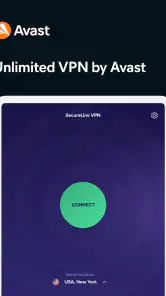
Getting started with this app is a breeze. I mean, who has time for complicated setups, right? Just download it, and with a few taps, you're good to go. The app's interface is super user-friendly, which is always a plus. Whether you're a tech whiz or a newbie, you won't have any trouble navigating through it.
Speedy Connections
Now, let's talk about speed. Some VPNs can slow you down, but not this one. I tested it out on various servers, and I was pleasantly surprised. Streaming, browsing, or downloading, everything ran smoothly without any hiccups. It's like having a turbo boost for your internet connection!
Global Coverage
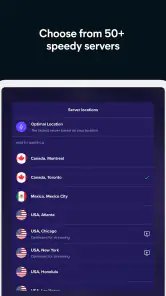
One of the standout features is its wide range of server locations. With servers in over 30 countries, you can virtually be anywhere you want. Need to bypass geo-restrictions? No problem! Access your favorite content from around the world as if you were right there. It's perfect for the globetrotter in all of us.
Privacy at Its Best
Of course, the main reason you’re getting a VPN is privacy, and Avast does not disappoint. It offers top-notch encryption, ensuring your data is locked tighter than Fort Knox. Plus, they have a strict no-logs policy, which means they’re not snooping around your online activities. That’s a big win for privacy enthusiasts!
Another cool feature is the automatic connection option. If you’re using public Wi-Fi, the app automatically connects to a VPN to keep your data safe. It’s like having a personal bodyguard for your internet connection!
Worth the Bucks?
Now, let’s get to the million-dollar question: is it worth your money? Well, considering the features it offers, I’d say it’s a solid investment in your online security. They offer a free trial, so you can take it for a spin before committing. That’s always a nice touch!
In conclusion, Avast SecureLine VPN & Privacy is a robust app that delivers on its promises. It’s user-friendly, fast, and offers excellent security features. Whether you’re a privacy advocate or just someone who wants a safer browsing experience, this app has got you covered. Give it a try and see for yourself!
How it fits beside other privacy choices
Compared with browsing without a VPN, SecureLine adds a protected connection layer, especially useful on public Wi-Fi. Compared with changing a browser’s privacy settings, it applies to internet traffic beyond a single browser session, while browser settings can still be more targeted for cookies and tracking. I would not treat either approach as a replacement for the other.
It is not automatically the best choice for every household. If your main goal is filtering a child’s searches, managing screen time, or sharing a single plan across many people, a family-focused security or parental-control product may suit that job better. If you only browse on trusted networks and do not need a VPN, the extra layer may not be worth adding to your routine.
Practical questions before you install
SecureLine is a free app to download, though in-app purchases range from under a dollar to around eighty dollars per item. I would check the purchase details in the app before committing, especially if the device is shared or a child can access the store. The app is rated for Everyone, has been available since 2013, and its current version is 7.1.14679; it requires Android 8.0 or later.
Its average rating is 4.3 from around 221,000 ratings, with roughly 8,200 written reviews and more than 10 million installs. Those figures suggest that it is widely used, but they do not tell me whether it fits a particular home’s habits. For a household, I would decide based on who uses the device, when they connect to public Wi-Fi, and whether everyone is comfortable with a VPN affecting the connection.
A household verdict
For a person who often connects away from home, or for a household member who wants a straightforward way to add privacy on shared networks, SecureLine is worth considering. Its simple setup and automatic connection option can make the routine easier, provided users understand what protection it does and does not provide. The trade-off is that a VPN can occasionally complicate access to a service, and it cannot replace device-level boundaries or careful account habits.
I would choose it for the adult who handles sensitive browsing on the go and can explain the basics to anyone sharing the device. I would skip it as a stand-alone solution for family safety, content filtering, or anonymity. Used with realistic expectations, it can be a convenient extra layer; the household still needs clear account boundaries and ordinary online judgment.
Avast SecureLine VPN & Privacy Frequently Asked Questions
What should I check before installing Avast SecureLine VPN & Privacy?
Avast SecureLine VPN & Privacy is a communication app from Avast Software, with a store description focused on securing internet and Wi-Fi use through a private tunnel. It is free to download and is rated for Everyone. Before installing, consider whether you want a VPN for mobile browsing and review the app’s permissions and purchase options on your device so they match your preferences.
How well regarded is Avast SecureLine VPN & Privacy by users?
The app has an average rating of 4.3 from around 221,000 ratings, alongside around 8,200 written reviews. These figures offer a useful sense of how users have responded, but individual experiences can differ depending on their devices, connection, and expectations. It has over 10 million installs, so it is a widely used option for people looking for a mobile VPN app.
Is Avast SecureLine VPN & Privacy suitable for beginners?
Avast SecureLine VPN & Privacy is intended for people who want to use a private tunnel while browsing on a mobile device. Its store summary highlights securing internet and Wi-Fi connections and using a mobile browser anonymously. It is an app from Avast Software, and its Everyone age rating means it is presented for a general audience. Consider whether a VPN fits the way you use the internet before downloading.
What is Avast SecureLine VPN & Privacy and how does it work?
Avast SecureLine VPN & Privacy is a virtual private network (VPN) service designed to protect your privacy and secure your internet connection. It encrypts your data, making it unreadable to hackers and snoopers, and hides your real IP address, which allows you to browse anonymously. By connecting to one of Avast’s worldwide servers, users can also access content that might be restricted in their region.
Is Avast SecureLine VPN & Privacy available on multiple devices?
Yes, Avast SecureLine VPN & Privacy can be used on multiple devices. It supports Windows, macOS, Android, and iOS platforms. If you have a subscription, you can use the VPN on up to five devices simultaneously, which makes it convenient for protecting all your personal gadgets with a single account.
Pros
- Easy to use and set up
- Strong encryption protocols
- Fast connection speeds
- Supports multiple devices
- No-log policy for privacy
Cons
- Limited server locations
- No free version available
- Inconsistent performance
- Limited advanced features
- Can be pricey for some users
- Category
- Communication
- Version
- 7.1.14679












