Avast Antivirus & Security
- 186.12K
- 4.6
- Installs
- 100.00M
- Price
- Free

Screenshots
Analysis by Reviewed
I judge phone security apps less by how many tools they put on one screen and more by whether I can build a routine I’ll actually follow. Avast Antivirus & Security is a free Android tools app from Avast Software, and its appeal is the mix of malware protection, privacy controls, and cleanup utilities in one place. It has a 4.6 average from around 7.3 million ratings and over 100 million installs, which suggests it has become a familiar option for Android users. My main question is whether that range of tools helps in everyday use or simply adds more settings to manage.
First Impressions
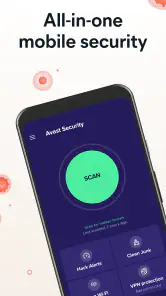
When I first launched the Avast Antivirus & Security app, I was greeted with a clean and intuitive interface. It's straightforward, which is a relief because who has time to fiddle with complicated settings? The dashboard offers a clear view of your device's security status, including potential threats and recommendations for fixes. The app is light on resources, so it won't slow down your phone, which is always a plus.
A practical first routine
I’d start by checking the dashboard and running a scan, then deal with any recommendations one at a time rather than accepting every suggested change at once. That gives me a chance to understand what each action affects, especially when the app offers cleanup or privacy-related options. Avast also includes phone-cleaning tools, but I treat those as optional housekeeping, not as a reason to delete files automatically. A security app is most useful when its alerts lead to deliberate choices instead of a reflex to tap every button.
This approach suits someone who installs apps from varied sources, uses shared networks, or wants a simple way to check several security basics. If you already keep your phone’s software current, install only from trusted sources, and prefer the built-in protections on your device, a separate suite may feel like more oversight than you need. The choice depends less on how worried you are in theory and more on whether the extra checks fit your habits.
Building a repeatable security habit
I find it more useful to give each tool a clear job than to treat the app as something that needs constant attention. A scan makes sense after installing an app from an unfamiliar source; a network check is relevant when I join public Wi-Fi; and app locking is for private apps I sometimes hand over to someone else. These triggers keep the tools tied to real situations instead of turning security into a daily checklist with no obvious benefit.
For example, if I’m waiting at a café and need to check a message, I can first look at the network check and decide whether to use mobile data for anything sensitive. Later, if I lend my phone to a family member to show them a photo, a lock on messaging or banking apps can provide a separate boundary. Neither action replaces careful judgment, but both are more useful when I know in advance what concern they address.
Features You’ll Love
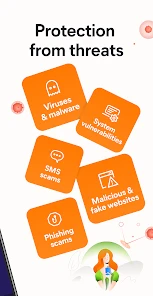
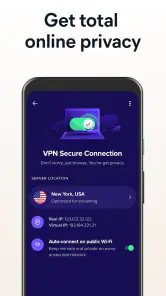
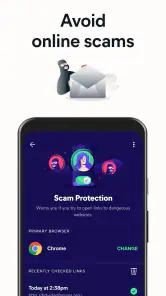
Let's talk features because that's where the magic happens. The app provides real-time protection against viruses, malware, and spyware. It's like having a digital bodyguard for your phone. One feature I particularly liked is the Wi-Fi security scan. It checks the security of the network you're connected to, ensuring you're not exposed to any potential risks. If you're a bit of a jet-setter or just love using public Wi-Fi, this feature is a godsend.
More From Our News Desk

Weather by Xiaomi Review: Clear at a Glance, Less Clear Up Close

X Under Pressure: Can It Recover When Posting Goes Wrong?

Clash of Clans Is Won Between the Battles

Android Auto Makes the Case for Quieter Car Software

MobiOffice: Transforming Mobile Productivity with Seamless Integration

EA SPORTS FC™ Mobile Soccer: Redefining Mobile Sports Gaming
For a useful travel habit, I’d check the network before doing anything sensitive on public Wi-Fi, then switch to a trusted connection or mobile data if the results make me uneasy. A scan can help flag concerns, but it cannot make an unfamiliar network trustworthy by itself. That distinction matters: the tool is a prompt to make a safer connection choice, not a guarantee that every online activity is protected.
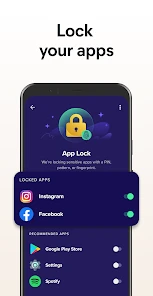
Another cool feature is the app lock, which allows you to protect your sensitive apps with a password or fingerprint. It's a great way to keep prying eyes away from your private messages or banking apps. Plus, the anti-theft feature is a lifesaver. It helps you track your device if it's lost or stolen and even lets you remotely lock it to protect your data.
I’d use app lock selectively, for the few apps that expose private conversations or financial information, rather than putting a barrier in front of everything. That keeps the extra step meaningful instead of turning routine phone use into a series of unlock prompts. Before relying on anti-theft tools, it’s sensible to review how they work and make sure the account and device settings needed to use them are in place; a feature is only helpful in a stressful moment if you understand it beforehand.
Settings and everyday trade-offs
The app is free to download, though it also offers in-app purchases ranging from under a dollar to over a hundred dollars per item. I’d begin with the free tools and consider paying only if a specific extra feature solves a problem I actually have. Avast is rated for Everyone, and the current Android release is version 26.0.8.251105937; it requires Android 10 or newer. The app has been available since December 2011, so it is a long-running product rather than a newly launched utility.
Notifications are worth reviewing as part of setup. I’d keep alerts that ask me to act on a security issue, while being more selective about routine reminders if they interrupt the day. The useful trade-off is visibility versus noise: too few prompts can make it easy to miss something, but too many make it tempting to dismiss them all. I would also check the wording of any recommended cleanup before proceeding, since freeing space and protecting privacy are different goals.
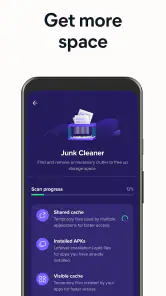
Cleanup deserves particular restraint. I wouldn’t remove something just because it appears in a cleaning suggestion; I’d first check what it is and whether I still use it. A quick tidy-up can be satisfying, but deleting files without understanding their purpose can create a problem that has nothing to do with malware. If storage is the real concern, I’d compare the suggested action with the phone’s own storage view before confirming it.
Compared with relying only on a phone’s built-in safeguards, Avast puts scanning, app locking, network checks, and cleaning tools together in a dedicated interface. That breadth is convenient if you want one place to manage those tasks. The flip side is that a larger suite can feel redundant if you already use separate tools or prefer the lighter approach of changing a few device settings and leaving them alone. I’d choose Avast for its combined workflow, not because every phone necessarily needs another security layer.
Choosing it over a simpler setup
The usual alternative is to rely on Android’s built-in protections and keep a few good habits: update the phone, be cautious with downloads, and avoid entering sensitive details on networks you don’t trust. That route has fewer things to configure. Avast makes more sense to me if I want scanning, app locks, and network checks gathered in one place, or if I’d rather have a visible dashboard than remember separate steps.
It is less compelling for someone who already uses another security suite or wants a phone with as few background utilities and notifications as possible. More tools do not automatically mean better protection, especially if overlapping apps compete for attention. I’d avoid running multiple security products just for reassurance; a smaller setup that I understand is generally easier to maintain than a collection of overlapping alerts.
Performance and Usability
In terms of performance, Avast doesn't disappoint. The scans are thorough yet quick, and I didn't notice any significant battery drain, which is often a concern with security apps. The app runs smoothly, and the notifications are helpful without being intrusive. It strikes a balance between being informative and not overwhelming you with alerts.
The usability is top-notch. Even if you're not tech-savvy, you'll find navigating through the app's features a breeze. The settings are customizable, allowing you to tailor the security levels to your preference. It's like having a personalized security expert at your fingertips.
For a low-friction routine, I’d use the dashboard when installing something unfamiliar or after connecting to a network I don’t recognize, rather than repeatedly running checks without a reason. A parent sharing a phone with a child, or someone who lends a device to family, may also value app lock more than frequent scans. On the other hand, anyone who dislikes extra prompts or already has a security setup they trust may find the added controls unnecessary. The best configuration is the smallest one that covers your actual concerns.
Limits worth understanding
No security app can make risky decisions harmless. A network check is a useful clue, not a promise that a public hotspot is safe; a scan cannot replace keeping Android and apps updated; and anti-theft features are not a substitute for setting up the relevant account and device access before a phone goes missing. I see Avast as a layer that helps me notice and manage issues, not permission to stop paying attention.
There is also a small attention cost to a suite with several kinds of tools. If I enable every reminder, lock too many apps, and accept every cleanup suggestion, the app can become another source of friction. I’d begin with the protections I know I will use, then add a control only when a real need appears. That makes it easier to tell whether a feature is helping rather than merely occupying space in my routine.
Making the routine work in real life
A useful everyday pattern is to connect each check to a change in circumstances. I would not run a scan just because a calendar reminder says it is time; I would use one after a download that makes me uncertain, or when the dashboard gives me a concrete reason to look closer. That keeps a security check from becoming a ritual that I perform without considering what it can tell me.
Imagine arriving at a hotel after a long trip and needing to check a booking message. I’d look at the network check before deciding whether the Wi-Fi is appropriate for that task, and I’d use mobile data for sensitive account access if I still felt unsure. Later, if I hand my phone to someone to make a call or browse photos, app lock can protect selected private areas without making every ordinary interaction cumbersome. The value is in choosing the right tool for that moment, not turning on every control at once.
One practical setup tip is to decide what “success” looks like before changing settings. If the goal is protecting private conversations when lending out the phone, focus on app lock and test that it works in the way you expect. If the concern is unfamiliar downloads, make the scan part of that installation decision. Keeping the goal narrow makes it easier to spot settings that add effort without addressing the concern.
Who will get the most from it
I think Avast is most useful for people who want a visible place to review several aspects of phone security, especially if they move between networks, share their device, or prefer guided prompts to remembering separate checks. Its appeal is practical rather than mysterious: scanning, app locking, network checks, and cleanup sit together, so a person who uses more than one of those tools may appreciate the single interface.
It is a weaker fit for someone who rarely installs unfamiliar apps, never lends out a phone, and already feels comfortable with their device’s built-in protections. It may also frustrate anyone who wants a security utility to disappear completely into the background. A broad dashboard is helpful when it supports a habit; it is unnecessary clutter when the person using it does not want to manage another set of controls.
When deciding whether to pay for an extra, I’d first identify the specific task it would improve and whether I would use it repeatedly. The app is free to start, so there is no reason to treat an in-app purchase as part of the basic setup. If the free features already cover the need, I’d leave it there. If not, I’d compare the particular extra with the cost and friction of a simpler alternative before buying.
Final Thoughts
In conclusion, Avast Antivirus & Security is a solid choice for anyone looking to beef up their mobile security. With its robust set of features, user-friendly interface, and reliable performance, it ticks all the right boxes. Whether you're a casual user or someone who handles sensitive information on your phone, this app provides the peace of mind you need. So, why not give it a try and see for yourself?
My recommendation is to try it with a clear purpose: use the scan and network check as decision aids, lock only the apps that genuinely need an extra boundary, and keep cleanup actions under your control. That makes the broad toolset easier to manage and helps avoid paying for extras you won’t use. For Android users who want these functions gathered together, Avast is worth considering; for someone who wants the fewest possible controls, the phone’s built-in options may be the better fit.
Overall, I’d recommend it most to Android users who value having several practical checks together and are willing to spend a little time choosing which ones matter. People who mainly want a minimal phone, already feel comfortable with built-in safeguards, or dislike extra prompts may be happier without it. The strongest result comes from treating the app as a set of focused tools: choose a sensible baseline, keep the settings you understand, and use each feature when its particular situation calls for it.
Avast Antivirus & Security Frequently Asked Questions
Can I download Avast Antivirus & Security from an official app store?
Avast Antivirus & Security is a mobile security app developed by Avast Software. Before downloading, look for the app in the official store for your device and check that the developer name matches. This helps you avoid confusing it with similarly named apps. You can also review the app’s description, compatibility details, and purchase options before deciding whether to install it.
What is Avast Antivirus & Security designed to do?
Avast Antivirus & Security is a Tools app for Android that brings mobile security and maintenance options together. Its listed functions include antivirus protection, a virus cleaner, app lock, and phone cleaner. If you want several routine phone tasks in one place, this combination may be convenient; consider which of these tools you actually plan to use before downloading.
Does Avast Antivirus & Security require an internet connection?
Some app functions may work differently depending on your device’s connection and the task you are performing. For the best experience, keep your phone connected when installing the app, checking for updates, or using features that rely on online services. You can explore the app’s settings after installation to see how each available tool behaves on your device.
Can Avast Antivirus & Security replace my phone’s built-in security?
Avast Antivirus & Security offers security tools, but it is sensible to keep using your phone’s built-in security measures as well. Use a device lock, install system updates, and review app permissions rather than relying on one app alone. Avast’s app lock is an additional option for selected apps; it does not remove the value of securing the device itself.
Will Avast Antivirus & Security scan my phone automatically?
The app is presented as offering antivirus protection and scanning tools. If you want to understand when scans run and what they cover, review the app’s settings and prompts after installation. That lets you choose options that fit your routine and avoid assuming that every scan or protection feature works in the same way on every device.
Pros
- Comprehensive virus protection
- User-friendly interface
- Frequent updates
- Low resource consumption
- Wi-Fi security scanner
Cons
- Ads in free version
- Some features require purchase
- Occasional false positives
- Can slow device startup
- Limited support in free version
- Category
- Tools
- Version
- 26.0.8.251105937









