AI Chat・Ask Chatbot Assistant
- 1.40K
- 4.6
- Installs
- 10.00M
- Price
- Free

Screenshots


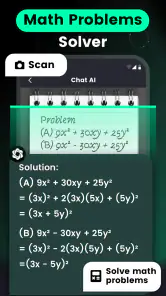
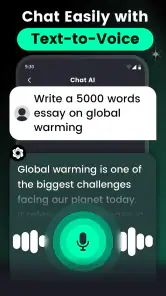
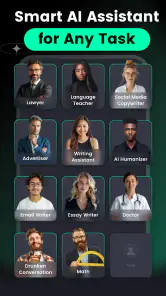
Analysis by Reviewed
I reach for an AI chatbot when I want to turn a half-formed question into a useful starting point, and AI Chat・Ask Chatbot Assistant is built for that broad, conversational role. It presents itself as an everyday productivity app rather than a specialist tool: I can ask for an explanation, explore an idea, or try a creative prompt without first learning a complicated workflow. That flexibility is appealing, though it also means the quality of the result depends a lot on how clearly I ask.
Quick questions, with realistic expectations
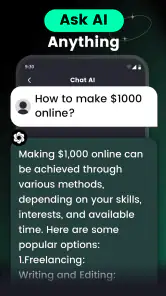
For a short request, the experience feels most natural: I can ask for a definition, a few ways to phrase a message, or a simple list of ideas and then refine the answer in the same conversation. I would not treat it as a guaranteed instant source of truth. A chatbot may respond confidently while misunderstanding a detail, so I check important facts elsewhere and give it context when the first answer is vague. That small habit is more useful than expecting every prompt to work perfectly on the first try.
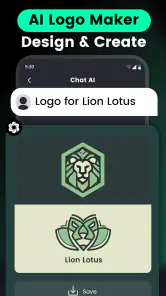
The app’s broad creative range also changes how I would use it. Someone considering a room refresh could ask for several style directions, then describe the room’s size, existing furniture, and preferred colors to make the suggestions more relevant. A logo or tattoo concept can be approached the same way: begin with a rough idea, ask for alternatives, and narrow down the mood or visual details. I’d treat those responses as inspiration rather than finished professional designs; the value is in getting unstuck and finding a direction worth developing.
Useful when a task is still taking shape
A realistic everyday example is planning a small get-together after work. I might ask for a few low-effort theme ideas, choose one, then request a simple shopping checklist or a friendly invitation draft. The useful part is the back-and-forth: instead of opening separate idea, writing, and search tools, I can explore the plan conversationally. I would still check practical details such as availability or current conditions independently, especially if a decision depends on up-to-date information.
There is a small prompting trick that makes this kind of assistant more useful: say what the answer is for, name the limits, and ask for a format. “Give me three options for a casual dinner, under an hour to prepare, with a short ingredient list” is easier to act on than “What should I cook?” If a response is close but not quite right, correcting one detail at a time helps me see whether the app understood the request or is simply producing another broad guess.
Turning a first answer into a workable plan
I also find it useful to treat a conversation as a sequence of small decisions instead of asking the assistant to solve an entire project at once. For a room refresh, for example, I could first request contrasting style directions, then pick one and ask what details would make it feel warmer or less cluttered. I would keep the suggestions that match the room I actually have and discard anything that depends on furniture, space, or a budget I do not have. This turns a broad creative response into a practical shortlist rather than a plan I cannot use.
The same approach helps with writing. If I need a polite message but do not know how formal it should sound, I can ask for two different tones, choose the closer one, and then adjust a specific phrase. That is more useful than accepting the first draft as finished. I would avoid including private information just to make an answer more personal; a general description of the situation is often enough to get a useful starting point without putting unnecessary details into a chat.
More From Our News Desk

Weather by Xiaomi Review: Clear at a Glance, Less Clear Up Close

X Under Pressure: Can It Recover When Posting Goes Wrong?

Clash of Clans Is Won Between the Battles

Android Auto Makes the Case for Quieter Car Software

MobiOffice: Transforming Mobile Productivity with Seamless Integration

EA SPORTS FC™ Mobile Soccer: Redefining Mobile Sports Gaming
A Friendly Digital Companion
The first thing that struck me about the AI Chat・Ask Chatbot Assistant is how user-friendly it is. You don’t have to be tech-savvy to get it up and running. The interface is clean and intuitive, making navigation a breeze. I was able to dive right in and start chatting without any hiccups. It’s designed with the user in mind, ensuring that even the least tech-inclined among us can make the most of its features.
Speed, effort, and what to expect
For ordinary prompts, the main appeal is the short path from question to response: I can try an idea and follow up without building a project or learning a dedicated editing interface. More involved requests naturally take more effort from me, because useful output usually needs specific context and a couple of rounds of refinement. I would not judge the app by whether every complicated task is solved in one go; I’d judge it by whether the conversation helps me move forward.
When I use an assistant heavily, I keep requests focused rather than stacking unrelated jobs into one long prompt. That makes it easier to spot a misunderstanding and revise only the part that needs work. It also gives me a practical way to compare suggestions: ask for a few distinct approaches, then request the trade-offs in plain language. For creative decisions, this is more helpful than asking for a single “best” answer, since taste and constraints matter more than a universal ranking.
What Can It Do?
Now, let’s talk about what this app can actually do. I was pleasantly surprised at the sheer range of functionalities it offers. Need to set a reminder for that meeting you keep forgetting? Just ask the chatbot. Want to know the weather forecast for your weekend getaway? It’s got you covered. I even tested it with some trivia questions, and it handled them like a pro.
One of the standout features is its ability to learn from our interactions. The more you chat with it, the better it gets at understanding your preferences and providing personalized responses. It’s like having a conversation with a friend who knows you well, always ready with the right information at the right time.
Making creative prompts more useful
For visual ideas, I would describe the purpose and the feeling I want before asking for details. A logo for a neighborhood club, for instance, needs a different tone from one for a serious professional service, even if both prompts mention the same subject. Asking for a few sharply different concepts can help reveal what I like; asking for tiny refinements too early can keep me polishing an idea that was never the right fit. I see this as a way to explore directions, not as a substitute for a designer’s control over a final asset.
There is a similar trade-off with tattoo concepts. A description can help me test themes, symbols, or moods, but I would not treat a generated idea as ready to take to a tattoo appointment without discussing placement, scale, and execution with a qualified artist. The assistant is most helpful before those decisions, when I am trying to explain an idea clearly or discover alternatives. Its breadth is convenient, but creative inspiration and production-ready work are different things.
Where it fits among other tools
Compared with a conventional search app, this chatbot is better suited to turning a question into a conversational exchange: I can ask for a simpler explanation or request another version without starting over. Search is still the better choice when I need to inspect sources, compare current information, or verify a claim. For polished graphic work, a dedicated design app gives me more direct control; this assistant is more useful at the brainstorming stage, when I need options before choosing a tool or committing to a look.
That distinction helps me decide who will enjoy it. It suits curious users, students looking for a first explanation, and people who want a flexible prompt partner for everyday writing or creative planning. It is less suitable as the sole authority for important decisions, as a replacement for a specialist design workflow, or for anyone who prefers structured menus and predictable, repeatable results over open-ended chat.
When another kind of app is the better fit
If I already know exactly what I need to produce, a purpose-built tool can save time. A calendar app is a more dependable place to manage an actual schedule, a dedicated design editor is better for precise placement and revisions, and a search engine is easier when I want to compare sources directly. The chatbot’s advantage is that it can help me think through an unclear task in ordinary language. Its limitation is that a conversational answer can feel complete even when I still need to check the details or carry out the work elsewhere.
For study, I would use it to get an accessible first explanation or generate questions that help me review a topic, then compare the explanation with course materials. For work, I might use it to draft a neutral outline or brainstorm wording, but I would check names, figures, and claims before sharing the result. Those boundaries do not make the app less useful; they make the useful part clearer. It is a starting assistant, not an automatic approval step.
Keeping It Real
While the AI Chat・Ask Chatbot Assistant is super helpful, it’s not without its quirks. At times, I noticed it might miss the mark slightly with its responses, especially with more complex or abstract questions. But hey, nobody’s perfect, right? It’s all part of the charm and frankly, it just adds to the experience.
Another thing I loved is how it respects user privacy. In an age where data is king, it’s comforting to know that this app prioritizes keeping your information safe and sound. I felt secure knowing that my chats and queries were handled with care, and that’s something everyone can appreciate.
Reliability during longer sessions
When a conversation goes off course, I would not keep piling instructions onto it and hope the next answer repairs everything. I would restate the goal in a shorter prompt, clarify the one detail that matters, or begin again with a cleaner description. That is a practical recovery habit for any open-ended chatbot: it gives me a fresh chance to communicate what I mean instead of letting an earlier misunderstanding shape every follow-up.
For a busy moment, I would also save the useful result somewhere outside the chat if I need to rely on it later. A checklist for an event, a draft message, or a set of design directions is easier to reuse when I have copied the parts I actually want. I would not assume that a chat is a durable record or that a generated answer will remain correct as circumstances change. For current or consequential details, a separate check is still the sensible final step.
Practical trade-offs before you install
The app is free to download, with optional in-app purchases ranging from $4.99 to $199.99 per item, so I would check the purchase details in the app before deciding whether any paid option suits me. AI Chat Studio develops it, and its 4.6 average from around 178,000 ratings, alongside over 10 million installs, suggests that many people have tried it. It is rated for Everyone, but that does not make every generated answer appropriate or reliable for every situation; I would still use ordinary judgment, particularly when a prompt involves personal or sensitive details.
On the practical side, version 1.9.4 requires Android 6.0 or later. That gives a clear baseline for Android users, but I would still consider how I use the app: frequent, long conversations may be less comfortable on an older or more constrained device than short questions, and I would avoid assuming that every response will arrive instantly. If a reply seems off, I can restate the goal more plainly, add the missing context, or start a fresh thread rather than relying on a mistaken answer as the conversation continues.
Its release on April 14, 2023, places it among the newer wave of general-purpose AI assistants, and I see the central trade-off clearly: flexibility makes it approachable, but it cannot replace careful checking or a purpose-built tool when precision and control matter. The strongest workflow is to use it for a first draft, explanation, or set of possibilities, then review the result and take the final step myself.
Who will get the most from it
I think this app makes the most sense for someone who likes asking follow-up questions and is comfortable shaping an answer through conversation. If I am curious about a topic, stuck on a first draft, or looking for several creative directions, it can lower the effort needed to begin. A student could use it to make a difficult concept easier to approach, while someone planning a casual event could turn a vague idea into a few decisions and a checklist. In both cases, I would treat its output as a draft to review, not a finished answer to trust automatically.
I would skip it if I needed guaranteed accuracy, transparent source checking, or fine-grained control over a finished design. It is also a weaker fit if I dislike conversational trial and error and would rather choose options from a fixed, specialized interface. The app’s flexibility is its main appeal, but that same openness asks me to provide context, notice when an answer drifts, and decide what deserves independent verification.
Final Thoughts
So, is the AI Chat・Ask Chatbot Assistant worth downloading? In my book, absolutely. It’s a handy tool that fits snugly into daily life, offering help and companionship whenever you need it. Whether you’re a student, a busy professional, or simply someone who loves tech, this app is a fantastic addition to your digital toolkit.
In conclusion, I’d say give it a whirl! It’s fun, it’s useful, and it just might become your new best friend in your pocket. Happy chatting!
AI Chat・Ask Chatbot Assistant Frequently Asked Questions
What should I know about the app’s popularity before downloading it?
AI Chat・Ask Chatbot Assistant has an average rating of around 4.6 from about 178,000 ratings, and it has over 10 million installs. Those figures suggest that many people have tried it, though popularity alone cannot tell you whether its answers and creative tools will suit your needs. If you are curious, consider trying the free download and judging the experience for yourself.
Can I use AI Chat・Ask Chatbot Assistant on my device?
The app is available for Android and iOS, so it can suit users across both major mobile platforms. Android users need version 6.0 or later. Before downloading, check that your device meets the requirements for the version of the operating system it uses, and make sure you are selecting the app by AI Chat Studio so you install the intended chatbot assistant.
When was AI Chat・Ask Chatbot Assistant released, and what version is current?
AI Chat・Ask Chatbot Assistant was released on April 14, 2023, and its current version is 1.9.4. These details can help you identify the app and understand its place in your download history, but they do not determine whether it will work well for your particular needs. Check the version shown on your device’s app store when you are ready to install or update it.
Is AI Chat・Ask Chatbot Assistant free to download, and are there optional purchases?
The app is free to download, so you can try its AI chat features without paying upfront. It also offers in-app purchases, with individual items ranging from around five dollars to about two hundred dollars. Check the purchase options in the app before confirming anything, especially if you plan to use it regularly.
What can I use AI Chat・Ask Chatbot Assistant for besides asking questions?
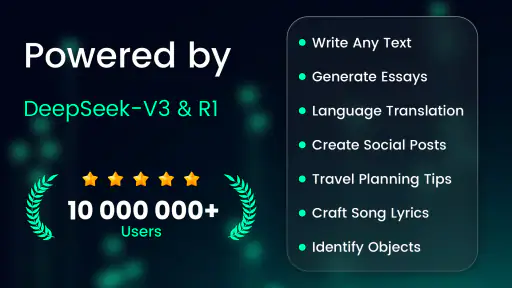
Its store description highlights several creative uses alongside general AI chat: home design ideas, logo creation, tattoo concepts, and image generation. This makes it worth considering if you want one app for both quick questions and brainstorming visual projects. The exact tools you see may depend on the options available within the app.
Pros
- Intuitive and user-friendly interface.
- Offers quick and accurate responses.
- Supports multiple languages seamlessly.
- Customizable chatbot personalities.
- Low resource consumption on devices.
Cons
- Limited offline functionality.
- Subscription required for premium features.
- Occasional irrelevant answers.
- May struggle with complex queries.
- Requires constant internet connection.
- Category
- Productivity
- Version
- 1.9.4