Math Games: Math for Kids
- 1.00K
- 4.4
- Installs
- 50.00M
- Price
- Free
Screenshots
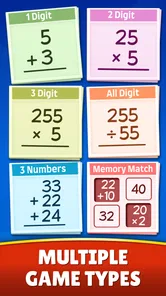
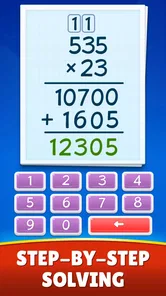
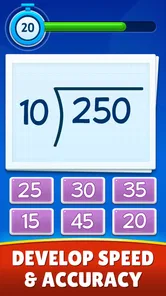
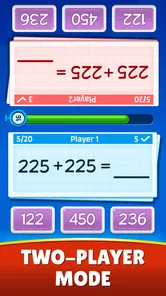
Analysis by Reviewed
At our house, a shared tablet can turn a quiet stretch before dinner into a small learning break: one child gets a few minutes with number practice, then passes the device along. Math Games: Math for Kids is the kind of educational game I’d consider for that routine because it focuses on familiar arithmetic rather than asking children to settle into a long lesson. It’s free, rated for Everyone, and made by RV AppStudios. I’d treat it as a useful practice option, not a replacement for a teacher or a parent who can explain why an answer works.
How It Fits into a Household Routine
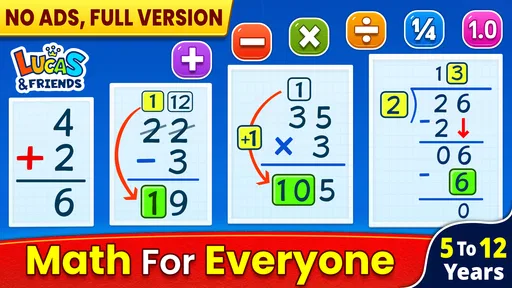
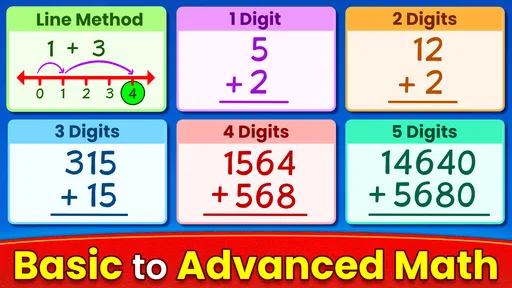
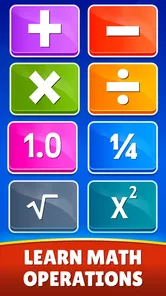
The game is designed around addition, subtraction, multiplication and division, so it makes most sense when a child is learning or rehearsing those operations. The store summary also points to math games for kids, and that narrow focus is helpful: a parent can choose it for quick arithmetic practice without expecting a complete school curriculum. If a child needs geometry, fractions or broader lessons, I’d check those needs separately rather than assume they are covered.
A Short Turn Works Better Than a Long Session
For a realistic after-school use, I’d offer it as a brief turn while dinner is being prepared, then ask the child to explain one answer aloud. That simple handoff makes the activity easier to share and gives an adult a chance to notice whether the child is guessing or understanding. The game can supply practice; the conversation is what helps connect a tap on the screen to a method the child can use on paper.
With more than ten million installs and an average rating of 4.5 from around sixty-four thousand ratings, it has clearly reached a large audience. Those figures are useful context, but they don’t tell me whether its style will suit a particular learner. I’d try it with the child and watch their response: some enjoy game-like repetition, while others prefer a workbook, manipulatives or a person working through examples beside them.
Shared Device, Clear Boundaries
On a family tablet, I’d make the turn-taking rule clear before opening the game: who is using the device, how long they have, and what happens when it is time to stop. I wouldn’t assume that separate children get separate progress records or that the app includes family coordination tools. If keeping each child’s work distinct matters, an adult should check how the app behaves on the actual device before relying on it for ongoing tracking.
This also helps avoid a common household snag: a child may want to keep playing after the learning moment is over, especially if they enjoy the game’s reward loop. I’d frame the activity as practice with a natural stopping point, rather than promise an unlimited play session. If screen-time boundaries are already a source of conflict, a paper activity or a short parent-led quiz may be easier to manage.
Age, Confidence and Adult Support
The Everyone rating makes the game suitable for a broad audience, but that doesn’t mean every child will find the same questions comfortable. A younger learner may need someone nearby to read directions or talk through an unfamiliar operation; an older child may find basic practice too easy if they have already moved beyond these skills. I’d use the first session to judge the fit instead of treating the age label as a promise of a particular level.
More From Our News Desk

Weather by Xiaomi Review: Clear at a Glance, Less Clear Up Close

X Under Pressure: Can It Recover When Posting Goes Wrong?

Clash of Clans Is Won Between the Battles

Android Auto Makes the Case for Quieter Car Software

MobiOffice: Transforming Mobile Productivity with Seamless Integration

EA SPORTS FC™ Mobile Soccer: Redefining Mobile Sports Gaming
RV AppStudios has made a free educational game, which lowers the barrier to trying it. The app has been available since August 25, 2020, and its popularity is reassuring in a general sense, but I’d still keep ordinary device habits in place: let children use it where an adult can check in, and don’t make assumptions about account separation or privacy arrangements without reviewing the app and device settings yourself.
When Another Approach Is Better
Compared with arithmetic worksheets, this game may feel more inviting to a child who resists written drills, and quick interactive practice can make it easier to begin. Compared with a one-to-one explanation, though, it cannot respond to a child’s reasoning in the same human way. If a child repeatedly gets a type of question wrong, I’d pause the game and work through an example together rather than simply ask for more attempts.
It may also be the wrong choice for a child who is looking for open-ended puzzles, a broader subject mix, or a carefully sequenced course with adult-led feedback. In those cases, a dedicated lesson resource, a teacher’s materials or hands-on activities could be more useful. The practical question is not whether a game is always better than a worksheet; it is whether this format helps this child practise without adding frustration.
Math Games: Math for Kids has 882 written reviews alongside its large rating base, and it is free to try. I’d start with one child and one short session, then ask what felt easy or confusing. If the child is engaged and the arithmetic matches what they need, it can earn a place in the household routine. If they are clicking through without thinking, or the content feels mismatched, I’d switch to a different kind of support rather than push the game as a universal fix.
Making a Shared Turn Useful
When siblings take turns, I’d give each child a small, specific goal rather than asking them to compete over who can finish more. One might practise a few addition questions while another works on multiplication facts they have already met at school. This keeps the device handoff calm and makes the activity feel connected to each child’s needs, even when everyone is using the same app. I would avoid treating a quick score or a streak as proof that one child is better at math.
A practical tip is to keep a scrap of paper beside the tablet. If a child hesitates, they can write the calculation down, work it out, then return to the game. That small change can reveal whether the difficulty is remembering a fact, understanding the operation, or simply reading the question quickly. It also means the screen does not have to carry the whole lesson. The app works best as a prompt for practice, with an adult ready to make a confusing moment more concrete.
Choosing the Right Moment and Learner
I see the strongest fit for children who already recognize the basic operations and need a low-pressure way to revisit them. A short session can fill a waiting period, offer a change from a workbook, or give a child who enjoys tapping through activities a reason to practise. It is less suitable when a child is distressed by timed-feeling challenges, needs extensive explanation, or is working on math topics outside the four operations. In those cases, calm paper practice or direct help may be the kinder choice.
Parents may also wonder whether the game can replace homework practice. I wouldn’t use it that way without checking what the child is expected to learn in class. Repetition can help arithmetic become familiar, but a school task may ask for written working, a particular strategy, or a concept the game does not address. I’d use it as an optional companion: useful for revisiting a skill, not a shortcut around the specific practice a teacher has assigned.
Let's chat about Math Games: Math for Kids, an app that turns the sometimes daunting world of mathematics into a playful and engaging experience for children. If you're someone who has ever struggled with getting your kids to do math homework, this app might just be the secret weapon you've been looking for. Seriously, it’s like having a math teacher in your pocket, but way more fun!
Engaging Learning Experience
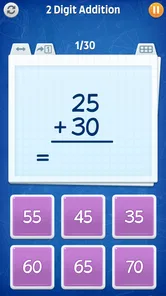
The first thing that struck me about Math Games: Math for Kids was how incredibly engaging it is. The app uses a variety of interactive games and challenges to teach mathematical concepts. We're not talking about boring flashcards here—these are games that actually make learning fun. From addition and subtraction to multiplication and division, kids can practise a focused set of arithmetic skills at their own pace. I found myself quite entertained, and I'm definitely not a kid!
Kid-Friendly Interface
One of the key strengths of this app is its user-friendly interface. It's bright, colorful, and intuitive, making it easy for kids to navigate. There's nothing worse than a complicated app that frustrates kids before they even start learning. With this app, children can dive right in and start playing without needing a tech tutorial. Just a few taps and they're off exploring numbers and arithmetic.
Adaptive Learning
Another impressive feature is the adaptive learning system, which tailors the difficulty level to the child's abilities. Whether your kid is a math whiz or someone who needs a bit more practice, the app adjusts to meet their needs. This personalization ensures that every child can progress without feeling overwhelmed or bored. It’s like having a personal tutor who knows just when to push and when to let them practice.
Incorporating rewards and achievements, the app motivates kids to keep learning. Kids earn points and badges as they complete levels, which adds a fun competitive element to their learning. These incentives are designed to encourage continuous practice, which is crucial for mastering math skills.
Parental Insights
As a parent, being able to track your child's progress is invaluable. The app provides detailed reports on what your child has learned and areas where they might need some extra help. It’s a great way to stay involved in their education and support them as they improve. Plus, it gives parents peace of mind knowing that their kids are not just playing games but actually learning valuable skills.
For a household deciding whether to keep it on a shared device, I’d weigh that progress view against the practical question of who is using the app. If more than one child plays, check that the reports make sense for your family’s routine and don’t assume they separate activity by child. An adult can make the feedback more useful by asking each learner to describe what they practised, then matching that answer with what they are doing in class. That helps prevent a broad progress summary from being mistaken for a complete picture of school readiness.
What the Game Can and Cannot Replace
Against flashcards, the game’s interactive format may be more appealing to a child who needs a little novelty to get started. Against a workbook, it can make a short practice break feel less like another assignment. But neither format automatically teaches the reasoning behind a wrong answer. If a child rushes through or repeats mistakes, I’d switch to a worked example, counters, or a conversation before continuing. The useful trade-off is motivation versus explanation: the game may help with the first, while a person often does the second better.
It is also worth keeping expectations modest about the word “adaptive.” A changing level of challenge can make practice feel better matched, but it is not the same as a teacher noticing a misconception and choosing a new explanation. I’d watch for signs of real understanding: can the child explain the answer, solve a similar problem on paper, or spot an error? If not, I’d treat the game’s progress as a reason to investigate, not as a final assessment.
A Sensible First Session
I’d introduce the game when there is time to sit nearby for the first few minutes, rather than handing over the tablet during a rushed moment. Let the child try the controls, notice which operation feels comfortable, and stop before the session becomes a negotiation. If the child enjoys it, a later turn can be more independent. If they become frustrated, ask whether the issue is the math, the pace, or the interface; that distinction points to a better next step than simply insisting they keep going.
Overall, Math Games: Math for Kids is more than just a game—it's an educational tool designed to make learning math an enjoyable journey. Whether your child is struggling with math or just looking to get ahead, this app offers a valuable resource that combines entertainment with education. It’s definitely worth checking out if you’re looking for a way to make math more appealing to your little learners.
My Household Verdict
I’d recommend it as a try-it-and-see option for families who want short arithmetic practice on a phone or tablet, especially when a child responds better to an interactive activity than to another page of sums. Its free price makes that first trial straightforward, and the Everyone rating offers a broad age context, though neither tells you whether the level suits a particular child. The game’s reach—over ten million installs—also suggests it is a familiar choice for many households, but personal fit matters more than popularity.
For a shared device, my best advice is to set a clear turn length, keep an adult within earshot at first, and use a quick spoken explanation to check whether practice is sticking. I’d skip it if your child needs a structured course, advanced topics, individual teaching, or a firm separation of each learner’s records that you have not checked on the device. Used with those boundaries, it can be a handy addition to a home learning routine, not a substitute for thoughtful support.
Math Games: Math for Kids Frequently Asked Questions
Does Math Games: Math for Kids make sense as a supplement to schoolwork?
It can be a useful way to add game-based practice to a child’s routine, especially when they are working on addition, subtraction, multiplication, or division. The activities are educational, but they are best viewed as practice rather than a replacement for lessons or help from a teacher. Parents can match the game’s arithmetic focus to what their child is currently learning.
Can parents use Math Games: Math for Kids with more than one child?
The game is designed for children to practice foundational arithmetic, so it may appeal to siblings who are working on similar skills. Each child’s comfort with numbers can differ, however, and the same activity may feel easy for one child but challenging for another. Parents can observe how each child responds and decide whether the available practice suits their needs.
Is Math Games: Math for Kids an educational game or a general entertainment app?
Math Games: Math for Kids is an educational game built around practicing arithmetic through games. Its focus is on addition, subtraction, multiplication, and division, rather than general-purpose entertainment. This makes it a potential option for families looking for a playful way to revisit math skills, while children who want other kinds of games may prefer a different app.
What math topics can children practice in Math Games: Math for Kids?
Math Games: Math for Kids focuses on addition, subtraction, multiplication, and division through games designed for learning. The variety of core operations can make it useful for children who want to practice different skills rather than concentrate on just one. Parents can consider whether these topics match what their child is learning and needs to reinforce.
Is Math Games: Math for Kids suitable for a child who is just beginning to learn math?
The game is intended for children and covers foundational arithmetic, including addition and subtraction, as well as multiplication and division. That makes it worth considering for a beginner, though the right fit depends on the child’s current skills and comfort with numbers. An adult can sit with the child at first to see whether the activities feel manageable and engaging.
Pros
- Enhances arithmetic skills effectively
- Engaging visuals for young learners
- Adaptive difficulty levels
- Wide variety of math challenges
- Promotes critical thinking
Cons
- Limited advanced math topics
- Ads can be distracting
- Requires internet for some features
- No multiplayer feature
- Limited language options













