Little Panda's Restaurant
- 1.04K
- 4.0
- Installs
- 100.00M
- Price
- Free

Screenshots






Analysis by Reviewed
I can see this working best as a short shared activity: a child can take a turn preparing a dish, then show a parent or sibling what they made. That makes Little Panda's Restaurant an easy choice for a quiet stretch at home, such as waiting for dinner to finish or filling a few minutes while an adult is nearby. I’d treat it as pretend play with gentle learning, rather than a substitute for cooking together in a real kitchen.
A useful pause in a busy day
One realistic use is the small gap before a meal: an adult is finishing dinner, another child is waiting, and there is time for one contained activity. I’d invite the child to make a dish and tell me what they did while I’m close by. That keeps the game connected to family life without asking it to occupy the whole evening. When the meal is ready, the conversation can shift back to the real food on the table.
It can also work during a quiet moment when a child wants to play independently but still enjoys showing someone the result. The actions give them something concrete to talk about: which ingredient they chose, what they did first, and what they would make next. I find that kind of sharing more useful than treating screen time as a simple reward or a way to keep a child busy without interaction.
Reads About Little Panda's Restaurant
For very short breaks, I would set a clear stopping point before handing over the device, such as finishing the current dish. That is a practical boundary rather than a game feature, and it helps avoid the familiar negotiation of “one more turn” when an adult needs the device back. If the child is likely to find stopping difficult, I’d choose an activity with a more obvious endpoint or stay involved to help them transition.
Cooking Up Fun and Learning
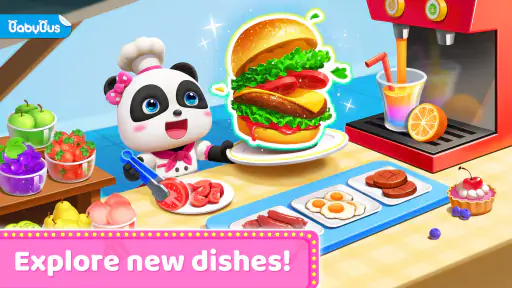
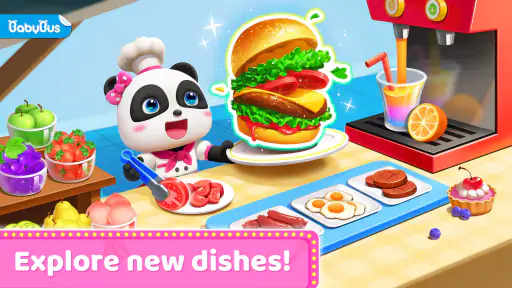
Upon firing up Little Panda's Restaurant, you're greeted with an array of colorful graphics that immediately capture the eye. The game sets you in a bustling restaurant where you, alongside the adorable panda, take on the role of a chef. The goal? To whip up exciting dishes for your animal customers who visit your restaurant. The app does a fantastic job of intertwining fun with learning, making it an ideal choice for young minds eager to explore the kitchen.
Interactive Gameplay
The gameplay is pretty straightforward yet incredibly engaging. Kids get to choose from a variety of ingredients and follow simple steps to create dishes. Each dish comes with its recipe, and I found it delightful how the app emphasizes the importance of following instructions, a skill that’s useful beyond the virtual kitchen. The interactive elements such as slicing vegetables or stirring soups keep the young chefs entertained and make them feel like they're truly part of the culinary world.
For a shared device, I’d keep turns simple: let one child choose and prepare a dish, then invite another to describe the steps or pick what to make next. It turns the recipe sequence into a small conversation about order and ingredients without turning play into a lesson. The trade-off is that children who want to build a long-running restaurant or compete for scores may find this gentler, recipe-focused loop too limited; it suits brief, self-contained play better than a deep management game.
More From Our News Desk

Android Auto Makes the Case for Quieter Car Software

MobiOffice: Transforming Mobile Productivity with Seamless Integration

EA SPORTS FC™ Mobile Soccer: Redefining Mobile Sports Gaming

How Microsoft OneDrive Became a Mobile Productivity Giant

How Google Translate Breaks Language Barriers Effortlessly

Why Google Sheets Is the Ultimate Mobile Productivity Tool
Making turns work on one device
A shared tablet or phone can make this kind of game a joint activity, but it also introduces the usual household question: whose turn is it? I’d agree on a simple rotation before opening the game, especially if siblings tend to want control of the same screen. One child can handle the ingredient choices while another watches and names the steps, then they can swap for the next dish. That makes waiting part of the activity instead of a dispute over who gets to tap.
I would not assume that a shared game automatically keeps each child’s activity separate. If one device is used by several people, treat the play as happening in a common space and avoid promising each child an individual record or account. A parent can make the arrangement clearer by saying that the game belongs to the household device and that turns are informal. This is a small point, but it prevents the disappointment that can come from expecting separate profiles or a personal restaurant for every sibling.
There is a useful trade-off here: a shared screen encourages conversation, while solo play gives a child more freedom to move at their own pace. If one child is much younger or slower with touch controls, taking turns by complete dish rather than by individual action may feel fairer. If the children have very different interests, they may not enjoy watching each other play for long; in that case, I’d keep sessions short rather than force the game into a group activity.
Adorable Graphics and Sounds
What really stood out to me were the adorable graphics and sound effects that accompany every move. The cheerful background music and the cute giggles of the panda make the experience enjoyable and lively. Plus, the vibrant colors used throughout the app are not only pleasing to the eye but also help in keeping children engaged for longer periods.
That lively presentation can be a plus during a short wait, but it may not suit every child or setting. If sound would be distracting in a shared room, I’d check the device’s audio before handing it over rather than assuming the game will be quiet. I also wouldn’t use the bright, animated style as a reason to leave a young child with a screen indefinitely; it works better as a bounded activity with an adult close enough to notice when the child is ready to stop.
Small practical checks before handing it over
On a device that adults also use, I’d first make sure the child is opening the intended game and knows where they are allowed to tap. A young player can easily treat every screen prompt as part of the activity, while an adult may be using the same device for messages or other tasks. Keeping the device in a familiar place and staying nearby is a simple way to avoid confusion without pretending the game has household controls it may not have.
Because optional purchases are part of the experience, I’d also make the purchase boundary clear in plain language: the child can play, but an adult handles any request involving spending. The game is free to start, with in-app purchases ranging from $1.99 to $4.99 per item. I would check the device’s purchase settings as well, particularly if it is shared, so a child cannot accidentally turn a moment of curiosity into an unexpected transaction.
Educational Value
Beyond just entertainment, Little Panda's Restaurant offers significant educational value. It introduces kids to different types of foods and cooking techniques, promoting creativity and curiosity. The app subtly encourages children to try new things and understand how different ingredients can come together to create something delicious. I also appreciate how it instills a sense of responsibility as kids manage their little restaurant, learning to satisfy their customers' needs.
I’d describe the learning as light and practical: following a sequence, noticing ingredients, and making choices, rather than formal teaching or a structured cooking course. That distinction matters if you’re choosing between this and a dedicated learning app. Little Panda’s approach is more playful and character-led; an app focused on letters, numbers, or step-by-step lessons would be a better fit when a specific skill is the priority. For a child who enjoys food-themed pretend play, though, the recipe actions give adults a natural opening to ask what comes first or which ingredient they recognize.
A small way to get more from a session is to let the child explain the sequence in their own words rather than correcting every move. I might ask, “What did you add first?” or “Which part would you show me?” That turns the game’s recipe structure into practice with describing and remembering, while leaving the child in charge of the pretend cooking. It works best as a light conversation, not a test; if the child would rather tap and play quietly, I’d let the activity stay playful.
How it compares with other children’s games
Compared with open-ended dress-up or virtual pet games, this one has a clearer task: choose ingredients and work through cooking actions. That structure can help a child who likes knowing what to do next, while still leaving room to make choices. Compared with a restaurant tycoon or time-management game, it is gentler and less focused on running a business, speed, or strategy. I’d pick it for pretend cooking, not for a child asking for a complex restaurant simulator.
It also sits somewhere different from a formal educational app. A lesson-oriented game is a better choice when a parent wants practice in a defined subject; this is more likely to appeal because of its panda character, food theme, and hands-on actions. The useful question is not whether it teaches more than a classroom-style app, but whether the child will enjoy returning to the simple cooking sequence. For many young children, that motivation is what makes a small learning moment possible.
Setting Expectations for a Household
Before making it a regular shared-device pick, I’d check the purchase settings on the device and agree on who may use it. The game is free, while optional in-app purchases are listed at $1.99 to $4.99 per item, so an adult should handle any purchase prompts and make the household rule clear. I wouldn’t assume that different children have separate progress or profiles; a shared device is simplest when everyone understands that they are taking turns on the same game.
The game is rated for everyone, and BabyBus is the developer. It has a 4.0 average from around 232,000 ratings, with over 100 million installs, which suggests broad reach but doesn’t tell me whether it will suit a particular child’s temperament. It was released on January 13, 2017, and version 8.72.00.00 requires Android 5.1 or later. Those details make it easier to judge device compatibility, but the best test is still whether the child enjoys the pace and can move on comfortably when playtime ends.
That age rating is a useful starting point, not a substitute for knowing the child. I’d sit with a first-time player long enough to see whether the controls feel comfortable and whether the sounds and pace are a good fit. Some children will happily explore the cooking steps on their own; others may want an adult to name ingredients or help them decide what to do next. Neither response is a problem, but it changes whether the game works as independent play or as a shared activity.
For a household with several children, I’d avoid using the game as a test of who is “better” at cooking or following directions. The simple actions make it inviting, but children develop touch control and patience at different speeds. Letting one child narrate and another tap can keep the activity cooperative. If that arrangement creates more arguing than fun, it is perfectly reasonable to offer the game one child at a time or choose a non-screen activity they can do together instead.
Parents may also wonder whether this is suitable for a child who is not yet reading confidently. The cooking actions are presented in an accessible, visual style, so a child can explore with support; I would still be close by if they need help interpreting a prompt or navigating the device. For an older child who wants detailed instructions, realistic cooking knowledge, or a longer challenge, the simplicity that helps younger players may feel repetitive. Matching expectations to the child’s interest matters more than the broad age label.
If a child asks whether it needs a parent to explain every step, I’d expect the simple cooking sequence to make it approachable, while a younger player may still enjoy having someone nearby to name ingredients or take turns. If you’re wondering whether it is a good fit for a quick distraction, that’s where I’d use it; for quiet reading, a low-stimulation activity, or a game built around substantial strategy, I’d choose something else. Its free entry lowers the barrier to trying it, but the optional purchases are a reason to set expectations before handing over a device.
For device compatibility, the current version is 8.72.00.00 and the minimum Android requirement is 5.1. I’d check that before choosing an older household phone or tablet, since a game that cannot run on the device is not a useful option no matter how well its style suits the child. For an iOS household, I’d check the relevant device requirements before installing rather than assuming the Android requirement applies there.
My best-fit child is someone who likes animals, food pretend play, and short sequences of tapping through a task. I’d skip it for a child who is looking for competitive scoring, deeper management, a quiet screen experience, or an activity that teaches a specific academic skill. It can be a pleasant bridge between independent play and parent-child conversation, but it is not meant to replace hands-on cooking, shared reading, or more structured learning when those are what the moment calls for.
In conclusion, Little Panda's Restaurant is more than just a game. It's a delightful mix of education and entertainment, making it a fantastic app for young children. Whether your child is a budding chef or just loves playful animations, this app is sure to provide hours of fun while subtly teaching them valuable skills. So, if you're on the lookout for a child-friendly app that combines fun with learning, this one's definitely worth a download!
A practical household verdict
I’d consider it a good shared-device option when an adult can set expectations, keep purchase decisions in adult hands, and help children take turns without promising separate accounts or progress. Its strongest use is a short, cheerful cooking activity that gives a child something to do and something to talk about afterward. If that is what you need, it is worth trying; if you want a quiet, highly educational, or strategically demanding game, I’d look elsewhere.
Little Panda's Restaurant Frequently Asked Questions
What does a child do in Little Panda's Restaurant?
Little Panda's Restaurant is built around the idea of being a chef and running a restaurant. Children can explore that role through cooking-themed play, which gives the game a clear focus for families looking for an activity centered on food and pretend restaurant work. Its educational category may also appeal to parents seeking playful learning experiences.
Who developed Little Panda's Restaurant?
BabyBus developed Little Panda's Restaurant, a name families may recognize when browsing for games aimed at young children. The game combines a restaurant theme with an educational focus, so it may suit children who enjoy imaginative play and cooking activities. Knowing who made it can help parents compare it with other children’s games before choosing a download.
Does Little Panda's Restaurant cost anything to download?
Little Panda's Restaurant is free to download, so families can try the game without paying upfront. It also offers optional in-app purchases, which means some extras may cost money. If a child will be using the device, parents can review purchase controls in the device settings and decide whether to require approval before any purchase is made.
Can I play Little Panda's Restaurant on my device?
Little Panda's Restaurant is available for Android devices running Android 5.1 or later. Before downloading, check the operating system version on your device to make sure it meets that requirement. The game is listed for iOS as well, so iPhone and iPad users can look for it in the App Store and check compatibility with their particular device.
What is Little Panda's Restaurant about?
Little Panda's Restaurant is an engaging educational game designed for children. It allows kids to step into the shoes of a chef, managing their own restaurant. The game encourages creativity and teaches children about different cuisines and cooking techniques in a playful environment, making it both entertaining and educational.
Pros
- Engaging for children with colorful graphics.
- Promotes creativity and imagination.
- Easy to navigate for young users.
- Educational content through fun activities.
- Regular updates with new features.
Cons
- In-app purchases can be frequent.
- Advertisements may interrupt gameplay.
- Limited content in the free version.
- Requires internet for full functionality.
- Might not appeal to older kids.
- Category
- Educational
- Version
- 8.72.00.00