Toca Boca Jr
- 62.12K
- 3.7
- Installs
- 100.00M
- Price
- Free

Screenshots
Analysis by Reviewed
When two children share a tablet, choosing a game is only half the job; the other half is making sure each child can enjoy it without turning screen time into a negotiation. I find Toca Boca Jr most useful as a flexible play option for young children, especially when an adult is nearby to help them take turns and decide when to stop. It is an educational game from Play Piknik, aimed at children aged two to six, and its open-ended activities suit short bursts of curiosity better than a long, structured lesson.
How it fits into a shared-device routine
Picture a rainy afternoon when one child wants to explore and a sibling is waiting for a turn. The game can give the first child room to tap around, while the adult sets a simple boundary outside the app: one activity or a short turn, then pass the device along. That arrangement works better than expecting the game itself to manage sharing. I would also agree on who is holding the tablet and where it stays, so a young child does not carry it off mid-turn or accidentally interrupt another household task.
For a smoother handoff, I’d keep the device in a shared room and sit with the children for the first few sessions. One child can describe what they are doing while the other watches, then swap. This turns waiting into a small part of the play rather than a dispute over whose turn it is. It is a practical approach for siblings or visiting cousins, but it depends on adult coordination; I would not assume the app provides separate child profiles, turn-taking tools, or household controls.
What to check before handing over the tablet
The game is free to install, but it includes in-app purchases priced from $7.99 to $99.99 per item. That is the detail I would check before a child starts exploring on a shared device. An adult should review the device’s purchase settings and decide whether purchases require approval; a child-facing design does not remove the need to set those boundaries. If several adults supervise the same tablet, it helps to agree on who handles purchase decisions rather than leaving that unclear during play.
It also helps to treat the device as a family screen, not as a personal account space for every child. I would open the game together, see how the child responds, and explain that an adult will help with any purchase prompts or settings. The current version is 3.4, and the game requires OS 9 or later. Those details matter when an older family tablet is being passed down: check compatibility before planning an activity around it.
A small routine that makes turns easier
For households where the tablet moves between a parent, a preschooler, and an older sibling, I’d make the handoff predictable rather than negotiating it from scratch each time. A simple spoken cue—“finish what you’re doing, then it’s your sibling’s turn”—can help a child understand that stopping is part of the routine. I would avoid promising a particular activity to the next child before checking whether they can comfortably wait; a shared device works best when the adult, not the game, sets the rhythm.
It can also help to let the waiting child choose a role that does not require holding the screen. They might suggest what the player should try next, or simply watch and tell a story about what is happening. This works only if both children enjoy participating that way; some will prefer a quiet wait. The useful point is to treat shared play as a social situation that needs gentle facilitation, not as a feature the app will automatically organize.
More From Our News Desk

Weather by Xiaomi Review: Clear at a Glance, Less Clear Up Close

X Under Pressure: Can It Recover When Posting Goes Wrong?

Clash of Clans Is Won Between the Battles

Android Auto Makes the Case for Quieter Car Software

MobiOffice: Transforming Mobile Productivity with Seamless Integration

EA SPORTS FC™ Mobile Soccer: Redefining Mobile Sports Gaming
Why the adult’s device setup matters
Before the first session, I’d check the device’s purchase approval settings and make sure the adults who use it know who is responsible for approving purchases. That is especially worthwhile when a tablet is shared between households or regularly borrowed by a child. A child may tap around with no intention of buying anything, but purchase safeguards belong at the device level and should be in place before play begins.
I would also decide whether the tablet is staying in a common area and whether the child may use it without an adult nearby. Those are household choices rather than promises about what the game can enforce. If the child is still learning how to handle a device carefully, a short first session beside an adult is a better test than handing it over during a rushed moment and hoping everything goes smoothly.
The World of Toca Boca Jr
Toca Boca Jr is like a magical playground that fits in your pocket. Designed specifically for the little ones, this app is a gateway to creativity and exploration. From the moment I opened it, I could see why kids are so captivated. The vibrant colors and friendly characters make it feel like a safe and inviting place for children to play.
Interactive Play
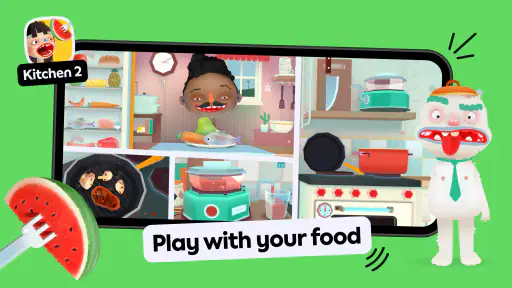
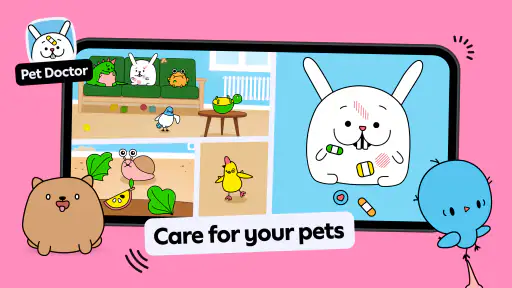
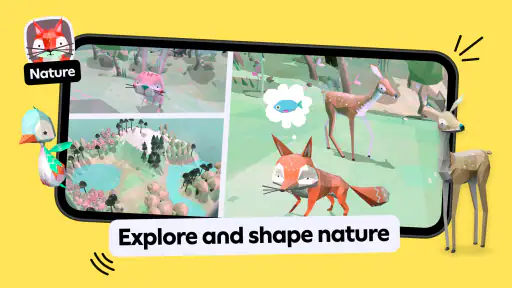
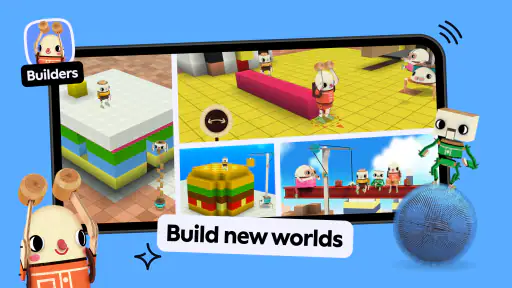
One of the coolest things about Toca Boca Jr is its interactive nature. Kids can tap, swipe, and drag their way through different activities. It’s like having a thousand toys all packed into one app! Whether it's playing dress-up, cooking in a virtual kitchen, or taking care of adorable animals, there’s something for every child’s imagination.
I personally love how the app encourages kids to be creative. It’s not about winning or losing; it’s about exploring and having fun. And let’s be honest, sometimes adults like me need a reminder that play is important too!
Kid-Friendly Design
The developers at Toca Boca really know their audience. The app is super intuitive, so even the youngest users can navigate it without getting frustrated. There are no tricky menus or complicated instructions. Just pure, simple fun. Plus, it’s completely free from ads and in-app purchases, which means kids can play safely without any interruptions.
For a preschooler, the lack of a demanding score or lesson sequence can be a strength: a child can move between pretend-play ideas without feeling tested. It also means parents looking for clear progress markers, reading practice, or a guided curriculum should choose a more structured educational game. Here, I’d use the play as a prompt for conversation instead: ask what the child is making, who is caring for whom, or what might happen next. That kind of adult participation gives the activity more shared value without turning it into a quiz.
Educational Value
While it’s primarily designed for entertainment, Toca Boca Jr also has some educational benefits. Through play, children can learn about different roles and responsibilities, like cooking or caring for a pet. It’s a great way to introduce them to new concepts in a fun and engaging way. And as someone who values education, this aspect of the app is a big win in my book.
For families comparing it with the usual alternatives, I see it as closer to a digital pretend-play box than a phonics or number-practice app. That makes it a better fit for a child who enjoys inventing little scenarios than for one who wants clear tasks and visible achievement. If your goal is calm, independent play, test it while you are close by before relying on it during a busy moment; some children will settle into imaginative play, while others may need an adult to help them choose what to do.
It’s fascinating to watch kids use their imagination, and with Toca Boca Jr, they can do just that. The app provides a safe space for them to express themselves creatively, which is essential for their development.
Making open-ended play work for different children
Children in the same age range can want very different things from a game. One may be happy to repeat a familiar pretend-play idea, while another wants to move on quickly and explore. I’d let each child set the pace during their own turn rather than treating every activity as something that needs to be completed. That keeps the experience low-pressure, but it also means an adult may need to help a child who gets stuck choosing what to do.
A useful way to join in without taking over is to narrate what the child is already doing and then leave room for them to respond. For example, if they are playing at cooking, I might ask what they are preparing rather than suggest a goal or correct their choices. This can make the screen time more conversational, though it will not suit every moment: if an adult needs to get work done, a game that expects nearby participation may be less convenient than a more self-directed activity.
Choosing it over a more structured learning game
The usual alternative in educational games is a clearer sequence of tasks: practice a skill, receive feedback, and move toward the next challenge. That can be a better choice when a family specifically wants support with early literacy or number recognition. This game’s value is different. I would choose it when a child wants to make up a scenario and explore at their own pace, not when I need the app to teach a measurable skill or report a lesson’s progress.
That distinction also matters when a child asks to play “an educational game.” The label does not mean every session will resemble a lesson. I would describe this one to a child as imaginative play on a screen, then use conversation to connect the pretend activity to everyday ideas. If the child is frustrated by a lack of instructions or wants the app to tell them whether an answer is right, a more guided learning game is likely to be a better match.
Final Thoughts
Overall, Toca Boca Jr is a fantastic app for young kids. It’s entertaining, educational, and most importantly, it’s designed with children’s safety in mind. As someone who’s seen firsthand the joy it brings to kids, I can confidently say that it’s worth downloading. If you’re looking for an app that will keep your little ones entertained while also nurturing their creativity, it’s definitely worth a try.
Its reach is substantial, with over 100 million installs, and its average rating is 3.7 from around 1.7 million ratings, alongside roughly 62,000 written reviews. I take that as a reason to consider it, not a guarantee that every child will enjoy it. It is free to start, rated for Everyone, and was released on May 25, 2015; the purchase range is worth keeping in mind for a family device. I would recommend it most to households with preschoolers who enjoy make-believe and can share adult-supervised screen time. I would skip it if you need a structured learning plan, strict built-in household boundaries, or a game that keeps siblings organized without help.
One practical question is whether it can occupy a child while an adult is busy. My answer is: sometimes, but I would not make that the main reason to install it. A child who already enjoys pretend play may settle into an activity, while another may quickly want help or company. Try it first when you can pay attention, then judge whether it fits your child’s temperament before counting on it during a call, meal preparation, or another task that needs focus.
Another consideration is how it will feel on an older family tablet. Since the game needs OS 9 or later, the operating system is the first compatibility check I’d make before planning a shared activity. If the device meets that requirement, I would still test the game myself before giving it to a child: this lets me confirm the tablet responds comfortably to taps and swipes and establish the household’s purchase boundaries in advance.
I would also think about what “safe” means for my own household instead of assuming that a child-friendly look settles every concern. The Everyone age rating and preschool focus make the intended audience clear, but they do not replace adult supervision or device-level purchase decisions. If your household needs separate accounts, enforced turn limits, or controls that prevent one child from changing another’s experience, choose a setup or app that explicitly provides those tools rather than relying on this game to do it.
So, the next time you need a break or want to give your kids a fun and educational experience, consider opening up Toca Boca Jr. You won’t be disappointed, and more importantly, neither will they!
Toca Boca Jr Frequently Asked Questions
Will Toca Boca Jr work on my child’s device?
Before downloading, check that your device meets the app’s operating-system requirements. Toca Boca Jr supports Android 9 or later, so older Android versions may not be compatible. It is available on Android and iOS, and the store describes it as a game for young children to create, explore, and play. Checking compatibility first can help avoid a failed installation.
What does a child do while playing Toca Boca Jr?
Toca Boca Jr is an educational game centered on creating, exploring, and playing through Toca Boca games. Rather than presenting its activities as a lesson to complete, it gives young children room to engage with play at their own pace. That open-ended style may suit families looking for a playful app for preschoolers, with an adult nearby to help decide which activities are right for the child.
Is Toca Boca Jr free to download, and what might require payment?
Toca Boca Jr is free to download, but in-app purchases are available for families who want access to paid content. The purchase options range from $7.99 to $99.99 per item, so it is worth checking the purchase details before letting a child play. Parents can also review device or store purchase controls to help prevent accidental spending.
What is Toca Boca Jr and what age group is it suitable for?
Toca Boca Jr is a mobile application designed specifically for young children, offering a variety of engaging games and activities that stimulate creativity and learning. Its store description highlights children aged 2 to 6 as its intended audience. The app provides a child-focused space for creating, exploring, and playing through Toca Boca games, making it especially suited to preschoolers.
Does Toca Boca Jr require an internet connection to play?
No, Toca Boca Jr does not require an internet connection for its core activities and games. This makes it an excellent choice for parents who want their children to enjoy educational content on the go, such as during travel or in areas with limited internet access. However, some updates or additional content might require an internet connection.
Pros
- Engaging educational content.
- Safe environment for kids.
- Intuitive user interface.
- Regular updates with new content.
- Encourages creativity and exploration.
Cons
- In-app purchases required for full content.
- May be too simplistic for older kids.
- Requires internet for some features.
- Limited parental controls.
- Can be repetitive over time.
- Category
- Educational
- Version
- 3.4