LEGO® Bluey
- 163.00
- 4.5
- Installs
- 5.00M
- Price
- Free

Screenshots
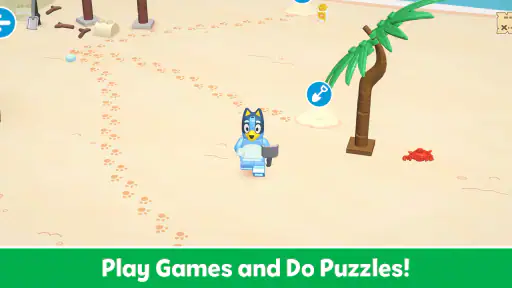
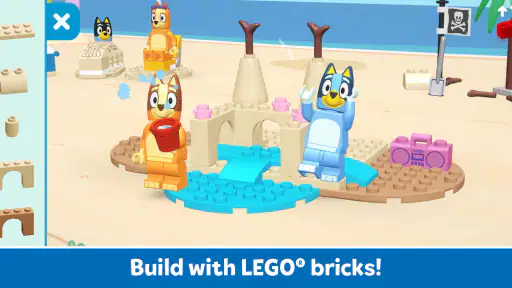

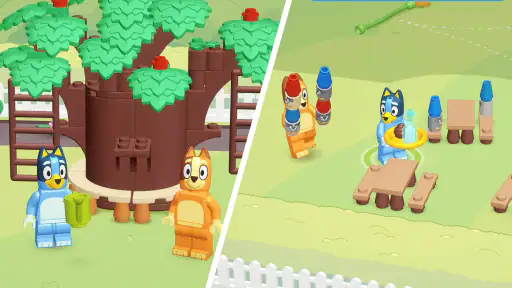
Analysis by Reviewed
The first thing I’d keep in mind about LEGO® Bluey is that it is meant to make play with familiar characters the point, not to turn a child into a serious LEGO builder. It’s an educational game from StoryToys, aimed at young players and rated for Everyone. If your child enjoys Bluey and likes making things, that combination is an appealing place to start; if they want a demanding building challenge or a broad sandbox, this may feel simpler than they expect.
Choosing the right moment to try it
I’d start with a short, shared session rather than treating the game as an instant babysitter. For example, it could fit while dinner is being prepared or during a wait when you have the phone or tablet with you. Sit nearby, let the child choose where to begin, and watch whether the familiar characters lead to active curiosity. That first visit gives you a better sense of fit than leaving a young player alone with a new interface.
It is also a reasonable choice for families who want a character-led game but do not want to buy physical bricks just to explore the theme. The trade-off is that digital play is still tied to the device, and the experience is not a substitute for the open-ended handling and rebuilding that real bricks offer. If the child’s main pleasure is sorting pieces, inventing structures, and changing them by hand, keep physical LEGO as the main activity and consider this game only as an occasional change of pace.
What to expect from a Bluey-and-LEGO game
The game brings Bluey and friends into a playful LEGO setting, giving children a recognizable theme to explore. That familiarity matters for a first-time player: a child who already knows the characters may be more willing to tap around, try an activity, and work out what the game is asking. I’d treat it as guided play and a bit of creative entertainment rather than a formal lesson or a replacement for hands-on bricks.
On Google Play, LEGO Bluey has an average rating of 4.5 from around 15,000 ratings, and it has passed 5 million installs. Those figures suggest that the character-and-building mix has found a substantial audience, though they cannot tell you whether it suits your particular child. The game is free to install, with in-app purchases listed from $4.99 to $39.99 per item, so I’d make the purchase situation clear to a child before handing over the device.
The practical appeal is easy to picture: a child can spend a short stretch of downtime engaging with a familiar world without needing a grown-up to explain the appeal of Bluey first. I would still sit alongside a first-time player. Young children can be confident tapping through screens but less sure what an activity expects, and a little guidance at the beginning can turn aimless exploration into a satisfying first result.
Make the first session easy
Before opening the game, check that the device meets its minimum operating-system requirement of Android 9, and leave enough time for any initial installation steps to finish. That is a small but useful bit of preparation: a child is more likely to enjoy the first session if they are not waiting while an adult sorts out the device or account. The current version is 7.1.0, so the experience may evolve over time, but I would avoid promising a child a particular activity before seeing what is available on the installed version.
More From Our News Desk

Weather by Xiaomi Review: Clear at a Glance, Less Clear Up Close

X Under Pressure: Can It Recover When Posting Goes Wrong?

Clash of Clans Is Won Between the Battles

Android Auto Makes the Case for Quieter Car Software

MobiOffice: Transforming Mobile Productivity with Seamless Integration

EA SPORTS FC™ Mobile Soccer: Redefining Mobile Sports Gaming
For the first launch, I’d choose a moment when you can share the screen rather than presenting it as a completely independent activity. Let the child look around, then invite them to choose what seems interesting. This keeps the opening low-pressure. If they hesitate, point out the LEGO setting and familiar characters, but resist tapping through everything for them; the small act of choosing is part of the play.
A useful routine is to agree on a simple aim before starting: “Let’s find one thing to make or play with.” That gives the session a gentle endpoint without turning it into a lesson. It also helps a parent judge whether the game is holding the child’s attention, instead of relying on a long stretch of screen time to decide.
Getting to a first satisfying moment
For a first meaningful success, I’d guide the child toward one activity that lets them interact with the LEGO world, then give them time to try it themselves. The goal is not to finish everything or understand every control. It is for the child to make a choice, see what happens, and feel that their input mattered. That is a better test of whether this game fits than simply watching an opening screen together.
If the child taps something unexpected, treat it as exploration rather than a mistake. Ask what they think the screen is inviting them to do, and offer one hint at a time. This is especially helpful when the child is younger or not used to touch-screen games: several instructions at once can make a playful activity feel like a test. Once they understand the basic rhythm, step back and let them repeat or change their choice.
One trade-off worth noticing is that screen-based building and physical LEGO play satisfy different impulses. A digital activity can be convenient when bricks are not available or the table is already occupied, but it cannot offer the same tactile experience as sorting, connecting, and rebuilding real pieces. I’d use the game as a companion to imaginative play, not as proof that a child is learning construction skills in the same way they would with physical bricks.
Where first-time players may get stuck
The most common source of confusion is likely to be expectation: the word “LEGO” can make adults picture a large, open-ended building toolkit, while the Bluey theme may lead children to expect an episode-like story. I would approach it as a themed children’s game, not assume it behaves exactly like a general LEGO building app or an interactive television episode. That framing helps avoid disappointment if the available play is more directed than a child’s imagination.
Another point to handle early is spending. The app is free to download, but it includes optional in-app purchases, and the listed item range runs from $4.99 to $39.99. Before a child plays alone, I’d check the device’s purchase controls and explain that seeing something offered does not mean they should buy it. That simple conversation is more useful than waiting for a surprise request at checkout.
If an activity does not make sense, pause and look at the screen together rather than repeatedly tapping. Children often learn a touch interface by watching what changes after a single action. A parent can model that approach—tap once, wait, and observe—then let the child take over. This also makes it easier to tell the difference between a genuine misunderstanding and a moment when the child simply wants to explore another part of the game.
It is also fair to set a modest expectation for the educational side. The game belongs to the educational category, but I would not choose it as a structured teaching tool with a specific academic outcome in mind. Its stronger case is playful engagement around Bluey and LEGO. If your priority is explicit lessons, reading practice, or a clearly sequenced curriculum, a dedicated learning app is a better match.
Who is likely to enjoy it—and who may prefer something else
I’d consider it for a child who already likes Bluey, responds well to familiar characters, and enjoys trying simple digital play. It may also suit a family looking for a short activity during a quiet moment at home or while waiting somewhere, provided an adult is comfortable managing the device and purchase settings. The Everyone age rating makes it broadly suitable in content terms, but it does not remove the need for a parent to decide whether the controls and spending options are right for a particular child.
By contrast, a child who wants open-ended construction with many tools may be happier with physical LEGO or a more expansive building game. A Bluey fan who mainly wants to watch a story may prefer a show, while a parent looking for measurable lesson progression should choose an app designed around that goal. These alternatives are not shortcomings of this game so much as different answers to different needs.
Compared with general-purpose building games, the character connection is the distinctive draw: it gives a young fan an immediate reason to approach the activity. Compared with other children’s educational games, the LEGO-and-Bluey identity is more central than a promise of a particular subject lesson. That makes it a specific choice rather than a universal one. I’d install it because the child is interested in this world, not simply because it is labeled educational.
A sensible next step after the first session
Once the child has found an activity they enjoy, let them show you what they discovered. Asking them to explain their choice or recreate the idea with toys nearby can extend the play without keeping them on the device. This is a practical way to connect digital make-believe with offline imagination, while also revealing whether the game is genuinely sparking interest or just holding attention through novelty.
If the first session goes well, keep the next one child-led: invite them back to the part they liked, then see whether they want to try something different. If they lose interest quickly, there is no need to push. A familiar character can get a child through the door, but it cannot make every style of game a fit. I’d also review purchase settings before allowing unsupervised use, especially if the device is shared with other family members.
StoryToys has made a focused proposition here: Bluey gives the game a warm, familiar entry point, while LEGO supplies the building theme. My recommendation is strongest for young Bluey fans who enjoy guided digital play and for adults willing to help with the first few minutes. It is less convincing for children seeking a deep construction sandbox or parents expecting a structured course. If you start with one shared session, agree on a simple goal, and keep purchases in view, you can quickly tell whether this particular mix earns a place in your family’s play rotation.
Deciding whether it earns a return visit
After the first try, I’d judge the game by what the child does rather than how long they stay on it. Do they make choices without needing every step explained? Do they want to show you something or return to a particular activity? Those are useful signs that the mix is engaging them. If they only keep tapping because the screen is available, that is a good reason to switch to another activity instead of extending the session.
The game is free to install, which makes trying it a relatively easy decision, but the purchase range is worth considering before a child gets attached to anything that may be offered inside. I’d decide in advance whether purchases are off-limits or require an adult, then keep that boundary consistent. That avoids turning a pleasant Bluey-themed play break into a negotiation about spending.
For a family choosing among children’s apps, I’d put this ahead of a generic puzzle or lesson game when the child’s interest in Bluey is the main hook. I’d put a focused literacy or numeracy app ahead of it when a parent has a specific learning goal, and a physical building set ahead of it when the child wants hands-on construction. The best reason to try it is its particular combination of familiar characters and digital LEGO play—not an expectation that it will do every job a children’s app might do.
LEGO® Bluey Frequently Asked Questions
What is LEGO® Bluey, and what can you do in the app?
LEGO® Bluey is a family-friendly digital experience inspired by the LEGO Bluey building sets and the animated series. Depending on the version available in your region, it may offer interactive play, building ideas, character-themed activities, or information about physical LEGO sets rather than a full standalone game. Check the app’s store listing and screenshots before downloading so you know which features are currently included.
Is LEGO® Bluey suitable for young children?
The Bluey theme and LEGO-style activities are designed to appeal to children, but suitability depends on the app’s actual content, controls, and any links or purchase options it includes. A parent or caregiver should review the store age rating and privacy details, then try the app with the child. For younger users, supervise device use and make sure in-app purchases are protected by parental controls.
Is LEGO® Bluey free to download, and does it include in-app purchases?
The cost and purchase options can vary by platform, country, and app version. Some LEGO experiences are free to install but may promote physical sets or include optional paid content, while others have no in-app purchases. Before downloading, check the current Google Play or Apple App Store listing for the price, in-app purchase disclosures, and any subscription information; these details can change over time.
Does LEGO® Bluey require an internet connection?
Some parts of an app may work offline after installation, while features such as downloading content, viewing product information, or opening external links may need an internet connection. The exact requirements depend on the version and device. If you plan to use it while travelling or away from Wi-Fi, check the app listing and test its main activities beforehand rather than assuming every feature will be available offline.
Which devices support LEGO® Bluey, and how can I download it safely?
Availability and compatibility may differ between Android and iOS, as well as by country and operating-system version. Use the official Google Play Store or Apple App Store listing to confirm that your device is supported and that the publisher is the expected LEGO-related provider. Avoid unofficial download sites, review the requested permissions, and check recent reviews for reports of crashes or other issues before installing.
Pros
- Familiar Bluey characters make the LEGO play experience appealing to fans.
- Brick-building activities offer a hands-on element alongside digital play.
- Suitable for enjoying short play sessions with young children.
- Encourages imaginative play by letting children explore Bluey-themed scenarios.
- A colourful
- child-friendly presentation makes the app easy to approach.
Cons
- Appeal may be limited for children who are unfamiliar with Bluey.
- Some activities may feel repetitive after repeated play.
- Young children may need adult help to navigate or build.
- Digital building may not offer the same tactile experience as physical LEGO bricks.
- Compatibility and performance can vary across devices.
- Category
- Educational
- Version
- 7.1.0













