Zocdoc - Find and book doctors
- 7.33K
- 4.8
- Installs
- 1.00M
- Price
- Free

Screenshots

Analysis by Reviewed
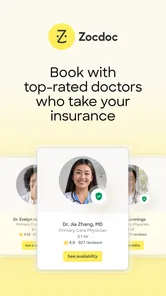
When I choose a doctor-finding app, I care about more than a long directory. I want to narrow the search by insurance and specialty, judge whether a provider looks suitable, and book without turning a spare moment into a series of phone calls. That is the practical problem Zocdoc is built to solve, and it works best when you already know what kind of care you need but want help finding an appointment that fits your life.
Start with the details that matter
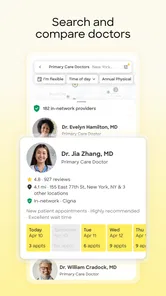
I would begin by checking the insurance and specialty filters before comparing profiles. Those choices can save time, but I’d still verify that the plan and appointment details match my needs before committing. A useful approach is to search with a clear specialty first, then compare a few providers rather than choosing the earliest opening automatically. An available time is convenient; it is not, by itself, a measure of fit.
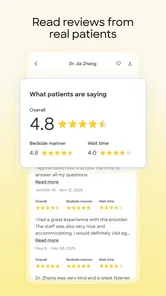
Reviews can add helpful context, especially when I’m unfamiliar with local doctors, but I treat them as one perspective rather than a verdict. I look for details that relate to my own priorities and consider the profile as a whole. If I’m choosing care for a specific concern, I’d also make sure the provider’s specialty suits that concern instead of relying on a general impression from ratings.
Finding Doctors Made Easy
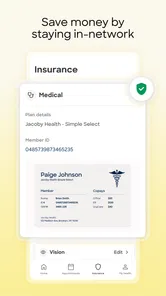
With Zocdoc, you can kiss goodbye to the old-school method of flipping through directories or waiting on hold with a receptionist. The app offers a user-friendly interface where you can search for doctors based on your insurance plan, specialty, or location. It's like having a personal healthcare assistant right in your pocket! You simply enter your criteria, and voilà – a list of available doctors pops up with their ratings and reviews. It’s incredibly empowering to have all this information at your fingertips.
Booking Appointments in a Snap
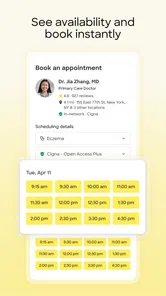
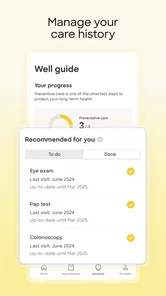
One of the standout features of Zocdoc is how seamlessly you can book appointments. Once you find a doctor that fits your needs, you can see their real-time availability and snag a slot that works for you. No more back-and-forth phone calls or waiting weeks to see a specialist. Plus, you get reminders about your upcoming appointments, which is a lifesaver for those of us who are a bit forgetful!
What I Love About It
Honestly, what’s not to love? The convenience of being able to book an appointment anytime, anywhere is unbeatable. The app is not only easy to navigate but also provides detailed profiles of doctors, including their education and specialties. The patient reviews are a real bonus, offering insights that help you make informed decisions. And let’s not forget the peace of mind knowing that you’re choosing a doctor who is compatible with your insurance.
A Few Quirks
As much as I adore Zocdoc, it’s not without its quirks. Sometimes, the availability isn't updated as frequently as one might hope, leading to rare instances where an appointment slot might already be taken. It’s a minor hiccup in an otherwise smooth experience, but definitely something to keep in mind. Also, while the app covers a wide range of specialties, there are still some areas where more options could be beneficial.
More From Our News Desk

 Block Blast!
 Makes Every Clear Feel Like One More Turn
A clean little block puzzle becomes a study in space, risk, and self-control. Its best moments come from one satisfying clear; its toughest test is knowing when to stop.

 Super Stylist Fashion Makeover
Super Stylist Turns Dress-Up into a Runway Career
Its makeover-to-client loop turns quick outfit decisions into shareable style theater. The question is whether the closet keeps giving players a reason to return.

 Block Craft 3D:Building Game
Block Craft 3D Under Pressure: How Well Does It Recover When Building Goes Wrong?
A failure-focused look at Block Craft 3D’s forgiving building loop, its uncertain recovery edges, and the moments that demand more than a cheerful village.

 Woodturning
 Trades Creative Freedom for a Satisfying Carving Loop
If your usual creative game is about building, decorating, or styling, Woodturning trades open-ended projects for a tactile, tightly guided carving loop. Here is what that switch really costs.

 PUBG MOBILE
 Shows What Battle Royale Must Get Right
PUBG MOBILE shows how battle royale has matured: bigger systems matter less than meaningful choices, readable fights, and a reason to return after every loss.

 Braindom: Brain Games Test
Braindom’s Social Life Happens Between Puzzles
Braindom turns quick logic traps into a personal ritual, but its community value is more about comparing answers than building together.
Latest News



When another route is better
For a routine appointment when I can be flexible about the time, browsing openings in Zocdoc is often more convenient than calling several offices one by one. If I already have a doctor I trust, though, contacting that office directly may be simpler, especially for follow-up care or a question about an existing appointment. A health plan’s own directory can also be useful when I want to cross-check coverage, while a general web search may help me discover practices that are not represented in the app. I see these options as complements, not reasons to expect one directory to show every suitable provider.
A realistic example: if I move to a new neighborhood and need a non-urgent appointment, I can search by specialty and insurance, compare a few profiles, then look for an opening that fits around work. Before booking, I’d confirm the appointment type and coverage with the practice if either is unclear. That small check matters because a convenient listing cannot replace direct confirmation for details that affect my visit.
Make the booking work for you
One useful habit is to keep the search criteria focused at first. If I apply too many preferences immediately, I may narrow the results before I understand what is available nearby. I’d start with the essentials, review the options, and then refine the search based on what actually matters—such as location or timing. When availability looks promising, I’d book promptly but keep an eye out for confirmation; the app’s appointment information is a starting point, not a reason to skip checking the details.
Zocdoc is a free medical app from Zocdoc, Inc., and its long-running presence is reflected in an average rating of 4.8 from around 38,000 ratings, with over a million installs. It is rated for Everyone, and version 3.217.0 supports devices running iOS 8.0 or later. Those figures help set expectations about its established audience, but the practical question is whether local providers and appointment choices suit your situation. Coverage and availability can vary, so I would not assume that a useful result in one search guarantees the same range for another specialty or location.
Who should use it—and who may not need it
I’d recommend it to people comparing unfamiliar providers, newcomers trying to establish care, and anyone whose schedule makes calling during office hours difficult. It is especially handy when the insurance filter and appointment timing are both important. I’d be less likely to rely on it as my only route if I need urgent attention, have a complex referral question, or already know which office I want to contact. For urgent symptoms, I would use appropriate immediate-care services rather than treating an appointment-booking app as a triage tool.
Switching to Zocdoc does not require replacing every way you manage care. I can use it to discover and book a new provider while keeping direct contact with an existing practice for ongoing treatment. That split approach is sensible: the app helps with discovery, while the office remains the better source for visit-specific instructions and follow-up arrangements. It also avoids assuming that every part of a patient’s care can be handled through one booking interface.
How I’d compare the options
For me, the useful comparison is not simply one app against another; it is app-based search against the different ways people already find care. A health-plan directory puts coverage checking first, which can be reassuring when insurance rules are the main concern. A local search engine can reveal practices beyond any single booking service, but it may leave me to piece together provider details and appointment availability myself. Calling an office takes more effort, yet it is often the clearest choice for a specific question about referrals, visit preparation, or an established treatment plan.
Zocdoc sits between those approaches. It can make the initial shortlist and booking step less laborious, while still leaving room for a call or a plan-directory check when the details matter. I would not treat the app’s search results as a complete map of local care, and I would not assume every profile or opening is equally relevant to my circumstances. Its advantage is most noticeable when I have a defined, non-urgent need and want a practical way to compare options without contacting each practice just to learn whether it has a suitable opening.
Small checks that prevent booking hassles
Before I choose a time, I’d read the appointment description carefully rather than judging the result by the provider’s name alone. A practice may offer different kinds of visits, and selecting the wrong appointment type can create avoidable confusion. I’d also check that the location shown is the one I can reach and that the provider’s specialty lines up with the reason for the visit. These are quick checks, but they make the difference between finding an opening and finding an appointment that actually works.
If I am comparing two promising profiles, I would write down the practical points that matter to me—such as travel, timing, and the information in each profile—before letting review scores decide. Reviews are more useful when I look for relevant specifics than when I treat a single high or low opinion as proof. A pattern may help me form questions, but it cannot tell me exactly how my own visit will go. That is why I see ratings as a screening aid, not a substitute for checking credentials and fit.
Who benefits most from a searchable booking flow
The app is particularly useful when I’m choosing a provider in an unfamiliar area or trying to fit a routine visit around a busy day. Someone comfortable making a short list and checking details independently can get real value from browsing several options in one place. It may also help a person who prefers to compare before speaking with a practice, rather than making calls without knowing which offices seem promising.
On the other hand, I would not make it my first stop for a medical emergency, advice about a new or worsening symptom, or a question that depends on my full clinical history. It is a way to find and arrange care, not a replacement for clinical guidance. People who already have a reliable clinician and only need to arrange a familiar follow-up may find direct contact quicker. Likewise, if the search does not show a suitable local option, I would broaden the search through a health plan or local practice rather than repeatedly adjusting filters and hoping for a different result.
What to expect after choosing a slot
A booking interface can reduce the work of finding a time, but I still treat the appointment as something to verify. I’d look for the confirmation and keep any visit details where I can find them, then contact the office if a key point remains uncertain. That is especially sensible when coverage, the purpose of the visit, or the location could affect whether the appointment is right for me. It also gives me a clear next step if an opening changes or the practice needs more information.
Reminders can help me remember that a visit is coming up, but I would not rely on a notification as my only record. I’d add the appointment to the calendar I normally use if that helps me plan travel or work commitments. This is a modest habit, yet it makes a booking app more useful in everyday life: the search helps me secure a possible slot, while my own calendar and the practice’s confirmation keep the plan organized.
Worth trying for the right search
In conclusion, Zocdoc is a fantastic tool for anyone looking to streamline their healthcare management. It takes the stress out of finding and booking doctor appointments, leaving you more time to focus on what really matters: your health. Whether you're new in town or just need a change, this app is definitely worth a try. So, next time you're in need of a doctor, give Zocdoc a whirl and experience the future of healthcare booking!
My recommendation is to try it when the task is specific: identify a suitable clinician, compare a manageable set of profiles, and find a time that fits. Keep the insurance and appointment details in view, and use direct contact or your health plan’s resources to resolve anything that could change your decision. With that realistic approach, Zocdoc is a convenient starting point rather than a promise that every care need can be handled in one place.
Zocdoc - Find and book doctors Frequently Asked Questions
Do I need an account to search for doctors on Zocdoc?
Before downloading, it may help to know what you can explore in the app. Zocdoc is built around searching for medical care, comparing providers, viewing verified reviews, and checking appointment openings. You can use those details to narrow down options that suit your needs. Booking is part of the service, so be prepared to provide the information requested during that process.
What kinds of information can help me compare doctors in Zocdoc?
Zocdoc’s search experience brings together details that can help you compare care options, including insurance information, verified reviews, and real-time appointment openings. Looking at these details together can make it easier to find a provider who fits your needs and schedule. Review the information shown for each doctor carefully before choosing an appointment.
Can I use Zocdoc to find doctors who accept my insurance?
Yes. Zocdoc lets you search for doctors by insurance, making it easier to focus on providers who may fit your coverage. You can also look at verified reviews and real-time appointment openings while comparing options. Check the details shown for a doctor and confirm that your plan is accepted before booking, since insurance coverage can depend on your specific plan.
How do I find an appointment that fits my schedule?
Zocdoc shows real-time openings, so you can look for available appointments as you compare doctors. Search by the kind of care you need and your insurance, then review the openings displayed for providers that suit your search. Availability can change, so it is sensible to select and book an option that works for you when you find one.
Is Zocdoc available on older phones?
Zocdoc is an app in the medical category, and its current version is 3.217.0. It requires iOS 8.0 or later, so users should check their device’s operating system before downloading. The app is free, and its content rating is Everyone, making it suitable for a broad audience interested in finding and booking medical care.
Pros
- Easy to book appointments online.
- Wide selection of healthcare providers.
- View verified patient reviews.
- Insurance compatibility checks.
- 24/7 access to booking services.
Cons
- Limited availability in rural areas.
- Some providers lack detailed profiles.
- Occasional booking confirmation delays.
- App can be slow to load at times.
- Limited customer support options.