Zello PTT Walkie Talkie
- 44.21K
- 4.2
- Installs
- 100.00M
- Price
- Free

Screenshots
Analysis by Reviewed
Have you ever found yourself in a situation where you needed to communicate with someone instantly, just like in the old walkie-talkie days? Well, the Zello PTT Walkie Talkie app brings that retro charm to our modern smartphones. I recently gave it a whirl and here's my take on it.
That push-to-talk rhythm is the point: instead of starting a call or waiting for a reply, I can send a short voice message when timing matters. It suits people who need quick coordination more than long conversations, from friends trying to find one another at a busy event to a household sharing brief updates while everyone is in different rooms. I would not replace every group chat with it, but it can make back-and-forth communication feel more immediate.
Getting Started with Zello
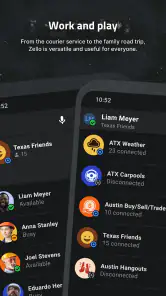
First things first, downloading and setting up the Zello PTT Walkie Talkie app was a breeze. Available for both Android and iOS, it takes just a few minutes to get up and running. Once installed, you’re greeted with a simple, user-friendly interface that makes navigation a piece of cake, even for the least tech-savvy among us.
Zello is a free communication app from Zello Inc, with optional in-app purchases. Its Everyone age rating makes it broadly suitable, while the app’s long history gives it a useful sense of continuity: it first appeared in 2011, and version 6.13.5 is the current release. That is a meaningful distinction for people returning after a break. Still, a version number alone does not tell me which changes matter most, so I judge the present experience by whether the basic push-to-talk workflow remains clear and useful.
How It Works
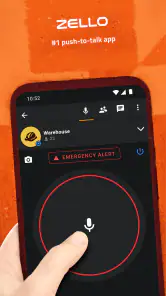
The concept is pretty straightforward. You press a button, talk, and your message gets transmitted instantly. It’s like having a walkie-talkie in your pocket, minus the static and range limitations. The app uses your internet connection, so as long as you have a decent signal, you’re good to go.
That internet requirement is also the main trade-off. Unlike a radio walkie-talkie, Zello depends on a working connection, so it is not the right tool for a place where mobile data or Wi-Fi is unavailable. Compared with ordinary calling, though, it can be less disruptive when a group only needs quick instructions: nobody has to keep a call open just to exchange a few short updates. For private conversations, a regular call or direct message may feel more natural.
One standout feature is the ability to create channels. This is particularly useful if you’re coordinating with a group, whether it’s for work, a family event, or just a bunch of friends planning a get-together. Channels can be public or private, giving you control over who gets to listen in.
More From Our News Desk

Weather by Xiaomi Review: Clear at a Glance, Less Clear Up Close

X Under Pressure: Can It Recover When Posting Goes Wrong?

Clash of Clans Is Won Between the Battles

Android Auto Makes the Case for Quieter Car Software

MobiOffice: Transforming Mobile Productivity with Seamless Integration

EA SPORTS FC™ Mobile Soccer: Redefining Mobile Sports Gaming
For a practical workflow, I’d keep a channel focused on one purpose rather than mixing every conversation together. A family outing, for example, can use brief updates about meeting points, while a separate channel can handle a volunteer team’s coordination. Before relying on a channel for anything important, make sure the people who need to hear the message are in the right place; push-to-talk is only helpful when the group is organized enough to receive it.
User Experience
Using Zello feels almost nostalgic. There's something satisfying about pressing that button and speaking your mind without the need for dialing or waiting for someone to pick up. The audio quality is surprisingly clear, and the latency is minimal, which is crucial for real-time communication.
In an everyday scenario, I can imagine using it while friends are arriving separately at a crowded venue: one person can send a quick location update, and everyone can respond without turning the plan into a string of calls. It also suits small teams doing hands-on work, where looking down to type may be awkward. I would still keep messages concise and avoid treating a voice channel like a private conversation in public; the convenience of speaking quickly does not remove the need to consider who might hear.
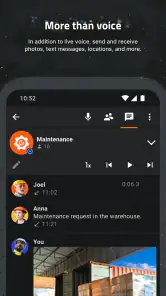
I also appreciated the app’s versatility. Whether you’re using it for casual chats or professional purposes, the app adapts well. Plus, with the option to send text messages and share images, it’s not just limited to voice communication.
Those extra formats are useful when voice is not the clearest way to share something. A short text can preserve a detail someone needs to check later, while an image can show what words would take longer to explain. My tip is to use voice for the immediate coordination and text or images when the group needs a reference to return to. That keeps a channel easier to follow instead of making every exchange a long spoken explanation.
What to Consider Before Relying on It
The app has a large established audience: it has more than 100 million installs, with an average rating of 4.2 from around 788,000 ratings and roughly 44,000 written reviews. Those figures suggest plenty of people have tried it, but they cannot guarantee that every group will enjoy the same experience. In practice, the biggest question is whether your friends, family, or coworkers will actually use a separate push-to-talk app consistently.
There is also a cost distinction worth noticing: the app is free to start, while optional purchases range from $7.99 to $749.99 per item. I would check what an in-app purchase is for before paying, rather than assuming the basic communication workflow requires an upgrade. If your group already handles everything comfortably through a familiar messaging app, asking everyone to adopt another tool may be more friction than benefit. And if you need communication that works without internet, a conventional radio is the better fit.
For people deciding whether to try it, I’d start with a small group and a clear purpose. Agree on which channel to use, keep messages brief, and test it during an ordinary low-stakes activity before depending on it for time-sensitive coordination. That simple trial makes it easier to tell whether hands-free, quick voice exchanges are genuinely more useful for your group than calls or chat.
Wrapping It Up
In a world overflowing with messaging apps, Zello PTT Walkie Talkie stands out by offering something a bit different. It combines modern technology with a classic concept, making it both fun and functional. Whether you’re reminiscing about the days of walkie-talkies or just looking for an efficient way to communicate, Zello is worth checking out.
So, if you’re ready to tap into a new way of communicating, give Zello a shot. It’s a neat little app that might just change how you stay in touch with your crew.
Zello PTT Walkie Talkie Frequently Asked Questions
How much mobile data does Zello use, and can I control when it connects?
Zello sends voice messages over Wi-Fi or mobile data, so it needs an internet connection while you communicate. If you are mindful of mobile-data use, connect to Wi-Fi when available and check your phone’s data settings. The app’s push-to-talk style lets you send voice when needed, rather than making a conventional phone call.
Do I need to create an account or add contacts before using Zello?
You will need other Zello users to communicate with, and the app can connect people through contacts or talk channels. Before relying on it for a conversation, make sure the people you want to reach are using Zello and that you can access them in the app. This helps set expectations: downloading the app alone does not create a conversation partner.
Does Zello PTT Walkie Talkie work on both Android and iOS?
Zello PTT Walkie Talkie is designed for use across mobile platforms, so people using different types of smartphones can communicate through the app. Its cross-platform support is useful when friends, family members, or colleagues do not all use the same kind of device. Before downloading, check that your phone’s operating system meets the app’s minimum requirement.
What do I need to start talking with someone on Zello?
You need an internet connection and other Zello users to connect with. The app uses Wi-Fi or mobile data to carry live voice messages, rather than communicating directly like a traditional radio. Once you have access to contacts or a talk channel, you can use the push-to-talk approach to send a voice message and listen to replies.
Is Zello PTT Walkie Talkie suitable for children?
Zello is a communication app rated for Everyone, but that rating does not replace a family’s own judgment about online conversations. Since users can connect with contacts or participate in channels, parents may want to discuss privacy and appropriate sharing with younger users. As with any messaging service, avoid sharing sensitive personal details in conversations.
Pros
- Real-time communication with low latency.
- Works well even on slow internet connections.
- Supports group channels for team collaboration.
- Available on both Android and iOS platforms.
- Battery efficient
- suitable for long-term use.
Cons
- Interface can be confusing for new users.
- Requires internet connection to function.
- Limited offline functionality.
- Audio quality varies with network speed.
- No video calling feature available.
- Category
- Communication
- Version
- 6.13.5











