WellSky Personal Care
- 13.60K
- 3.8
- Installs
- 1.00M
- Price
- Free

Screenshots
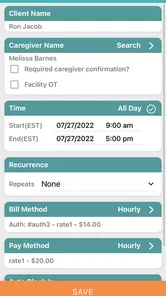
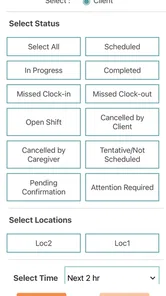
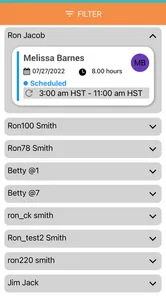
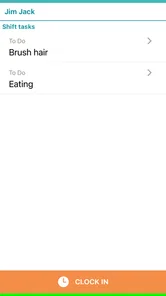
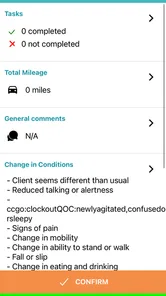
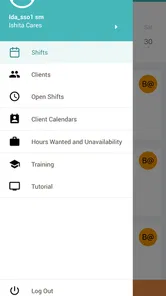
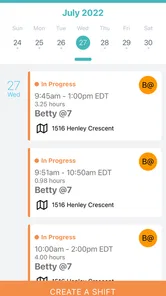
Analysis by Reviewed
I’d approach WellSky Personal Care as a care-coordination tool rather than a general health app. Its strongest case is practical: it brings medication tracking, appointment management, reminders, and caregiver coordination into one place. That can be useful when care involves more than one person and details are easy to lose across messages or paper notes. The trade-off is that it makes most sense within a caregiver-supported routine; someone looking for a broad wellness tracker may find a simpler option better suited to them.
What it is built to help with
WellSky Personal Care is a free medical app from WellSky Mobile Apps, aimed at caregivers and administrators. Its focus is day-to-day care organization, not diagnosis or replacing conversations with a clinician. The app has a 4.2 average from around 31,000 ratings and has been installed over 500,000 times, which suggests it has reached a substantial audience without telling me whether it will fit every care arrangement.
In a realistic routine, I can see its value when a family member helps an older relative keep track of appointments and medication. One person can use reminders to stay on top of a dose, while caregivers can coordinate around the care being provided. That is more useful than keeping separate notes on several phones, provided everyone involved is actually willing and able to use the same workflow.
Where coordination matters more than convenience
The practical benefit is not simply having a list of tasks; it is having care details gathered around the people responsible for them. Before relying on reminders, I’d make sure the medication information is entered carefully and that the person receiving care understands which alerts matter. A reminder can prompt action, but it does not verify that a dose was taken or replace professional advice. For appointments, keeping the schedule current is equally important: an outdated entry can create confusion rather than prevent it.
This makes the app a better match for shared care than for someone who only wants a private pill alarm. A basic reminder app may be quicker if one person handles everything and needs only a notification. A paper calendar can also be perfectly adequate when the routine is stable and everyone sees the same notes. WellSky’s appeal is strongest when coordinating people is part of the problem, not just remembering dates.
The app is rated for Everyone, and its current version is 4.0.1. It was released on September 28, 2017, and runs on Android 7.0 or later. That broad minimum requirement makes it accessible to many Android users, though I’d still check that the device used by each caregiver can install and run the current version before making it central to a shared routine.
What to consider before making it part of care
Care coordination depends on habits as much as features. If a caregiver rarely checks the app, or if the person receiving care cannot comfortably use a phone, the group may need a backup such as a shared calendar or written schedule. I would agree in advance who updates appointments and medication details, then make a simple check-in part of the routine. That small bit of responsibility-setting can prevent duplicate entries and mismatched expectations.
More From Our News Desk

 Block Blast!
 Makes Every Clear Feel Like One More Turn
A clean little block puzzle becomes a study in space, risk, and self-control. Its best moments come from one satisfying clear; its toughest test is knowing when to stop.

 Super Stylist Fashion Makeover
Super Stylist Turns Dress-Up into a Runway Career
Its makeover-to-client loop turns quick outfit decisions into shareable style theater. The question is whether the closet keeps giving players a reason to return.

 Block Craft 3D:Building Game
Block Craft 3D Under Pressure: How Well Does It Recover When Building Goes Wrong?
A failure-focused look at Block Craft 3D’s forgiving building loop, its uncertain recovery edges, and the moments that demand more than a cheerful village.

 Woodturning
 Trades Creative Freedom for a Satisfying Carving Loop
If your usual creative game is about building, decorating, or styling, Woodturning trades open-ended projects for a tactile, tightly guided carving loop. Here is what that switch really costs.

 PUBG MOBILE
 Shows What Battle Royale Must Get Right
PUBG MOBILE shows how battle royale has matured: bigger systems matter less than meaningful choices, readable fights, and a reason to return after every loss.

 Braindom: Brain Games Test
Braindom’s Social Life Happens Between Puzzles
Braindom turns quick logic traps into a personal ritual, but its community value is more about comparing answers than building together.
Latest News



I also wouldn’t treat any medical app as a secure place for sensitive details without reviewing its privacy information and the access options available on the device. Health information deserves care, and convenience should not mean sharing more than necessary. For someone who needs clinical records, medical advice, or a complete health-history system, a provider’s own tools may be more appropriate; this app’s described role is narrower and centered on personal care coordination.
A handoff routine that reduces confusion
One useful way to introduce the app is to treat it as a shared handoff aid, not as a substitute for talking. Imagine one caregiver handles a morning visit and another takes over later in the day. Before the changeover, they can use the same care-planning routine to check what appointments are coming up and which reminders are relevant. The key is agreeing on who records changes; otherwise, two people may assume the other has updated a detail.
I’d keep the first setup deliberately modest. Add only the information needed to support the immediate routine, then confirm that the schedule makes sense to both the person receiving care and the people helping. This is a practical safeguard against turning a useful organizer into a crowded, unreliable record. It also makes it easier to notice whether the app is genuinely helping or whether a simpler shared calendar would do the job.
Questions worth settling with the care team
Before depending on shared coordination, I’d ask who is expected to enter and maintain each item, how caregivers will communicate changes, and what to do if someone misses an alert. Those are workflow questions rather than app settings, but they determine whether a reminder system is dependable in everyday life. If multiple people have different assumptions about who is responsible, even a well-organized schedule can leave gaps.
I’d also decide what should stay outside the app. A care organizer is not the place to make a medication change based on a notification, and it should not replace instructions from a clinician or pharmacist. If a dose, symptom, or appointment raises a clinical question, the right next step is direct professional guidance. Keeping that boundary clear makes the app more useful because it is being asked to do a manageable job.
Why Choose WellSky Personal Care?
First off, let’s talk about what WellSky Personal Care offers. This app is designed to streamline and simplify the process of managing your personal health care. Whether you’re coordinating with caregivers or managing medications, this app has got your back. The interface is intuitive, which means you don’t have to be a tech wizard to navigate through it. I found it quite refreshing that I didn’t have to spend hours trying to figure out how to use the features.
User-Friendly Interface
One of the first things I noticed was how user-friendly the app is. The developers have clearly put a lot of thought into making sure that even the least tech-savvy among us can use it without a hitch. From the moment you open the app, you’re greeted with a clean, uncluttered interface. This makes for a hassle-free user experience, which is always a plus in my book.
Comprehensive Features
Now, let’s get into the nitty-gritty of what you can do with WellSky Personal Care. The app allows you to keep track of appointments, medications, and even provides reminders so you never miss a dose. Plus, if you’re managing care for a loved one, you can coordinate with other caregivers directly through the app. It’s like having a personal assistant dedicated to your health care needs.
- Track medications with ease
- Schedule and manage appointments
- Coordinate with caregivers
- Receive timely reminders
Having all these features in one place is incredibly convenient. I particularly appreciated the medication tracking feature, as it can be a lifesaver for those of us who have a lot to keep track of.
Where a shared tool beats separate reminders
The clearest advantage over ordinary phone alarms is the care context. A personal alarm can tell one person that it is time to act, but it does little to help a second caregiver understand the broader schedule. WellSky’s coordination focus is more relevant when responsibility is shared, such as when relatives take turns helping or an administrator needs to keep a care routine organized. That does not mean it replaces conversation; it gives a group a common place to organize the practical details.
For a household where only one person manages a predictable routine, I would not assume that a dedicated care app is automatically better. A calendar and a single reminder may involve less setup and fewer habits to maintain. The trade-off changes when updates need to reach more than one caregiver: a single shared workflow can reduce the chance that each person is working from a different note, as long as everyone keeps it current.
Making reminders useful rather than noisy
Reminders work best when they correspond to clear actions. I’d avoid treating every note as an alert, since an overfull stream of prompts can become easy to ignore. Instead, agree which events need a timely nudge and which details are simply there for reference. That distinction helps the person receiving care recognize important prompts and keeps caregivers from relying on notifications for information that should be discussed directly.
There is also a human side to using medication reminders. A caregiver may be supporting someone who prefers to manage their own routine, so it is worth agreeing how the app fits into that person’s independence. The best workflow is not necessarily the one with the most oversight; it is the one that helps people remember responsibilities without making the care recipient feel reduced to a checklist.
Security and Privacy
In today’s digital age, security is a big concern, especially when it comes to personal health information. Thankfully, WellSky Personal Care takes this seriously. The app is equipped with top-notch security features to ensure that your data is safe and secure. Knowing that my information is protected gives me peace of mind, which is invaluable.
Even with that reassurance, I’d make privacy part of the setup conversation. People supporting someone’s care should share only what is needed for the task and be thoughtful about who can access a device used for care coordination. A phone may also be used for personal messages and other accounts, so basic device privacy matters alongside any app-level safeguards. For families, agreeing on these boundaries early can prevent awkwardness later.
Who is most likely to benefit
I’d recommend considering it for a caregiver-supported routine where appointments and medication reminders need to be organized alongside coordination between people. It may also suit administrators who need a mobile way to take part in personal-care organization. It is less compelling for someone seeking a general fitness or wellness dashboard, a clinical record system, or medical advice. Those needs call for tools designed around those specific jobs.
Someone who is not comfortable with smartphones should not be pressured into making the app the only source of care information. A printed schedule or a visible calendar can be easier to check at home, and a direct call may be the safer way to relay an urgent change. I see the app as most effective when it supports the existing relationship between caregivers and the person receiving help, rather than forcing everyone into a digital routine that does not suit them.
In conclusion, WellSky Personal Care is an app that I would recommend considering for people looking for a focused way to organize personal care with help from others. Its combination of medication tracking, appointments, reminders, and caregiver coordination gives it a practical role, and the free price makes it easy to explore. I would use it with clear ownership of updates, sensible privacy habits, and a backup plan for missed alerts. If your needs are limited to one person’s simple reminders, a standard calendar may be less work; when shared care is the real challenge, WellSky Personal Care is the more relevant fit.
WellSky Personal Care Frequently Asked Questions
Do I need an account or an invitation from a care organization to use WellSky Personal Care?
WellSky Personal Care is intended for caregivers and administrators working with personal care services, so it is best suited to people who need access through their care organization. Before installing it, check with your employer or the organization coordinating your work about access and setup. This can help you confirm that the app fits your role and that you can use it as part of your care team’s processes.
Who develops WellSky Personal Care, and what kind of app is it?
WellSky Personal Care is a medical app developed by WellSky Mobile Apps. Its store summary describes it as a mobile app for caregivers and administrators, which gives a useful sense of its intended audience. It is not presented as a general wellness tracker for personal use; it is aimed at people involved in delivering or managing personal care services.
Who is WellSky Personal Care designed for?
WellSky Personal Care is a medical app intended for caregivers and administrators involved in personal care services. Its focus is on supporting the work of care teams, rather than serving as a general-purpose health or wellness app. Before downloading, consider whether you are a caregiver or administrator who needs access to your organization’s personal care processes through a mobile app.
What Android version do I need to use WellSky Personal Care?
For Android devices, WellSky Personal Care requires Android 7.0 or later. Check your device’s operating system version before downloading so you can tell whether it meets this requirement. The app is free and is rated for Everyone, but those details do not replace the Android compatibility requirement. If your device runs an earlier version, it will not meet the stated minimum.
What is WellSky Personal Care used for?
WellSky Personal Care is a comprehensive software solution designed to streamline and enhance the management of home care services. It allows caregivers and healthcare agencies to efficiently manage scheduling, billing, and reporting. With its intuitive interface, the app helps improve service delivery by ensuring accurate tracking of patient information and care tasks.
Pros
- User-friendly interface for easy navigation.
- Comprehensive care scheduling features.
- Real-time updates on care activities.
- Secure data management and privacy.
- Customizable care plans for diverse needs.
Cons
- Requires stable internet connection.
- Limited offline functionality.
- Subscription-based advanced features.
- Occasional app performance lags.
- Complex setup for first-time users.