Weatherzone: Weather Forecasts
- 939.00
- 4.2
- Installs
- 1.00M
- Price
- Free
Screenshots
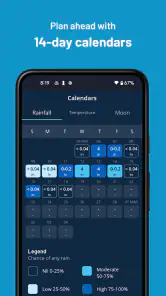
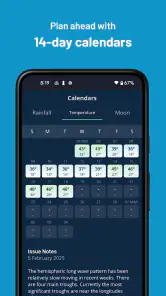
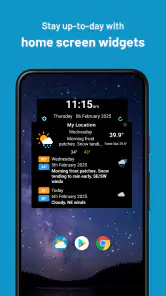
Analysis by Reviewed
I turn to Weatherzone when a basic “sunny or rainy” answer isn’t enough. It’s a weather app from DTN APAC Pty Ltd, and its focus is practical detail: forecasts by the hour, a longer outlook, radar, and graphs for people who like to inspect conditions rather than glance at one temperature. That extra depth can be useful, though it also means there is more to take in than in a bare-bones forecast app.
How it fits into a daily routine
For an ordinary commute, I’d use the hourly view to decide whether to leave early, carry a raincoat, or move a walk to later in the day. The longer forecast is more helpful for rough planning than for locking in an outdoor event: conditions several days away can change, so I treat it as a guide and check again closer to the date. When rain is nearby, radar can answer a different question from the forecast: not just whether rain is expected, but whether it appears to be approaching my area.
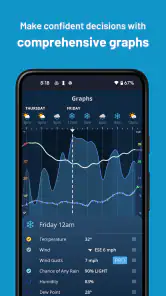
A useful habit is to check the forecast in two passes. First, look at the hours that matter for the day’s plans; then use the radar only when timing or movement of precipitation could change a decision. That keeps the map from becoming a distraction and can help limit mobile data use, particularly if you don’t need to watch it continuously. Custom graphs also suit people who prefer to compare changing conditions visually rather than repeatedly scanning separate readings.
Where the detail helps—and where it can get in the way
The app’s strength is the range of information it brings together. An hourly outlook can help with a school run or a lunch break outside, while a wider forecast gives a quick sense of whether a trip needs a backup plan. Radar and graphs add another layer for users who want to make their own judgement. In my view, that makes Weatherzone more appealing to people who check weather for specific decisions than to someone who only wants a single number on a home screen.
There is a trade-off: more forecast detail does not make weather certain. I wouldn’t treat a long-range outlook as a promise, and radar is most useful for interpreting near-term conditions, not guaranteeing exactly when rain will reach one street. If you only check the weather occasionally, a simpler app or the forecast built into your phone may be quicker. If you need a highly specialized source for a particular outdoor activity, it also makes sense to compare the information you rely on with a service designed for that purpose.
Choosing the right level of forecast detail
Weatherzone is a better fit for someone who likes to make a small decision from several pieces of information than for someone who wants a single reassuring symbol. I’d use it to work out whether a dog walk is more sensible before breakfast or after work, for example, rather than expecting one screen to settle every question about the day. Checking the hourly forecast first gives a useful outline; opening the radar only when precipitation could alter the plan adds context without requiring a long session in the app.
That approach also makes the app easier to compare with familiar alternatives. A phone’s built-in weather screen is often the fastest choice for a quick temperature check, and a simple forecast app may feel calmer if you rarely need anything beyond a daily summary. Weatherzone’s appeal is the step beyond that glance: radar and custom graphs give curious users more ways to examine conditions. The trade-off is that those extra views ask for attention, and they do not automatically make a forecast more certain.
More From Our News Desk

Clash of Clans Is Won Between the Battles

Android Auto Makes the Case for Quieter Car Software

MobiOffice: Transforming Mobile Productivity with Seamless Integration

EA SPORTS FC™ Mobile Soccer: Redefining Mobile Sports Gaming

How Microsoft OneDrive Became a Mobile Productivity Giant

How Google Translate Breaks Language Barriers Effortlessly
I’d be cautious about using the longer outlook to commit to a fixed outdoor plan far ahead. It is useful for spotting a possible change in the week, but I would treat it as a prompt to keep a backup option, then revisit the forecast nearer the event. That’s a more practical use of a long-range view than expecting it to answer a yes-or-no question days in advance.
Who should give it a try
Weatherzone is free to download and has an Everyone content rating. It has an average rating of 4.2 from around 162,000 ratings, with over a million installs, which gives a prospective user a sense of its broad reach without telling you whether its style will suit your routine. The current version is 7.4.3, and the app has been available since March 10, 2011. It works on Android 5.0 and later. Optional in-app purchases are listed at around $3.99 to $4.49 per item, so I’d start with the free experience and only consider paying if the available extras solve a need you actually have.
For someone who plans around changing weather—commuters, walkers, parents arranging outdoor activities, or people deciding whether to reschedule a weekend outing—the combination of hourly detail and radar is the main reason to try it. A simple everyday test is to check the next few hours before leaving home, then compare the forecast with the radar only if rain could affect your route. That gives you a practical answer without turning weather-checking into a chore.
It can also help when a plan involves several people and a narrow window of time. If friends are choosing when to meet outside, I’d check the hourly outlook for the likely meeting period rather than use the day’s general description as a substitute. If the forecast suggests unsettled conditions, radar can help me decide whether to suggest a covered location or keep the plan flexible. I would still leave room for conditions to shift, but the two views support a more useful conversation than a simple “looks fine” guess.
The app is less compelling if you dislike switching between forecast panels or only want a tiny glance at current conditions. More detail can become friction when you are in a hurry, and radar is not something I’d keep open just for reassurance. For a quick check, the default weather tool on a phone may be enough; for a specialist activity, a purpose-built service may offer a more relevant kind of information. Weatherzone sits in between those needs: more hands-on than a minimalist forecast, without being a replacement for specialist judgement.
As an established app, Weatherzone has had time to evolve, but a version number alone doesn’t tell me which screens or forecasting details have changed over time. What matters for an existing user is whether the current layout still makes their usual checks easy and whether the information they rely on is clear. I’d judge any future changes by that standard: useful improvements should make it faster to understand the forecast, not simply add more things to scroll through.
Getting Started with Weatherzone
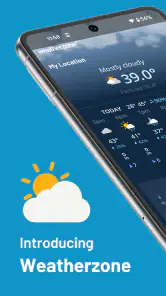
First things first, downloading Weatherzone is a breeze. Available on both Android and iOS, it takes just a couple of taps to get it up and running. When you first open the app, you’re greeted with a sleek and intuitive interface. The home screen is packed with information, but don’t worry, it’s not overwhelming. Everything is laid out in a way that makes sense. You’ve got current weather conditions, hourly forecasts, and even a peek at what the next week has in store.
For a first visit, I’d resist the urge to inspect every panel at once. Start with the current conditions and the hours that affect your plans, then explore the longer view or graphs when you have a reason to compare changes. This gives you a feel for the app’s level of detail without turning setup into homework. If your main need is a commute check, there is no need to make radar part of every routine; save it for days when rain timing could change your route or what you pack.
Features That Stand Out
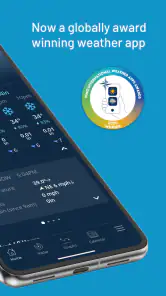
What sets Weatherzone apart from other weather apps? For starters, its detailed forecasts. I’m talking about everything from temperature and humidity to wind speed and UV index. And for those who like to dive deeper, there are radar maps and weather warnings. It’s like having a meteorologist in your pocket. One feature I particularly love is the customizable alerts. You can set notifications for specific weather conditions, which is super handy if you’re waiting on a sunny day to hit the beach.
Alerts are most useful when they support a decision you already care about, rather than asking you to monitor every possible change. I’d choose conditions that could genuinely alter an outing or a routine, then keep the hourly view as the place to check the day’s timing. That division of labour helps: an alert can draw attention to something worth reviewing, while the forecast and radar let you decide what to do with it. If notifications become noisy, the feature loses its value, so I’d keep the setup focused.
Custom graphs offer another way to inspect forecast changes. Rather than treating the display as a prediction to accept unquestioningly, I’d use a graph to notice how conditions vary across the period I care about. That can be helpful when choosing between two possible times for an activity, especially if a gradual change matters more than the day’s headline condition. The practical benefit is comparison, not certainty; a graph makes the forecast easier to read for some people, but it cannot remove the uncertainty of changing weather.
Another neat feature is the integration with social media. You can share weather updates with friends and family directly from the app. It’s perfect for those group chats where you’re trying to plan an outdoor event.
Sharing can save a bit of back-and-forth when a group is deciding whether to meet outside, but I’d still explain the specific time and place I’m checking. A general update may not answer what matters to everyone in the group, particularly if plans span several hours. I find the useful workflow is to share the forecast as a starting point, then keep the plan flexible rather than treating a screenshot or update as a guarantee.
What I would check before relying on it
People often want to know whether this is useful for planning several days ahead. I’d say yes, as a way to spot broad possibilities and think through alternatives, but not as a final call on an event. The nearer the plan, the more useful it is to revisit the hourly detail and, where appropriate, the radar. That layered approach makes better use of the app than expecting one early check to settle the question.
Another reasonable concern is whether the extra tools are necessary. If you just want to know whether to take a jacket, a basic phone forecast may already be enough. If you regularly make plans around rain timing, want to look at changing conditions, or appreciate a longer view, Weatherzone’s added detail has a clearer purpose. I’d try the free experience first and judge it against the decisions you actually make, rather than assuming an in-app purchase is required to get value from the app.
For anyone worried about data use, I’d treat radar as an on-demand tool instead of leaving it open unnecessarily. The map is most valuable when precipitation is relevant to a decision; for ordinary checks, the text and hourly forecast may be all you need. That habit keeps the experience focused and avoids spending time watching a map when it cannot change your plans.
Is Weatherzone Right for You?
Now, you might be wondering if Weatherzone is the right app for you. In my experience, it’s perfect for anyone who wants accurate and detailed weather information without any fuss. The app is free, but there’s also a premium version available if you want even more features. Personally, I’ve stuck with the free version, and it suits my needs just fine.
In terms of performance, I’ve found it to be reliable and fast. The app loads quickly, and I haven’t experienced any crashes or bugs, which is always a plus. The only downside? It can be a bit data-heavy if you’re constantly checking those radar maps. But hey, that’s a small price to pay for staying one step ahead of the weather.
My recommendation is to give the free version a few ordinary days of use before deciding whether it belongs in your routine. Check it before a commute, compare the hourly view with one outdoor plan, and open radar only when it might change what you do. If you find yourself returning to those tools because they answer real questions, the app is earning its place. If you always close it after seeing the current temperature, a simpler option may suit you better.
For existing users, the most useful measure of product evolution is not simply that the version number advances. It is whether familiar tasks remain straightforward and whether any new detail earns the extra attention it asks for. I would watch for changes that clarify how to interpret a forecast, make comparisons easier, or keep routine checks quick. More panels alone would not be an improvement for me if they made the main decision harder to find.
To wrap things up, if you’re on the hunt for a new weather app, give Weatherzone a try. With its user-friendly design and comprehensive features, it’s sure to keep you informed and prepared for whatever Mother Nature throws your way. Happy weather watching!
Weatherzone: Weather Forecasts Frequently Asked Questions
Does Weatherzone: Weather Forecasts cover the United States?
The app’s store summary specifically highlights US weather, including hourly through 14-day forecasts, rain and snow radar, and custom graphs. That makes it worth considering if you want to follow conditions in the United States. Forecast coverage and available details can vary by location, so check the places you care about in the app to see how its information fits your needs.
Can I use Weatherzone: Weather Forecasts without paying?
Yes. Weatherzone: Weather Forecasts is free to download, so you can try its weather tools without making an upfront purchase. Optional in-app purchases are also available, priced from $3.99 to $4.49 per item. If you are considering a paid option, review its details in the app first so you understand what you are choosing before completing a purchase.
Is Weatherzone: Weather Forecasts suitable for general audiences?
Weatherzone: Weather Forecasts has an Everyone content rating, making it suitable for a general audience. Its focus is weather information, such as forecasts and radar, which can help users check conditions and plan everyday activities. Parents and other users can still review the app themselves to decide whether its features and any optional purchases are appropriate for their household.
Is Weatherzone: Weather Forecasts available for my device?
Weatherzone: Weather Forecasts is an app for Android and iOS users looking for weather information. On Android, it requires version 5.0 or later. The app is free to download, and its Everyone content rating makes it suitable for a general audience. Check that your device meets the operating-system requirement before installing.
What features does Weatherzone: Weather Forecasts offer?
Weatherzone: Weather Forecasts provides users with real-time weather updates, including temperature, wind speed, humidity, and precipitation forecasts. It also offers radar images, hourly and 7-day forecasts, and alerts for severe weather conditions. The app's detailed insights and advanced mapping tools allow users to visualize weather patterns effectively, making it a comprehensive tool for planning daily activities. Its store summary also highlights US hourly through 14-day forecasts, rain and snow radar, and custom graphs.
Pros
- Accurate and timely weather updates.
- Easy-to-navigate interface.
- Customizable weather alerts.
- Comprehensive radar maps.
- Detailed long-range forecasts.
Cons
- Ads can be intrusive at times.
- Premium features require subscription.
- Occasional app freezes.
- Battery drains faster with GPS on.
- Limited offline features.
- Category
- Weather
- Version
- 7.4.3