Weather XL PRO
- 4.43K
- 4.4
- Installs
- 10.00M
- Price
- Free

Screenshots
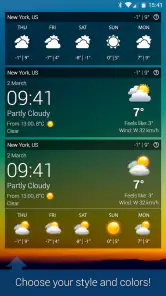
Analysis by Reviewed
I use a weather app most when I need to make a small decision quickly: whether to bring a jacket, change my route, or move an errand earlier. Weather XL PRO is built for that everyday check, but it also gives forecasts and animated visuals for people who like a fuller picture than a temperature alone. My main advice is to treat any forecast as a useful guide rather than a promise, especially when plans depend on local conditions.
Who will get the most from it
This weather app is a good fit if you check conditions throughout the day and want forecasts, a radar view, and weather alerts together. For example, before walking to work, I would check the near-term outlook and radar, then decide whether to take a waterproof layer. Someone who only wants a temperature at a glance may find a basic phone widget quicker, while travelers with tightly timed outdoor plans may prefer to compare more than one forecast source.
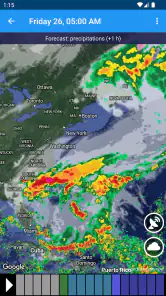
A practical tip is to use the radar as context, not as a guarantee about exactly when rain will reach your street. It can help me notice a band of weather approaching and reconsider an outdoor plan, but I would leave extra flexibility for a commute or event that cannot easily be rescheduled. Alerts are most useful when they prompt a sensible check-in; they should not replace local safety advice during dangerous conditions.
Everyday planning and trade-offs
Compared with the default weather app on a phone, Weather XL PRO puts more emphasis on animated presentation and a dedicated radar experience. That can make changing conditions easier to grasp visually, though a clean, minimal forecast may be faster for people who dislike extra detail. I would use the radar before a walk or a short drive, and the broader forecast when deciding what to pack for the day. For a long trip, I would still recheck conditions as departure gets closer instead of relying on one early glance.
There is also a difference between having many kinds of weather information and knowing which one matters for your decision. If you are in a hurry, focus on the forecast window relevant to your plans rather than browsing every screen. If you prefer a quiet app with no animated presentation, or need specialist information for a particular outdoor activity, another weather tool may suit you better. Weather forecasts can vary, so I would not use a single app as the sole basis for a high-stakes decision.
First Impressions
From the moment I downloaded Weather XL PRO, I was hooked. The app’s interface is sleek and user-friendly, which makes checking the weather not only easy but also enjoyable. The animations are quite impressive, almost making you wish the weather was as dramatic as it looks on your screen. It’s like having a mini weather station right in your pocket!
Features That Stand Out
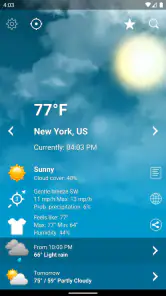
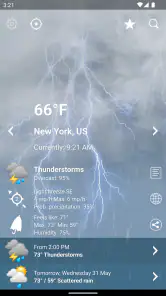
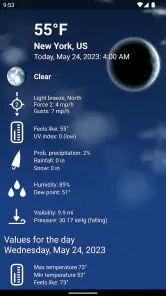
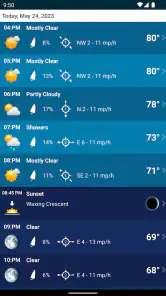
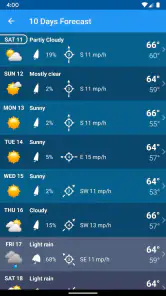
Now, let’s dive into the features. The app offers real-time weather updates with a high level of accuracy. You can get hourly and weekly forecasts, which is super handy for planning your week. There’s a radar map feature that allows you to visualize weather patterns, and honestly, it’s kind of mesmerizing to watch those clouds move across the screen.
You May Like

Clash of Clans Is Won Between the Battles

Android Auto Makes the Case for Quieter Car Software

MobiOffice: Transforming Mobile Productivity with Seamless Integration

EA SPORTS FC™ Mobile Soccer: Redefining Mobile Sports Gaming

How Microsoft OneDrive Became a Mobile Productivity Giant

How Google Translate Breaks Language Barriers Effortlessly
One feature I particularly love is the alert system. The app sends you notifications about severe weather conditions, so you can plan ahead and stay safe. Whether it’s a storm, heavy rain, or a heatwave, Weather XL PRO has got you covered.
What to expect from the app
Weather XL PRO is a free weather app from Exovoid Sàrl, rated for Everyone. It has been available since Aug 15, 2014, and its audience has grown to over 10 million installs, with an average rating of 4.4 from around 504,000 ratings. That gives a sense of its reach, though popularity alone cannot tell me whether a forecast will match conditions in every neighborhood. In-app purchases are offered at $6.99 per item, so I would check what an optional purchase includes before deciding whether it is worthwhile for my needs.
For a regular user, the key question is not whether the screen looks polished but whether the forecast helps with a specific plan. I would check the hourly view for a same-day outing, then use the weekly view as a rough planning aid rather than treating it as fixed. If a change would be costly or unsafe, I would verify conditions again nearer the time. That habit makes the app more useful without asking it to be perfectly precise.
Usability and Performance
Usability-wise, this app is top-notch. The layout is intuitive, and everything is where you expect it to be. I didn’t experience any lags or crashes, which is a huge plus. It runs smoothly on both Android and iOS, and the updates are frequent enough to keep everything running without a hitch.
Battery usage is another important aspect, and I’m happy to report that Weather XL PRO doesn’t drain your phone’s battery, even if you have it running in the background. This is crucial for those of us who rely heavily on our phones throughout the day.
What I would keep in mind
The visual style is part of the appeal, but it will not be everyone’s preference. If you mainly want a tiny glanceable forecast and rarely open a full app, your phone’s built-in option may be enough. If you do open the app, the useful approach is to make the radar answer one concrete question—such as whether to take a covered route—rather than treating moving clouds as a precise street-level timetable. I also would not assume an alert will cover every weather risk; checking official local guidance matters when conditions become serious.
Weather XL PRO is most compelling for people who enjoy seeing conditions represented visually and want both short- and longer-range forecasts in one place. It is less compelling for anyone who expects certainty far ahead, wants a bare-bones display, or needs tools tailored to specialized forecasting. Those are not reasons to dismiss it; they are reminders to match the app to the job. For ordinary day-to-day decisions, I find that distinction more helpful than chasing a forecast that claims to answer everything.
Making the forecasts work for your routine
One way I would use the app is to build a simple check-in habit around transitions in the day, rather than leaving it open constantly. Before leaving home, I would look at the hourly forecast and radar together; before heading back, I would check again if the sky has changed or the route is exposed. This is more useful than repeatedly refreshing the same view without a decision in mind. It also keeps the app in the role it handles best: a quick planning aid, not a substitute for watching the weather around you.
For a family outing, I would use the weekly forecast to choose a promising day, then narrow the decision with the hourly outlook on the morning itself. If the plan involves children, older relatives, or a long walk away from shelter, I would keep a flexible alternative in mind even when the forecast looks favorable. The useful trade-off is that a broad outlook helps with scheduling, while the closer view is better for deciding what to do now. Neither removes the need to adapt when conditions change.
How it fits beside other weather tools
Many default phone weather apps are designed for a fast glance: temperature, a small icon, and perhaps a short forecast. That is convenient when I only need to decide whether to wear a light layer. Weather XL PRO makes more sense when I want to open a radar view, watch weather movement, or check alerts in the same weather-focused setting. The extra visual detail is a benefit only if I actually use it; for someone who never looks beyond the current temperature, the built-in app is probably the simpler choice.
At the other end, some people rely on specialist services for aviation, marine conditions, hiking, or other activities where a general forecast is not enough. I would not treat this app as a replacement for those tools. Its appeal is the everyday middle ground: more context than a bare widget, without requiring every casual user to interpret specialist charts. If you are planning an activity where wind, visibility, or rapidly changing local conditions carry serious consequences, use a source designed for that decision as well.
Small habits that prevent misleading reads
Animated maps can be compelling, but motion on a screen can make a forecast feel more exact than it is. I find it better to look for the broad pattern—whether weather is moving toward the area and whether the situation appears to be changing—then check the forecast timing separately. A map is a visual aid, not a promise that a particular block will stay dry until a precise minute. That distinction is especially helpful when deciding whether to start a walk or wait before setting off.
I would also avoid making a week of plans from one early look at the longer-range forecast. Use that view to compare possible days, then revisit the relevant hours nearer the event. If a notification arrives, treat it as a prompt to assess the situation, not as a complete explanation of what is happening locally. Keeping those habits in mind makes the radar and alerts more useful without encouraging false confidence.
Who may want a different approach
If you dislike animated interfaces, want the fewest possible taps, or only check weather once in a while, Weather XL PRO may feel like more app than you need. A compact widget or the phone’s built-in forecast can be a better fit for that routine. Likewise, anyone who needs a specialized forecast should choose a tool built around that activity rather than assuming a general weather app will cover every detail. I would still consider this one when the goal is a visual, regular check for ordinary plans.
The free starting point makes it easy to try the basic experience, but I would not buy an optional item just because it appears in the app. At $6.99 per item, the sensible question is what a purchase adds and whether that addition solves a problem I actually have. I would first use the forecast and radar in my normal routine, then decide whether anything missing is important enough to pay for. That keeps the choice grounded in personal use instead of curiosity about an upgrade.
What its track record does—and does not—tell me
Weather XL PRO has been around since 2014, and its reach is substantial: more than 10 million installs, with a 4.4 average from roughly 504,000 ratings. It also has around 4,400 written reviews. Those figures suggest that many people have found a reason to keep it installed, but they cannot tell me how well a forecast performs in a particular town or under unusual local conditions. For that, my own repeated checks against what actually happens matter more than popularity.
For existing users, a familiar layout and routine can be a real advantage: the value of a weather app often comes from knowing where to look when time is short. The developer, Exovoid Sàrl, has maintained a product that has stayed available over the years, but I would judge any current change by whether it makes a daily decision clearer, not simply by the fact that an app has a long history. If a screen or setting changes, it is worth spending a minute confirming that your usual forecast and alert checks still fit your habits.
What I would watch for over time
Weather apps depend on information that can vary by place and situation, so I would pay attention to how well the forecasts match my own neighborhood rather than assuming one experience applies everywhere. After using it through a few rainy days and clear spells, I would have a more practical sense of when its near-term view helps me and when I should double-check elsewhere. That kind of personal calibration is more useful than expecting a single accuracy claim to settle every question.
I would also keep an eye on whether optional purchases remain worthwhile for my own routine and whether notifications are helpful rather than distracting. Those are personal trade-offs, not reasons to avoid the app outright. The clearest test is simple: does opening it help me make a better everyday choice, without adding unnecessary steps? If the answer is yes, its mix of forecasts, radar, and alerts earns a place on my phone.
Final Thoughts
In conclusion, if you’re looking for a reliable, visually appealing, and feature-rich weather app, Weather XL PRO should definitely be on your radar (pun intended). It’s easy to use, packed with useful features, and provides accurate weather updates that can help you stay prepared for whatever Mother Nature throws your way.
So, next time you step out of the house, make sure to check Weather XL PRO first. Trust me, your future self will thank you for it!
Weather XL PRO Frequently Asked Questions
What kind of app is Weather XL PRO, and what is its main appeal?
Weather XL PRO is a weather app centered on forecasts and current conditions. Its store summary highlights accurate weather forecasts and stunning animations, so it may appeal to people who want weather information presented with a visual touch. If you prefer checking conditions at a glance rather than reading a plain text report, the app’s animated presentation is one reason to consider trying it.
Can I use Weather XL PRO to check weather in places beyond my current location?
Weather XL PRO is designed for checking weather information, and it can be useful when you want to consider conditions for places relevant to your plans. Before downloading, think about how you typically use a weather app: you might check conditions for your everyday routine, or look ahead when planning a trip. The app’s forecasts and weather displays can help you decide whether its approach suits that habit.
Is Weather XL PRO free to download, and are there optional purchases?
Weather XL PRO is a free weather app, so you can try it without paying an upfront download price. It also offers in-app purchases, listed at $6.99 per item, which is worth keeping in mind if you are comparing free access with optional paid features. Check the purchase details in your app store before confirming a transaction.
Who makes Weather XL PRO, and is it suitable for everyone?
Weather XL PRO is developed by Exovoid Sàrl and is rated Everyone, making it suitable for a broad audience. The app focuses on weather information, so it may appeal to anyone who wants forecasts and current conditions in one place. Its broad age rating can help families decide whether it is appropriate to install, while individual preferences will still determine which features are useful.
What features does Weather XL PRO offer?
Weather XL PRO provides a comprehensive suite of features for weather enthusiasts. It includes real-time weather updates, detailed forecasts, radar maps, and severe weather alerts. The app also offers customizable widgets for your home screen, allowing quick access to current weather conditions. Additionally, it provides detailed graphs and charts for a deeper understanding of weather patterns.
Pros
- Accurate weather forecasts
- User-friendly interface
- Real-time weather updates
- Customizable notifications
- Detailed weather maps
Cons
- Ads in free version
- In-app purchases
- Limited free features
- Requires internet connection
- Battery consumption

- Category
- Weather
- Version
- Varies with device